nginx-proxy-manager: SSL | Intern error
Checklist
- Have you pulled and found the error with
jc21/nginx-proxy-manager:latestdocker image?- Yes
- Are you sure you’re not using someone else’s docker image?
- Yes
- Have you searched for similar issues (both open and closed)?
- Yes
Describe the bug
Nginx Proxy Manager Version
Nginx Proxy Manager Version v2.10.2
To Reproduce


Expected behavior
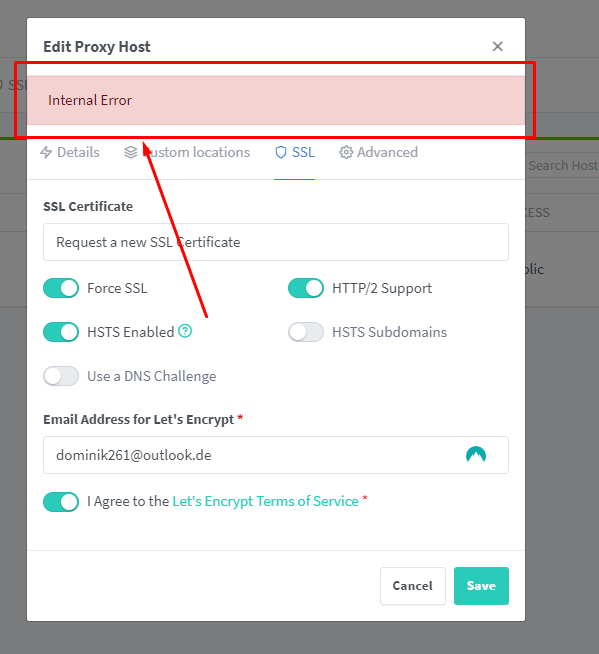
ERROR form Docker Nginx Proxy Manager
[5/5/2023] [10:17:33 PM] [Nginx    ] › ⬤  debug     Deleting file: /data/nginx/temp/letsencrypt_5.conf
[5/5/2023] [10:17:33 PM] [Nginx    ] › ℹ  info      Reloading Nginx
[5/5/2023] [10:17:33 PM] [Express  ] › ⚠  warning   Command failed: certbot certonly --config "/etc/letsencrypt.ini" --work-dir "/tmp/letsencrypt-lib" --logs-dir "/tmp/letsencrypt-log" --cert-name "npm-5" --agree-tos --authenticator webroot --email "@outlook.de" --preferred-challenges "dns,http" --domains "portainer.the-dodo.de"
Saving debug log to /tmp/letsencrypt-log/letsencrypt.log
Some challenges have failed.
Ask for help or search for solutions at https://community.letsencrypt.org. See the logfile /tmp/letsencrypt-log/letsencrypt.log or re-run Certbot with -v for more details.
[5/5/2023] [10:29:06 PM] [Nginx    ] › ⬤  debug     Deleting file: /data/nginx/proxy_host/1.conf
[5/5/2023] [10:29:06 PM] [Nginx    ] › ⬤  debug     Deleting file: /data/nginx/proxy_host/1.conf.err
[5/5/2023] [10:29:06 PM] [Nginx    ] › ⬤  debug     Could not delete file: {
  "errno": -2,
  "syscall": "unlink",
  "code": "ENOENT",
  "path": "/data/nginx/proxy_host/1.conf.err"
}
[5/5/2023] [10:29:06 PM] [Nginx    ] › ℹ  info      Reloading Nginx
[5/5/2023] [10:29:11 PM] [SSL      ] › ℹ  info      Requesting Let'sEncrypt certificates for Cert #6: portainer.the-dodo.de
[5/5/2023] [10:29:11 PM] [SSL      ] › ℹ  info      Command: certbot certonly --config "/etc/letsencrypt.ini" --work-dir "/tmp/letsencrypt-lib" --logs-dir "/tmp/letsencrypt-log" --cert-name "npm-6" --agree-tos --authenticator webroot --email "@outlook.de" --preferred-challenges "dns,http" --domains "portainer.the-dodo.de"
[5/5/2023] [10:29:12 PM] [Nginx    ] › ⬤  debug     Deleting file: /data/nginx/temp/letsencrypt_6.conf
[5/5/2023] [10:29:12 PM] [Nginx    ] › ℹ  info      Reloading Nginx
[5/5/2023] [10:29:12 PM] [Express  ] › ⚠  warning   Command failed: certbot certonly --config "/etc/letsencrypt.ini" --work-dir "/tmp/letsencrypt-lib" --logs-dir "/tmp/letsencrypt-log" --cert-name "npm-6" --agree-tos --authenticator webroot --email "@outlook.de" --preferred-challenges "dns,http" --domains "portainer.the-dodo.de"
Saving debug log to /tmp/letsencrypt-log/letsencrypt.log
An unexpected error occurred:
Error creating new order :: too many failed authorizations recently: see https://letsencrypt.org/docs/failed-validation-limit/
Ask for help or search for solutions at https://community.letsencrypt.org. See the logfile /tmp/letsencrypt-log/letsencrypt.log or re-run Certbot with -v for more details.
In /tmp/letsencrypt-log/letsencrypt.log is nothing
Operating System Ubuntu 20
About this issue
- Original URL
- State: closed
- Created a year ago
- Reactions: 7
- Comments: 26
I am getting the exact same error
I have the exact same problem… Don’t know why this was closed since many have the same problem.
What closes this? I am also encountering this problem and for every site I have it says
ERR_EMPTY_RESPONSEwhen I visit it.Why is this issue close since it still persist?
Can’t add custom certificate either, same error.
then the hostfile disappear, server offline.
YMMV, but i found my unraid setup was using the docker image
jlesage/nginx-proxy-manager. i switched to the one in the quick setup guide, and used the correct port numbers and volumes that differed from the old image and it started working again. i did need to set up all my hosts again in the new instance though.https://nginxproxymanager.com/guide/#quick-setup
Hi, same problem here 😦
Hello,
Same here …
Has anyone solved this issue?
Duplicate relation “access_list” in a relation expression. You should use “a.[b, c]” instead of “[a.b, a.c]”. This will cause an error in objection 2.0 [6/20/2023] [9:52:40 PM] [Nginx ] › ⬤ debug Deleting file: /data/nginx/proxy_host/4.conf [6/20/2023] [9:52:40 PM] [Nginx ] › ⬤ debug Could not delete file: { “errno”: -2, “syscall”: “unlink”, “code”: “ENOENT”, “path”: “/data/nginx/proxy_host/4.conf” } [6/20/2023] [9:52:40 PM] [Nginx ] › ℹ info Reloading Nginx [6/20/2023] [9:52:55 PM] [Nginx ] › ⬤ debug Deleting file: /data/nginx/proxy_host/4.conf [6/20/2023] [9:52:55 PM] [Nginx ] › ℹ info Reloading Nginx [6/20/2023] [9:54:50 PM] [Nginx ] › ⬤ debug Deleting file: /data/nginx/proxy_host/5.conf [6/20/2023] [9:54:50 PM] [Nginx ] › ⬤ debug Could not delete file: { “errno”: -2, “syscall”: “unlink”, “code”: “ENOENT”, “path”: “/data/nginx/proxy_host/5.conf” }
Ive been having the same issue for a couple months now also, not sure what the problem is. Cant generate any certs only difference is im using unraid.