next-auth: Custom Sign In Page with Typescript doesn't work

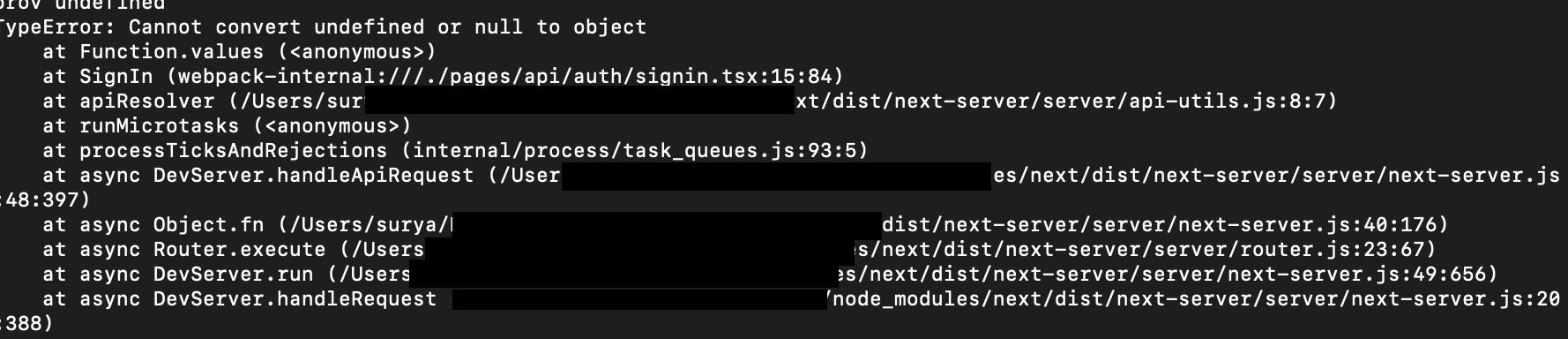
Describe the bug Getting a TypeError: Cannot convert undefined or null to object when adding a custom sign in page under /api/auth/signin. This is because export default function SignIn({ providers }) { is being passed null (suspecting SignIn.getInitialProps isn’t getting the context properly, resulting in the default SignIn function being passed in null).

Steps to reproduce Use example code except rename .js to .tsx and install types. Here is my /api/auth/signin.tsx file:

import React from "react";
import { providers, signIn } from "next-auth/client";

export default function SignIn({ providers }) {
  return (
    <>
      {Object.values(providers).map((provider) => (
        <div key={provider.name}>
          <button onClick={() => signIn(provider.id)}>
            Sign in with {provider.name}
          </button>
        </div>
      ))}
    </>
  );
}

SignIn.getInitialProps = async (context) => {
  return {
    providers: await providers(context),
  };
};

Expected behavior Able to create a simple sign in page

Screenshots or error logs Screen Shot 2020-11-06 at 6 48 04 AM
  • [] Found the documentation helpful
  • [*] Found documentation but was incomplete
  • [*] Could not find relevant documentation
  • [*] Found the example project helpful
  • Did not find the example project helpful

About this issue

  • Original URL
  • State: closed
  • Created 4 years ago
  • Reactions: 6
  • Comments: 20 (2 by maintainers)

Most upvoted comments

Hi @sdan,

The problem is not related with TypeScript;

Main problem is the location of your file. You have to put your custom signin page into;

correct location: pages/auth/signin.[js|tsx] wrong location: pages/api/auth/signin.[js|tsx]

If you put it under api folder, getInitialProps won’t work since these files works only on server side and do not have getInitialProps method.

Check file locations on documentation: https://next-auth.js.org/configuration/pages

Hi,

I was having a similar problem and I found out I had forgotten to create the file pages/api/auth/[…nextauth].js

I don’t know if it’s your case, but have a look on this.

@pleasantweb can you add styles also

check out my repository — https://github.com/pleasantweb/next_auth_prisma_postgresql

This is the working code with typescript. What you have to get is props type from getServerSideProps to Signup page , Use InferGetServerSidePropsType to get that. Than check if provider exists or not and than map over it. Obviously, all this in page/auth/signin.tsx. . I have only added email and github Provider. Twitter and google are just for CSS part (if anyone gets confuse how i am mapping) , one can simply add logic to map to give buttons there work.

import { getProviders,signIn, getCsrfToken,useSession } from "next-auth/react"
import styles from '../../styles/Auth.module.scss'
import {InferGetServerSidePropsType} from 'next'
import {FaGithub,FaTwitter,FaGoogle} from "react-icons/fa";
import { useEffect } from "react";
import { useRouter } from "next/router";
import { CtxOrReq } from "next-auth/client/_utils";


const SignIn =({providers,csrfToken}:InferGetServerSidePropsType<typeof getServerSideProps>)=>{
    const { data: session } = useSession()
    const router = useRouter()
    console.log(providers);
    
    useEffect(()=>{
        if(session){         
          router.push('/')
        }
    },[session])
    return (
        <>
       <section className={styles.signup}>
           <h1>SignIn to Continue</h1>

           <div className={styles.formDiv}>

                <form method="post" action="/api/auth/signin/email">
                    <input name="csrfToken" type="hidden" defaultValue={csrfToken} />
                        <input type="email" id="email" name="email"  placeholder="Email" />
                    <button className={styles.btn} type="submit">Sign in with Email</button>
                </form>
            <h1>OR</h1>

            <div className={styles.icons}>

            {providers ? (  Object.values(providers).map((provider,i) =>{
                if(provider.id !== 'email'){
                   return (
                      <div key={provider.name} className={styles.icon}>
                          <div className={styles.icon}><FaGithub onClick={() => signIn(provider.id)} /></div>
                       </div>
                   )
                }
            }         
      )):('')}
      
          <div className={styles.icon}><FaTwitter /></div>
          <div className={styles.icon}><FaGoogle /></div>
      </div>

           </div>

       </section>
   
    </>
    )
}


export const getServerSideProps = async (context: CtxOrReq | undefined)=>{
    const providers = await getProviders()
    const csrfToken = await getCsrfToken(context)
        return {
            props:{providers,csrfToken},
        }
}

export default SignIn


@Marujah Please keep in mind that many just had their winter holiday, this can be a reason for little/no activity. Anyway, - as mentioned - TypeScript support is a community effort right now, and therefore I cannot speak for why there has been little activity. You can always fix TS errors locally for your project like so:

//tsconfig.json
{
  //...
  "compilerOptions": {
    "typeRoots": [
      "next-auth.d.ts"
    ],
  }
  //...
}
// next-auth.d.ts
declare module "next-auth" {
  // your own core types
}

declare module "next-auth/providers" {
  // your own provider types
}

Feel free to open PRs with fixes to DefinitelyTyped, or a PR to this library including types.

Keep in mind that rewriting the whole library in TS is a big task, so maybe we should do it incrementally.

Hi @sdan,

The problem is not related with TypeScript;

Main problem is the location of your file.

You have to put your custom signin page into;

correct location: pages/auth/signin.[js|tsx]

wrong location: pages/api/auth/signin.[js|tsx]

If you put it under api folder, getInitialProps won’t work since these files works only on server side and do not have getInitialProps method.

Check file locations on documentation: https://next-auth.js.org/configuration/pages

Hey, yeah I realized this a few hours after I opened the issue and subsequently closed it 😀 .

@muuki88 , actually you don’t really need to handle the session on the client side since you can get the session in the serverSideProps using :

let session = null;
try {
    session = await getSession(context)
  } catch (error) {
    console.error('Error getting customer', error)
  }
  if (!session) {
    return {
      redirect: {
        destination: '/',
        permanent: false,
      },
    }
  }
return {
    props: {
        ...,
       session
    }
}

so you handle the redirect on the server side und can pass the session to the client (if needed). Because if you don’t do so, you can try to go to the page, logout and make a refresh you’ll see (for some ms) a strange behaviour.

I am also getting the same error Expected 0 arguments, but got 1.ts(2554) when using TS. Anyone discovered a solution?

import { providers, signIn } from "next-auth/client";
import { NextPageContext } from "next";

export default function SignIn({ providers }: { providers: any[] }) {
  return (
    <>
      {Object.values(providers).map((provider) => (
        <div key={provider.name}>
          <button onClick={() => signIn(provider.id)}>
            Sign in with {provider.name}
          </button>
        </div>
      ))}
    </>
  );
}

export async function getServerSideProps(context: any) {
  return {
    props: {
      providers: await providers(context),
    },
  };
}