xrdp: cannot start xrdp daemon
update the xrdp with the following commands in Ubuntu 16.04 LTS:
sudo apt-get install xrdp
sudo apt-get install vnc4server
sudo apt-get install xubuntu-desktop
after run these commands, and restart the xrdp service
sudo systemctl start xrdp
error occurs: Job for xrdp.service failed because the control process exited with error code. See “systemctl status xrdp.service” and “journalctl -xe” for details.
the information of systemctl status xrdp.service:
● xrdp.service - xrdp daemon
   Loaded: loaded (/lib/systemd/system/xrdp.service; enabled; vendor preset: enabled)
   Active: failed (Result: exit-code) since
     Docs: man:xrdp(8)
           man:xrdp.ini(5)
  Process: 49975 ExecStop=/usr/local/sbin/xrdp $XRDP_OPTIONS --kill (code=exited, status=1/FAILURE)
  Process: 44991 ExecStart=/usr/local/sbin/xrdp $XRDP_OPTIONS (code=exited, status=1/FAILURE)
 Main PID: 3316 (code=exited, status=0/SUCCESS)
About this issue
- Original URL
- State: closed
- Created 4 years ago
- Comments: 18 (7 by maintainers)
Thanks.
If your getting that prompt, it seems likely your
xrdp.inihas changed, and that is possibly preventing the XRDP daemon from starting.Try the following to start with clean files:-
If that gets you running we can look at the saved files to see what they actually contain.
I got this error only if I have remote desktop turned on (in gnome environment)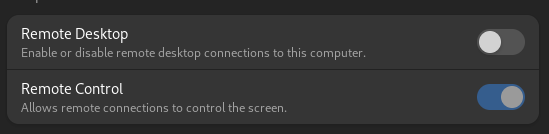 after switching it of xrdp starts normally
A year has passed, why do I still have this problem when I installed it by command? After the system restarts, the XRDP service fails to start