netlify-lambda: Functions not being built and packaged?
I’ve been trying to get a simple set of functions setup and running and it keeps failing and I can’t figure out why.
My netlify.toml looks like this:
[build]
  command = "npm run build"
  functions = "dist"
And my npm run build command is just netlify-lambda build src
If I run npm run build locally, everything works just fine.
> npm run build

> api@1.0.0 build /Users/jimnielsen/Sites/jim-nielsen.com/api
> netlify-lambda build src

netlify-lambda: Building functions
Hash: 8faa90c77ae883f3a8c3
Version: webpack 4.30.0
Time: 1117ms
Built at: 04/16/2019 4:04:00 PM
              Asset      Size  Chunks             Chunk Names
           hello.js  1.03 KiB       0  [emitted]  hello
icg-slack-deploy.js  18.5 KiB       1  [emitted]  icg-slack-deploy
Entrypoint hello = hello.js
Entrypoint icg-slack-deploy = icg-slack-deploy.js
[0] external "stream" 42 bytes {1} [built]
[1] external "zlib" 42 bytes {1} [built]
[2] external "url" 42 bytes {1} [built]
[3] external "http" 42 bytes {1} [built]
[4] external "https" 42 bytes {1} [built]
[5] ./hello.js 123 bytes {0} [built]
[6] ./icg-slack-deploy.js 2.19 KiB {1} [built]
[7] ../node_modules/node-fetch/lib/index.mjs 39.6 KiB {1} [built]
But as soon as I push, the build fails:
3:55:55 PM: Executing user command: npm run build
3:55:56 PM: > api@1.0.0 build /opt/build/repo
3:55:56 PM: > netlify-lambda build src
3:55:56 PM: netlify-lambda: Building functions
3:55:58 PM: Hash: a6669134aaaa082f8a2e
3:55:58 PM: Version: webpack 4.30.0
3:55:58 PM: Time: 1634ms
3:55:58 PM: Built at: 04/16/2019 9:55:58 PM
3:55:58 PM:               Asset      Size  Chunks             Chunk Names
3:55:58 PM:            hello.js  1.03 KiB       0  [emitted]  hello
3:55:58 PM: icg-slack-deploy.js  19.5 KiB       1  [emitted]  icg-slack-deploy
3:55:58 PM: Entrypoint hello = hello.js
3:55:58 PM: Entrypoint icg-slack-deploy = icg-slack-deploy.js
3:55:58 PM:  [0] external "stream" 42 bytes {1} [built]
3:55:58 PM:  [1] external "zlib" 42 bytes {1} [built]
3:55:58 PM:  [2] external "url" 42 bytes {1} [built]
3:55:58 PM:  [3] external "http" 42 bytes {1} [built]
3:55:58 PM:  [4] external "https" 42 bytes {1} [built]
3:55:58 PM:  [5] ./hello.js 123 bytes {0} [built]
3:55:58 PM:  [6] ./icg-slack-deploy.js 2.19 KiB {1} [built]
3:55:58 PM:  [7] ../node_modules/dotenv/lib/main.js 2.87 KiB {1} [built]
3:55:58 PM:  [8] external "fs" 42 bytes {1} [built]
3:55:58 PM:  [9] external "path" 42 bytes {1} [built]
3:55:58 PM: [10] ../node_modules/node-fetch/lib/index.mjs 39.6 KiB {1} [built]
3:55:58 PM: Build script success
3:55:58 PM: Starting to prepare functions from '/'
3:55:58 PM: Zipping functions from /opt/build/repo/dist to /tmp/zisi-940663858
3:56:04 PM: Error: Could not find "encoding" module in file: /repo/dist/icg-slack-deploy.js.

Please ensure "encoding" is installed in the project.
3:56:04 PM: Failing build: Failed to prepare functions for deployment
3:56:04 PM: failed during stage 'preparing functions for deployment': exit status 1
3:56:05 PM: Finished processing build request in 23.159125539s
3:56:05 PM: Shutting down logging, 0 messages pending
This is the interesting line to me: “Could not find “encoding” module in file: /repo/dist/icg-slack-deploy.js.”
What’s interesting is that I am only requireing one dependency in that file:
const fetch = require('node-fetch');
That line of code is making everything fail. If I comment that file out, Netlify builds everything as expected (but then the function doesn’t work, because I can’t use fetch).
Am I missing something here?
About this issue
- Original URL
- State: closed
- Created 5 years ago
- Reactions: 1
- Comments: 25 (9 by maintainers)
Commits related to this issue
- add encoding as explicit dependency temp fix for https://github.com/netlify/netlify-lambda/issues/142\#issuecomment-483880089 — committed to maxboeck/mxb by maxboeck 5 years ago
- Temporary workaround for netlify/netlify-lambda#142; Prettify lambda fn PR - netlify/zip-it-and-ship-it#34 — committed to fielding/giphunky by fielding 5 years ago
- Add 'encoding' as explicit dependency https://github.com/netlify/netlify-lambda/issues/142 — committed to johnnyoshika/react-apollo-lambda-netlify by johnnyoshika 4 years ago
hell is underspecified dependencies.
I was able to fix this temporarily by changing
to
Just to get the info out there, node-fetch uses an undeclared peer dependency in some cases. Our bundling tree shaker sometimes fails the build when it can’t find this dependency. Failing the build due to missing dependencies is generally the desired behavior (vs a successful deploy that will fail during runtime due to missing deps), however in some cases, when modules do weird things, it’s sometimes not what you want. We are currently investigating available options to handle this edge case in a cleaner manner. In the meantime, just install the
encodingpeer dependency. Track here: https://github.com/netlify/zip-it-and-ship-it/issues/30I was using
node-fetchinnetlify-lambda. I had to doimport fetch from 'node-fetch'. If I used require, I would get undefined error. I also had to installencodingpackage.Sorry I posted the wrong PR: https://github.com/netlify/zip-it-and-ship-it/pull/34 is the correct one that I intended to refer to.
Argh! I wasted a couple hours reverting and rewriting various parts of my code… only then did I stumble upon this thread and discover that it was not my fault. Please try to be a little more careful when you make breaking changes! How am I supposed to know that I all I need to do is add “encoding” to my package.json? I’ve never even heard of that package before.
Haha ok well, so I stopped using this “new” method and instead went back to the “old” way of doing things, which funnily enough is where I started when I first posted this issue.
So to resolve the first issue I had, I added
encodingto mypackage.json(as recommended) and that finally made the build succeed in netlify when pushed to GitHub.However, now my simple
hello.jsfunction doesn’t actually work. After some troubleshooting, I found once again it seems to stem from use ofnode-fetch. When I don’t usenode-fetchat all, my functions deploy and they actually work. Example ofhello.js:But as soon as I try to bring in a fetch call, it fails.
That code results in Netlify functions logging this:
When I run
netlify-lamdba servelocally to test this, I get something similar when I hit http://localhost:9000/.netlify/functions/helloIn fact, if I change that my
hello.jsfile while the server is running locally,netlify-lambdaseems to choke on something and just dies:netlify devseems to have a similar issue. If I runnetlify devand then hit http://localhost:8888/.netlify/functions/hello, it gives me a similaro is not a function(butnetlify devdoesn’t seem to choke when the server is running locally and I change the file, the server stays up and running with my updated file changes, but it still chokes on thefetchcall)I never did see this fixed.
My use case was pretty simple, so I ended up just removing my dependence on
node-fetchand opted to wrangle thehttpslib that’s part of node instead. So, in the end, it was a win for me because now I have 0 deps in this particular case.But it’s unfortunate to see so many people had the same issue. Hopefully some of the workarounds listed in here help.
Thank you @bcomnes! I figured this was the case (having to add a build step) but wasn’t 100%. I wound up going with the classic netlify-lambda build step that I used to use. Only key difference I am noticing is that when serving functions with netlify-dev, the received POST request is base64 encoded and using netlify-lambda to serve does not. Not a big deal, just something I noticed.
Thanks again for the detailed update!
I opened a PR to add a single exception for node-fetch oddness: ~~https://github.com/netlify/zip-it-and-ship-it/pull/35~~ https://github.com/netlify/zip-it-and-ship-it/pull/34
Hi there - I’m running into this with all other libraries (other than node-fetch) and have searched for a solution/answer but coming up blank… When using the approach of having function dependencies in the folder i.e.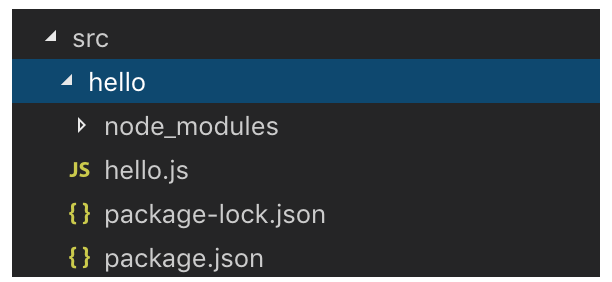
This structure works fine locally with local dev (
netlify dev) as well as live with a command line deploy (netlify deploy --prod) but errors out on live with a “cannot find module” as described in above comments when usinggit pushto trigger the deploy. In my case it’s a “cannot find axios…” fail.My question - are we required to upload the corresponding node_modules folder within that function folder for github push deploys to work?
Thanks!