NativeScript: NS 6.4 HtmlView inconsistent results on Android and iOS
Environment
Provide version numbers for the following components (information can be retrieved by running tns info in your project folder or by inspecting the package.json of the project):
- CLI: 6.4.0
- Cross-platform modules: 6.4.1
- Android Runtime: 6.4.1
- iOS Runtime: 6.4.0
- Plugin(s): -
Describe the bug According to According to https://github.com/NativeScript/NativeScript/pull/8207, the HtmlView should support new properties like color, link-color and font-size. We want to try out the new features added to the HtmlView, so we try to style it in CSS like this:
.html-view {
    font-size: 16;
    color: #808080;
    link-color: #FF44FF;
}
While it works correctly on Android, it only works partially on iOS 12 (correct font-size and correct darkgrey text-color but it shows just the default blue link-color) and it does not work at all on iOS 13, as all the text is just black (only the font-size is set correctly). See the result in the screenshot below:
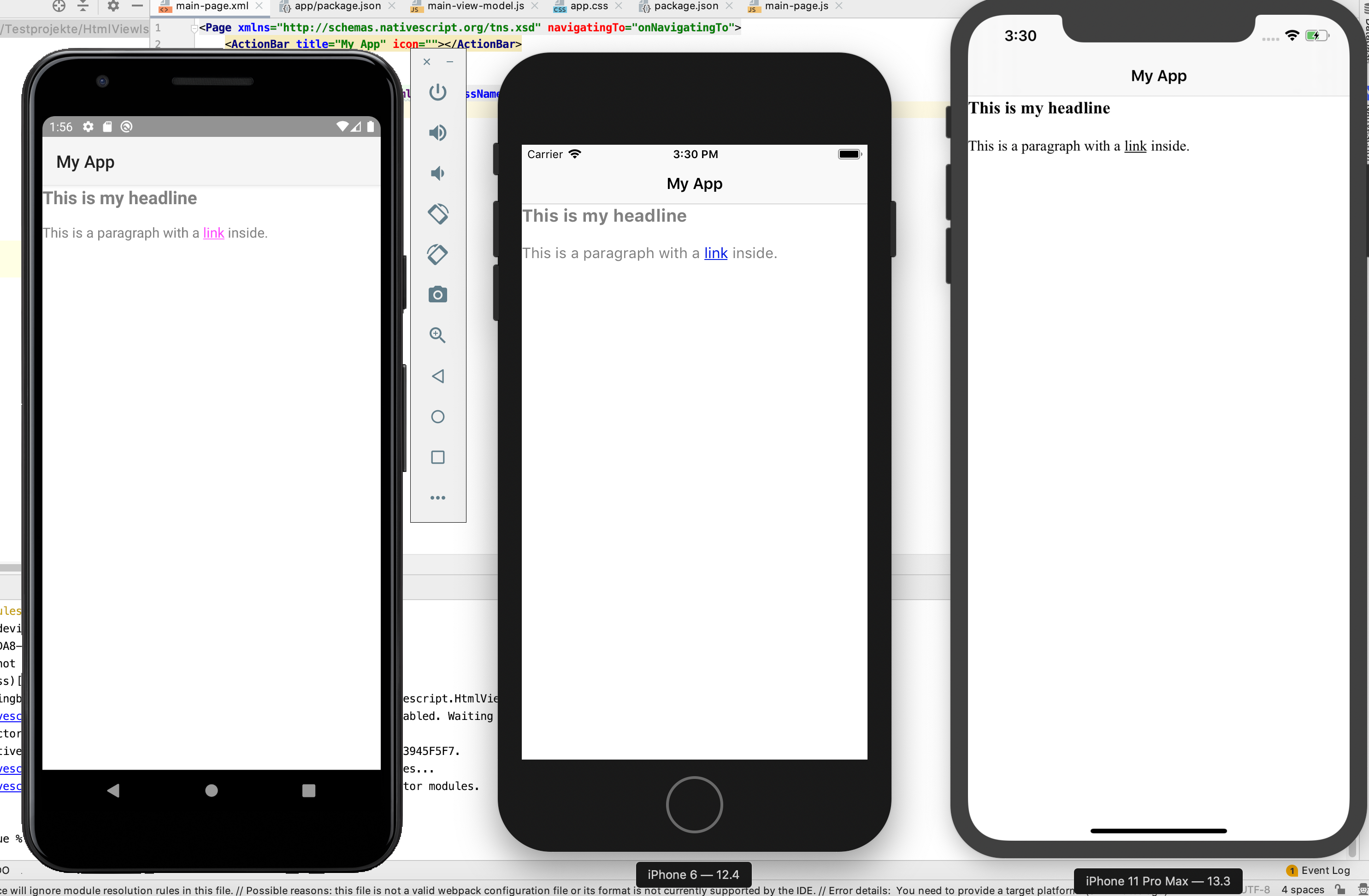
When trying to set those properties in XML like this: <HtmlView html="{{ myHtml }}" color="#808080" linkColor="#FF44FF" fontSize="16"/>
On Android and iOS 12, the color is set correctly to the darkgrey tone, but the font-size and the link-color are not set correctly. On iOS 13 none of the properties are set correctly. The text and the link is black and it has the default font-size.

To Reproduce Just open the sample app provided below.
Expected behavior When setting those prperties in CSS or XML, they should be applied correctly to the HtmlView component.
Sample project HtmlViewIssue.zip
About this issue
- Original URL
- State: open
- Created 4 years ago
- Reactions: 4
- Comments: 19 (4 by maintainers)
Working solution (vue, but can be used in any case):
@NickIliev Any chance that this line affects color problem in iOS 13:
https://github.com/NativeScript/NativeScript/blob/master/nativescript-core/ui/html-view/html-view.ios.ts#L93
@NickIliev Any update on this? I see it’s also implemented in NS8.
I can’t just simply comment out core code since our app runs CI.
Thanks for the help
How are you applying that code? I have a NativeScript Vue project and am not sure where to put that code and what the syntax should be. (This NativeScript journey has been very challenging, I feel like all the documentation and best practices are so cryptic!)