ghidra: Importing executable files with auto-detected format exports corrupted binaries
Describe the bug
If you import an ELF binary with the format as Executable and Linking Format (ELF) and then export that binary, it creates a corrupted binary that segfaults.
However, if you import it as “Raw binary” and manually select the language, then the exported file works as expected.
To Reproduce Steps to reproduce the behavior:
- Import the
cpELF binary into your project (default settings). - Right-Click it and click
Export... - Select
Binaryas the format. - Export it.
- Make the exported binary executable.
- Run the exported binary.
Expected behavior The exported binary should work instead of segfaulting (happens with multiple binaries that I’ve tested).
Screenshots
Default:
 Import as Raw binary:
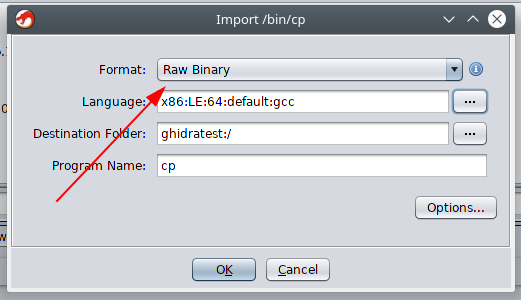
Environment (please complete the following information):
- OS: Kubuntu 18.10
- Ghira Version 9.0
Additional context Happens with both i386 and x86_64 binaries.
About this issue
- Original URL
- State: closed
- Created 5 years ago
- Reactions: 51
- Comments: 36
Commits related to this issue
- Merge remote-tracking branch 'origin/GP-786_ryanmkurtz_PR-1505_astrelsky_exporters' (Closes #19, Closes #1501, Closes #1505) — committed to NationalSecurityAgency/ghidra by ghidra1 3 years ago
Yeah, Working exported binaries is a very important feature for many workflows.
The binary export is not intended to create a valid executable - there is no export for doing this. It simply dumps the memory blocks that exist within Ghidra void of any address placement information.
I just went back to IDA, at least I can export from it easily and I don’t have to run it inside 4 nested VMs to avoid myself being backdoored 😉
So what are people supposed to do without the ability to export a working binary for windows? Re-write the program or? Isn’t this the point of reversing an EXE or am I missing something that people are doing better than patching a working binary?
Ghidra 9.1 will add the ability to retain and access the original imported program bytes. This was a key requirement for this type of exporter to be written properly. However, Ghidra 9.1 will not introduce any new exporters. Writing an exporter to take a loaded memory image back to a runnable binary is a pretty sizeable task (to do it correctly and completely), and it is specific to each loader (there is no generic solution). However, now that the infrastructure is in place, you might start seeing the community take a stab at it for the more popular file formats (PE, ELF).
alright then, i can’t finish my root-me assignments using ghidra, what i should do without export, use other tools, what is the point, this is high priority bug.
@Ristovski interesting. To me this would seem like a basic feature. The ability to edit the binary and run that binary independently of Ghidra. I’m shocked this is seen as normal behaviour. Even IDA does this.
I have written a python script to write back small patches to a copy of the original PE/ELF binary: https://github.com/schlafwandler/ghidra_SavePatch
It’s still experimental and far away from a complete export feature; but if you are only dealing with few and small modified locations it might be a good enough workaround.
The request is a reasonable improvement, although as an analysis tool re-writing binaries has not been a high priority.
I am closing this ticket and deferring the issue to #1505 as an enhancement/improvement.
#1505 was merged in, so there are now PE and ELF exporters that behave how you thought the Binary exporter should have behaved. No changes were made to the Binary exporter…that one still just dumps the memory image to a file as-is. The PE and ELF exporters can be used to save basic byte modifications back to a new runnable PE/ELF file.
Here is the help for the PE exporter:
Note that the Binary export is not broken, it is simply misunderstood. This exporter simply dumps the initialized memory blocks defined within Ghidra in binary form. The blocks are appended sequentially. It was never intended to recreate a loadable/executable binary. While this is certainly a desirable feature, it does not yet exist within Ghidra.
The binary exporter can provide a means of exporting a selected memory region as binary such that it can be subsequently added to another Ghidra program. This can be useful if a specific section needs to be unpacked and loaded to a specific memory address within Ghidra.
A few things to add:
@johnalanwoods Don’t worry, it won’t be long. Imagine all these poor agents at the NSA who can’t work because their hacking toy is broken. They won’t let this linger long. LOL
@ghidra1 understood thanks.
However this means Ghidra can’t be used to patch a binary. Which is the primary reason I use IDA.
Otherwise the use is restricted to inspecting methods and watching output.
Great find, almost lost my mind trying to figure it out.
Note: Loading as
Raw Binarydoes not seem to produce the same analysis/disassembly output at all.The disassembly after analysis is missing various things ranging from functions not being disassembled to missing Xrefs.
It also appears to analyze the binary much faster than when imported as
ELFindicating it is either unable to analyze is as thoroughly when loaded as aRaw Binaryor just skips a bunch of analysis options which are enabled/supported only underELF.Thus, loading as
Raw Binaryshould not be considered a workaround for this as the output differs.I agree with @bernky, there are things which can be done without export. Such as exfiltration of data and there is python scripting etc, but still the ability to export is very important.
Thank you for the clarification @ryanmkurtz.
It seems unusual to me that, as sophisticated as Ghidra is, it doesn’t include this feature.
How much utility can there be without being able to generate an edited executable?
Anyway, not to worry.
Regards, John
Also have this issue.
When I make patches to apps, I can’t export a binary without seg fault, nor does it make the change to the underlying binary referenced by the project.
Just tested it on Windows and it’s the same story with PE executables. They also need to be imported raw, else you can’t run them.
@najamelan it does not appear to be a bug
One of the devs (whose account is now deleted) mentioned this:
I doubt this will be “fixed”
Once I imported as Raw Binary what can I do to produce the same binary analysis of an ELF? At least to automatically show assembly code.
Raw badly affects the quality of the disassembly. It makes it really hard to work in.
they are considering this as an “Enhancement feature”
Issue affects ARM binaries too.
Does 9.0.4 fix this?
Same issue here with every binary I have tested.
Same problem, works with raw binary, doesn’t with auto detection.
Can confirm. The exported
lsbecomes ~3kb larger than the original. Some binaries also end up with missing headers.