MudBlazor: MudTextField with Mask enabled has unexpected behavior on mobile browsers

Bug type

Component

Component name

MudMask MudTextField

What happened?

When we set up a MudTextField with a Mask, everything works fine on desktop browsers. If we go to a real mobile browser, it will not get the updated value as we fill. An example is this simple code :

<MudTextField T="string" Label="CEP" Variant="Variant.Outlined" HelperTextOnFocus="true" HelperText="Rua do titular da conta"
                                  InputType="InputType.Text" Mask="@(new PatternMask("00.000-000"))"
                                  Required="true" RequiredError="CEP é obrigatório"> 
 </MudTextField>

This makes the Required property not work correctly. This also impacts Validator behaviour. This is probably connected to events being handled.

Expected behavior

Expected behaviour is when using mask, even on mobile browsers at least the correct value is passed ahead for validators and MudBlazor actions. Ideal behaviour is Mask being applied at least when focus is out or value is detected as changed, since using ValueChanged works pretty OK.

Reproduction link

https://try.mudblazor.com/snippet/QuQmOymJeZQhVpOu

Reproduction steps

  1. Create a MudTextField
  2. Add PatternMask
  3. Enable any validation, like Required or Validation func.
  4. Open on real mobile browser
  5. Fill the MudTextField

Relevant log output

No response

Version (bug)

6.0.10

Version (working)

No response

What browsers are you seeing the problem on?

Chrome, Microsoft Edge

On what operating system are you experiencing the issue?

Android

Pull Request

  • I would like to do a Pull Request

Code of Conduct

  • I agree to follow this project’s Code of Conduct

About this issue

  • Original URL
  • State: open
  • Created 2 years ago
  • Reactions: 5
  • Comments: 29 (8 by maintainers)

Most upvoted comments

I also found this problem while playing with the demo on mobile (Chrome on Android). After some debugging on my mobile browser I found that the event provided to this method differs from what I see when debugging on Chrome desktop . For example, on this demo, if I press the letter A on mobile the args.key property value is Unidentified, whereas on desktop its value is A. The keyCode is also offimage The logic in the KeyInterceptor depends on the value provided by the key property of the event for it to work properly.

Additionally, on Chrome mobile the pressed key goes straight into the input before the keydown event gets fire. image I found this and this, which makes me think that the current approach taken by the key interceptor in MudBlazor is not suitable for mobile.
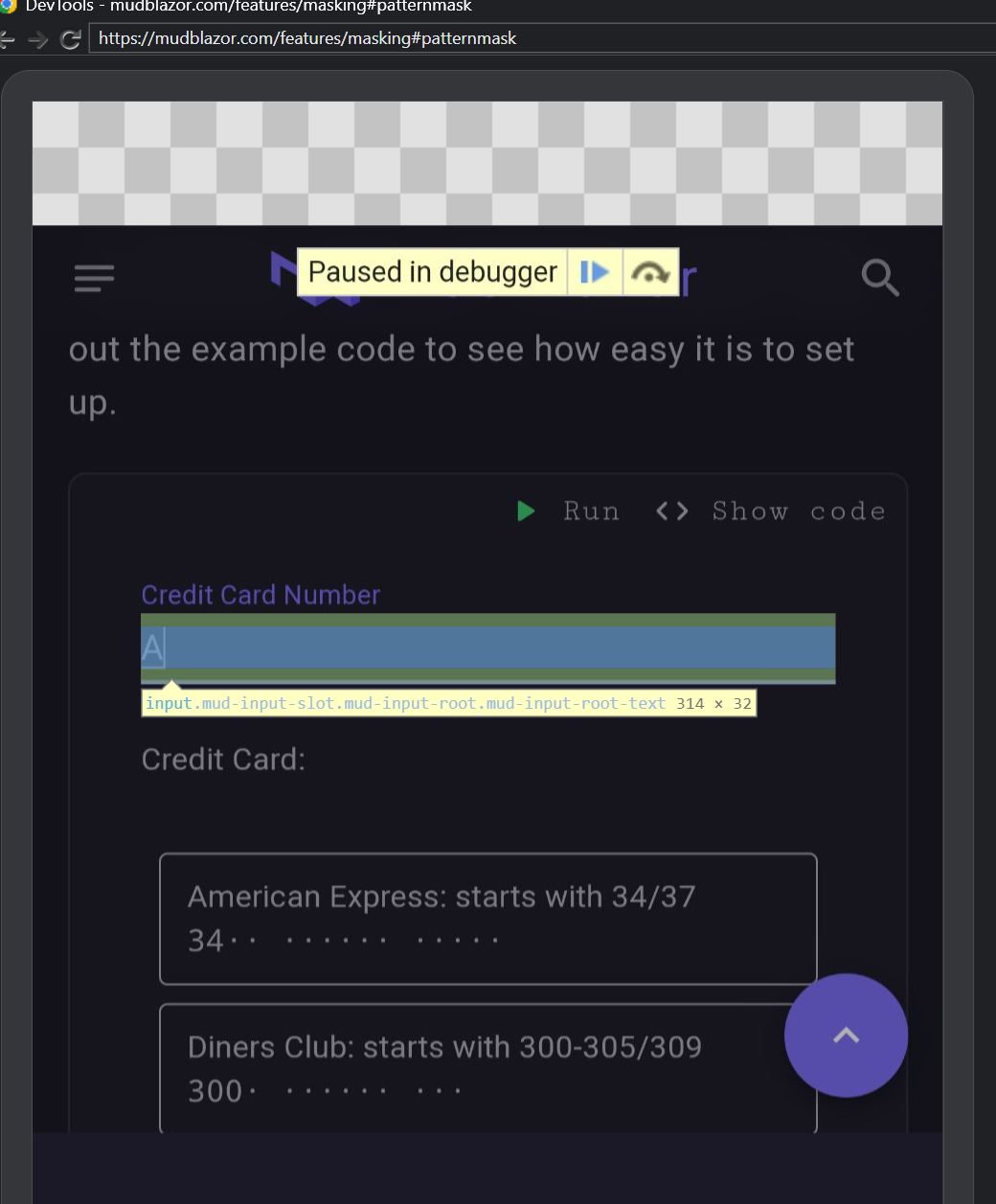
I’m going to dig more into this to confirm my findings. If I got something of the above wrong please let me know.

If I can find a solution I’ll submit a PR with it.

CC @Mr-Technician @mckaragoz

Looking at this issue: https://bugs.chromium.org/p/chromium/issues/detail?id=118639, the GBoard don’t send the keycode in the keydown event (except for special ones like “Delete”,“Backspace”). As can be seen in the above link, the GBoard Team consider it as a choice, not a bug. So the current Mud implementation should not rely on the keydown event to work properly on Android.

I think most js libs that works everywhere, like IMaskJS, ng-mask and v-mask, uses the input event. In this event, they sychronously check the new input value, compute the masked text, set it in the input value and adjust the cursor position.

It is important to be synchonous, otherwise will occur some underised flickering effects. Also, in my experiments, after an asynchonous call inside the input event handler the input.setSelectionRange calls won’t work. This means that the implementation will have to use dotnetRef.invokeMethod instead of dotnetRef.invokeMethodAsync when computing the mask.

I’m currently using a workaround (WASM only) for this problem, with some custom script and Reflection.

Add the following script in the index.html:

<script>
        class MudMaskWorkaround {
            static applyFix(appTextFieldRef, maskId) {
                const maskElement = document.getElementById(maskId);
                const input = maskElement.querySelector('input');
                let justFoundUnidentifiedKey = false;
                input.addEventListener('keydown', (args) => {
                    if (args.key == 'Unidentified') {
                        justFoundUnidentifiedKey = true;
                    }
                });
                input.addEventListener('input', async (args) => {
                    if (justFoundUnidentifiedKey) {
                        justFoundUnidentifiedKey = false;
                        const mask = appTextFieldRef.invokeMethod('ApplyMask', input.value);
                        input.value = mask.text;
                        input.setSelectionRange(mask.caretPos, mask.caretPos);
                        await appTextFieldRef.invokeMethodAsync('SetTextFromJSAsync', input.value);
                    }
                });
            }
        }
        window.MudMaskWorkaround = MudMaskWorkaround;
</script>

Create a component that inherits from MudTextField, ex: AppTextField.razor:

@using System.Reflection
@typeparam T
@inherits MudTextField<T>
@inject IJSRuntime JS
@{
    base.BuildRenderTree(__builder);
}
@code{
    private DotNetObjectReference<AppTextField<T>>? _ref;
    private MudMask? _maskReference;

    protected override async Task OnAfterRenderAsync(bool firstRender)
    {
        await base.OnAfterRenderAsync(firstRender);
        if(firstRender){
            _ref = DotNetObjectReference.Create(this);
            _maskReference = (MudMask)GetType().BaseType!.GetField("_maskReference", BindingFlags.NonPublic | BindingFlags.Instance)!.GetValue(this)!;
            var maskId = (string)_maskReference.GetType().GetField("_elementId", BindingFlags.NonPublic | BindingFlags.Instance)!.GetValue(_maskReference)!;
            await JS.InvokeVoidAsync("MudMaskWorkaround.applyFix", _ref, maskId);
        }
    }

    [JSInvokable]
    public IMask ApplyMask(string text){
        Mask.SetText(text);
        return Mask;
    }

    [JSInvokable]
    public Task SetTextFromJSAsync(string text) => SetTextAsync(text, true);
}

Then use your custom inherited component instead of MudTextField:

<AppTextField Mask="..." etc.../>

In my app I had to adapt the MudDatePicker too. AppDatePicker.razor:

@using System.Reflection
@inherits MudDatePicker
@inject IJSRuntime JS
@{
    base.BuildRenderTree(__builder);
}
@code{
    private DotNetObjectReference<AppDatePicker>? _ref;
    private MudMask? _maskReference;

    protected override async Task OnAfterRenderAsync(bool firstRender)
    {
        await base.OnAfterRenderAsync(firstRender);
        if(firstRender){
            _ref = DotNetObjectReference.Create(this);
            var inputReference = typeof(MudPicker<DateTime?>).GetField("_inputReference", BindingFlags.NonPublic | BindingFlags.Instance)!.GetValue(this);
            _maskReference = (MudMask)inputReference!.GetType().GetField("_maskReference", BindingFlags.NonPublic | BindingFlags.Instance)!.GetValue(inputReference)!;
            var maskId = (string)_maskReference.GetType().GetField("_elementId", BindingFlags.NonPublic | BindingFlags.Instance)!.GetValue(_maskReference)!;
            await JS.InvokeVoidAsync("MudMaskWorkaround.applyFix", _ref, maskId);
        }
    }

    [JSInvokable]
    public IMask ApplyMask(string text){
        Mask.SetText(text);
        return Mask;
    }

    [JSInvokable]
    public Task SetTextFromJSAsync(string text) => SetTextAsync(text, true);
}

@lufe70 @shorden Does this workaround help you? #4487 (comment) Looping in @henon and @mckaragoz.

Will take a deeper look into it when I can, but my first try did not work.

I haven’t worked with blazor in a while since I posted this workaround.

Now I’m working with it again, on an updated wasm project, and it didn’t work for me either.

This is the solution that is working for me now:

<script>
    class MudMaskWorkaround {
        static applyFix(appTextFieldRef, maskId) {
            const maskElement = document.getElementById(maskId);
            const input = maskElement.querySelector('input');
            input.addEventListener('input', async (args) => {
                const mask = appTextFieldRef.invokeMethod('ApplyMask', input.value);
                input.value = mask.text;
                input.setSelectionRange(mask.caretPos, mask.caretPos);
                if(mask.text){
                    // fix label behaviour when using browser autofill
                    maskElement.classList.add('mud-shrink');
                }
                await appTextFieldRef.invokeMethodAsync('SetTextFromJSAsync', input.value);
            });
        }
    }
    window.MudMaskWorkaround = MudMaskWorkaround;
</script>

Custom Textfield:

@using System.Reflection
@using Microsoft.JSInterop;
@typeparam T
@inherits MudTextField<T>
@inject IJSRuntime JS
@{
    base.BuildRenderTree(__builder);
}
@code {
    private DotNetObjectReference<AppTextField<T>>? _ref;
    private MudMask? _maskReference;

    protected override async Task OnAfterRenderAsync(bool firstRender)
    {
        await base.OnAfterRenderAsync(firstRender);
        if (firstRender)
        {
            _ref = DotNetObjectReference.Create(this);
            _maskReference = (MudMask)GetType().BaseType!.GetField("_maskReference", BindingFlags.NonPublic | BindingFlags.Instance)!.GetValue(this)!;
            var maskId = (string)_maskReference.GetType().GetField("_elementId", BindingFlags.NonPublic | BindingFlags.Instance)!.GetValue(_maskReference)!;
            await JS.InvokeVoidAsync("MudMaskWorkaround.applyFix", _ref, maskId);
        }
    }

    [JSInvokable]
    public MaskData ApplyMask(string text)
    {
        Mask.SetText(text);
        return new MaskData{ Text = Mask.Text, CaretPos = Mask.CaretPos };
    }

    [JSInvokable]
    public Task SetTextFromJSAsync(string text) => SetTextAsync(text, true);

    public class MaskData
    {
        public string? Text { get; set; }
        public int CaretPos { get; set; }
    }
}

This is a major issue for my app, any news on this?

hi any fix for this ???

Please, does anyone know if there was a definitive solution for this?

The following link may be useful to help resolve the issue with MudTextField mask functionality.

https://www.outsystems.com/blog/posts/create-input-mask-for-mobile/ https://codepen.io/glaubercorreaarticles/pen/JyPPor

I used an Android emulator (Android Studio) to test the functionality of the MudTextField in Android Chrome.

@HGCollier Interesting, I can reproduce the issue from the Mudblazor docs on the Android tablet I’m using (Chrome). I’ll test Firefox later and see if it’s any different.