vscode-sqltools: Unable to view schema for Redshift
Describe the bug Prior to latest release of VS Code/SQLTools I was able to view the schema of my Redshift database. Since the upgrade this is longer visible in the SQLTools menu - “Nothing here” text is displayed - see below.
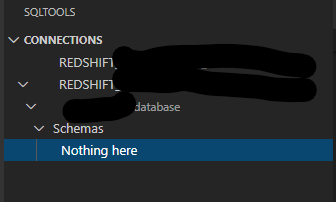
To Reproduce Steps to reproduce the behavior:
- create Redshift connection
- connect to Redshift instance using the SQLTools
Connectionsmenu - expand database within connection
- expand
Schemawithin connection - “Nothing here” is displayed instead of a list of tables.
Expected behavior
Expanding the Schema option within a db connection allows users to see tables within the schema
Desktop (please complete the following information):
- SQLTools Version 0.22.3 (issue first appeared on 0.22.2)
- VSCode Version: 1.45.1
- Driver Used/Version: SQLTools PostgresSQL/Redshift Driver 0.0.3
- OS: Windows
About this issue
- Original URL
- State: closed
- Created 4 years ago
- Comments: 26 (5 by maintainers)
Commits related to this issue
- Use pg_tables to fix #604 — committed to zengjie/vscode-sqltools by zengjie 3 years ago
Because the maintainer seems busy currently, I published the quick fix version of redshift driver for this issue. If anyone want the quick fix for this issue (like me), please use this extention.
Dear @mtxr, As soon as this issue is solved for current PostgreSQL driver, I will unpublish this driver.
Have we got a fix for this problem? I’m experiencing the same problem.
Hi @dudeKB No, you don’t need two drivers. Perhaps you are trying using dedcated driver with a PostgreSQL/Redshift Driver connection config.
Can you check that you created and using the config for dedicated driver? You can create it with “Add new connection” -> clicking below.
@mtxr thank you for your reply.
It is fine for me to keep my redshift driver separate from the PostgreSQL driver.
This will be nice information for users. It is bit confusing that there are two drivers for redshift for now.
Is this should be another issue? Tell me if I can help for doing this.
I agree with you that there are too many databases for one person to follow. I cannot believe that you maintained so many drivers so far!
Ok, that makes sense - and totally fixes the issue. I figured I had just skipped a step somewhere.
Thanks @kj-9 for the quick response! And thanks to all for your work on this!