mlflow: Cannot preview artifacts in UI when uploaded to remote machine via FTP
System information
- Have I written custom code (as opposed to using a stock example script provided in MLflow): No
- OS Platform and Distribution (e.g., Linux Ubuntu 16.04): Linux Ubuntu 18.04
- MLflow installed from (source or binary): installed via from pypi via pip
- MLflow version (run
mlflow --version): 0.9.1 - Python version: 3.6.7
- **npm version (if running the dev UI):
- Exact command to reproduce: Server runs with:
mlflow server --backend-store-uri ./mlruns --default-artifact-root ./artifacts -h 0.0.0.0 -p 5020
within a folder holding a mlruns and a artifacts folder
Describe the problem
I am running the server on a remote machine.
On the local machine which uploads via the tracking API the
tracking uri is set to: http://path.to.server:port
and artifact uri to: ftp://anonymous:@path.to.server/artifacts
uploading the tracking information and artifacts work fine and everything shows in the ui:
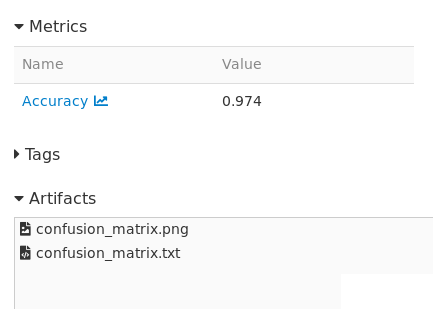
However when I try to click one of the artifacts I always get the message that something went wrong:
Previewing the artifacts work when I store them locally on my machine but as soon as I transfer them via FTP and then try to preview them from the remote machine I get the error shown above.
Source code / logs
About this issue
- Original URL
- State: closed
- Created 5 years ago
- Comments: 19 (10 by maintainers)
Hi, @nlaille. We were able to solve the problem. The issue is at
ftp_artifact_repo.pyin the functionlist_artifacts(). In line 106, the functionftp.nlst(list_dir)creates a list that is later used to get the artifacts. The problem is that the first 2 items of this list are “.” and “…”, bash commands to remain or leave the directory. When MLflow tries to search for these files it returns an error. The fix we found was to change line 108 tofor file_name in artifact_files[2:]:so it starts the iteration at the firts real file.