react-md: [General] - Using modules does not exclude unused components as expected
I guess something is wrong with the rollup.config.js file. When doing:
import { Button } from 'react-md';
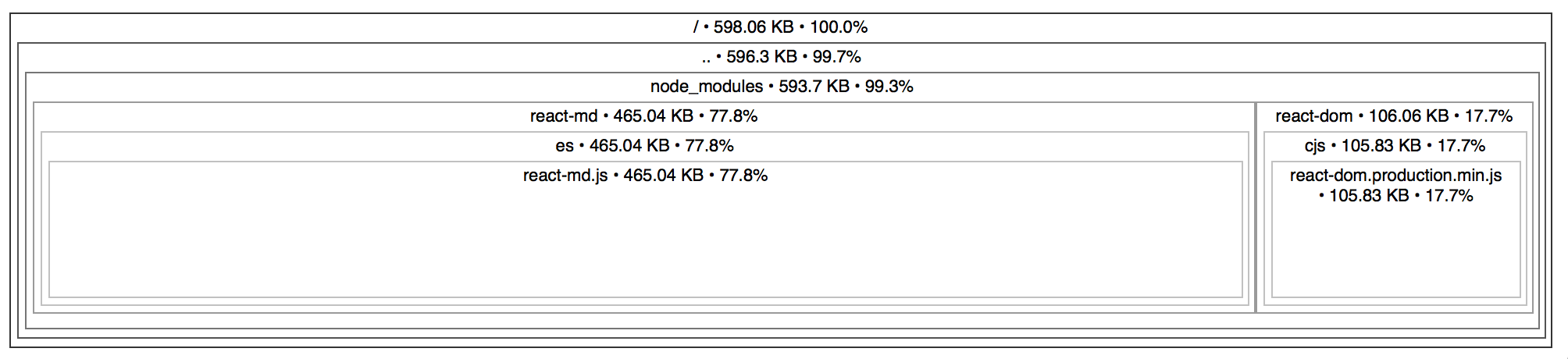
it looks like the full library is still being imported. The bundle size does not change even when more components are imported.
About this issue
- Original URL
- State: closed
- Created 7 years ago
- Reactions: 3
- Comments: 16 (12 by maintainers)
Commits related to this issue
- ES6 Module Support V2 I ended up copying how react-router does their "module" support with their build. However, it still doesn't look like react-md or react-router works as expected when importing a... — committed to mlaursen/react-md by mlaursen 7 years ago
- Fixed testing. Related to #587 — committed to mlaursen/react-md by mlaursen 7 years ago
- Added jsnext:main to package.json for #587 — committed to mlaursen/react-md by mlaursen 6 years ago
yes @stickfigure. That trick with the
babel-plugin-transform-importsand of course a good code splitting. In my case, in development my bundle size was ~8.5 MB due to source maps. Besides those large bundles I had some app modules inside them so every time I saved a file the bundle was compiled.ls -lh node_modules/react-md/es/react-md.jsgives me-rw-r--r-- 1 hisa staff 1.4M Dec 4 13:47 node_modules/react-md/es/react-md.jsI think the react-md build should be an index file that exports each of the components and not a bundle containing all the lib’s modules.
A library with tree-shaking working ok is
"react-router": "^3.2.0",.results in a smaller bundle size than
With the tricks mentioned my vendor-base.js bundle is now 5.91MB … it is the largest in my output but it only contains vendor code so it doesn’t need to be updated each time a save a file in my app.
alas I can’t figure out how to get it to work with my own setup, but in case anyone else is using hisapy’s setup i put together a (i think) complete version of that switch statement:
Cool @stickfigure … I was doing that but since I’m a lazy developer I looked for a pluggable solution (like babel-plugin-lodash) so then I started writing my first babel plugin. Luckily, after some researching/reading I found the babel-plugin-transform-imports. Also, I remembered how tedious was rewriting the deep imports to namespaced imports when upgraded react-md to the version with tree-shaking
I’d suggest you try the https://github.com/Kaishiyoku/webpack-react-md-import-transformer created by @Kaishiyoku . In the future, when the tree-shaking gets fixed you’ll just have to unplug the the plugin to try tree-shaking again.
@hisapy You’re right! I updated the README.
I’ve created a small package with a transformer for most components: https://github.com/Kaishiyoku/webpack-react-md-import-transformer
Please read the installation instructions carefully.
@hisapy I stumbled across the same thing today but didn’t investigate any further but also wanted to build a custom import transformer for react-md. Will grab your code and extend it further to my needs, thanks!
Currently react-md is the largest dependency regarding bundle size (~1.25MB).
Hey guys, I’m struggling with my bundle size too. A temporary solution I found is to use babel-plugin-transform-imports … that way you can use the namespaced imports and the plugin will take care of transforming them to deep imports considerably reducing the bundle size.
For my current components I’m using the following transform function which you might like to extend according to your needs: