WSL: WSL2 on ARM64 runs very slow when CPU otherwise idle
- Your Windows build number: (Type
verat a Windows Command Prompt)
Microsoft Windows [Version 10.0.19025.1]
- What you’re doing and what’s happening: (Copy&paste the full set of specific command-line steps necessary to reproduce the behavior, and their output. Include screen shots if that helps demonstrate the problem.)
In a WSL2 Ubuntu virtual machine (current LTS) on ARM64 Surface Pro X running Insiders build 19025, am running a multithreaded CPU-intensive program. (In this case a Rust program, though something simpler may be fine.) The program’s reported runtimes are much slower than expected when the machine is left sitting, but speeds up to expected speeds when exercising CPU on the Windows side, such as by tapping the ‘windows’ key to cycle the Start Menu.
Task Manager shows very low CPU usage as well as a very low CPU clock speed (<0.5 GHz) during the slow periods, even though ‘top’ or ‘htop’ in Linux shows heavy usage.
I suspect that the CPU is being throttled based on what it thinks is low usage on the Windows side, slowing down the Linux processes, but could be wrong about the details…
Steps to reproduce:
- Surface Pro X, updated to Insiders current build
- install Ubuntu from microsoft store
wsl --set-version Ubuntu 2- install Rust:
curl --proto '=https' --tlsv1.2 -sSf https://sh.rustup.rs | sh
git clone https://github.com/brion/mtpng.gitcd mtpng./test-sample.sh dual4k.png --repeat=1000
This will take a few moments to compile then start spitting out compression times per iteration, like this:
Using 8 threads
dual4k.png -> ../out/dual4k.png
Done in 954 ms
Done in 983 ms
Done in 848 ms
Done in 422 ms
Done in 201 ms
Done in 156 ms
Done in 172 ms
Done in 362 ms
Done in 714 ms

- What’s wrong / what should be happening instead:
When the machine is otherwise idle, times are often 800-1000ms but should be consistently in the 160-200ms range as with WSL1. These numbers can be reached when triggering some minor CPU usage on the Windows side such as hitting the ‘windows’ key to cycle the Start Menu, or running a sustained 1-thread CPU program on the Windows side.
About this issue
- Original URL
- State: closed
- Created 7 years ago
- Reactions: 10
- Comments: 25 (5 by maintainers)
@brion So I’ll let @benhillis or @craigloewen-msft decide how much they can share, but I do continue to push on this issue internally as an interested party.
I observed the identical problem with WSL2 and Hyper-V VM - it seems that the power management driver (specifically Qualcomm PEP / qcpep8180.sys) do DVFS (dynamic voltage and freq scaling) based on the management OS partition’s workload.
Putting some workload on the host OS (e.g. running 7-zip) slightly improves WSL2 performance (but this is an ugly workaround).
Hopefully we will have some news to share soon, progress is being made.
Any status updates on this? I hate asking questions like this but it’s been a while, and this still happens on build 20175.
This is very much a real issue. PEP can only see the load outside the VM so the CPUs never clock up. This is a pain and as an end-user I don’t see any real way to work around it. This needs to be fixed on the Microsoft and Qualcomm side of things, Microsoft is shipping the Pro X as a high end product even!
I have some good news to report, this issue should be fixed in 21292. I’d encourage users to give this a try and let us know if you continue to have lower than expected performance on ARM64.
To be clear, the performance I’m seeing still has some dependency on the outside host, but performance seems better (before I was averaging ~900ms on your benchmark at idle and now it averages ~400ms at idle).
@benhillis did you loop in the right people on this? Is there anything we can do as users to provide data or feedback which will help prioritize development? Thanks.
Still the same. WSL2 on SPX is really great but this CPU problem defeats the purpose…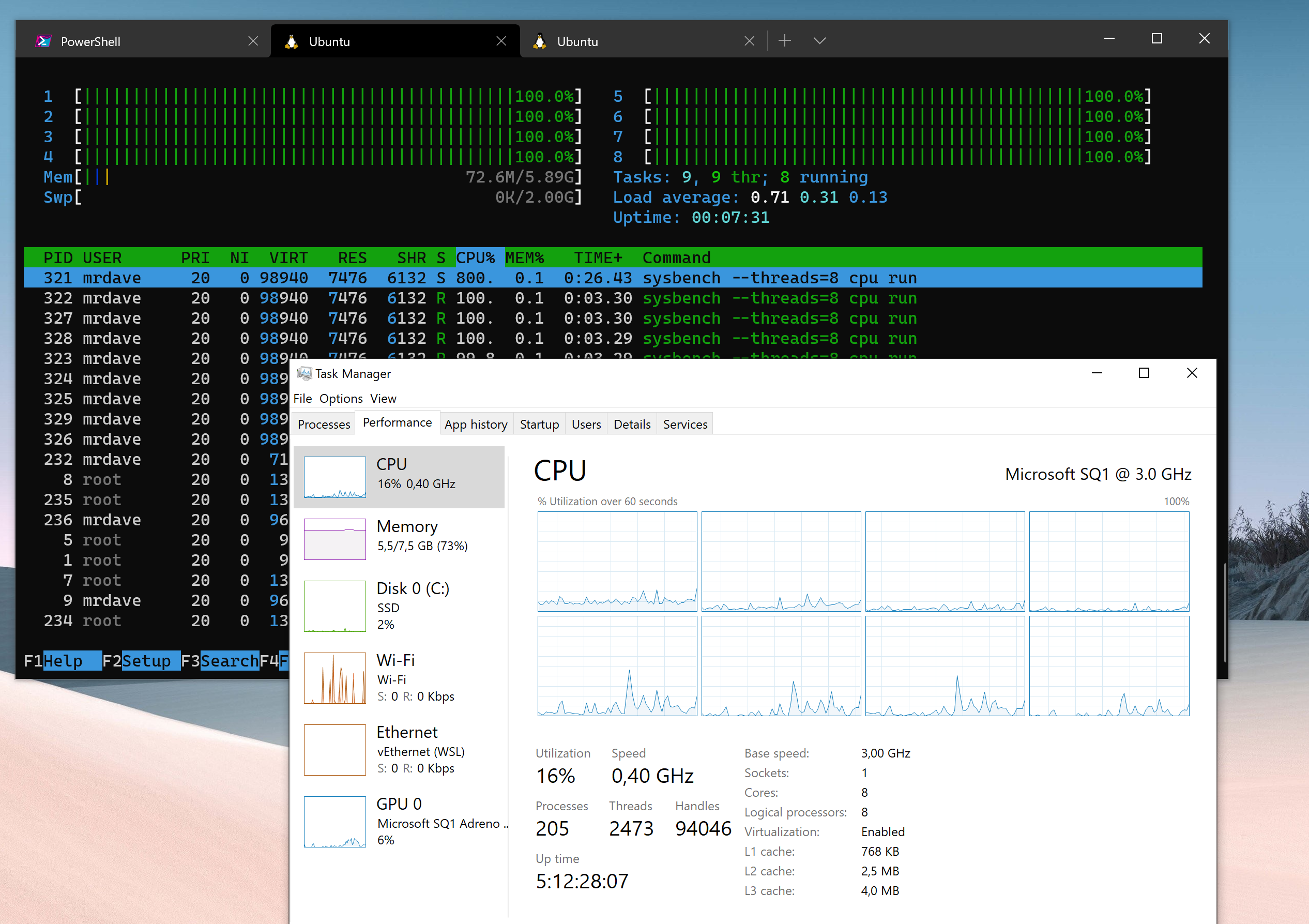
I believe that insider build 20262 or higher should have some improvements (I could be misreading the commit history and it might be in the build that comes out immediately after 20262). There are still known issues that are being worked on and I’ll keep pushing internally to get those resolved.
I submitted feedback in case it helps to get the priority up.
@benhillis @craigloewen-msft I’m also hitting this when compiling dotnet core applications in WSL2 on a Surface Pro X. If you need more information or want to look at my device I can reach out internally.
@benhillis yes, clocks are staying exactly where they should under non-synthetic load as well 😃