WSL: [wsl2] filesystem performance is much slower than wsl1 in /mnt
I decided to open this as a separate issue because although it’s related to the generic issue of filesystem performance it’s directly related to WSL 2 while the other issues are for WSL 1 and it’s showing very conflicting results.
-
Your Windows build number: (Type
verat a Windows Command Prompt) Version 10.0.18917 Build 18917 -
What you’re doing and what’s happening: I’m testing filesystem write speed in /mnt using dd command. Performing the following tests
WSL2
root@LUCIANO-PC:/home/# dd if=/dev/zero of=/mnt/e/testfile bs=1M count=1000 1000+0 records in 1000+0 records out 1048576000 bytes (1.0 GB, 1000 MiB) copied, 25.939 s, 40.4 MB/s
WSL1
root@LUCIANO-PC:/home/# dd if=/dev/zero of=/mnt/e/testfile bs=1M count=20000 20000+0 records in 20000+0 records out 20971520000 bytes (21 GB, 20 GiB) copied, 47.4897 s, 442 MB/s
On / it’s actually the reverse. WSL2 is more than 2 times faster than WSL1.
- What’s wrong / what should be happening instead: I would expect the filesystem performance in /mnt to at least be on the same level but it’s over 10 times slower.
Another interesting fact is that if I mount the same drive as a cifs share I get 3x performance
WSL 2 (cifs share)
root@LUCIANO-PC:/mnt/sambae# dd if=/dev/zero of=/mnt/sambae/testfile bs=1M count=10000 10000+0 records in 10000+0 records out 10485760000 bytes (10 GB, 9.8 GiB) copied, 84.001 s, 125 MB/s
An update of the current status because it’s way too hidden in this thread.
Latest status report: https://github.com/microsoft/WSL/issues/4197#issuecomment-604592340_
About this issue
- Original URL
- State: open
- Created 7 years ago
- Reactions: 825
- Comments: 514 (11 by maintainers)
Links to this issue
- Пользователь bill876 — Хабр Q&A
- nvidia - Install Tensorflow-GPU on WSL2 - Stack Overflow
- ubuntu - Why is WSL extremely slow when compared with native Windows NPM/Yarn processing? - Stack Overflow
- conda - Snakemake takes 90 s on WSL for test snakefile with very simple workload - Stack Overflow
- javascript - Yarn 5x slower on windows - Stack Overflow
- qmk_firmware/newbs_getting_started.md at master - qmk_firmware - Gitea: Git with a cup of tea
- What will decide the loading speed of a model?
- I was able to load WizardLM-30b onto my RTX 3090
- Guide for Llama2 70b model merging and exllama2 quantization
Commits related to this issue
- feat: invoke Windows' git.exe if we are in /mnt/* Due to https://github.com/microsoft/WSL/issues/4197, git status is slow on WSL2 with repos in Windows filesystem. This patch fixes it by invoking git... — committed to theseanl/powerline-go by theseanl 3 years ago
- invoke git.exe instead of git in /mnt See: https://github.com/microsoft/WSL/issues/4197 — committed to jenbroek/etc by jenbroek 3 years ago
- invoke git.exe instead of git in /mnt See: https://github.com/microsoft/WSL/issues/4197 — committed to jenbroek/etc by jenbroek 3 years ago
- invoke git.exe instead of git in /mnt See: https://github.com/microsoft/WSL/issues/4197 — committed to jenbroek/etc by jenbroek 3 years ago
- invoke git.exe instead of git in /mnt See: https://github.com/microsoft/WSL/issues/4197 — committed to jenbroek/etc by jenbroek 3 years ago
- invoke git.exe instead of git in /mnt See: https://github.com/microsoft/WSL/issues/4197 — committed to jenbroek/etc by jenbroek 3 years ago
- invoke git.exe instead of git in /mnt See: https://github.com/microsoft/WSL/issues/4197 — committed to jenbroek/etc by jenbroek 3 years ago
- invoke git.exe instead of git in /mnt See: https://github.com/microsoft/WSL/issues/4197 — committed to jenbroek/etc by jenbroek 3 years ago
- invoke git.exe instead of git in /mnt See: https://github.com/microsoft/WSL/issues/4197 — committed to jenbroek/etc by jenbroek 3 years ago
- Work around Microsoft not bothering with basic fucking WSL features Custom keyboard layouts do not propagate to WSL GUI apps: * https://github.com/microsoft/wslg/issues/173 - initial report * Als... — committed to LunarWatcher/dotfiles by LunarWatcher a year ago
- Update .gitattributes for use with Git on Windows and WSL Enable cross-platform git operability when Git for Windows is installed with default settings while trying to avoid performance loss using ex... — committed to nos1609/WSL2-Linux-Kernel by nos1609 a year ago
In WSL1, file performance was slow compared to Linux because it had to emulate Linux behavior on top of the Windows IO subsystem, which has a very different design than Linux and is slow for many operations that are extremely fast in Linux and therefore used a lot by Linux tools. This was the case for both the “internal” Linux file system, and the Windows file systems mounted in /mnt, because they both use regular NTFS files.
With WSL2, the Linux file system is now an ext4 partition in a VHD. It cuts Windows out of the loop except for having to read/write from/to the VHD file, so that’s much, much faster.
Windows files are now accessed across the VM boundary, however. In WSL1, we could just call the NT kernel from our lxcore.sys kernel driver, and that was that. In WSL2, every operation has to send data to the host, exit the VM, wait for the host to perform the operation (which still involves emulating Linux behavior and the cost of Windows IO operations), send data back to the VM, trigger an interrupt in the VM, schedule the virtual processor to run, and continue executing in the VM.
Essentially, Windows files are now a “remote” file system. To access them, we use the 9p file system protocol, a protocol also used by QEMU to provide host file access, and the same protocol we already used to provide Linux file access through \\wsl$. Communication is done over Hyper-V sockets, which is faster than a real network, but it still has many of the same drawbacks as a network file system.
To make matter worse, to ensure the same behavior as WSL1, we don’t use any caching. Typically network file system like NFS or SMB will cache both file data and attributes for some amount of time to avoid too many round trips to the server. We are in the unique position where the host and the guest are tightly integrated through things like interop. It’s entirely possible that you have a script which runs a git command in WSL followed immediately by some Windows tool. In that case, any cache inconsistency between the host and the VM could cause incorrect behavior, or worse, data loss. Even the 1 second attribute cache used by NFS could be problematic for this reason.
Caching is also problematic because the Linux 9p client only has two real caching modes: none and loose (there’s also mmap, which enables caching only for read-write memory mapped files, and fscache, which is irrelevant in this discussion). WSL2 actually uses mmap (because using the “none” option makes certain mmap operations fail entirely). If we wanted to use caching, the only option is “loose”, which means Linux will cache data and attributes essentially forever (until the kernel evicts them due to memory pressure), and will never try to refresh from the host, which is obviously not desirable.
Without caching, it means every “stat” operation has to make a round-trip to the host (multiple, actually, partially because of how Linux VFS works, and partially because of how 9p works). It also means that reading/writing files is done using direct IO, which means that the buffer size used by the application is what’s used when talking to the host. An application that’s using 32KB buffers to read a file will therefore be significantly faster than one that’s using 4KB buffers, because it has to do fewer round trips. This will be true for increased buffer sizes up to the maximum message size for 9p, which is slightly under 64KB.
You can actually enable caching by adding the “cache=loose” option to your mount options in /etc/wsl.conf (note: if you do this and convert back to WSL1, DrvFs will fail to mount because it doesn’t recognize that option, so you’ll have to remove it again). But if you do this, then all bets are off. There is no consistency whatsoever. It’s only safe to do this for drives that you only access from Linux (and if that’s the case, you should really just move your files to the Linux file system). Also note that because the Linux 9p client does not intelligently implement cache read-ahead, reading files will always use the page size for each round-trip, which is 4KB on most kernels. So reading a file that’s not yet in the cache can actually be slower if the application was using a large buffer size, though once the file is in the cache, reading it again will be extremely fast of course.
So, that gives you an idea of why this is slow. This isn’t unique to us; cross-VM file access always tends to be slow, and a lot of solutions employ caching to hide that, which is fine because most VMs can’t just run executables on the host operating on the same files the way WSL2 can with interop. Unfortunately, we don’t have that luxury.
We are constantly working to improve this. We already have an improvement in the pipeline that will reduce the round-trip cost significantly. Unfortunately, despite our best efforts, that improvement was not ready for the upcoming 2004 release of Windows. We are also looking at alternatives to 9p and other improvements we could make to get us closer to at least WSL1 DrvFs performance. And that work is going on in parallel with ongoing efforts to make IO performance in Windows better in general, which we would also benefit from of course.
Is this work going as fast as we, or you, would want? No, unfortunately not. These are hard problems and they take time to solve. We really wanted to have a better story for the initial release of WSL2, but unfortunately, reality just didn’t allow it.
So yes, for now the most important thing is: if it’s at all possible, store your projects in the Linux file system in WSL2. This will be much faster than anything in WSL1, and gives you the full benefit of WSL2.
We understand that there are cases where you can’t do that. All I can tell you is that we know about it, we’re not happy with where we are either, and we’re working on it as fast as we can. We ask you to be understanding, and know that we will be working on it regardless of whether you keep posting in this thread or not. 😃
I’m experiencing the same issue,
/mntis extremely slow compared to WSL1 (seconds to rungit statuson a relatively small repository).Hi everyone, thank you for the discussion here on /mnt performance in WSL2. We realize this is a dealbreaker for many of you commenting here, and we are looking into ways to improve this, and make the file system performance faster in /mnt drives.
As of right now, if you can move your project over to the Linux file system, please consider doing so and using a WSL2 distro running Linux applications accessing files in your Linux file system for faster file performance. If your use case requires you to access Windows files, please feel free to move back to a WSL1 distro, or consider having a WSL1 distro and a WSL2 distro side by side for your different applications.
We’ll be sure to post any updates on this thread as soon as they are available. Thank you for your patience!
Guys, I think the only solution for this problem is re build a new Windows 11 based on Unix like mac does.
Please cut it with those “me too” comments. The issue is there, well-documented, acknowledged, probably being addressed. There’s absolutely no need to constantly remind all 44 subscribers that there’s still nothing new here.
The issue affects you, we get it. Just add a reaction to the initial comment, subscribe, and do NOT comment unless you have anything useful to add to what’s already been said.
@definelicht - Yep we’re working on improving the performance. In the meaning working out of your root file system (the ext4 volume) will have MUCH better performance.
The disheartening part is that 3 years later there’s no improvement in this area whatsoever
I know that wsl2 is a preview, but is there any hope that accessing \wsl$ from windows or /mnt from wsl will reach acceptable speeds?
Just let it go and switch to MacOS =)
WSL is a great technology, really. I really thank Microsoft for allowing us to have a Linux subsystem on Windows.
I use WSL every day as a developer, with Docker, it has become a must-have.
But, this problem really spoils the development experience with WSL, even with a Ryzen 9 5950X and a Samsung 980 PRO PCIe 4.0 SSD, it still takes me several minutes for PHPStorm / Clion to index the whole project, while it only takes a few seconds without WSL.
I beg you Microsoft, I imagine that it must be difficult, but please concentrate your efforts on this issue, it’s time to get this fixed so that we can finally develop without performance problems on WSL.
I thank you in advance! ❤
The issue is that this post is filled with lots of (negative ?) comments just stating the same thing over and over again. As this is a real struggling issue, maybe you would have seen both this post: https://github.com/microsoft/WSL/issues/4197#issuecomment-568923487
But now this happen:
So you can’t see one of the constructive statement / detailed technical answer: https://github.com/microsoft/WSL/issues/4197#issuecomment-604592340 (Can’t fit in one screen)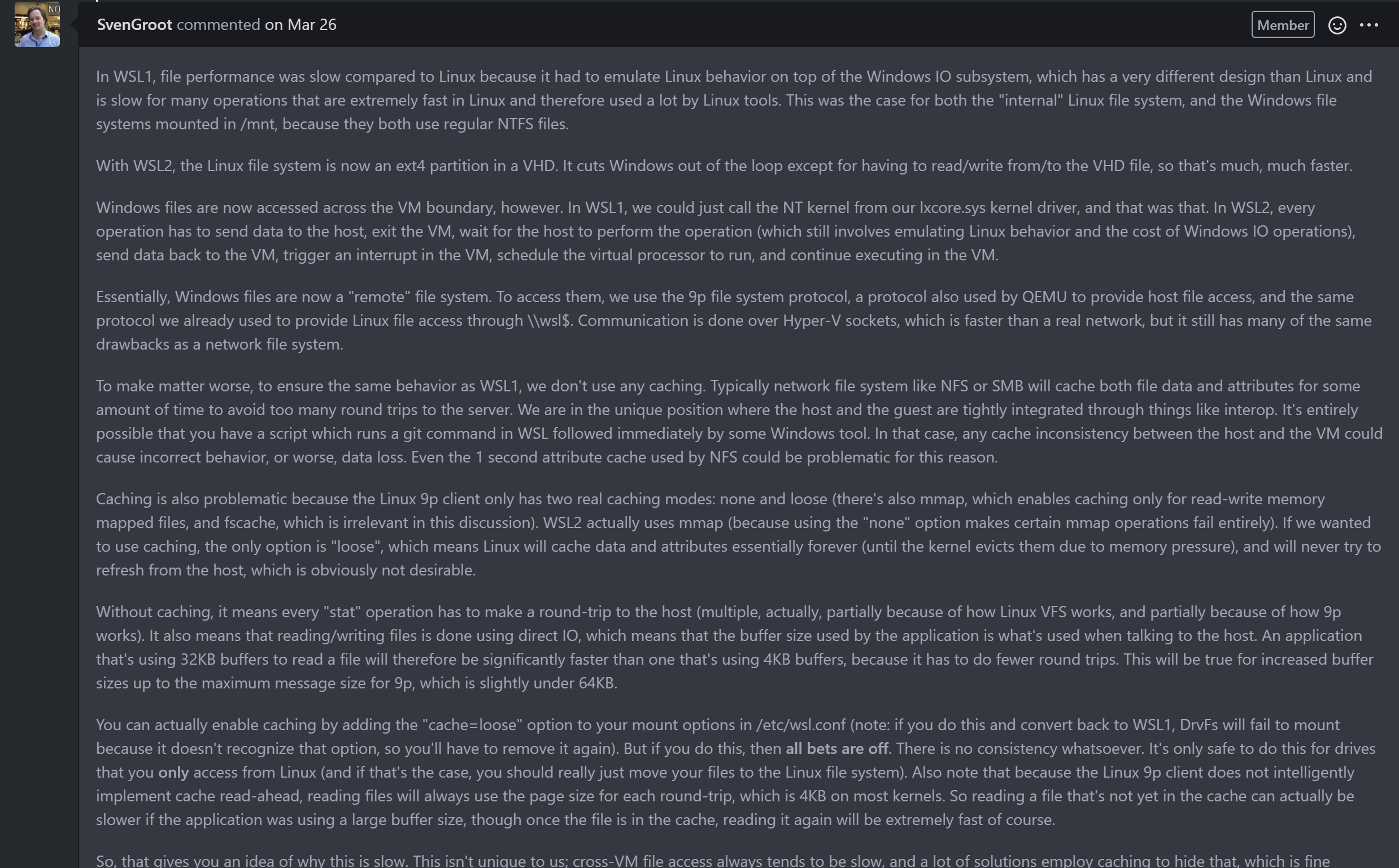
The end result is that nobody can keep track of anything in this post anymore and starts to unsubscribe making it a bit useless … “A yes we know there is a problem”
Feel free to open another issue listing all the workaround … that would probably be more effective to compare / bench / propose setup eg: “Optimise your setup with WSL1 / WSL2 for speed”
I think it depends what problem you’re trying to solve, but I’ve summarised it in my own head like:
“If you just need occasional access to Linux tools, but mostly do things in Windows” Install WSL2, keep your files in Windows
“If you rely more heavily on Linux tools that require high performance access to files, but you still want to use Windows for everything else” Install WSL2, keep said files on the Linux disk, to open an IDE on those files find one that supports remote WSL2 development (i.e. don’t open them from the \\wsl$ share)
“If you rely heavily on Linux tools and your favourite IDE is available in Linux, and you don’t really need Windows for anything” Install Linux
Let’s make our own opensource WSL-3-GPL with all improvements
Just use vmWare or vbox virtual machines, it’s the same with only adequate performance inside vm filesystem. Entire wsl2 project it’s just not worthy cli wrapper around hyper v VM’s…
I’m currently using the normal Docker Desktop with linux containers to run a PHP projekt during local development. The repo is in a normal Windows directory and gets mounted via volume bind in the docker container, so that I can easily manipulate the files through an IDE.
The same setup on a native linux machine has always been multiple times faster and the “problem” (from what I’ve read) has always been attributed to the Linux VM that is used on Docker Desktop.
Then WSL 2 was announced and I finally came around to set everything up. But when I ran our teststuite for the first time, I was pretty disappointed that the performance was actually much worse than before (40s on the Docker Deskop Linux VM setup vs 100s on the WSL2 setup). Subsequent investigation brought me to this thread.
From what I’ve read here so far:
Does it even make sense to switch to WSL 2 for local development yet if “bad performance” is your primary reason to do so?
A “no” would be a totally acceptable answer - I just don’t want to waste any more time on this if it’s simply not ready yet.
At some point it’s just not worth the hassle of running WSL. Reboot to Linux and get back to work.
WSL 2, version 2.0.9.0 dd file read from files under /mnt/d/, speed is around 30MB/s. The disk is a NVME SSD. Looks like this issue has not been fixed after 4 years.
I cant tolerate it, so I just test the mutagen alternative fix.
Here is the fix based on mutagen: I wrote the docs here, and tested it, it works great.
https://j0eii.cwh-labs.com/wsl2-extremely-slow-file-read-fix-mutagen/
It really been a long long time for this one. Thanks @kyriakos for the issue fix suggestion, and Microsoft for providing WSL2 docker, and everyone whom discussed this issue fix.
Moigagoo: thank you for fighting for all of the subscribers that can’t handle the notification spam, but other people lending their support to an issue to attempt to get a major problem fixed is not a problem for everyone. Open-source github issues users generally follow the accepted “+1/me too” pattern, but for those who are inconvenienced by the notifications, you can just instead bookmark this page and unsubscribe to the notifications. I am not looking to start an internet fight or trolling competition, but personally I appreciate the "+1"s here and on many issues I track, so I am defending those following this path. stop notifications
I am also affected by the issue referenced here and hope that this has enough traction that it is being working on actively. Look forward to testing the fix when its available.
Hopefully this will be a step in the right direction, even if it’s not coming from Microsoft: https://www.phoronix.com/news/Linux-9p-10x-Performance
This experience is being worked on, thank you for posting updates on the build numbers that you are still seeing this issue, but please keep in mind that this can make a fair amount of unnecessary noise for users who are subscribed to this thread, so I’d ask if you could please not do so.
When there are changes in this area, i.e: things that will affect file performance in the mounted drives, we (the WSL team) will be sure to post updates in this thread. Thanks!
If done enough as in the live reloading, it will eventually hang the console and wsl needs to be shut down. Live reloading and a tiny bundling takes minutes to load the server.
Has this issue seriously been open for two years without a resolution? I’m running into this problem now, and it’s making WSL2 unusable.
Just fix the issues with WSL1, please.
I use it from the very beginning and switched from OSX to Windows because of this.
Using a VM for development is a horrible pain in many-many ways, that’s why people left you for a mac in the first place including me.
Big Chinese giants started selling laptops with Linux on them and the competition is growing with a speed we have never experienced.
Only a proper Windows - Linux integration can keep up with a working Linux desktop.
This is a major threat to your business and you have no control over it apart from WSL1. In a few years, half of the world will not be able to run their software on windows if you stick with VMs.
Windows Vista was a pile of flowers and you haven’t given up, you can do it with WSL1 too.
I will be use WSL1 until WSL2 solve this problem.
@danrossi Please avoid writing 4 posts in a row as you will create multiple notifications bugging everyone (resulting in people adding downvote emojis to show you are misbehaving). Just use the edit feature to update your post. Also, please read the other messages to find out why that’s the case and how to avoid it right now (hint: not using /mnt and moving files and https://github.com/microsoft/WSL/issues/4197#issuecomment-1413891734)
Yes, this is a dealbreaker. I was very excited to hear about WSL2 and the performance improvement just to find that it actually is much slower. My use case is using and IDE from windows on code that also want to run/test in linux.
I even have processes hanging for some reason. so local http server hanging. Loading new consoles hangs until I shut down wsl.
2022年9月, 我还在找这个问题的答案,然后翻到了这个2019年的帖子.
This slow file process thing causes everything to take twice as long to do things also. I dont get the wierd console hanging again though.
I’ve noticed all javascript bundling, compiling and loading from a local “http-server” with live reload. Is extremely slow and has been slowing down every WSL update. It’s becoming unproductive waiting for WSL to process files off my NTFS SSD D drive mount. I load my work off /mnt/d. What is the issue here ?
Implement a linux file system driver that will natively redirect IO-requests to Windows drive is not a big deal at all
Looks like MS just lacks of good developer to deal with the issue;(
So a lot of people are saying to store your source files on the wsl side. Which for a lot of people is a perfectly good solution. However it does not work for my use case. My use case is that I have a multi-platform (Windows/Linux/Apple/WASM) C/C++ project. What I would like to do is check out the source in Windows, make changes, then build in both Windows and WSL (ideally inside a docker container). I think this workflow is something a lot of multi-platform native developers will be interested in. A lot of the comments seem focused on people who want to use Windows but build on Linux, I don’t want the multi-platform developers to be forgotten.
This may be a bit of a naive take, but my understanding of the root cause of this problem is that WSL2 uses 9P for sharing it’s data, which does not support caching in any meaningful sense. Why not use something like SMB, which does?
Edit: The Visual Studio team is working around this using rsync. It’s a bit sad that this appears to be the best solution.
Hello guys, so 5 years passed, the best way still get a new SSD and put everything in it? and this problem could be solved in future one day?
Of course wsl1 requires more work and maintenance. But it also has potential. Potential to make world better, make something important for our childrens, replace stupid docker over hyperv with native Linux images on top of windows nt. Replace Linux kernel with a fully compatible user and kernel interfaces. Change windows nt license to gpl and kill the Linux kernel!
I was so happy running my complex Linux projects inside a little tiny laptop. And it was so quiet and native. But now we’re stuck without wsl1 growth to use this intensive virtualization technologies with memory leak’s, slowest speeds, etc… (As example docker Linux version doesn’t use any virtualization and works native and perfect)
What’s the official statement on this subject? Is there a plan to improve this use case or it’s recommended to go back WSL1?
It’s still very slow on WSL2 - 2.0.4
Unfortunately, I am on the same spot as you, this issue exists as of June 2019, I am astonished this issue doesn’t bring more attention to the community.
WSL2 is too slow to be useful for development with node on /mnt/ volumes. yarn/npm install takes “forever” compared to git bash.
Clearing node_modules between runs:
WSL2 Ubuntu - 218 seconds Git Bash - 28 seconds
rm -rf node_modules also took much longer under WSL2 vs git bash.
Rarely rollbacking has been so satisfiying. How is this even released…
Is there any status update on this? I read in this discussion that a new 9P driver is available in the Linux kernel, which should increase performance nearly 10x:
https://github.com/microsoft/WSL/discussions/9412
It would be awesome if this could be integrated in WSL2 soon. The current WSL2 IO performance is just horrible, and the workarounds are too complicated for many use cases.
The problem is not, and has never been a HDD performance issue - it’s how they changed how filesystems are accessed.
I just moved from Macos to Windows, and I have to say, there are endless problems with Docker on Macos. Now that Docker for Desktop is paid, it’s hell: minikube can’t do host mounts, colima has bugs that prevent istio from working, rancher doesn’t exist for linux (we needed something that worked the same on macos and linux), and so on. Not to mention all those solutions want to bite off a huge chunk of your RAM even if they aren’t using it. WSL2 is perfect for this - very resource efficient, you get native Linux dockerd working, and besides, Windows is just better than Macos.
However, this WSL2 NTFS performance bug is extremely unfortunate. It brings so many woes, along with the fact that programs running under WSL can’t handle NTFS symlinks.
👍 to get this fixed. Running in
/mntperformance has ground to a halt, and I am having to revert back to WSL 1 to continue workingI’d also like to ask about this, doing a
git statuson something in/mnt/c/..takes about a minute, something seems wrong …Indeed after the last update I can already see much better performance on WSL2.
root@LUCIANO-PC:~# dd if=/dev/zero of=/mnt/e/testfile bs=1M count=10000 10000+0 records in 10000+0 records out 10485760000 bytes (10 GB, 9.8 GiB) copied, 41.277 s, 254 MB/s
That’s on an SSD and it’s like 6 times faster than before. Still slower then WSL1 but it’s definitely improved.
–correction— I see much better performance on sequential writes. Untar seems very slow still extracting data at bytes/sec while in wsl1 I can see speeds at kb/sec for the same part
When I run a
git statuson a clone of https://github.com/hashicorp/terraform in/mntI get output like this:So, you want sources for a statement that states a “think” for implying an uncertainty?
I don’t keep track of what I read everyday if it’s not super important for me and If I’d remember where I’ve read that, I’d have posted the link.
You can search MS blogs and/or Github issues for that kind of technical information, I am not a MS employee.
WSL seems aimed at developers who want to live in a Linux environment while working in an organization where Windows is the dominant OS, once in a while using Windows applications. That means most people will generate files on a Windows native file system and there will be remote Windows servers which must be accessed as well. Files must be written to Windows file systems for sharing and collaboration. Therefore, access to /mnt/c and \server\share directories must be fast and replication of files onto Linux native file systems is not a solution due to potential synchronization issues. That is why there are so many messages here and regardless of the complexity of the problem, a reasonably performant solution is required.
For those who mainly use Windows apps/tools and once in a while want to use Linux tools, there is little need for WSL, just use Windows compiled binaries of Linux commands and/or a Windows X Server.
I did some measurements using the latest slow ring WSL2 as of today and wrote them up in this blog post: https://vxlabs.com/2019/12/06/wsl2-io-measurements/
WSL 2 is currently about 5x slower than WSL 1 accessing files on NTFS.
However, WSL 2 is showing such great potential everywhere else, so I really hope that MS is able to address this issue also!
@benhillis Is there any update you can share about the work-in-progress fixes ? Is there a preview version we can try\test or provide sampling data, telemetry or anything to help with this work ?
@rswdp It may be shocking to hear this (forgive the joke), but a lot of people prefer Windows 10 to any Linux distro…
I don’t mean to be snarky or rude - I have multiple desktop systems and I am free to choose the OS, and I chose windows 10 professional. Even paid for the license!
I might have changed to linux, but WSL eliminates that need 😃 Not everyone is a hostage!
Doesn’t Microsoft understand that modern software development is heavily based on the ability to build/run containerised applications? They will loose the last couple windows devs with this shit show…
I just had a wild idea while reading into this https://research.checkpoint.com/2021/playing-in-the-windows-sandbox/
What if we used some sort of fuse-smb-client on the linux side and connected to the infrastructure that windows-sandbox uses to serve the file requests over vSMB, that seems like it would be ultra-fast.
Someone just needs to figure out how to port one of the several linux SMB clients to run on vSMB over the VMBUS, its the same protocol, just encapsulated. WSL2 has access to the VMBUS, doesn’t it ?
That would be much better than using the slow 9P thing.
It would not work for everything as its a SMB-fuse, but I bet that most people complaining here just want their source files to be fastly accessed.
Windows never ceases to amaze me, the amount of hidden gems you guys have.
I had this problem.
I solved put all my files on the WSL System, WSL uses a protocol that is extremelly slow on access folders on windows.
so I create on WSL in this path: home > my personal folder >
And put all my folders there and everything works well.
I hope that’s helps.
Better to switch to WSL1 and finish implementing linux kernel API’s inside Windows kernel natively. Maybe some 500-1000 developers to support and sync upstream linux kernel with its windows mirror implementation
Very disappointed that MS switched to a VM’s 😭
This is not a fix but a workaround so you can be productive even with the current limitation.
I have 2 copies of my project files and keep them in sync using mutagen. Mutagen running on Windows side, connecting to wsl2 via ssh. I believe it runs rsync behind the scenes. The ide and git runs on Windows but all other devtools on wsl2 (npm etc). I use two way sync and configured it to ignore git directories. This keeps my ide work flow smooth and execution times in wsl2 fast.
I use jetbrains IDEs and found this method to be good enough. I hope Microsoft fixes this problem properly.
@erick2red, yes they’re actively working on it: check out this post from one of the WSL team members: https://github.com/microsoft/WSL/issues/4197#issuecomment-604592340
@SvenGroot Thank you very much for taking the time to provide a detailed report on the current status so we can plan on our side.
I am also seeing this, accessing Windows files from the Linux environment is several orders of magnitude slower in WSL2 than in WSL1.
MacOS is like a plush dog unix, its not a real dog like a real Unix. It looks like one, but it is not.
Time to ditch docker ? I tried it last week while I was helping a friend, and it was hell. Docker-Desktop is so done. You better alone just grabbing docker-cli and docker-engine and doing it all yourself. Also, WSL2 had problems on that machine, its not cool to use WSL2, lots of rough points, specially if you make a mistake of having
Windows Homeor older hardware.Windows is definitively better than Macos, and Linux.
Windows is also better than Linux as a desktop, Linux is good running quietly headless out of sight as infrastructure, it’ll never be an appliance. I want my desktop to just be an appliance box where I connect to my workstation to do work (instead of playing with buttons).
Windows don’t allow me to customize it, so I don’t lose time trying (we developers have this urge to fix things, fixing operating systems is pointless work, not for Microsoft I pay them for this, but as a user obviously, I want my computer like I want my car [I pay for it, I don’t know how to fix the ECU or something] , sorry Linux people, I do have a life).
Also, I don’t get why Windows Update is so bad, its just a chore, I just scheduled it every week for reboot on Friday when I’m sleeping. ( you guys sleep, right ? its funny people criticize windows for having to reboot, why are you turning off your computer ? computers aren’t meant to be turned off anymore. )
In my experience the more you postpone any update on any system, the more problems you have, no one is testing updating from each possible combination of intermediate step to the final stable system all over the way, they just test the last one to the current one. (don’t update drivers thou, just check that off, only update drivers if there’s problems).
A good thing about the Windows Update is that its “small” (compared to 10GB+ on MacOS) and it installs very fast if you don’t let it creep up, just reboot, and 15sec later, update is done, its very fast on M2 drives.
About RAM, RAM is cheap (if its not DDR5), my old workstation has like 128GB of DDR3 RAM. I don’t care much about that. You guys have only 8GB ? an watch probably has more RAM than that, probably my router has 4GB of RAM. Its really not a problem.
Now, this is a real problem. In my opnion the
vmware-fuse-filesystemworks well enough and its fast enough, but doesn’t support symlinks and that was making me crazy. So what did I do ? I made my ownlnthat goes intosshon the Host Windows (yes, my Windows has sshd ! ) and just do thenew-symlinkthere. Problem solved ! Such a simple solution, I wish someone reads this and do something .I’m now using VmWare with Docker-Engine, all my problems went away !
I highly recomend this https://dev.to/josemmo/docker-vmware-on-windows-the-easy-way-498k docs https://web.archive.org/web/20190328080609mp_/https://docs.docker.com/machine/overview/ (Docker obviously ditched it, but its open source and there’s a company that has commercial support for it)
Someone has already mentioned it https://github.com/microsoft/WSL/issues/4197#issuecomment-641133562
I think Microsoft really should be looking at creating a tool like docker-engine with as a sort of “WSL3” to run containers, and ditch the 9P file system, they are like 4 years stuck having performance problems with filesystems. If VmWare is able to make their
vmware-fuse-filesystemwork and be fast enough, even on top of NTFS, its is possible to do that (perhaps they heavily use memory cache or something).Third time is a charm for Microsoft, isn’t ? things only get usable past version 2. (its the opposite of
Valve, that seems to never get to 3)(edit: sorry about being spammy, I think the purpose of having a community is helping people) (also:
pinningthis back here https://github.com/microsoft/WSL/issues/4197#issuecomment-637333045 , Pinning comments would be a good solution. for endless scrolls of comments)ReFS is a pita to use outside of WindowsServer environment to be honest. It also doesn’t solve any of the performance problems, It has nothing with do with either “NTFS” or “ext4”, but with the 9P filesystem.
Operations taking way too long in WSL with files in
/mnt, while files onC:\have no filesystem events in WSL.For me, this means development, when including WSL, is broken on Windows.
This will be my last intervention because I don’t want to bother other subscribers anymore than I’ve already done. It was a simple question because I was genuinely interested in your remark and wanted to read more about it. You reacted to an accusation that simply wasn’t there.
Most people reading your comment would think it’s probably true or you wouldn’t have come to that conclusion. So it’s entirely reasonable to ask “oh where did you hear that?”
For anyone else landing here from Google that is only seeing performance issues when running git commands:
WSL or WSL2 is not the problem: Which GIT you are using is the problem!
Use git.exe in /mnt/ and it’s as snappy as you would expect.
See https://www.reddit.com/r/bashonubuntuonwindows/comments/evs4hr/do_you_like_using_wsl2_but_hate_how_slow_git_runs/
This replacement
gitscript fixed it instantly!https://gist.github.com/jasonboukheir/3fdab92ece236744528447a4f7f5de00
Yes ok I’ve already read this article and I understand what you mean but I’m not taking it to extremes here. I want to untar a 75mb tar.gz file and it takes 35 minutes in /mnt on an ssd compared to 2 on wsl1 and less than 30 secs on linux/windows. I can live with 2 but 35? When vmware can do it faster and it’s third party? The article mentions in initial builds, but this feels like forever so that’s why most people just give up.
It feels the same as it was when asking for windows explorer to support >255 char paths since 2000 all over again (which is still not possible 20 years later) and getting the answer “we’ve heard you”, if you know what I mean.
6.1 kernel doesn’t make a huge change. NTFS mount on WSL2
Compare to ext4 on WSL2
Microsoft Windows [Version 10.0.22621.2283] : wsl 2. I still experience same issue.
With kernel 5.15 for WSL2 there seems to be some improvement, but not by an order of magnitude. Releasenotes of a previous 5.15 release mention fixing some 9p regressions, not sure if those impacted performance.
kernel 5.10.102.1-microsoft-standard-WSL2
$ dd if=/dev/zero of=/mnt/e/testfile bs=1M count=1000 1000+0 records in 1000+0 records out 1048576000 bytes (1.0 GB, 1000 MiB) copied, 8.22853 s, 127 MB/s
kernel 5.15.68.1-microsoft-standard-WSL2
$ dd if=/dev/zero of=/mnt/e/testfile bs=1M count=1000 1000+0 records in 1000+0 records out 1048576000 bytes (1.0 GB, 1000 MiB) copied, 5.64821 s, 186 MB/s
Well, yes, but clearly Microsoft has way more resources to fix it, publish it, and take advantage of closed windows apis than a random github poster. Linux being open source seems pretty irrelevant to that.
Yeah, that guy just wants to argue. 🙄
He put more effort into a pointless argument than it would have to do a quick Google search. Just a waste of everyone’s time.
Yes, that’s what I asked for. One doesn’t usually think of other people working on low-level drivers without the faintest reason. Thanks.
Putting files under WSL’s drive isn’t a solution simply because a lot of tools are unable to correctly function with stuff stored there if you access them then from Windows.
Microsoft should simply figure out a way to make I/O to the Windows drives from within WSL performant.
this shortcoming practically nullifies the development on windows
I wonder if this would be backported to Windows 10 21H1
Just to let you know: I have the same problem with WSL2 using WordPress containers. A pageview in my simple website takes 8s, while in WSL1 it takes less than a second. That’s why I turned back to WSL1.
My use case is similar to others posting here. I store my project files on Windows filesystem and use WSL2 for command line operations. My IDE is performing well since its windows based but any CLI commands that affect multiple files are ridiculously slow. A medium/large Git repository doing
git checkoutto switch branches takes 5+ minutes.git statustakes comparable amount of time. If I run git on the windows side things are instant. This completely kills my WSL workflow. Is a fix being actively worked on for this problem? If I am go run my IDE on linux as well I may as well switch to Ubuntu and ditch windows altogether.ask your IDE editor to support the same feature as “Wsl remote” VsCode properly works for dotnet/node/npm accross wsl directly
Makes it possible to work in wsl user folder and as explain in this thread … stop working on
/mnt/c(Not tested but I think it works too in Vs2k2019)
I believe that if vscode managed to do it in electron/js/node it’s probably something possible for heavier IDE (like IntelliJ) I suppose
Check out “Remote dev pack” extension Your git repo will be on linux partition that also fix the
git statusissueI find that the filesystem performance has not improved, and it is the same as it was 5 years ago. Last week, I used WSL2 to transfer 500GB of files, but the speed was only 300MB/s.
@clee704 https://en.wikipedia.org/wiki/Rsync
Would that be virtio-fs? Perhaps even with dax? The latter could avoid double-caching and enable host-guest consistency of memory-mapped files.
@ioweb-gr Unfortunately, 9p does not offer any caching options that would suit you. While we allow you to turn it on, as I said the only caching option is “loose” which means Linux never refreshes the files once cached. This means that any changes made in your Windows IDE would not be visible to Linux until you either explicitly drop the caches or shutdown WSL (or the vm runs out of memory and needs to evict stuff from the cache).
For your scenario, a 1 second NFS-style attribute cache or an opened files only read-ahead cache would probably work, yeah, but unfortunately 9p doesn’t have the ability to do that.
You can of course set up an SMB share with the host using its default caching options, which will likely be faster, but that’s not exactly convenient to do, defeating a lot of what makes WSL2 superior to a regular VM in the first place in our opinion, so we definitely want to be able to do better than that in the long term.
I was doing the Linux apps in X thing. It was ok, but not great. I’m back on Linux full time now anyway doing the latter part of your comment. 🤣
ext4 is not a clustered filesystem and as such can only be mounted one place at a time.
Wsl1 was much better. Linux kernel syscalls implementation inside windows nt. Without virtualization. Stupid wsl2 “cli vm wrapper” will never be as good as wsl1 idea
Hello, page loading time, localhost:
[php 8, laravel 8 project, files mounted FROM WINDOWS filesystem to container with debian 10, apache2 php] Wsl1: 1500ms (1.5s) Wsl2: 14000ms (14s) !!!
[php 8, laravel 8 project, files COPIED TO CONTAINER filesystem with debian 10, apache2 php] Wsl1: 600ms (0.6s) Wsl2: 500ms (0.5s)
On WSL2: If I store my files on the Linux File System as proposed:
I think this is the most common use-case for DEVs right now.
@andreialecu I did it - inside WSL2 linux partion everything IS fast & smooth. However - I am using Windows based PHPSTORM IDE, which cannot access those files. I can map a network drive (\wsl$\ubuntu\home.…) but then it is slow again.
Incredible. I’m on 19035, doing basic package installs.
It’s been sitting like that for 10 minutes running unzip under the hood. How big is that zip you ask? 7.5 Megabytes
It’s a lot of small text files.
WSL was released with some serious hype. I’ve spent the time to get all our developers using it just so we can get some cheaper windows laptops but at this point I’m spending more time trying to support this configuration than it would cost to simply get Macbooks for everyone.
If you release WSL2 like this my recommendation will be to drop Windows entirely.
just use docker inside linux vm 😉
Also i don’k understand, why there is no ways to get access to windows drives without network just with forwarding read&writes to nt kernel…
seems like the project is developing by early-courses students
This is my performance in a medium project:
GIT_TRACE_PERFORMANCE=1 git status -sb -uno
13:20:04.630972 read-cache.c:2267 performance: 0.017249300 s: read cache .git/index 13:20:07.766270 preload-index.c:146 performance: 3.135180100 s: preload index Refresh index: 100% (3463/3463), done. 13:20:53.531359 read-cache.c:1575 performance: 48.900269600 s: refresh index 13:20:53.981829 read-cache.c:2267 performance: 0.016242500 s: read cache /mnt/e/p/keyed_au/.git/ modules/Files/media/nusoap/index 13:20:54.383135 read-cache.c:1575 performance: 0.401222700 s: refresh index 13:20:54.426399 diff-lib.c:251 performance: 0.000005000 s: diff-files 13:20:54.468000 unpack-trees.c:1554 performance: 0.000087700 s: traverse_trees 13:20:54.468266 unpack-trees.c:465 performance: 0.000164900 s: check_updates 13:20:54.468346 unpack-trees.c:1649 performance: 0.000438000 s: unpack_trees 13:20:54.468368 diff-lib.c:537 performance: 0.001873400 s: diff-index 13:20:54.569793 read-cache.c:2989 performance: 0.014679900 s: write index, changed mask = 2 13:20:54.586550 trace.c:477 performance: 0.736638600 s: git command: /usr/lib/git-core/git status --porcelai n=2 -uno 13:20:55.277184 read-cache.c:2267 performance: 0.031572000 s: read cache /mnt/e/p/keyed_au/.git/ modules/Files/modules/unittest/index 13:20:55.958706 read-cache.c:1575 performance: 0.681302500 s: refresh index 13:20:56.007094 diff-lib.c:251 performance: 0.000003500 s: diff-files 13:20:56.041768 unpack-trees.c:1554 performance: 0.000081200 s: traverse_trees 13:20:56.042014 unpack-trees.c:465 performance: 0.000162100 s: check_updates 13:20:56.042084 unpack-trees.c:1649 performance: 0.000399800 s: unpack_trees 13:20:56.042102 diff-lib.c:537 performance: 0.000454400 s: diff-index 13:20:56.126615 read-cache.c:2989 performance: 0.012095500 s: write index, changed mask = 2 13:20:56.141174 trace.c:477 performance: 1.261971900 s: git command: /usr/lib/git-core/git status --porcelain=2 -uno 13:20:56.148677 diff-lib.c:251 performance: 2.586112000 s: diff-files 13:20:56.190888 unpack-trees.c:1554 performance: 0.000022200 s: traverse_trees 13:20:56.191028 unpack-trees.c:465 performance: 0.000027800 s: check_updates 13:20:56.191106 unpack-trees.c:1649 performance: 0.000639200 s: unpack_trees 13:20:56.191175 diff-lib.c:537 performance: 0.001413100 s: diff-index 13:20:56.215068 trace.c:477 performance: 51.628126000 s: git command: git status -sb -uno
File System exFat, the result is the same is other file system… WSL 2 git=51.62 sec git for windows=0.8 sec
What the hell, it’s 2024 and we still don’t have a solution to this problem? The WSL for me would be perfect if it weren’t for this problem. I need to load AI models which are huge files into another NVME and the speed is ridiculous 30Mb/s.
Would alternatively be useful to have a way to create a Linux volume that lives outside of a single WSL2 instance. That way we could mount the volume to /home and it would be fast and external.
I also found myself having similar troubles. In my case, I sync a Nexcloud folder between my Linux, Mac and Windows systems, so for me it was not possible to move Nextcloud inside ths WSL2 Ubuntu (not possible for w/e reasons). Anyway, I setup file network sharing in Windows for this directory and mount the Directory in my homedir in WSL.
sudo mount -t cifs //172.28.240.1/Nextcloud /home/user/Nexcloud-samba -o user="your windows user",uid=1000,gid=1000,rwAt least now I can again work with zsh and an enabled git plugin on git directories, without waiting 10 seconds until a command (like
ls) executes.I’m not sure if I stick with this configuration, but perphaps this helps someone to solve their problem.
This unfortunately cannot be tolerated, too much of a faff. There are processes that are taking 100 x times slower because of this issue. There is a limit, hence going full Ubuntu.
Don’t get me wrong WSL2 is awesome but this particular issue ruins it.
I can’t see a fix unless something drastically changes in the filesystems
Its a workaround for a next few decades until the smartest MS developers fix the issue in 2045 year
https://vxlabs.com/2019/12/06/wsl2-io-measurements/
You will need to be on Windows 11 Build 22000 or higher to access this feature. You can join the Windows Insiders Program to get the latest preview builds.
Please, really need it on windows 10 too . It still works great.
need a fix please please also include the wsl2 mount external ext4 in windows 10 build please really need it
the external ext4 mount can be a fix for this unbearable slow file read issue
Slowness in accessing mounted windows drives and remote windows servers is the major problem we face in using WSL, whether version 1 or 2. I would hope solving that any way you can would be one of your top priorities, as it has got to be the most reported problem at this point because it is such a major use case. Why not put a bunch of people on it for up to two months and if you can’t solve it within that span, acknowledge that you can’t so the user base knows whether you can improve it or not. It is at least time to have some public strategy and timeframe on this.
@bog-h I’m using X410 and so this article was enough to get me started. From what I’ve seen in all X-Server apps, the key thing is the
DISPLAYvariable and getting your X-Server app excluded from your firewall (I only use Windows Defender). At least, this was the case for me.Then, there’s the memory/RAM issue in WSL2 (#4166) and the workaround that worked for me can be seen in my comment on that issue.
This setup seems to work fine for me so far - performance-wise, at least I don’t notice any slow downs on my workflow. Unlike when I had the project files under
/mnt/<drive>, which I just can’t work as the slowness is very noticeable as it is not that astronomically slow in WSL1.+1
I just wanted to +1 this as well
That’s actually one of the worst recommendations I’ve ever seen.
Please use mac, so you can use a soft virtual machine, to run another soft virtual machine, which you can run natively in Windows using proper hardware.
I love mac, but there are some things it’s not good at. Dont’ let your ideology cloud your advice.
I kind of gave up waiting for a fix. Once Microsoft fixed #7480 (WSL1 memory management BSOD), I switched back to WSL1 and it’s been a breath of fresh air. Shared filesystem performance is back up to tolerable levels.
bump for this whose still looking for alternative fixes
Unfortunately there’s no real improvement in real-life situations. For example I’m trying to untar an almost 1G project…
WSL 1
WSL 2 Still running 50 minutes later 😃
It’s hard to find a year old comment in 300+ comments )
Just wanted to say bless you for this statement:
Seriously, thank you.
I get a little tired of the “the community didn’t upvote your feature request” for stuff that’s just plain broken! (not that I’m saying this is, the rationale is understandable).
As I already wrote, you can find that kind of information if you search at MS blogs and on GH, I’m not a search engine. There is no change in a million that I sit to search where I read something regarding to my implying thinking statement and I really don’t care what you ask for or what you believe “one” should or shouldn’t do. You have totally missed the point of my comment which is about usability on the current state. Yes, I read it somewhere. If you want to believe I’m lying about it just to write something fancy, I don’t give even a grain of sand, thank you.
@adipose it’s not a conclusion, it’s an additional info I read somewhere about it and I added with an uncertainty to my statement because I don’t remember, but you can call it as you like; call it a conclusion. My point was on usability on the current state and that accessing files directly on WLS works better than accessing files that are located on Windows drives from WSL I/O and that works most of the times. I don’t really care that you believe most people reading my comment will think of that, yes, some will do, but I believe most people will focus more on my point rather than an implied statement.
It really depends and I found that in most cases having all the project files directly in WSL works pretty well. Most of the tools I need, WSL OS will most likely have it. For example, I won’t use Git through Windows shell nor Github desktop, but I’ll do it inside a WSL session shell. Same goes for CLI tools like NodeJS and even Docker containers; I have projects having around 10 connected docker containers running inside WSL with JS clients, PHP server, Python scripts, databases and even .NET runtimes and can access every opened port from Windows with no issues.
Of course it will be nice to have low lever drivers that will handle I/O between Windows and WSL and I think they are working on something similar for Windows 11. It would be nice to have it for Windows 10 as well, but it’s not so easy because Windows 11 have lots of system refactoring and the future is W11 even though W10 will have support until 2024 if I remember correctly.
yes, true. but they already have a alternative fix for windows 10 if you have an external ext4 linux drive 1 yr ago. and they now moved that to windows 11 in last yr. I am just asking them very politely and raise this issue that please also retain this feature for windows 10. At least it can be fixed for some users who encountered this issue which also have an external dual boot linux drive for use.
You’re missing the point here. If you mount a disk as ext4, it becomes invisible to windows. Therefore you can use it but you can’t access it from both windows and wsl simultaneously. I had the idea of mounting it as ext4 on wsl and then mounting it on windows with ext2fsd driver which would solve my issues but couldn’t
I mean, if you’re gonna do that, you might as well just use WSL2 and not comingle filesystem access – will work the same way, YMMV.
@yszty This is well known, languages that cause a diffusion of tiny files (node likely the worst offender) are hit the hardest when you use comingled filesystem access. In comparison, stuff like Go/Java are barely affected (if at all).
@EvilVir Create a clone of your WSL2 setup and switch it to WSL1 - you will achieve quite significant boost in build times and gradle would still be fine. So for docker stuff with sockets and when you need 100% compartible kernel - you have to use wsl2 setup, but for gradle build - wsl1, it works quite well there. This is an OK alternative to cifs or any other solutions here.
PS: imo WSL2 is not release ready, tested scenarios are not covering the quite common use case as this bug suggests. It’s been a year since it was open and this is still open and there is no updates trickle down from MS besides “check that comment we know it’s broken” and “we are working on it”. I don’t believe it will be ever done, they have other prioritise and KPIs…
That’s what I’m doing (option #1 in my original post), but then editing & building on the Windows side (i.e. with Visual Studio) slows to a crawl with projects of any real size because of the slow ext4 file access from Windows.
Run intellij in linux too and use some X server to show it. That’ll give you the best IO performance currently available potentially at the expense of some UI performance.
This means the SAMBA service must be always running. Last time I checked with Docker service, it gets stopped after a while since I closed WSL window.
It all depends on how far WSL team wants this solution to go. They could get Windows Service architecture to manage Linux daemons. They could get Windows to support ext4 for WSL linux to mount directly. They could provide plugins to many IDEs to support remote development.
I think the cheapest solution is to fully support Linux GUI apps, which the team is working on. That way you can run Linux version of IDEs or what tools you need for work within WSL. You won’t need interoperability. WSL is all you need.
Would someone be willing to create and manage an issue with all the workarounds mentioned in here for optimizing the workflow when possible? What makes you think that the new issue won’t be polluted like this one hiding all useful information? I guess I could edit the original post though to add Sven’s response to the very top as a pointer
I don’t think that will ever happen. But tbh i don’t even know what is the endgame here. This is clearly targeted at developers, i dont know who wants to use this, this is clearly so slow that nobody in the right mind would use this. You are better of straight using a virtualbox if you want to use a windows as your main os or what i have done just switch to linux (except for a surface i have a linux and macos laptop) And i would love to use windows, onenote is that important to me but this is not everyday usable for me, i dont want ro pull my hair out when i use git, and it adds seconds to every time i have to restart a web server and so on. For some languages where that is not required like php it could work but for my usecase it’s to slow. and after reading a microsoft employee response about hard limitations that they are hitting i dont know will it anytime soon be better.
I’ve measured the same program (16k unit tests) in some scenarios as I was looking for a new setup:
WSL 1 in /mnt real 16m37.403s user 17m24.031s sys 62m46.406s
WSL 2 in /mnt real 17m26.257s << it took like 30 seconds before the first line was even printed. user 20m4.096s sys 16m7.990s
WSL 2 in ~ real 3m59.666s user 15m35.286s sys 6m25.831s
Any roadmap on fixing this issue?
If you use the
wsl --exportandwsl --importcommands, it’s possible to move your Linux files to a location other than the system drive. This works for both WSL1 and WSL2.But trust me, we know Windows file system interop performance is important, and we spend a lot of resources trying to improve it.
After switch configuration from WSL to WSL 2 (Build 18975), without any change on my distro, the server respond time incresed.
Configuration : Debian buster Apache2.X / PHP-FPM 7.3 / MySQL
Root : /Web directories :/c/repositories/xxxWSL 1 : 0.5 sec WSL 2 : 8 sec
With Docker (Ubuntu 18.04) WSL Tech preview i could not test on WSL 1, but WSL 2 takes over 30 sec… I suppose the issue is the same.
I don’t think that will work; the file system is not meant to be used by two drivers/kernels at the same time. So even if you get it to work, it will most likely corrupt the file system. Or if one of them is just read only, it will still most likely just read stale data, due to the file caches not being in sync.
And that’s the whole reason why they use a network file system in the first place, otherwise WSL would already use direct mounts on both sides.
But… We are still waiting to see the impact of the optimizations that were added to the 6.1 kernel in the end of 2022 https://www.phoronix.com/news/Linux-9p-10x-Performance, but WSL is still using kernel 5.15 for some reason. I haven’t seen any benchmarks with a custom-built kernel, but I don’t think it’s enough, we probably need a similar patch on the Windows side as well.
@craigwardman
I would suggest WSL1 for that. It’s more lightweight, and it has no performance issues when using Linux tools on Windows files.
Such an approach will block a lot of system development. Making WSL 2 useless in such scenarios.
Which is why it’s linked at the very top as the current status.
Agreed. The current status explains why it’s hard - there are multiple VM layers, etc. Read the post, it’s quite informative.
I’m frustrated as well, which is why I subscribed, but some things aren’t trivial.
according to the research report : https://vxlabs.com/2019/12/06/wsl2-io-measurements/
it looks that wsl2 with ext4 can have almost the native file read speed on linux. So i think may be this is the ultimate solution because it can also mount my dual boot linux drive at the same time, at least it is a fix for this issue since its already been 2 yrs and the function is already been tested for a year…
Microsoft has a pre-flight build on mount ext4 to this issue released officially in last Dec, 2020: https://www.bleepingcomputer.com/news/microsoft/windows-10-now-lets-you-mount-linux-ext4-filesystems-in-wsl-2/
Not trying to urge developers to fix this, it just somehow can be fixed to this issue alternatively to some users who also have a dual boot linux drive with windows.
The key is, this feature is now somehow only on windows 11 dev channel … I tried to join the windows insider program to use it few days ago… they disabled it… now they require win 11 to enable this feature:
I have no idea who has got the idea that
wsl --mountwill help here. The fact is it won’t change anything regarding use of/mntto access partitions already mounted by Windows.You don’t need it for this specific issue at least.
The reasons are:
wsl --mount. This means that it’s not possible to use installed filesystem drivers (such as ntfs-3g for example) by callingwsl --mount.” - quoted from wsl2-mount-disk@Wintereise
Try building Quarkus (a 900+ module project, mostly Java) with your local Maven repo located on Windows filesystem. 😉
Having said that, I hardly have any issues placing my project files inside WSL2. Eclipse IDE usage is a bit tricky, since it needs file locking support for accessing the local Maven repo and
\\wsl$doesn’t support that. So on my private PC I added a Samba share. At work this is not an option due to VPN limitations, so I run Eclipse inside of the WSL2 dist via xfce and xrdp. Could be snappier but it’s good enough.Thanks to all providing alternatives and suggestions to increase the performance using WSL2.
We had suggestions like the following multiple times in this issue:
But that’s like suggesting to use a car if someone asks for bike lanes. It is an alternative, but not a good one, and not something you “just” do.
Getting a good performance for e.g. web development with WSL2 atm requires a very specific and annoyingly restricting development setup, which a lot of people are not willing to use. I’d rather move a away from Windows completely, if I’d be willing to change my development setup in such a drastic way.
I’m hoping there will be improvements in this area soon. Until then Docker Desktop with Hyper-V seems to remain the best option for web development on Windows with focus on flexibility and acceptable performance and stability.
Care to explain this setup more in-depth please?
It would seem that lots of people want to edit their projects on windows (VSCode, IntelliJ etc) and then compile/build on Linux. So one of the solutions would be to expose the working Linux dir as an SMB mount for windows, edit files there (it won’t matter if SMB is slow here), and then do compilation/building on WSL. Basically, do the reverse network FS.
So after moving my project directory from
/mnt/c...to/home/<user>/...everything became normal again. Just wondering why performance is really really slow on/mntTrue and sorry for adding to this spam. Meanwhile - most commented Issues tends to get more attention from the repo owner; some obscure commenter might offer temporary solution (for example, adding Defender exclusions helps a bit); and lastly - it has been more then 8 months since the beginning of this conversation.
Just throwing this out there… might be nice to get an X-Server option close to a click and it’s ready for a windows X-server (or Wayland) so that one could just run the GUI app (assuming it’s cross platform) in the Linux environment.
For that matter, have been considering xming to experiment with, mainly around dockerized apps, unsure if anyone has good tutorials for that.
Would like to see this improve, especially if CIFS mounts are better performing than the default /mnt/X interface.
– edit:
For those using a windows gui tool against a linux filesystem or vice-versa with linux tooling from a windows mounted fs. I think php/webstorm was mentioned above), running it in linux, with an xwindows server in windows proper would maybe be an option for that.
Second issue (linux access to windows /mnt/X) if it’s faster via CIFS/Samba mount than the default, there should be room to improve this performance.
The other devs on my team want to use Sourcetree as a GUI for Git and since they are running it as a Windows app the code must be on a windows drive. Putting the code into the Linux partition is not a solution.
@hparadiz I’ve since downgraded from WSL2 -> WSL1 until the performance issues are resolved. The main limitation of this is that I cannot run docker naively, so I have docker desktop for windows running. WSL1 is amazingly fast for my use cases, which include heavy usage of docker, java and python.
Really looking forward to being able to migrate my workflow to WSL2, though, as I’m sure we all are.
EDIT: Or, you can of course, not work in a
/mnt/drive, which should resolve your performance issues, albeit with other downsides.Fyi. With every passing version it’s getting worse instead of improving. I can’t even run composer anymore because it times out checking out git repositories. Reverted to WSL1 today on my main instance
same with 1903 (18990.1) absolutely useless…
Since operating pytorch/triton is way faster on Linux I tried to install my stuff in the wsl. And indeed processing images with Flux is significantly faster. Unless you count how long it takes to load the 24GB models from /mnt/x/aimodels which takes as long as my grandma for taking a dump. I can’t believe this is real in 2025, Cmon Microsoft get your big pants on and fix this. <please>
To mount a drive on WSL startup
Use PowerShell to find out the number of the drive you want to mount:
GET-CimInstance -query "SELECT * from Win32_DiskDrive"Find out the uuid of the drive by mounting it with the
--bareoptionand then querying devices with
(You might want to use
lsblkto find out which device you are looking for.)/etc/wsl.conf:/mount.sh:(replace the UUID in the script with the one you found out in step 2 and adjust the mount point to your liking)
The idea of calling WSL to mount the drive from within WSL at bootup is absurd and genious 😃
(source: https://github.com/microsoft/WSL/issues/6073)
I did some more digging.
There has actually been quite a bit of progress of writing custom 9P drivers for QEMU https://gitlab.com/qemu-project/qemu/-/issues/974, with links to various mailing list discussions. If that was completed, I think it should be usable together with WSL2 as well.
Unfortunately, it looks like the progress has stalled due to security issues.
For virtiofsd, which probably would be faster, the situation doesn’t look as promising https://gitlab.com/qemu-project/qemu/-/issues/623. Windows guest support exist, but I don’t think the drivers can be installed and work on a physical machine. So, we need host driver support, where WSL would be a guest.
I continue to observe. On new WSL2 build nothing change 😦
Windows 11 23H2 WSL2 - 2.0.7 (autoMemoryReclaim - on)
I saw a couple of comments suggesting WSL2 is using 9P still. If that’s really the case, has anyone considered virtiofsd (on the ntoskrnl host) and fuse.ko (on the linux guest)? I’ve booted Debian 12 guests off virtiofsd. It was not fast, but it was still faster than qemu’s internal 9P server. (And obviously it let me entirely avoid making disk images and filesystems, and instead JUST have directories on the host.) I looked for a separate ticket, but I couldn’t find one. Since the whole point of virtiofs is “like 9p, but faster”, I’ll mention it here.
https://virtio-fs.gitlab.io/ https://gitlab.com/virtio-fs/virtiofsd/ https://docs.kernel.org/filesystems/virtiofs.html
PS: my main use case for wsl is things like
du -haxt1G /mnt/C/*/steam | sort -hr, because I’m too lazy to learn powershell equivalents. So I’m quite happy to stick to WSL1 for now. I thought having ntoskrnl implement a linux personality was an elegant idea, and I like not having any linux or systemd in my Debian GNU/NTOSkrnl containers, and using GUI apps viaGTK_BACKEND=broadwayd emacsorwireshark -platform webgl. 😃Using the official WSL support in vscode is the best way to manage this, especially if you’re already using vscode. There’s heaps of guides online, try this official one https://code.visualstudio.com/docs/remote/wsl-tutorial
Moving the files into the Linux file system was a bit faster. I hope that there will be a fix for this issue soon.
isn’t that what coLinux did like 15 years ago?
I said it before. Usermode Linux Kernel as Windows application. It should be possible.
Linux paravirtualized kernel in what the KVM used to do, but it was Linux inside Linux , how hard would be to make Linux on Windows paravirtualized ? Linux can be very shill and don’t touch the PIT and registers or anything, just swap out its HAL and puts the
vmmonly for that.Then you create a file system mounter that just pass-through to the NT APIs for files. That way would make much more sense than trying to implement the Linux Syscall interface as a subsystem.
This software won’t be “windows subsystem for linux”, it will be a “windows-linux hardware abstraction layer for linux”
Just my 99c
Maybe develop a file system that work with both kernels in mind and is precisely made for this sharing ? Then you format a partition to this shared file system. If its possible for some quora disks in a SAN storage for Active Directory, why is it not possible for StorageFS or something ? Something that’s not EXT4 slow when used from Windows, nor it is NTFS slow when used from the Linux kernel. Some distributed file system that can be shared between kernels.
It would be a fun science experiment.
rsync it is then ! I didn’t knew Visual Studio could do it, I want it, I was already concocting my own rsync madness. (but mainly because I use buck and cmake at the same time)
Why’s it sad ? you lose twice the space ? it is. How much bigger is your source code ? you don’t need sync “.git” files, you use git itself to sync to a shared place. I do native hybrid development too. I don’t usually have more than 20GB of sources to synchronize. Space is cheap, all we want is performance. But its fast. and I can leave all the build artifacts on a BTRFS inside WSL on its own disk with compression and dedup.
Thanks, yeh I’ve used VSCode’s remote feature for this but I much prefer to use Rider as my IDE on bigger projects. As you mentioned @skuda a lot of the JetBrains community have gone the xserver route since all of their products are fully cross platform, but I’m not that committed to making this happen - I just thought it would be “nice” if things ran locally as they would when deployed (which for my dotnet or next.js/node developments would always be in a Linux based server).
Getting wild here, but I wonder if there’s actually a “generic” solution based on how VSCode did it?
I’m not exactly experienced in such low level understanding of VMs and disk access, so I’m happy to be taught why this isn’t possible - but in my head, VS code is running a daemon in WSL so it can do super fast disk access via native ext4 and then VS Code in Windows just talks to the daemon via a pipe or something? So why can’t WSL2 run a “generic” daemon for accessing the Linux disk from Windows (if you also directed Linux’s internal access to the disk through the same daemon it could use in memory caching too as all roads lead to the cache before hitting the real ext4 partition)
This sort of thing’s been discussed here before; these discussions get lost when a GitHub issue gets too long like this one and can’t be easily searched.
Basically no, unfortunately it cannot work. A single filesystem can only by naively mounted in one place / one OS at a time. So you could theoretically switch it back and forth between mounted to one at as time, but that sounds quite painful in practice.
That is the original link https://github.com/microsoft/WSL/issues/4401 without the proxy spam site.
I am experiencing the same file access performance issues. I installed Ubuntu to my Windows 10 machine. File access from Ubuntu to Windows 10 was good. Then changed Ubuntu from WSL1 to WSL2 and file access is now very slow. It takes four times as long to perform the same file operations in WSL2.
Environment: Windows 10 Pro, Version 21H1, build 19043.1620 Linux: Ubuntu 20.04 LTS, WSL version 2
I tried to use NFS to share my WSL home with windows
In WSL I’ve installed nfs with
sudo apt install nfs-kernel-serverOn Windows, you need to enable/install “Client for NFS” https://graspingtech.com/mount-nfs-share-windows-10/Then I’ve the following script, which starts rpcbind/nfs and mounts the E drive to home directory
This is also a workaround, but gives me better performance than the \wsl$ share NOTE: This solution does not handle “german umlauts” in file names correctly.
Thank you for your inspiring compliment. I am glad to hear that you liked my work.
docker is a dependent instance running on both ws2 and windows , which can be used as a io bridge in this case as a alternative fix. you need to install windows docker first in order to use this solution.
I find it amusing that people think that another implementation of NTFS, but for the Linux kernel would be any faster, or that using EXT4 somehow would make Windows faster accessing archives.
When the problem is that the File System on windows is very complex multi-layer cake, more similar to using VFS on Linux, and on top of it aufs, and even or some kind of overlay. I guess the problem with the 9P service is that its marshaling data between two processes. You have a virtual driver inside linux, then you pass through the IPC layer of the VM, then to some kind of service, then to another service that calls to the entire cake of the Windows File System.
Of course all of that would take a performance hit. I bet they could create an NTFS filter and let blocks be save directly. SQL Server can do that, if I’m not mistaken. But even then, you still have to marshall data through the hyper-visor. It seems its not an easy problem to solve. And even then, it would incur a security risk by doing that.
I guess marshaling through the V-NET on SR-IOV is that much faster because you can literally DMA from the client driver inside Linux inside the VM to the CIFS server inside Windows on the Host, no bytes are copied, just message passing in circular queues and some thread signaling.
Guys, just go for the network file server path, it works.
But all of this is just hypothesis. (I need to grab the new Windows Sys Internals book and play with it more to discover things)
@clytras
can you share your sources for this statement?
Not likely, I don’t think that’s much different to the tuxera ntfs-3g that’s been the defacto standard NTFS for years.
Thats a direct / bare metal filesystem driver - and there can only be one of them accessing a disk at one time. So if windows is shut down and you’re just running Linux, this NTFS driver can be used to mount your windows drive.
Similarly, if Linux/wsl is shut down then you can use a windows ext4 disk driver to mount the Linux disk (image) on windows.
But when you have windows and wsl both running, you have to remember that wsl is like a separate computer with its own direct/exclusive access to ext4 filesystem (even if it happens to be a disk image), just like windows has its own direct/exclusive access to windows filesystem.
In this case, wsl can only access a network share version of windows drives and windows can only access a network share copy of the Linux drive.
I’m still not sure why the Linux drive can’t be shared with SMB/samba by default though, I can get much faster file access to my separate Linux server / samba nas over network connection than the wsl shared Linux drive…
Potential to create another cygwin. (wsl1 never was a good idea, it will be plagued by misimplementation, do we even have another linux-POSIX flavorured kernel ? no, wonder why) The fact is that wsl1 was like wine, good, but never quite close the real thing, virtualization is the next best thing, except when it isn’t.
They could look at hosting user-mode Linux on top of Windows Kernel without virtualization. I need the VT instructions to run VmWare, and I’m not intending on stacking hypervisors.
Its going to be hypervisors all the way down, isn’t ?
How hard would it be to create a Windows Driver for UMD Linux ? Do we still have that customization entry-point on the executable loader ? so I can create it ?
Or they should resurrect Interix ! (or perhaps I just need to have 2 computers…)
But having said all that, WSL2 does indeed work very well on Windows11, and performance is very good (its faster than a VM inside Vmware, for example), except besides conflicting with other hypervisor… the only downside.
I need to be able to use WSL2 and VmWare and QEMU at the same time. Perhaps hypervisor stacking is inevitable, when will Hyper-V support stacking like Xen does ?.. (rhetorical question as I wait)
encountering the same issue. Rust compilation, js operations (npm/yarn installs, running tests) and pretty much everything else is very slow on
/mnt/c/..., but works great under/home/username/...and also the other way - if I put my project under
/home/username/...and try to use my IDE to develop on it - it works… but slowly. I still prefer it this way, but it’s annoying…apparently this update (https://docs.microsoft.com/en-us/windows/wsl/release-notes#build-21364) was supposed to help, but I’m running 22000.168 and it’s still happening… any workaround and/or timelines for a permanent fix would be highly appreciated
ps. more details about my exact case are here: https://stackoverflow.com/questions/68972448/why-is-wsl-extremely-slow-when-compared-with-native-windows-npm-yarn-processing TL;DR: ~300s vs ~10s for running
create-react-appLooks like the latest build resolves that bug: https://docs.microsoft.com/en-us/windows/wsl/release-notes#build-21364
I used to think that all of the project files should be located in the host Windows OS, but in most cases, it’s better to save the project files directly inside WSL OS and it even makes much more sense. Everything is done using WSL on terminal and I use VSCode which it has WSL integration that works very well and the whole workflow is fast for development even for Laravel+Node/React projects using Laravel Sail (Docker containers).
@yszty I suggest you try saving your project files directly inside WSL. There won’t be an issue nor any difference since I believe you as even >90% of developers nowadays are committing projects to source control cloud systems like Bitbucket, Github, etc.
@effolkronium you may feel frustrated regarding some of the WSL “issues”, but these issues are not regarding the main usage of WSL, which is mainly for local development. If you want a Linux distro inside your host to mount devices, open ports and run servers, then install it as a VM. If you want a fast, quick and reliable way to develop, test and build software, then WSL can do the job seamlessly.
Discussion has run its course. We are very actively working on improving the performance of accessing your Windows drives from WSL2.
I was pretty excited with WSL2. I just got a new workstation to run my simulations and… even
pip install packagetakes forever.I think this is related to issue #4387
So, whereas before WSL2 all project files where in the MS Windows file system, with WSL2 I’ve needed to clone the project into a WSL2 Ubuntu 20.04 file system sub-directory, under
~/home/<username>.I think this performance issue is expected by MS (but not most devs) as they list “Performance across OS file systems” as a reason to continue using WSL1 over WSL2: https://docs.microsoft.com/en-us/windows/wsl/compare-versions
@EvilVir Great that works, a very roundabout way of doing it but there is a noticeable improvement. Hope a more permanent solution is found, surely if a GPU can be tunneled to WSL2 everything else should be possible.
Follow up on my gradle build, mentioned before. I’ve mounted the drive myself, via CFIS/Samba and tested the build this way.
Here are the results (using very same WSL2 Ubuntu):
When building inside
/mnt/d/(WindowsD:drive mounted automatically by WSL2):When building inside
/mnt/win_d(same WindowsD:drive as above, but mounted manually via CFIS as network share (so in theory it should also do roundtrip via 1Gbit LAN)):Insane! Unfortunately CFIS workaround isn’t perfect - there are problems with permissions that requires some additional configuration and maybe some more other problems as well (I’ve just made some proof of concept here, didn’t tested this thoroughly). But maybe that’s the way to go for now. Here’s what you need on Debian/Ubuntu:
One time installation:
To mount the share:
I was elated with the new WSL2 GPU, CUDA support. Sitting on 20 core, 256GB RAM, RTX 8000, 50TB worth of HDD+SDD mounted. I was hyper, ready to do so much big data science. Then all came crashing down when I found that with
/mntwrite speeds I was getting were 1.5MB/s max.It hurts:(
Can you have two OS’s mount a filesystem at the same time? Maybe that is where the problem is. If you can’t, could we run a layer underneath Windows that would mount it instead, then both Windows and Linux would talk to it using a common API? Forgive my ignorance of how these systems work internally.
This is the correct solution as mentioned above, at least for now. I have X410 for this reason but VcXsrv or others work. If it weren’t for Docker and other integrations working really well out of the box, you really might as well be running a VM (you basically already are) in something like VMWare or VirtualBox.
Because it’s a VM, I don’t necessarily believe it is possible to achieve speeds like we’re talking about because talking to a VM has this entire bulky layer in between it and the host system. How would anyone implement it? It seems like you’d almost have to have Windows running ontop of Linux and Linux ontop of Windows, both at the same time.
Check inside your WSL instance for the
initcommand, watch it intopand see the CPU usage skyrocket when you’re compiling. It’s running thewsl$mount. It has to continuously swap out files through the “network” on every read/write. This is so slow it’s sinful. In fact, worse than sinful.That said, I’d be willing to donate some of my own development time if we knew what the solution would look like. I also had significant performance problems on WSL1. From my perspective, this problem isn’t unique to WSL2.
Is there a recommended workflow for WSL2 and Visual Studio 2019 to get around this issue? I’m using docker via WSL2 which works great for smaller projects + VS Code remote, but not large projects + VS2019.
If I have my project code in ~/projects, map \wsl$\Ubuntu-20.04 to Z: I can open the solution in VS2019 but then every file operation the IDE does (indexing, searching, building) is really slow, the editor is semi-usable if I disable the VS2019 version control plugin but still far from a smooth experience.
If I have my project code in %userprofile%\source VS2019 is (of course) fine, but any external WSL2 tooling I want to use (i.e. Docker or webpack) is painfully slow.
How are people working with docker (wsl2) + Visual Studio 2019?
Hi, I’m trying to do the UNC wsl approach to work win Intellij and have fast git but I can’t even do that…
Do I need to activate something so that I can see those network paths. The curious thing is that I can do
cd \\wsl$\Ubuntufrom powershell and it gets in. But if I doexplorer.exe .it shows me the Windows Documents folder… Any ideas?Is there any plans to fix this? I mean, not by providing hacks to put this here and that there.
Its all a compromise between IDE performance and execution performance. Personally I use PHPStorm, keep project in wsl2 file system and IDE on Windows side. Indexing is very slow and new files aren’t picked up immediately (PHPStorm sees wsl$ as a network path) but its a small price to pay for the shorter execution times.
Either way this is a well known issue by now I am pretty sure it must be high on Microsoft’s priority list to fix so its a matter of waiting.
Wsl2 is simply not a usable solution when source needs to be synced on windows AND the Unix system.
My current setup is to use Docker-toolbox with VMware workstation. The speed is so much faster than wsl.
For even faster development I copy the vendor dir into the container (cause it does not change as much). This is significantly faster then having vendor in mount bind. I tried the same approach in wsl… little bit faster than normal wsl but still terrible.
tbh the only solution i see them implementing that could cover a lot of use cases and could be implemented in short term is the way vscode does it with a remote vscode, where there is a server running in a linux side that comunicates with windows side. if other IDE-s implement the same thing (microsoft sure could sponsor something like that for major IDE-s). then we are stuck at git, npm and tools like that and for that the same could be done from other side. linux triggers the command, windows does it and then returns the output to linux, or other side. at least for those tools that are most used (and they have the data) this could be the way and for others let them run natively. to me it looks that for most of people in this issue that would be good enough
@kovaldenys13 if you have to use something in both windows and linux nope, not yet.
Also got the same problem. I’ve updated to WSL 2. Any actions with /mnt/* are extremelly slow except root folder. It’s not possible to use new version for this purposes. How I cought, there isn’t any solutions to fix it, is it?
i updated win10 to 19041, and did a speed test on /mnt/c between a wsl2 vm and a virtualbox vm.
VBoxVM: 493MB/s WSL2: 326MB/s
wsl2 is still slow than a vm guest os.
With WSL I can keep my repo on my windows filesystem, compile it with make on wsl and then flash and debug it with openOCD under windows. CLion supports that entire flow (apart from the makefile support) out of the box and its really neat.
USB Device is a programmer like an ST-Link for my embedded target.
My current workaround is to keep a ubuntu wsl ver 1 for that and a wsl 2 for any docker env. Was hoping to use docker under wsl for compiling but that doesnt seem like an option for now.
But yeah USB support would help.
I have a same issue from a Java build with Maven. From Windows my build is done in 57s but from WSL (in dedicated Java and Maven) and from the same folder (/mnt/c), the same build is done is nearly 15 minutes! 😦 :(l
This defeats the purpose of using Wsl in the first place. If I run the Windows git executable for example my ssh keys from wsl are not used.
Ok but for me npm and sometimes even rm -rf is slow.
https://github.com/microsoft/WSL/issues/4197#issuecomment-606200787
/mnt/d/disks = D:\disks = NTFS1024000000 = 1GBYou can use 100GB + compress file in windows (D:\disks > Properties > Compress Contents to Save Disk Space)@PVermeer Yet more easy, no need for PowerShell script thanks to WSL interop and wsl.exe nature. No need to add anything in the external distro Alpine
.profileeither. Just adding this to the Ubuntu.profileit mounts the external Alpine /home folder and exits automatically.@anedisi As explained, moving your repo to the Linux file system solves this problem for now (and its’s fast!). If you want fast access from another drive, the suggestion from @onomatopellan is a viable solutions. I managed to get this working quite easily with a little script (as root) that I run when I need acces from another drive, it spins up the mount (as described by @onomatopellan) and removes it when no longer used.
Powershell:
I really don’t know anything about Powershell, but this worked, so don’t shoot me 😉.
The only issue I have with this, for now, is the false advertising of: ‘it’s much faster’. Out of the box and using the windows drive mounts for development is clearly very slow… 😦.
So far no reason has been given as to why we took such a performance hit from switching to the overmarketed wsl2 as drvfs users.
Sadly I’m now at a point where it’s faster to switch between versions depending on what task I need done.
If I need to compile a new php or ruby I go to wsl2 as it’s hours versus minutes. If I want to use git on ntfs drive in /mnt I switch to wsl1 as wsl1 is 20 times faster. If I need to use git on a Refs drive in /mnt back to wsl2 because wsl1 is not compatible.
Webpack is slow, symfony is slow, ruby is slow. We see nothing coming up for a looooong time now.
The wsl devs are aware of the issue but I’m certain by now that it’s still in the backlog and not something they would prioritize as the bulk of users are happy to keep everything in the isolated main disk area. I’m not really sure if this thread should still be open as no one can really contribute and there are no updates targetting this almost a year later. Posting our findings and feedback here as originally intended is only helpful if there is active development for this.
So ultimately the one question that remains for me is whether there are going to be any improvements this year or should I just give up and go back to dual booting? A simple non-vague one-line response would be very helpful
As the title says … “if you are in
/mnt” If it’s just acreate-react-app, just don’t work there 😃That folder exists only if you have a VERY STRONG requirement over sharing in absolutely real time the FileSystem
you could just
git cloneyour project in 2 place if only a very small part need that “sync back”and you just sync them, that’s a way => 0 perf issue The only scenario shown earlier that could be an issue so far is when there is a strong need to keep a “Windows IDE” not supporting language server
Just my 2 cents to the discussion. I am using devcontainers in vscode alot. I just installed WSL 2 and activated the docker support for WSL 2 with much hope of even better experience. The WSL 2 makes the devconainers basically useless. Same code (node based docs) is blazingly fast directly under WSL ~/ as described here but very slow in the devcontainer. For me the use-case not be able to use devcontainers in WSL 2 is a dealbreaker. I see two things to work out that issue, improve perf on windows filesystem files and make vscode remoting support using remote docker instances. Then I would be able to run docker in the WSL 2 context instead. Thanks WSL team for trying to make improvements in this area!
I just tried wsl2 with rely high hopes to die up my development. I was crushed after trying.
I developing laravel with Docker via workstation VM. Normal page loads are from 1,5s to 2.0 with Docker bind on the vm.
With wsl2 page loads are about 15(!!!) seconds! Putting everything out of /mint speeds it up to 90ms… but this is the same speed if I use a regular vm. So why use wsl?
I can confirm the issue. OS Build 19041.84 WSL2 with Ubuntu-18.04 LTS Docker under the WSL2 (without Docker Desktop)
docker-compose has next services:
Pure Symfony 5 project. docker-compose up -d from /mnt/c/users/****/symfony Welcome page loading around 2.8 seconds from ~/symfony Welcome page loading around 50 ms
What I can say, I thought that local development using Windows 10 is real, but current problem with the mnt performance and issue with systemctl (docker cannot run automatically on wsl2 start), make it pointless.
With hope in the best wsl future, Bogdan.
Is it possible to get some indication of whether we are looking at weeks or months for a resolution?
We are also in the ‘Docker + WSL2’ boat and can get by for a while if there’s a fix on the horizon, but if not we’re better served by holding off on running Docker natively as we can’t move our development environments into the linux filesystem completely.
I think that some regular status updates (if there are any) on the progress of this issue from people who are overseeing this project would probably stop people spamming
i kinda don’t mind the notifications, and somehow was hoping for some sort of the official comment. for me i jumped back to linux and invested more time there. i just cannot work with this performance and i got tired of all the workarounds. im suprised that they would release this kind of quality even for beta.
I’ve started noticing recently that disk activity on
/mnt/d(SSD on C:, HDD on D:) is reaching 100% easily sometimes, even when there’s nothing intentionally using anything on that disc or any folder/file inside it (see edit below) I couldn’t trace what exactly is triggering this activity or being accessed there, but I can say that almost nothing has changed on my use pattern or on the linux image to justify this, other than constant fast-ring updates. It does feel, through my anedoctal evidence, that IO is not getting much better with time.Let me know if there’s any way I can monitor in details such a scenario involving WSL2 so that I can provide more information and maybe help identify bottlenecks.
I’m really hoping WSL2 will improve on IO the same way it has improved recently on memory usage (it’s amazing now).
EDIT: I was so into the *nix mindset that I had forgotten I have access to the amazing Resource Monitor from Windows, which now shows that the thing getting constantly bombarded is
pagefyle.sys, though not only byvmmem. I can say now that this issue on my case is not really immediately IO then, but overall resource consumption (that is only augmented by a suboptimal IO environment). The thing is, I have RAM available for everything to fit in there, but a lot of disk activity still routes to windows virtual memory…Just try out the WSL 2 today on
Build 19013.vb_release.191025-1609and notice the performance drop on/mnt/. I have to continue to work in a VM until this is fixed, because there are no way to work with PHPStorm/WebStorm without accessing files in mounted drives.Please note that for WSL2, we recommend that you put your files in the Linux file system (not under /mnt) whenever possible. It will be much faster (than WSL1 even) and you can still work on them from Windows using \wsl$ or tools such as Visual Studio Code Remote.
We realize that accessing Windows files in WSL2 is slow. We’re working on ways to make this better, but not all of those will be ready for the 20h1 release.
@ioweb-gr I did some research into this, and it appears that this slowdown is caused by the bash-completion script used by git. For
git add, this script tried to find all modified files in the repository, for which it needs to “stat” every file, which can be somewhat slow (equivalent togit status).However, I found this was only really slow if the repository was cloned by Git for Windows. In this case, it seems there’s a mismatch between the attributes git expects and the results it gets from stat, so git ends up rehashing every file in your repository. This is not the case if the repository was cloned using git on WSL.
Did you clone your repository using Git for Windows?
A possible workaround for slow git could be to use git.exe from WSL2. For me a git status with linux git takes 15 seconds while using
git.exetakes 0.3 seconds.can you share the cause of it? I’m curious
Hello,
Okay I was having this problem with a server years ago, fixed with moving files to WSL filesystem Even if it was on WSL 1, Windows Server 2019 Here’s the best workaround i’ve found without moving files :
My Visual Studio Code Intellisense was almost unusable Expectifully with Unreal Engine sources
It’s a lot better and almost usable with clangd instead of Intellisense (because clangd is very fast) Moving engine source code to C folder helped a lot And even more performance moving to /opt But still, even with only my project to disk S, it was slow
So I have done these tests to be sure:
Using Debian Version WSL : 2.5.9.0 Version core : 6.6.87.2-1 Version WSLg : 1.0.66 Version MSRDC : 1.2.6074 Version direct3D : 1.611.1-81528511 Version DXCore : 10.0.26100.1-240331-1435.ge-release Version Windows : 10.0.26100.4351
Disk type: Q : R disk partition, formatted to ext4, and mounted with Paragon R : Samsung 980 Pro 2 Tb C : Samsung 990 Evo Plus 2 Tb S : Samsung 990 Pro 4 Tb
SMALL FILES PERFORMANCE (50MB): Disk Write (MB/s) Read (MB/s) Access (ms)
Q 142.24 142.42 6.285709000 R 249.15 339.43 5.886378000 C 11150.33 14303.88 4.492797000 S 204.39 389.05 6.626243000 OPT 1251.93 2554.91 5.163466000
BIG FILES PERFORMANCE (2GB): Disk Write (MB/s) Read (MB/s) Access (ms)
Q 155.29 165.98 5.913899000 R 276.57 413.01 5.753620000 C 606590.15 597243.34 4.286312000 S 298.09 416.27 5.348877000 OPT 1851.43 4217.13 5.761849000
SOURCE FILES PERFORMANCE (1000 files): Disk Write (f/s) Read (f/s) IDE Access (ms)
Q 492.7 120565.9 4.815356040 R 818.2 1041.5 2.946186770 C 762.0 1075.1 2.750066900 S 803.6 1140.8 2.740503790 OPT 29978.2 8890.6 1.306290230
LATENCY AND RANDOM I/O: Disk Write Latency (ms) Random IOPS (ops/s)
Q 2.000 860.8 R 3.000 895.7 C 4.000 838.6 S 2.000 946.0 OPT 5.000 34954.9
S disk is surprising, sometime i was getting better acces than all others, even /opt
I think having a SSD with DRAM cache can help a lot, that would explain my C disk performance S have cache too, but my R disk doesn’t
So for now, i have pretty good performance with my UE sources on /opt, and my code project in C
I feel you. I use StabilityMatrix for managing my models and Loras etc and thanks to the bad performance of WSL with files on a Windows FS I could not find a way to a) run StableDiffusion in a Docker Container and b) run StabilityMatrix for managing the Models. That‘s why I switched to Linux on the PC that stuff runs on and never regretted it.
Thank you Jens for your suggestion, I already read your posts above. That’s very useful for a workaround.
But I can’t do that, firstly I can not shift around a couple of hundreds of GB into my distro. They are fine where they are and they are needed there. Of course I can duplicate them, what I have done already for one or two models. But that is really a crap thing to do.
I just wanted to express my anger towards Microsoft to be so ignorant and not doing anything about it for ages.
This has me stumped: I don’t know of a fast extfs driver for Windows.
My impression of the
/mnt/wsl/PHYSICALDRIVE2p2/mount point is that it’s as fast as the using the WSL image. I shared a git example above of the external WSL mount at232.08 MiB | 55.25 MiB/for git. Here are some examples with dd.Using Paragon Linux Filesystem:
Or using the WSL extfs mount:
On the image:
On the WSL mount of the NTFS drive:
I’d be happy to run other tests.
I want to use WSL 2 for its USB features such that I can flash embedded devices but this slow git performance is completely and entirely holding me back from moving up to WSL 2. Has anyone come up with viable workarounds? Is USB possible in WSL 1? Sheesh…
Hi, I’m also experiencing dramatic slowdowns when files are stored outside the Linux filesystem. Could anyone confirm that WSL 2.0.0 that has just been released solves this issue or is this unrelated?
https://devblogs.microsoft.com/commandline/windows-subsystem-for-linux-september-2023-update/
@danrossi Is using WSL1 an option? If you need to work with files from Windows but need to use WSL to do it, the easiest way it seems is to use WSL1 for now. I pretty much keep both WSL1 and WSL2 versions installed for the primary WSL distro that I’m using because of this.
@danrossi easiest way I’ve found is to not share data between WSL and windows. Run everything inside the linux VM. 😦 Or install a linux desktop directly. Not ideal for everyone, but at least it’s fast. Jetbrains Gateway and VS Code WSL extensions make this mostly seamless. Convert your SSD to ext4 and mount it inside WSL. Avoid working with NTFS.
Is there a quick fix to this problem ? as in using fuse ? Serving over node server and code reloads take minutes each time. It makes stuff take so much longer to complete. I do my work on a second SSD drive and I run it in wsl on /mnt/d. I don’t want to have to move over to powershell to run things. I use a symlink for node_modules for alot of sub projects.
Don’t be fooled, WSL2 does not have native docker, it just CMD wrapper around Hyper-V Virtual Machine MS just gave up for supporting WSL1 which is native, but require enormous amount of work for supporting complex kernel- dependent things like docker natively
As for MacOS issue, its not an issue. Don’t seek native linux docker performance in not Linux environments. Just use Parallels Virutal Machine of Ubuntu or etc. and run docker inside it for free with MacOS
Eventually i have solved the issue by installing an NFS server and shared the directory i wanted to work on then mounted it in my WSL2 linux installation. works way faster than WSL2 file sharing. Unfortunately i couldn’t find an NFS4 server for windows so i had to compromise on NFS3 (which still works way better) https://nfsforwindows.com/
@deepy colinux had to use a system device, I believe that handled switching between Linux and Windows, so I don’t think it was exactly user-mode.
I’ve used this with GoLand and it works really well. (Not with WSL but between two computers)
@craigwardman
Highly recommend looking into VS Code Remote for WSL. It allows you to use VS Code on Windows with a dev environment on WSL, and effectively solves this issue.
Granted, it doesn’t cover absolutely every possible use case and locks you into using VS Code. But it works ridiculously well and integrates almost seamlessly with other Code extensions so it should be more than suitable for the vast majority of cases.
@tracker1 FYI if you plan to use git as scm.
Git does not work reliable on an NFS share - I get “permission denied” errors for several git commands. It seems that some file-io (like file locking) isn’t implemented in NFS 3 (didn’t try NFS 4, because it is not supported by Windows out of the box)
Not sure if this is related at all. I have a command line tool that works off a directory of files. If I create a symlink via: ln -s source newdir
Then, run the tool against the new symlink dir instead of the actual source dir, I get a significantly slower run of the tool.
I know this doesn’t happen on raw linux.
By build: uname -a Linux <redacted> 5.10.16.3-microsoft-standard-WSL2 #1 SMP Fri Apr 2 22:23:49 UTC 2021 x86_64 GNU/Linux
Did you read https://github.com/microsoft/WSL/issues/4197#issuecomment-604592340 ?
Hey - I have an idea, Linux is open source, so why don’t you write that driver?
I’m using docker CIFS to access the files on Host, its much faster than the 9P service, and that from inside the container, the irony.
unfortunately wsl1’s idea (no matter how good it was) was limiting and required more work and maintenance in the long run.
I switched to wsl 1 because of networking issues with wireguard VPN and I found out
masscanno longer works which was fine by me, but shows wsl 1’s limits but now I’m enjoying the filesystem performance and the networking issue is gone.I’ve encountered an extreme example where WSL 2 is extremely slow when accessing Windows filesystem. I used the Python package PIL to crop sub images from less than 400 screenshots. It takes about 30 seconds to get the job done if I copy the images to WSL 2. However, it takes around 3 hours to get it done if the images are placed in the Windows filesystem!
I am noticing WSL2 being really slow even with the files mounted in the linux distro. Are there any ways to practically test performance to see if there is something wrong with my implementation?
Most of these, even GUI apps, are already on Windows 10 Insiders latest WSL version. You can check the official WSL Release Notes by Microsoft.
@stevenlafl I don’t believe there will be an update/upgrade for WSL that Windows 10 won’t follow until it’s EOL date. This is unrelated to Window 11. If you have any information regarding such claims, please provide links.
@VirtualTim Docker containers work seamlessly in WSL and you can use them to compile for Linux, macOS, other architectures and with specific options; it’s all a matter of configuring the building scripts. I’m having some multiplatform low-level libs written in C and some in C++, some other compiling using NodeGyp and some other for React Native, and there is no issue when it comes to compiling/testing them even from the host machine. It’s a bit tricky to properly configure everything, but once it’s done it works flawlessly.
@garbinmarcelo Docker settings are independent from your console configuration - it has it’s own distributive: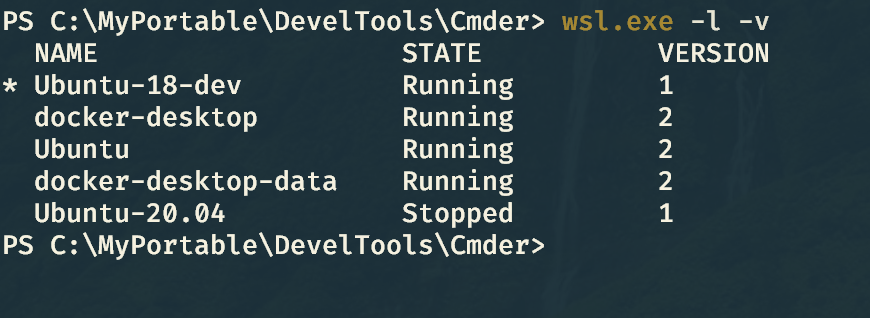
It’s just
wsl --set-version DISTRO 1Is your code on Linux or on windows side? If I have it on windows. Then this is the right behaviour. Application is slow but phpstorm for example is fast.
If you put your code into the Linux part, the application becomes fast but phpstorm becomes unusable caused by the shared mount. that’s the problem of wsl2 right now.
@brettmarl You don’t have to run as root, you have to specify which Linux user and group correspond to the CIFS user you connect as. Just add
uid=brettmarl,gid=brettmarlto the mount options (if your Linux user is brettmarl). Then add the mount to/etc/fstabto make it permanent. I don’t mount the host system with CIFS yet, but I do have a file server on 10 GbE that I mount with this line in /etc/fstab. The principle is the same.//server/pool /pool cifs credentials=/etc/server-cifs,uid=tuxie,gid=tuxie 0 0And /etc/server-cifs is a file owned by root with permissions 0600 (this is important so you don’t expose your password!) that looks like:Right, but the only performant way to run Docker is with WSL2. In WSL1, the filesystem mount for Docker in a Hypervisor VM is similar to how WSL2 “mounts” it anyways, with the networking implementation. The inability to run VMs without Hypervisor is a severe impairment. Also, especially now, people might want to run GPU-centric applications on their computers, which is not supported in WSL1, and is significantly impaired in general when Hypervisor is enabled.
@MustafaElshani Try with LAN IP of the host machine. Mine is at 192.168.0.1 so that’s what I’ve put in
WIN_SHARE_IPplace.This is an option. Or I can as well just run physical Linux machine, from which I will expose code folders via Samba or SFTP (via SFTP Drive app for example) to the Windows machine. I suspect that even that will run faster than WSL 2.
I think that the best thing you can do at this stage is get an x11 server, bootstrap intellij inside wsl and store the code inside the wsl volume, it would the the closest to native experience but it’s a pain we have to do stuff like that.
I’ve just faced this very issue myself. Got some gradle based Java project that builds about 7 jars.
When code is on the
/mount building all of them takes 33 seconds. When code is inside/mntsomwhere, build of all jars takes 19 minutes!And it’s all on PCI-E 4.0 NVMe SSD drives with a Threadripper 3970x CPU.
Guys, this isn’t even funny. Who at MS thought that WSL 2 is ready for shipping in this state? It’s not. It’s unusable.
@zakeryooo My alternative is to write code in WSL2( \wsl$\Ubuntu) directly. It is much more faster than before.
Docker-Toolbox installes a VM on your computer in which docker runs. I’m using the driver from @pecigonzalo (https://github.com/pecigonzalo/docker-machine-vmwareworkstation) to use VMware Workstation instead of VirtualBox. Docker-Machine than uses boot2docker (https://github.com/boot2docker/boot2docker) to setup a running vm. Your data (C:\users) is mounted via hgfs into the vm so u can access it.
It is basically the same approach as wsl2 uses, but hgfs is so much faster than whatever microsoft uses to mount the host data.
I’m also not happy with this half-baken solution. I did a lot of research and found mutagen.io.
What about having the files inside the Docker Container WSL2 and syncing them to your lokal environment using mutagen sync? Dis someone try something like that?
Then we could have full speed of IntelliJ / PHPStorm and full IO speed inside the Docker Container. Syncing them with a short delay seems to be a ok-ish solution.
My current setup on Windows is Vagrant, Virtualbox. For filesync I use NFS (WinNFSd plugin for Vagrant).
For anyone who struggling with cross-platform vscode +
ms-vscode-remote.remote-wslplugin, you have to create two workspaces, one for Windows repos + file editing and another one for WSL repos (I recommend rewriting all path to absolute paths). If you right click the vscode icon on taskbar and pin this two workspace there, at startup vscode will initialize the WSL remote connection when you choose WSL! This is huge time saver and makes multi environment less painful. You can keep the WSL workspace file on Windows host next to Windows one. It’s not a huge file to have any performance issues.One neat feature in MSYS2 if you put the Windows folder path within a quote, like
$ ls -al "C:\Users\User", MSYS will translate the path to/c/Users/User. Unfortunately vscode can’t do that. 😦 If you brave enough, you can add MSYS executible’s folder to path, this way they can be used in batch scripts. I’m Cygwin -> MSYS2 user almost a decade and so far never had a “catastrophic failure” having all of these “Linux” apps in my path. If you want to have same “feel” with WSL, you can have batch scripts in your path like:With this, you can call
> nano newfile.txtin your cmd. What you will see that you runnanoin Command Line, but in reality it will run in WSL2 like normally would. If you want interop with your legacy MSYS2 batch scripts and not want to appendwslin front of every command, then this time saver is for you.Keep in mind this solution have lots of compatibility issues with vscode plugins (like eslint), which likely not gonna work. That’s why
ms-vscode-remote.remote-wslplugin is for. For piping CLI output though, I think it’s gonna work.Regarding the conversation that is WSL2 suitable for “moving all of your dev stuff into WSL”, I think it’s almost there, but not quite there yet. The biggest problem is not with WSL2’s design, it’s within the “cross platform reproducable dev environment” paradigm. That is why Vagrant + Virtualbox created on the first place.
Regarding the development tools that you need to keep on your host Windows, I think most devs what really want is not platform agnostic development, it’s easier tool maintenance, aka: a proper package manager! WinGet (formerly AppGet) is a good addition, but needs lot of time to become a great one. This tool not a package manager, it should be called “INAPGI” (I’m not a Package Manager, Get it!?). It installs stuff and honestly this would be enough, if it can update those programs, but it can’t. It’s not a Chocolatey and it’s not an AppGet unfortunately. We can hope it will become one day that is intended to be. At least offer an “upgradable” variable turned off globally by default. For example, if a “package” is tested that can safely self-upgrade itself (like Node.js), then it should be enabled to offer upgrade functionality. But this is a discussion for another problem and another tool…
I can confirm that accessing any type of network share in intellij idea will cause tremendous slow downs in the IDE so they won’t work
@lamuertepeluda the answer 2 post up here : https://github.com/microsoft/wsl/issues/4197#issuecomment-637333045 has the link to the answer you are looking for
Yeap, simple
git statusfor me takes like 2 minutes while in Linux machine, samegit statuson same code would take like2 seconds.@tebeco
I’m not @jonpugh but it’s a lose-lose situation for me. If I clone my repo somewhere under Linux and try to open it with my IDE on Windows then my IDE will be slow. If I keep the repo under Windows, then my linux tooling will be slow.
The only thing that mostly works in VS Code running under Windows w/ the Remote - WSL extension and the repo under linux.
An alternative to the
hack that I came up with is:
This will work no matter where your mount is or how many drives you have. Unless maybe you have some other
v9fsfile system that isn’t Windows. It returnsext2/ext3on the linux side for me.But again, to be clear, this is a hack and in no way solves the problem. Might even create more issues.
I’m trying to learn Powershell now so I can avoid this altogether. Powershell 7 has the
&&and||operators now, so that’s nice.@bog-h this seems only a shortcut to the old \wsl$<yourdisto> that is reading linux fs from windows. Off topic here where the issue is reading the windows partition from Linux 😉
https://docs.microsoft.com/en-us/windows/wsl/wsl2-ux-changes
IIRC it was announced since day 0
i think the details of “why” were explained through multiple conf/cast article
that’s the very first match on google after few minutes of googling you might want to look a bit deeper in all WebCast and announcement
as it’s now a real kernel comparing to v1 that had way much worse behavior, the “disk side effect only on /mnt” is better than all the previous bug and issue bad emulation / disk permission / thread model / socket / some native invoke could not be properly emulated / huge network trouble / …
so yeah now most of this has been fixed and the side effect is very well known for
/mnt😦 as everyone all I have to do is wait and during that time only use that mount when it’s needed, not for “real-time with 100k npm module double sync” 😉This thread is awesome:)
My scenario - PHP/Javascript (Vue.js) project running in Docker. PHPStorm as IDE, using XDebug. Composer on PHP side, Node/NPM on Javascript side. Project is average size, so enough composer/npm packages needs to be installed.
Everything set up on Linux machine - works great & fast. (git, docker, composer, npm, xdebug)
WSL2 seems like very promising concept because I still prefer Windows as Desktop OS for non-development reasons. Also Docker needs to run inside WSL2 (Because Docker in Windows have some strange behavior when running npm packages because of underlying filesystem access issues, which I don’t want to debug). Only way currently is to locate project files under /home/ folder, because /mnt is definetly not working. And PhpStorm IDE access to mounted network folder \wsl$\Debian\home.… Such setup is reasonably doable without too many hacks. Docker itself (image bulding, etc) works fine. Rest of the stack - not so good. Composer - slower; npm - slower; git - slower; phpstorm indexing - slower; xdebug - slower; nginx - slower; I haven’t measured exact timing but it is there.
So - can somebody from @Microsoft finally comment - IF performance is fixable and will be fixed in the future? Thanks:) Version/build: 2004 / 19041.153
This problem still exists. The issue for me started when I upgrade existing WSL to WSL2. Can’t even start vscode with intellisense.
I’ve got a gigantic repo (50GB not including builds) for a multi-platform project. I’d like to build from linux using the same source so I don’t have to take up double the space on disk. Part of the build process is globbing the source and it just hangs forever.
@ioweb-gr can you add the same stat for wsl OUT of
/mnt?as it would be an objective comparison of all flow here especially checking previous comments dropping for “17min” to “4min” look like a 4x diff
as machine spec can’t really be compared i guess i can’t say wsl2 would be
1600MB/s => 1.6GB/sright ?even if it mean removing potential NFS server to get a real grip on all the various possibilities and respective speed.
Not the perfect, but the working solution for the Intellij idea/PHPStorm/WebStorm. You need to have:
On every autosave, the file watcher will run the sync script, which is using rsync to sync the files between mnt and linux partition. The only one problem, this sync process can take around 4-7 seconds, but the project is working fast.
I can share my example with the comment on the important moments, so, you can modify it for your own purpose. HOWEVER, I hope WSL2 team will fix this problem!
start.sh
#!/bin/bashsudo service docker start#important, copy the whole project to the linux folder, to speed up initial start of rsynccp -a /mnt/c/Users/bogh/projects/symfony/ /var/www/symfony/ --progress --no-perms --no-owner --no-group --cvs-excludechmod -R 777 /var/www/symfony/var/log/chmod -R 777 /var/www/symfony/public/#shellcheck disable=SC2164cd /var/www/symfony/docker-compose upsync.bat
#important, exclude can be different for you as the name of the foldersbash -c "rsync -rvWS /mnt/c/Users/bogh/projects/symfony/ /var/www/symfony/ --no-perms --no-owner --no-compress --exclude .idea/ --exclude .git/ --exclude .docker/ --exclude /var/cache/"File watchers (select a folder only with the source code, to speed up the file watchers)
@andrewleech I am using Allegro NFS Server. Unfortunately it’s not free, im using its trial version. I will look for a free one later xD.
I tested on WSL1 and WSL2. The result is WSL1
$ dd if=/dev/zero of=~/testfile bs=1M count=1000 1000+0 records in 1000+0 records out 1048576000 bytes (1.0 GB, 1000 MiB) copied, 0.351729 s, 3.0 GB/s
WSL2 $ dd if=/dev/zero of=~/testfile bs=1M count=1000 1000+0 records in 1000+0 records out 1048576000 bytes (1.0 GB, 1000 MiB) copied, 1.18549 s, 885 MB/s
@SvenGroot I understand what you mean however for us it’s not always possible to do it like this unfortunately. It very much depends on your workflow for that matter. If I put everything on / I would have to move everything of my projects on my main OS disk which is bad and unsafe. I currently keep them on a separate mirrored drive comprising of 3x2TB SSDs which is mounted on /mnt under wsl but is also portable if needed.
I guess for a lot of people having small ssds on OS there is gonna be a similar workflow so the need to use fast files on /mnt becomes much more important as time passes
Do we know what’s at the root of this, and whether there are any other workarounds than downgrading?