WSL: WSL hang, arm64 cpu, not solved by other solutions
Version
Windows version: 10.0.22621.963
WSL Version
- WSL 2
- WSL 1
Kernel Version
Kernel version: 5.15.79.1
Distro Version
Ubuntu 20.04.5 LTS
Other Software
I’m running on a Microsoft Surface X laptop with a Microsoft SQ2 processor & 16GB ram
C:\Users\hwine> wsl -v -l
WSL version: 1.0.3.0
Kernel version: 5.15.79.1
WSLg version: 1.0.47
MSRDC version: 1.2.3575
Direct3D version: 1.606.4
DXCore version: 10.0.25131.1002-220531-1700.rs-onecore-base2-hyp
Windows version: 10.0.22621.963
Repro Steps
Intermittent, but occurs regularly (1-4 times a day).
- start Ubuntu in WSL
- use it for a while
- wait a few hours (leaving open)
- try to use it again, find terminals locked up.
Some factors that may make it worse (subjective & anecdotal):
- sleep/wake PC (but PC is plugged in the entire time).
- leave “fancy terminal apps” (e.g. vim) running in a non-displayed window (e.g. via
tmux)
Some factors that do not appear to change behavior:
- terminal app (I’ve used “Windows Terminal”, “Windows Terminal Preview”, and VSCode terminal)
- docker running or not
- use of X or Wayland GUI apps
I have followed suggestions in other “hang issues” such as #9114, #8824, but they have not resolved the issue.
Expected Behavior
Terminals and apps work without hangs. (I have simple needs.)
(I use Windows for all high GUI/network apps, such as Zoom, Web Browsing, etc.)
Actual Behavior
WSL becomes unresponsive:
- no response to keyboard (powershell tabs in same terminal session work fine)
- no response to mouse operations, such as clicking ‘close’ on an Xterm window
- high CPU on
VmmemWSLWindows background process
Trying to regain control in powershell with wsl.exe
wsl.exe -l -vexecutes and output is correctwsl.exe -t workexecutes but may delay noticeably before returning- it “works” (as shown by a 2nd run of
wsl.exe -l -v), but cannot start a fresh session
- it “works” (as shown by a 2nd run of
wsl.exe --shutdownwith some success- if it returns, I can open a fresh working wsl session
wsl.exe --shutdownhangs about 50% of the time (does not return to powershell prompt)- Killing
wslservice.exewill reliably allow me to start a new WSL session, but very occasionally the new session will be overly sluggish, and I find rebooting will clear the problem. - When killing
wslservice.exe, thewsl.exe --shutdownwill terminate, with the message:
C:\Users\hwine> wsl --shutdown
The remote procedure call failed.
Error code: Wsl/0x800706be
C:\Users\hwine>
Diagnostic Logs
I’ve tried the procedure described here by OneBlue to obtain dumps & other logs. However, I can not successfully perform the procedure as the system distro shell is also hung. (It is a separate tab in the same windows terminal instance.)
I’m hoping you can provide some additional techniques to allow me to gather logs which will be of use in finding and fixing the issue.
About this issue
- Original URL
- State: open
- Created 4 years ago
- Reactions: 14
- Comments: 102 (2 by maintainers)
Seconded, I experience the same behavior on my SP X SQ2, sometimes the threads that are running will be responsive for a while, but generally the entire system / WSL instance just freezes. The only way for me to kill WSL in this situation is to forcefully kill the WSL instance (
wsl --shutdowndoes not do a thing for me). Through a elevated PowerShell window usinghcsdiag kill @(hcsdiag list | Select-Object -First 1).Considering the entire WSL instance (c.q. VM) does not respond at the time of these crashes, it’s not possible to run any command into the system distribution, even if that was opened before the crash happens even. It feels like something is not entirely right with the process forking / VM on this chip, but it’s difficult to do any troubleshooting (on the kernel level) as everything is frozen.
I’ve learned to live with this for now, and regularly have to clean up corrupted git repositories or files if this crash happens during a write (or git commit). I have noticed that just walking away from the machine and letting it run for fifteen minutes or so, it often recovers.
Upgraded to:
WSL version: 1.1.3.0 Kernel version: 5.15.90.1 WSLg version: 1.0.49 MSRDC version: 1.2.3770 Direct3D version: 1.608.2-61064218 DXCore version: 10.0.25131.1002-220531-1700.rs-onecore-base2-hyp Windows version: 10.0.22624.1391
this morning - seems that VmmemWSL behaves much nicer now 😃
Thanks for your patience and sorry for making you all wait. I can get back on this today.
As I understand it, there’s nothing I can do about providing additional logs until @pmartincic resolves the debug shell bug.
For whatever reason, the hanging is now occurring more frequently for me. Anecdotally, I am finding
dmesgreports a stalled CPU after a “hang” self resolves.typical report
From scanning the RCU docs and configuration options, I’m hoping that some tuning may reduce the impact of these hangs until a fix is available. Before I start kernel-tuning-by-coincidence (which feels risky), does anyone have any suggestions?
Absent any other guidance, my first experiment will be to change
/sys/module/rcupdate/parameters/rcu_cpu_stall_timeoutfrom the current value of 60, to the documented (for kernel 6.2.0) 21 seconds. 60I’m feeling like these RCU stalls are mainly happening for me after I’ve had my screen locked for a while, or even had my device suspend. Does that rhyme with experience others have?
@maxboone, for the moment no 😦 There was a wsl --shutdown hang seen and addressed on amd64, issue in the OS code.
Hypothetically if you gave us dumps for vmcompute.exe, vmwp.exe, wslservice.exe, and wsl.exe we might be able to figure something out. Might require a kernel dump in addition. I’d need to figure out the best way to give them to us, NOT HERE, feedback hub is unreliable. Let me get back to you.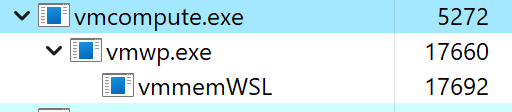
Since microsoft takes forever to fix things (and that’s only 50-50), here’s a batch file to restart it - remove the ‘.txt’, and always run as admin: restart WSL - run as admin.ps1.txt
Currently sick, won’t be able to respond quickly.
As I said, the change makes it possible to access the debug shell on an as needed basis. Meaning you already need to have wsl running and be using it. If wsl is not running there is no debug shell to access. You got that error because you don’t have anything running, hence no debug shell. It’s not a great error message and I’m sorry for that.
I just tested on my arm tablet and the debug shell seems to work as expected. It is also possible given what little I’ve learned about the issue that the debug shell itself may become unresponsive while reproducing this issue.
I did give it a try. I started up a dev container with a rather large code base, which I usually won’t be able to compile, much less start a debugging session, before WSL hangs. With this kernel, however, I was able to compile, debug and actually run. As you note, I still got the crashes but it took much longer for them to occur and it seems WSL was able to recover more quickly. A big step forward but not quite usable 😃.
It also didn’t solve the problem where WSL always completely hangs and uses 99% CPU when closing VS Code and the dev container.
I will try to collect some logs and post them here.
My initial experiences seemed to be linked to “fancy terminal usage” (e.g. tmux, nvim). See also #7913, #10667, and #9454. However, I have seen recent hangs with simply normal bash terminal idling, but have not checked if they are RCU related. (Passing that test is now my first “gate” for any wsl/win11 updates that might improve things enough to warrant more in-depth testing.)
fwiw, there are some RCU tuning notes in that thread. IIRC, at the time it helped delay freezes, but not prevent them. Maybe they’re worth another try now.
@pmartincic any updates?
@f0o I’m already on 23H2 but no luck, for me at least. But please report back.
Once per hour sounds great, actually. If I start a moderately complex development environment in Docker (in WSL2) I can work for about 2-10 minutes before WSL hangs.
@f0o I’ve installed all patch tuesday patches to date and the issue still persists. I’ve asked in issue #10667 if the mentioned fix has actually been released (or, if it has and doesn’t solve the issue, I can provide any more information to help debugging), but no response so far… 😔
My case:
My workaround: It could be only a particular solution, but tested and working for days. In L2M, I connect to WSL using Terminal (from Windows Store) and as is usual I use multiple windows. When I work, I distributed my Terminal windows in both monitors, but before go to hibernate (or stop for a while else OS automatically turn off the display) I move all the Terminal windows to the main monitor (the screen built with the laptop). No more hangs after hibernate or when OS automatically turn off the display. Enjoy
Ah nice, will do that so I can dust off my Pro X again 😄
The “Quick Setup” thing didn’t work, but downloading the ISO from the website and installing from that worked fine. One possible gotcha is you need to disable Secure Boot for the VM in Hyper-V Manager
I see this post is from November - I’d have expected this fix to show up on other releases by now. I’m running a SPX & SQ2 as well and it’s practically unusable for coding at the moment.
Upgraded to: WSL version: 1.1.5.0 Kernel version: 5.15.90.1 WSLg version: 1.0.50 MSRDC version: 1.2.3770 Direct3D version: 1.608.2-61064218 DXCore version: 10.0.25131.1002-220531-1700.rs-onecore-base2-hyp Windows version: 10.0.22624.1391
Issue seems to persist 😕
True, quitting/re-starting the WSL process “works” - but this is really not feasible when working remotely and relying on mounting remote disks etc. As of now I cannot use my Microsoft PC to work with - need to use my old Lenovo laptop which has an Intel-processor 😦
If there are still issues, please log more details. I won’t be able to jump on this for the time being, got routed elsewhere.
Also, there’s currently an issue with the debug-shell where if you
exitin the debug-shell you won’t be able to get it back until restarting wsl. Just close the window for the time being.I noticed this: “Fixed an issue causing VmmemWSL to sometimes use an unexpectedly large amount of CPU and lead to freezing on ARM64 devices over time.” from https://betawiki.net/wiki/Windows_11_build_25247 - so maybe something is in the works concerning this? I am not in a situation where I can fast forward to 25247 (still on 22623), but maybe there’s hope?
Good stuff @hwine!
I’ll try the same for my instances, where do you plan on tweaking the kernel settings. Considering it’s a system-wide (all instances &
--systeminstance), are you going to try tweaking this on the system distro?For the non-system distros, I’ll set these tweaks (or create a script that does them, if more tweaks are added) using the following in my
wsl.conf:I do see that there’s avmIdleTimeoutsetting that defaults to60000(60s) in.wslconfig. I wonder if that’s related.It’s not.
WSLg natively, but I must say that I don’t use it often.
Thanks! I’m still working on the debug shell issue at the moment.
Exactly! Thanks @maxboone! (I should learn how to make those videos.)
I do not get a debug shell popping up on my normal instances. 🤷
Same here, if I run the system shell as specified and have the debug shell configured, it just disappears after a couple of seconds.
Of course the system shell stays open, but that one freezes up when my main / working instance hangs.
I think this is also the behavior that OP is talking about, see video:
P.S. same behavior on regular WSL instances (so not the system distro, but e.g.
wsl -d teamblue), debug shell pops up and closes itself after a couple seconds (probably due to a timeout connecting to the underlying shell?).