WSL: WSL 2 consumes massive amounts of RAM and doesn't return it
-
Your Windows build number: 18917
-
What’s wrong / what should be happening instead: WSL 2 starts using huge amounts of RAM after a while, just using it like normal. At the moment I’m using phpstorm, and did a dump/load of a database.
Vmmemis using 7 GB of my 16 GB of RAM and not returning any, even though Ubuntu is actually using much less. I have seen it grow until nearly 100% of my system memory is in use, and it will not release it until I shut down the WSL 2 VM.
This may or may not be related to #4159
corey@Corey-Laptop:/mnt/c/WINDOWS/system32$ vmstat -s
     15235516 K total memory
       920348 K used memory
      1886048 K active memory
      6434312 K inactive memory
      6606548 K free memory
        76280 K buffer memory
      7632340 K swap cache
            0 K total swap
            0 K used swap
            0 K free swap
       163729 non-nice user cpu ticks
          298 nice user cpu ticks
        13177 system cpu ticks
     68988300 idle cpu ticks
         8962 IO-wait cpu ticks
            0 IRQ cpu ticks
        10022 softirq cpu ticks
            0 stolen cpu ticks
      1481417 pages paged in
      6792976 pages paged out
            0 pages swapped in
            0 pages swapped out
      1079177 interrupts
      5131981 CPU context switches
   1560599814 boot time
         8772 forks
About this issue
- Original URL
- State: open
- Created 7 years ago
- Reactions: 426
- Comments: 414 (29 by maintainers)
Links to this issue
- Solved: Re: Memory leak on Zen4? - AMD Community
- Solved: Re: Memory leak on Zen4? - AMD Community
- Solved: Re: Memory leak on Zen4? - AMD Community
- Solved: Re: Memory leak on Zen4? - AMD Community
- Solved: Re: Memory leak on Zen4? - AMD Community
- Solved: Re: Memory leak on Zen4? - AMD Community
- Solved: Re: Memory leak on Zen4? - AMD Community
- Solved: Re: Memory leak on Zen4? - AMD Community
- Solved: Re: Memory leak on Zen4? - AMD Community
- Solved: Re: Memory leak on Zen4? - AMD Community
- Názory k článku Windows Subsystem for Linux 2 podporuje platformu ARM64 [Windows Insider] - Cnews.cz
- Solved: Re: Memory leak on Zen4? - AMD Community
- Solved: Re: Memory leak on Zen4? - AMD Community
- Solved: Re: Memory leak on Zen4? - AMD Community
- Solved: Re: Memory leak on Zen4? - AMD Community
- Solved: Re: Memory leak on Zen4? - AMD Community
- Solved: Re: Memory leak on Zen4? - AMD Community
- Сравнение версий WSL | Microsoft Learn
- Vergleichen von WSL-Versionen | Microsoft Learn
- Comparing WSL Versions | Microsoft Learn
- Comparaison des versions WSL | Microsoft Learn
- WSL read speeds are slower then Windows
- Release: drop-cache-if-idle
Commits related to this issue
- Start root's cron under WSL WSL2 has some uncontrolled memory growth, so a cronjob to clear caches is a prudent way to help until it is resolved. https://github.com/microsoft/WSL/issues/4166#issueco... — committed to bjeanes/dotfiles by bjeanes 7 years ago
- Add protection against WSL 2 using all your memory At the time of writing this commit there's a pending issue for WSL 2 where it happily eats all of your memory over time. Details are at: https://gi... — committed to nickjj/dotfiles by nickjj 6 years ago
Workaround: Create a
%UserProfile%\.wslconfigfile in Windows and use it to limit memory assigned to WSL2 VM.Example
This will still consume the entire 6GBs regardless of Linux memory usage, but at least it’ll stop growing more than that.
Supported settings are documented here.
Thanks for opening the issue. We have a fix for this in the works.
A fix is on the way, ETA ~2 weeks.
Hi folks, we have just put out a new experimental feature in WSL that aims to address this in the latest update. Please update your
.wslconfigfile to haveexperimental.autoMemoryReclaim=gradual. This will automatically and gradually release memory back to your Windows machine. Please note that this disables cgroups v1 and could cause errors if you are running the docker deamon in your WSL VM!More info on this release and the changes can be found here in the blog post. Please tell us what you think!
Same here with Docker running on Ubuntu 18.04
Can confirm this on 18963 as well. WSL 2 ate most (29GB+ of 32GB) of my RAM after less than 15 minutes of uptime for no good reason; all I’ve done is a rsync from the host NTFS volume to the ext4 volume, and an
apt-get update.I feel the need to point out that the solution many people have suggested of limiting RAM given to the WSL machine doesn’t actually fix the issue, it hides it, and it can come back to bite you later. WSL is still using way more RAM than it should so all you’re doing is saying “only eat up 8GB of RAM instead of 16GB of RAM”. You still end up with memory pressure inside the WSL VM, and that can cause it to start OOMing and killing processes inside, leading to non-reproducible and unfortunate behavior while you’re trying to run tests or do dev work. (I’ve hit this, multiple times.)
The cron job approach of hitting the drop_caches proc endpoint prevents this altogether at the cost of less caching of data. I have this in root’s crontab:
Note that this runs every minute – you may only need or want this to run every e.g. 5 or 10 or 15 minutes but since I sometimes run test suites that can chew up pretty much all my RAM I want to ensure it gets cleared out pretty often.
In my
.bashrcfor my normal user I havesudo /etc/init.d/cron startbecause if the WSL machine terminates or I reboot it won’t automatically run. This way it just ensures it’s running everytime I open a shell.I’ve got
%sudo ALL=NOPASSWD: /etc/init.d/cron startin my sudo file (viavisudo) to ensure my normal user can do this.I strongly recommend this approach over simply limiting RAM, as it both lets you keep sharing RAM between WSL and the host and doesn’t simply hide the problem for it to come back and bite you later.
I have a fix in PR to adjust the hueristic for how much memory to assign to the WSL2 VM.
As some of you on this thread have guessed, the primary reason for this issue is that the Linux Kernel consumes a lot of memory for it’s page cache. We are investigating lots of different options, but the high-level goal is to avoid needing to use Linux page cache and using Windows own page cache, likely utilizing DAX.
Just in case, here’s a workaround to free the allocated caches/buffers memory without shutting down the whole WSL (ref):
In my case, running this immediately drops the memory usage of
vmmemfrom ~10 GB to ~1-2 GB.Nice fixing TWO year old critical bug when it was reported on insider version system. Memory leak in all it’s glory. You want to close this conversation to make your company less worse?
I’ll summarize in a step by step workaround based on the replies in this issue, specially the one of @jefferai
Step-by-step Workaround
Execute cache drop periodically On your WSL bash execute
$ sudo crontab -e -u rootand add the following line:*/15 * * * * sync; echo 3 > /proc/sys/vm/drop_caches; touch /root/drop_caches_last_runThe “*/15” means that it will be executed every 15 minutes. You can change it if you wishAuto start cron service On your ~/.bashrc add the following line:
[ -z "$(ps -ef | grep cron | grep -v grep)" ] && sudo /etc/init.d/cron start &> /dev/nullAllow starting cron service without asking by root password On your WSL bash execute
$ sudo visudoand add the following line:%sudo ALL=NOPASSWD: /etc/init.d/cron start(Optional) Hard limit the maximum memory By default it’s limited to 80% of the host memory, if you want to change it create a
.wslconfigfile on your%UserProfile%with the following content:Finally, to make sure that all changes take effect, execute
wsl --shutdownon your cmd.exe. Re-open your WSL terminal and have fun 😃You can check if the cron job is running accordingly by looking at the /root/drop_caches_last_run last modification date:
$ sudo stat -c '%y' /root/drop_caches_last_runNot currently. For some additional context this change requires some changes to the Linux kernel that are in the process of being upstreamed. We will be integrating these changes into the WSL2 kernel as soon as we can.
I can confirm this problem on 2004
I really don’t know who said Microsoft isn’t mining Bitcoin on our machine. It really looks like
@benhillis please lock this conversation. I don’t think there can be any useful conversation here. All the workarounds have already been posted. So, people will only use it to spam with complaints.
PLEASE LOCK THIS CONVERSATION and then remove this comment as well 😃
We’ve turned on
autoMemoryReclaim=dropCachesby default for the latest WSL version and updated the inactivity time to 10 minutes to help with this issue. This will make WSL by default return its used memory after 10 minutes of inactivity.If you’re seeing this issue, please can you upgrade to the latest with
wsl --update --pre-releaseand try out the new behaviour and let us know your feedback!It happens to me with the following set of software: WSL2, VSCode with Remote-WSL extension, big git projects, and Docker with WSL2 integration.
WORKAROUND:
create this alias at the end of your ~/.bashrc file
alias drop_cache="sudo sh -c \"echo 3 >'/proc/sys/vm/drop_caches' && swapoff -a && swapon -a && printf '\n%s\n' 'Ram-cache and Swap Cleared'\""run:
source ~/.bashrcin your shell to setup the aliasthen you can run the
drop_cachecommand when you need itYou can run it manually when you notice high memory usage or you can try to create a crontab job
I’m experiencing this too. It happens every time I run wsl after some elapsed time (varying from minutes to hours). It continues regardless of what’s running in wsl, and I need to issue a
wsl --shutdownto stop it.Windows insider build: 18922.1000 Linux distro: 18.04
I assume this really belongs in a new issue, but wanted to group my comment with that of @mithunshanbhag so I’ll leave it here.
@benhillis , any updated ETA for the fix?
Now that Windows 10 2004 has been released, is there an ETA for this fix?
thanks! nocache has changed my env from “completely broken” to “merely sucks”
After moving to WSL2, VmMem seems to be constantly pegging my CPU. Please see attached screenshots.
Anything I can do to help your team troubleshoot?
Relevant details:
Hi @benhillis , any update on when a fix for this might be deployed to insiders? My 8gb of ram is really getting hammered by this issue… 😦
@azeveco, for most people, dual-booting Linux usually isn’t a faster or stable solution, especially on portable development devices or company-issued machines. Also, telling people to simply use Linux is exactly opposite to the mission of WSL development. You shouldn’t forget that it is experimental software on a prerelease build.
The best way, that I found, to avoid RAM problems in the WSL2 instance is to limit the amount of RAM available for the Linux environment creating a
.wslconfigfile in your user User directory (%UserProfile%\.wslconfig).The problem with that solution is that it depends on you knowing your demand both from the Linux and windows side. But it is the problem with hardware if you were running a VM or any other of workflow, right?
E.g.: If your machine has 16GB of RAM and your windows programs during workflow always use approximately 6 GB of RAM you should limit the amount of memory to WSL instance to 8 or 9 GB of RAM, you should use something like:
For the changes to the take effect, you have to restart WSL2 instance through PowerShell or command prompt
wsl --shutdown. Don’t forge line-endings should be Windows, take care with text editors that automagically convert to POSIX line-endings!I really hope you don’t lose your fate in WSL without experimenting a bit more. The magic of WSL is exactly being capable of running Linux and Windows workflows side-by-side.
Best regards ✌
Great update, thanks for your work!
When can we expect it to release in stable channel?
This may not be a solution for everybody but nevertheless: Mid of 2024 I had enough. I banned Microsoft Windows from my computers and replaced it with Ubuntu. I didn’t realize how much resources just the OS consumes even without starting anything program or WSL.
I no longer have an issue with WSL. Do I regret it? No. I’m glad I made the change. And it resolved all issues around WSL. On Ubuntu I use docker engine, not docker desktop. It works like a charm even if I have a dozen or so containers running at the same time. The system stays responsive. No more forced reboots. No more “added value” shoved down the throat.
Today, I’ve also unsubscribed from notifications about this issue. If you want to resolve this permanently then consider ditching Microsoft Windows. The first 2 or 3 months are a bit of a challenge, but you will get used to the new OS, whatever you choose.
All the best to all who stay on Windows and all the best to those how choose to move on.
Happy coding!
Many users face issues because they don’t properly configure the Docker VM WSL2 limits when using Docker Desktop.
Additionally, there’s a general misunderstanding of how RAM is used in Linux. For more information, check out this link: https://www.linuxatemyram.com/
How would they mine Bitcoin in our pc if they address this issue
As a reminder, please adhere to the Microsoft Open Source Code of Conduct when having discussions on these boards, including being friendly and patient, respectful, and understanding disagreements.
We are investigating this issue! Our ultimate goal is to keep the WSL2 VM lightweight and quick. We’ve implemented the first part of this, which is returning in process memory, and we are investigating the second part of this, returning cached memory for files. Please stay tuned on this thread for any relevant updates!
@Indribell - we are looking at improving the behavior in the future to improve the behavior regarding Linux’s cached memory.
How is this issue still open after ~ 5 years?
Why the hell people trying use linux are switching to mac due microsoft fault?, lol
almost 5 years after and the issue havent been fixed, i think this issue was on the main reasons i’ve switched to mac 🫠
same issue 5 years later
@cmeiklejohn - Correct, 19013 has the fix for this.
Looks like 19013 fixes this.
Same issue on Win build 18950
Off-topic reply to an off-topic post but I just wanted to let you know that you may be able to play Microsoft Flight Simulator in Ubuntu (although there are problems reported with the latest version):
https://www.protondb.com/app/1250410
Please don’t lock the conversation, people may have questions about the fix in progress. It is sufficient to mark the complaints as spam
In build 20175 we’ve changed the default memory scheme in WSL 2 to use 50% of your memory in Windows, or 8GB (whichever is smaller). This change should help address some of the immediate pain points, and we are still working on improving our overall story with regards to cached files in memory. We’ll be looking forwards to hearing your feedback!
Hi, Same problem here. Lots of memory consumption with WSL2, nodejs app and VS Code with Remote - WSL while very low consumption in WSL1 with the same tasks.
Avoid using Docker Desktop, switch to Docker CE directly in your WSL2 distro - noticed memory usage has been a lot better and you don’t miss anything other than the clunky electron UI of docker-desktop.
Seems like
experimental.autoMemoryReclaim=dropworks like my https://github.com/validatedev/drop-cache-if-idle, which has worked for me without any issue until the day. If I have been able to contribute, I’m happy for it 😃 Congrats!It’d be nice if there was a bit more intelligent method of determining when cache is no longer being used vs “detecting idle CPU usage”.
I’m running an instance of PhotoPrism in WSL via Docker. When indexing a photo library of about 10,000 photos my memory eventually fills to 100% saturation followed by WSL crashing. We’re talking 128GB of available memory here as well…
System memory
usedreported within WSL (free -mh) is sub 4GB at almost all times. Butbuff/cachememory builds until my entire memory pool is saturated, even withautoMemoryReclaimenabled. I assume this is because my CPU never goes idle during the indexing of my photo library.I don’t have a good grip on what’s feasible, but it would be much more preferable if there was a way to detect that something in cache is no longer being accessed, and therefore gets dropped.
Im getting spammed so hardcore for this issue, could you guys maybe just upvote the first post instead saying stuff like “me too” or sth?
We’ve released a blog post to help go over the details of this feature: Memory Reclaim in the Windows Subsystem for Linux 2. It should help clear up how memory becomes freed!
Limiting Memory Usage in WSL2 https://www.aleksandrhovhannisyan.com/blog/limiting-memory-usage-in-wsl-2/
@gustavozantut 100%
Who said it’s Microsoft’ fault? Apple is killing it with the Macs.
I always have this RAM problem but today, with new vscode and wsl update, using vscode with wsl is nearly impossible. This wsl issue is pursuing me to buy a macbook but I don’t want to! 🤣
This issue just destroyed 32GB of ram and caused explorer to crash! had to revert to Hyper-V to be able to continue developing with my cluster running
“We have a fix for this in the works.”
We’ve added a ‘Auto Memory Reclaim’ feature which aims to help reduce this issue. By default it’s on ‘dropCache’.
If you’re still seeing this, could you try out the ‘Gradual’ setting as well? This issue is likely caused by Linux caching behaviour.
I wasn’t aware of this project, but yes it looks like a very similar idea! Thank you for writing and contributing such an awesome open source project 😃
And @torumakabe the script in the blog post was just written by me as an example script and the actual implementation of the feature is different. Thanks for letting us know about this, I will check in with the team to make sure it’s accounted for!
I feel like we have reached the end of meaningful discussion on this thread again. The most recent comments here nicely explain the workaround to future explorers, I think this thread should be locked until there is more news on the more complete solution.
does not appear to be a part of the 19002 insiders build
Since topic is untouched for 6y, i think there’s nothing more offtopic then the topic
Is Microsoft in need of our RAM? even hours after turning WSL down vmmem is consuming and consuming. Are you mining crypto with our PC’s?
There is three separate issue here.
Linux using free memory as cache. WSL2 needs a way to tell windows that that part of memory can be freed. Windows needs to recognize this memory can be requested when required. Windows requests wsl to free that memory when required. wsl linux kernel frees it by using technology like vm/drop_caches
Implementing this will be the most complex endeavor and I’m not expecting to see this implemented anytime soon, maybe after a couple of years when other pressing issues are fixed.
Provide users a better monitoring system. As wsl doesn’t show up in hyperv manager, we need a way to check how and where system resources are being used. Can be implemented in wsl.exe.
Optimize memory use. For example right now I see
1227 (used)+976 (cache)=2203memory usage inside wsl fromfree -m. But in task manager2730is being used by Vmmem. Who is using extra ~ 500M? I can guess two scenariosA. soXamount of linux memory translates toA * Xamount in windows/Vmmem. This is highly unlikely, but without the monitoring tools i mentioned in previous point, can’t check.500Mat boot. Is it the linux kernel? If so msft needs a way to optimize and fine tune it to consume less.I’d love some clarification from msft guys on how and why this issue is happening. I’ve seen some nice explanation of various underlying technologies in other issues in this project, So expecting those rockstars to post another essay here 😄
@jimjenkins5 - there are a lot of variables of when a given fix will make an Insider build. I would expect this change in the next week or so.
Nah. People don’t have time to understand your logical answer. Whats more likely is its a conspiracy by microsoft to eat your RAM and do evil things with it. 😉
Just by not seeing comments as embarrassing as the ones that @megapro17 is writing, I would prefer that they block this thread, honestly.
@GTMxCode The original issue actually was fixed, but then it highlighted this new one with the cache.
wsl: Expected ‘=’ in C:\Users\user.wslconfig:4 Line 4:
experimental.autoMemoryReclaim=gradualHmm.[edit] This works:
The initial instructions were wrong.
@programad Locking the conversation doesn’t mean the issue itself is closed, so yes, you will be notified in one way or another. Please wait patiently until @benhillis merges his work - What more could you ask for?
I think an improvement would be letting WSL 2 consume as much memory as it wants but having some kind of mechanism where Windows 10 could send a signal to the running WSL 2 instances like “hey, I need memory!”, which then would trigger the cached memory drop automatically, without needing cron jobs or manually running commands. Kinda like Chromium-based browsers automatically discards inactive tabs from RAM when the system is running low on memory…
Windows shuts down and then turns on, and then Vmmem completely frees up the memory. So far, there’s no better way!😂
Haha, isn’t the reason we joined this program exactly to complain about those issues? Don’t be a wuss and suck it up is not an option here by definition.
There is an issue. It needs to be fixed. It is not acceptable the way this feature behaves regarding overall system performance,
I am not sure what in those statements is ambiguous or wimpy. I understand that this might not even be shipped at all, but in my book, you either provide an “ok” work-around or fix the damn thing. As soon as you (MS in this case) gave this into the hands of the highly invested early adopters (myself included) you own it.
Is it possible to switch back to WSL v1 after converting to v2?
Great, now the issue is just about
buff/cachenot being released.Hi, could you explain how nocache should be used?
The above-mentioned article provides some good information, and also has an error. The Windows build it mentions was a preview of Windows 10, version 21H2, and was never publicly released. Because this build has a high number, you might think that it is newer than any released build. Ignore the misleading information.
I have found that the current version of Windows has solved the memory problem. To update the Windows Subsystem for Linux (WSL), you can use the command
wsl --updatein PowerShell or Command Prompt (as administrator).Notepad++ can save files with Linux line endings (Edit menu / EOL conversion) and no BOM (Encoding menu).
The best way to express the path to the configuration file in native Windows, so Notepad++ can edit it, is
%SYSTEMDRIVE%%HOMEPATH%\.wslconfig.The
free -h --gigacommand proves that memory usage is under control.Same, switched to Mac and observing this issue just for entertainment purposes now.
So many useless comments in just one day…
Maintainers please lock this thread as a lot of people watching this issue and waiting for progress updates but all we get is yet another “me too” or just trolling!
Workaround
You can force linux to drop page cache with:
echo 1 | sudo tee /proc/sys/vm/drop_caches(couldn’t see this anywhere above; edit: ahh, it is around example – just not easy to spot + github’s autohide means it’s probably been posted many times before. Maybe @LordMonoxide could add it to OP so ppl don’t have to go looking too far?)
Before (~18GB / 32GB RAM used; 97% total usage in Windows)
After (~7 GB / 32 RAM used)
After dropping all caches
echo 3 | sudo tee /proc/sys/vm/drop_caches(~5.5 GB / 32 RAM used)Just wanted to pop in and say this issue is still present on the stable 2004 build.
I noticed
Vmmemwas using 11GB of memory after simply starting and stopping a couple of Docker projects. Thedrop_cachesalias above made it go down to 1.5GB in about 20 seconds.Will disabling the swap / cache at the wsl config file level reduce stability btw, or more importantly will having a swap available mean it’s going to kill your SSD from writing to it?
I cant play flight simulator in ubuntu but congrats for the choice
Run docker system prune -a
As many of us constantly have terminals open for work, consuming all available RAM when open and only releasing when all terminals close isn’t much of an improvement.
@zachChilders - ETA on this one is a bit hard unfortunately. Certainly before WSL2 ships to non-insiders.
@benhillis - Do we have a rough ETA on the fix? I’m actually hitting OOM issues on a machine with 32 gigs while just running a normal ninja build that should succeed.
Build 18955
Let me introduce my script which does exactly the same thing you mentioned, based on CPU load so you won’t lose required cached data: https://github.com/validatedev/drop-cache-if-idle
I am sorry about being toxic at this point, but I bet for WSL from V1 as my team’s main development environment.
Now after waiting and fighting against the memory leak bug for 3 years or so, we ended up giving up for that.
We also bought 32Gb RAM laptops in case they are usable and they couldn’t handle building docker images in some cases without hitting swap (throttling by rising disk I/O to 100%).
It feels like Docker Desktop, VSCode & WSL2 are doing this RAM hoarding on purpose.
I also tried out the new
auto memory reclaimserting twice and in both cases it destroyed my WSL file system and affected my windows filesystem with file corruption. I had to format and start again after that.Sadly we are migrating to Linux desktop and pushing happy people on windows to a new OS, something we hate to do honestly.
I really hope a comeback on this issue
Thanks for trying 🙏
@craigloewen-msft Great enhancement! Anyway, how do you calculate the amount of reclaimable memory? Your example scripts seems to refer to buff/cache in the free command, but I think buff/cache is not recommended nowadays because it does not take shared memory and slabs into account.
There is a good explanation in this article.
The implementation in the product and the example script may be different, but I hope you can check it out.
Apologies if this has already been said, but some discussion of this issue and instructions for using the
.wslconfigfile to adjust max memory usage should be added to the WSL docs, probably under troubleshooting, maybe FAQs. I just had a look here and didn’t notice mention of this: https://docs.microsoft.com/en-us/windows/wsl/This change affects the total memory available to your WSL 2 VM. We changed it from 80% of your Windows memory to 50% by default. So on my 16GB machine the total memory I see when I run
free -hwent from ~13GB to ~8GB. This can also be overriden to be any value you like using the .wslconfig file.For those who came here after Windows 10 2004 public release as me, there is a little advice. After creating
%UserProfile%\.wslconfigfileYou just need to restart Windows. It only helped me to get 2Gb memory limit on virtual machine, nothing more. Old good Windows, yeah!
Build 2004 of Windows and this issue remains.
Vmmen consuming 12GB of my 16GB of RAM.
@AlexanderLanin, If you add more RAM the Linux cache will use all your RAM, it’s the normal behavior of Linux. The problem here is that windows don’t know that the RAM used in the
vmmemprocess is just cache and can’t retrieve it.If you check the first picture above you will see the yellow bar showing that all of the 205GB of RAM is “occupied” by the cache (yellow bars).
And in this second screenshot you will see that the buff/cache is equivalent to 197G (blue circle) and only 561M is “free”, but the Linux kernel knows that 168G is available what is shown by the orange circle.
The real problem is Windows not being able to use the available/cached memory.
I would like to note that even though the
wslconfigfile does prevent my instance from consuming all my system’s RAM, it’s not actually releasing any unused RAM to the instance itself, which means all of my WSL processes eventually OOM given enough time. I’ve downgraded to WSL1 to work around this for now, even though the FS performance is nothing to write home about. Anxiously awaiting the fix! 😃In my case I switched from docker desktop to docker ce in wsl and there is no 4GB ram overhead anymore. Use lazydocker a cli UI like docker desktop and you are good to go.
I am sorry but Docker desktop is taking more and more ram to the point my workflow is to expect not hitting swap by running 1 python container and maxing out resources.
After years of following this thread I came to the conclusion that the problem was ME trying to use Docker on Windows, it simply isn’t functional, it has already been said that WSL2 is behaving as it should. For MY NEEDS, I was simply able to work better using Linux in dualboot, where Docker works perfectly for ME, without leaving my computer without resources to carry out other activities, such as debugging in my IDE what is running in Docker. I’m not speaking in a hateful tone, I’m just advising other colleagues that this could be a more productive way out.
I am having this same issue , WSL2 ubuntu 20.04 on Windows 11 i9-13900HX with 32GB of RAM. WSL2 will take up to 70% of my RAM while installing a simple apt package or coding and won’t return it when the process is finished. It just keeps building its memory use until I shut it down.
@sarim You’d firstly read about what memory leak, then posting messages,
In computer science, a memory leak is a type of resource leak that occurs when a computer program incorrectly manages memory allocations in a way that memory which is no longer needed is not released.It could be anything, cache including. It should be released but it is not occurringI have zero WSL related things open ( I.E closed all terminals and VS code ) and vmmem is using 8gb on memory
e/ After about 30s after closing editor it has gone back down to 1500mb
Also ❤️ for your continued effort on WSL, it’s making developing on windows a dream.
But actually don’t do that ^ because it has a lot of drawbacks. See https://github.com/microsoft/WSL/issues/4166#issuecomment-604707989
The command
echo 1 > /proc/sys/vm/drop_cachesrun as the root user from this article was enough for me to reclaim the memory used from page cache. I think this is a workaround for now but looking forward to a permanent fix for this from WSL team.The OP did not mention Docker. This issue is not restricted to Docker, and is not dependent on Docker.
Still having the same issue even with the latest WSL2. Docker-Desktop having its own memory leaks isn’t helping either 😕
This is on a always running VMWare VM with Nested Virtualized Enabled on an Intel Xeon Gold 6430, Windows 10 and fully updated VM, WSL etc.
WSL2 Ubuntu 22.04.03 has been allocated 20GB RAM max (Out of 64GB). It only really uses 4GB atm with VSCode remoted into it. Kubernetes/Docker Desktop says it uses 4-10GB depending on its memory bloat
I had it saying 54GB used yesterday, so I ran RAMMAP64.exe. Amazingly, it flushed the RAM, and I went down to 22-24GB, which is about typical for my dev environment. Now, after a day of not even using it, and just having things running, after re-logging in my RAM went from 24GB to 46GB usage in an instant. Not to say the huge VMEM CPU killing will always get worse over time until almost full resource utilization, even with less memory leaks
As you can see here, “Driver Locked” memory is what has stolen all of my RAM, and repeatedly terminating WSL2 / Docker to clear RAM shouldn’t be the solution
Even after stopping WSL2 and Docker, we still have 16-20GB of unusable memory noted by Task Manager. Which then, after 4 more minutes, clears up to this:
Same issuse as mentioned here:
My fresh ubuntu WSL with
autoMemoryReclaim=dropcacheMy exact same WSL fresh instance afeter just opening vscode:
The first time I started to use WSL2 when it came out, it was a breeze. Then Docker Desktop integration was a dream to work with. Finally, today I cannot just run a single container without taking 90% RAM of my 16Gb and start noticing massive performance drop because Swap start kicking in. Not even to mention about building simple docker images. Suddenly your
.vhdxdistro virtual disk will eat your space if you work with large files, python environment and that wont ever be reclaimed back. You can try to compress the.vhdxwithDISKPARTgoogling some tutorials, or try the next.wslconfig:But when that experimental feature came out, it just destroyed my windows system, corrupting random files across my computer. I was forced to format once. I am giving it a last chance to work with WSL and
sparseVhd. But my productivity is hold by a thin rope because of this issue.I finally uninstalled Docker Desktop and installed Docker CE on WSL2 but the problem persist with VSCode as a RAM hoarder. Today, after years of recommending wsl to my teammates, my dream development environment is a nightmare and I cannot fix theirs.
I am forced to dual boot again as the last workaround.
Don’t Panic! Your ram is fine!
This is working as intended, you have 8GB of unused RAM and Linux is using it as cache, this is a feature in Linux, not a bug. This makes the system faster, not slower.
What you need to test is when Windows requests the RAM back if WSL2 is releasing it.
And that is what the configuration
wsl2.autoMemoryReclaim=dropis supposed to allow.I would add that on wsl2 on Windows 10 2004, the wsl vm starts with about 1gb allocated even though absolutely nothing on the linux side consumes that memory.
“Smaller memory usage on startup” is advertised as a feature of wsl2 vs wsl1, but this doesn’t seem to reflect reality for me.
free -hon the wsl environment reports that 98mb are in use, 27mb are used as buffers/cache. vmmem reports 1084.1mb of memory usage, meanwhile, even after dropping caches via/proc/sys/vm/drop_caches.This isn’t with docker or any particular workload – just on initial startup. I had this behavior with a wsl distro migrated from 1 to 2, but reinstalled clean with version 2, same behavior.
Happened to me also, I loved to use WSL2 and now facing huge cpu/memory issues. Running docker seems a nightmare with these settings.
Version 2004, Build 19041.264(stable)
A more sensible default might be in order:
https://docs.microsoft.com/en-us/windows/wsl/wsl-config#configure-global-options-with-wslconfig
Currently it is 80%, which I would say is too high, considering WSL is primarily for headless operation, i.e. no native ability to run apps with a UI. 25-50% is probably more sensible as a default. Better yet, prompt the user when they first run WSL and ask them and optionally provide a brief text to help less knowledgeable users choose.
For example:
This is by design though right? I don’t think it’s a bug. Linux will cache files in whatever RAM it sees that it is not actively using, which means that if it can see 16GB of RAM and you run any process that touches a lot of files, then Linux will utilise almost all of it for its file cache. On a VM where the amount of RAM made available is not 100% of the host memory, this works perfectly.
I set my WSL memory limit to 2100MB a week or so ago (based on an earlier comment in this thread) and since then I have had no problem:
Clearly didn’t fix it before the general release which I’m using today and vmmem is eating up resources like it’s the only process on my computer!
This from build 19619 (kernel 4.19.104) is definitely something new. After some minutes my WSL2 VM is using 140Mb of RAM while running The Docker for Desktop tutorial container (it used 1Gb at launch). So it seems cached memory in Linux is now returning little by little to Windows. 👏
Edit: 80 MB! The vmmem process finally did shrink to only 80Mb and the Docker container did keep working flawlessly. This is great!
On Fri, 27 Dec 2019 at 22:31, Mateus B. Cassiano notifications@github.com wrote:
That’s great, but it shouldn’t be using a configuration by default that results in machines locking up completely for sustained periods. That’s not acceptable behavior, and i’m pretty sure microsoft would understand that. Acting like it is acceptable for it to act this way (and closing down peoples posts about such issues) is why windows 10 ends up getting a bad reception when it gets released.
My Windows 10 Build 19013.vb_release.191025-1609 is still bothered by this issue. WSL2 Ubuntu 18.04 LTS.
I’m using VSCode remotely editing codes in WSL2. Vmmem consumes large memory and does not release them.
I close VSCode without executing
wsl --shutdown. Vmmem does not release the memory.Only after
wsl --shutdown, the memory is given back to Windows.just ran a small django and front end app on docker 👍, nice stuff wsl team, vmmem was using 10 gigs at one point as well.
echo 1 > /proc/sys/vm/drop_caches echo 1 > /proc/sys/vm/compact_memory
I subscribed to this issue. Will we be notified when it gets fixed?
Hi folks, we are still investigating this and are actively working on it (see Ben’s comment from 6 days ago: https://github.com/microsoft/WSL/issues/4166#issuecomment-641445502 )! We’ve heard your feedback, and this is something that definitely matters to us. We don’t yet have any updates, but please stay tuned and thank you for your patience. In the meantime there are workarounds as other users have mentioned and if you find yourself hitting this issue I would recommend using
.wslconfig(documented here) to cap the memory available to your WSL 2 VM.We love hearing your discussions, but please remember to adhere to the Microsoft Code of Conduct when discussing issues on this board. I’ll lock this thread for now as the current discussion has run its course, and so new users can see this summary when reading about this issue. We’ll reopen it later as we have more updates. Thank you all for your feedback! 😊
Closing the terminal does not immediately release the memory, but I believe I have observed WSL shutting down a few minutes aftterwards. For this to occur, everything that interacts with WSL needs to be closed.
Doing a
wsl --shutdownforces this to occur.Neither is an efficient workaround.
Windows cannot (or does not) distinguish between memory in use by programs running in WSL and in use for the Linux filesystem cache. Linux does not know (or care) that its filesystem cache is depriving its Windows host of memory. It is this lack of coordination and cooperation that is causing the problem.
https://www.linuxatemyram.com/
What worked for me is to set the memory and swap available for WSL2 to a sufficiently low number so that my host doesn’t run out of memory.
My default settings were around 12g memory and 0 swap. Running htop I noticed that when my WSL2 slows to a crawl the memory usage goes up to around 9 gigs and stops there while my host also ran out of memory. Probably what’s going on is that the WSL2 linux is trying to utilize all the memory available to it before using swap, however it does not get it(as the host ran out of memory as well). I’ve decreased it to 6gb and 3gb swap and now all is good - I don’t even have to clear cache / compact memory.
@MKHSKY I feel like people are probably confused because the issue was labelled “fixedininsiderbuilds” when it isn’t really
Not seeing the same behaviour re: cache vs commit size. The memory usage grows over time, but I doubt it is due to caching.
You could free-up VM cache in linux with
# sync; echo 1 > /proc/sys/vm/drop_caches- clears PageCache# sync; echo 2 > /proc/sys/vm/drop_caches- clears inodesThis freed-up ~1Gb of RAM for me.
@pimentelleo There is a temporary solution, so let’s not pollute this thread with comments such as “this isn’t really an issue because this is how Linux is outside WSL 2”, which didn’t even made sense on this context and started a whole new discussion outside of the subject, we all already know there is an issue. You might not understand exactly but GitHub issue sections are for both newbies and pros, it just won’t help if you keep straying from the subject. Keep professional and respectful, stay on subject, plain and simple.
I guess it is better talk about solve the issue for newbie ppl instead find who of us is “the best ppl for make the software world better” U guys wasting u time, the solution is up until the issue is fixed someway
So I’m on build 19025 and I still get this problem. Does this still to be fixed or is there something i’m doing wrong?
Okay, I fixed this. when I opened the wslconfig file in Notepad the encoding was set to UTF-16 LE, which maybe is the default encoding for text files? Anyway, I used
File > Save Asand picked UTF-8 instead, and the setting now seems to be respected.Depending of your usage, nocache utility can be used as a workaround to greatly reduce WSL 2 memory consumption, especially if whatever you’re running inside it does a lot of filesystem operations…
I’m back on Windows because need to use a Windows-only VPN client to connect to the corporate network. I’ve had this issue for ages and switching to Linux solved it for me. I don’t want to reboot every time I need to touch the deployment environments so reluctantly I’m back on Windows (with a completely fresh install from May 2025).
And lo and behold, the memory issue with WSL is still there. I almost forgot about it.
I’d really love to see a fix for this as not everyone has the luxury to switch to Linux.
While is true that unused RAM is wasted RAM, not the case when you have two OSes competing for it. If you want to free it, people in the comments above said
sync; echo 3 > /proc/sys/vm/drop_caches
And it actually works, you will see the memory being reclaimed. I guess its a trick to make Plan9 share not suck, which ended up not flushing any cache.
Try this:
Well, before it turns into an off topic discussion, i think people misunderstood what i’ve said 🤔 I’m not saying it’s microsoft fault, or the developers fault, by my own necessity to work. The less friction i have on my workflow, the better, and i do like windows, unfortunately the amount of friction i was having to deal with using windows + wsl was so big that it was more worth it to switched to a mac, i can do almost anything i can do on windows (i don’t game) + i have unix powers, without the hiccups of using a virtual machine.
So yeah, not blaming anyone, but it’s the truth, at least for me.
Note: This is unrelated but lets me confess: I myself waited for one and a half-year to resolve this issue but no progress then I uninstalled Windows OS (I was a regular user of windows for 8 years) and installed only Linux (Ubuntu) OS. Now I am using windows (for Office work) in Virtual Box.
Update from @craigloewen-msft about it on Twitter:
https://twitter.com/craigaloewen/status/1267867503394295809
That’s very normal behaviour for Linux because Linux marks caches as available memory. Problem is that windows does not know that memory is used as disk cache and Linux (in WSL2) doesn’t know that it is running in a virtual environment.
I think the fixedininsiderbuilds probably refers to this fix (which was posted above): https://devblogs.microsoft.com/commandline/memory-reclaim-in-the-windows-subsystem-for-linux-2/ However, even in that post it mentions that not freeing cached memory is a design decision… and I guess one that a lot of people posting on this issue don’t like. Maybe the issue should be renamed or somehow clarified to state “which memory” it is referring to. If this is fixed and not about cached memory then maybe there needs to be a new issue for that. But I think most people these days are posting about the cached memory.
@MrBlaise Me too, I have to
wsl --shutdownafter running Docker Desktop in WSL2 for 3~4 hours.Will the feature mentioned in the above comment make its way to Windows 10 2004? Or do we have to switch to fast insider builds? @benhillis?
Check this comment. This way the
cronjobworks for me without having to do anything in Windows.Well, I could diminish the RAM usage of
Vmmemsubstantially by doing these:sudo crontab -e.* * * * * sync;echo 1 > /proc/sys/vm/compact_memory;echo 1 > /proc/sys/vm/drop_caches;echo 2 > /proc/sys/vm/drop_caches;echo 3 > /proc/sys/vm/drop_caches;touch /root/drop_caches_last_run;sync;echo 1 > /proc/sys/vm/drop_caches;echo 2 > /proc/sys/vm/drop_caches;echo 3 > /proc/sys/vm/drop_caches;touch /root/drop_caches_last_run.cronjobdoesn’t work, because of the how WSL works.C:\Windows\System32\wscript.exewith the argument likeC:\wsl-autostart\start.vbs. Trigger will be At log on and it should be running highest privileges.Limiting RAM to Linux defeats much of the advantage of having an integrated WSL solution vs. a VM. A much better approach for me has been to simply set up a cron job in the WSL distro to drop caches regularly.
two gotchas here. there’s no effect of sudo on echo as echo is a separate statement from
sudo syncdue to;. It still does not work if you change;to&&because redirection>happens before sudo gets permission.echo 3 | sudo tee /proc/sys/vm/drop_cachesworks.@ErvalhouS - The performance impacts are substantial. When you drop the page cache you’re going to be reading from disk so it’s not something we want to do without being sure you’re done with the files that are cached.
@dariothornhill, the best workaround that is working for me is to create a wslconfig file (
%UserProfile%\.wslconfig) limiting the amount of RAM of the wsl2 vm and using additional swap space for RAM demanding operations.It is running really smooth in a laptop with SSD storage for the swap.
For the changes to the take effect you have to restart WSL 2 vm through powershell or cmd command
wsl --shutdownIn a laptop with 8GB of RAM, setting the WSL2 VM RAM to 4GB and increasing the swap partition with a SSD allowed me to perform operations that were failing before, just setting a lower WSL2 VM RAM.
Example
%UserProfile%\.wslconfigfileI was looking for an ai that works offline so I downloaded ollama, then deepseek through ollama then i downloaded openwebui then docker desktop. followed a youtube video. Now when i am trying to interact with the ai its showing ‘500: model requires more system memory (6.6 GiB) than is available (3.4 GiB)’. what should i do. I have tried advance resources but there is no option to change GiB. I dont know how to code. please help
To be clear, my comment was directed toward the developers / maintainers of WSL. I just don’t understand how an issue could be reported and not solved in 5 years. You could rewrite the entire thing from scratch twice in that timeframe.
I too have continually revisited v2 and resorted to reverting to v1 for various reasons.
Same here on AMD Processor (5800H). After using Ollama in WSL, after stopping it, WSL never releases the RAM.
updt. I am quite wrong about this. It works as it descibed early in this topic. I mean, WSL releases memory when Windows requests it - when RAM load goes above 90%. On screenshot I used Ollama in WSL and it took 12 Gb of RAM, but after I simulated RAM requests (basically starting games which require a lot of memory) we can see Windows very simply and fast releases RAM. So it isnt an issue for me for now I guess.
For me it did not cause any unexpected issues at all. It did however change how networking works, to match how it’s working natively on linux, for example in my compose files I had to explicitly specify what is
host.docker.internal, as it’s available in docker desktop out of the box but not in docker engine. Ah also when I was on Docker Desktop my Devcontainers networking was not working properly, and switching to docker engine just fixed them to run smoothly without any bugs.You can drop Docker Desktop for Windows all together and use native docker engine in WSL - which will be more efficient and less ram hungry. I did it more then 6 month ago and not looking back.
Just do as I do:
I have given many chances to WSL but it remains unusable for any practical purposes
Lately I can’t really use WSL for long periods of time, it wasn’t that often, but now it is, for some reason it takes all my ram and holds it, which leads vscode to disconnect from WSL when I save a file or without any action of mine, it shows a modal saying it tries to reconnect, but it just don’t work. It also makes my computer really slow, I need to kill WSL via cmd and turn it on again, but eventually I’ll face this issue again, fucking annoying, I’ll just leave WSL, today I just can’t have work sessions without being disturbed by WSL. Apparently 16gb RAM is not that much.
@darkRaspberry it was said hundreds times on WSL bugtracker. Linux considers free RAM as useless and it doesn’t like useless memory so it’s using it as a cache for disk: https://www.linuxatemyram.com/
You can drop current cache this way: https://www.tecmint.com/clear-ram-memory-cache-buffer-and-swap-space-on-linux/
Please buy more ram guys.
@megapro17 Don’t be so rude. I’ve posted my fair share of rants in github, but you seem to be a bit misinformed. This is not just a
Memory leak in all it's glory. Those extra memories linux kernel is using as cache is making your application load and run faster.So I feel like this issue needs a progress update or something in the OP as some solutions and updates are being flooded with more comments and missed, for example comment above about a twitter post saying the devs are looking into a better solution. Not to mention there has been some workarounds that help manage the memory from getting out of control, though they don’t completely fix the underlying memory issue in WSL2 vs using WSL1.
I’m using the drop cache workaround plus other suggestions from comments above and they seem to help somewhat, but I haven’t done any thorough testing or thorough comparisons, just know that my system memory looks much better. But I’m now trying to turn off the wsl system completely unless absolutely necessary which defeats the point as I miss my linux terminal and considering dual booting and move dev to linux completely, which I wanted to avoid at all costs.
Also I did have high memory usage until I stopped using remote-wsl from vs code, which means wsl2 has become somewhat useless for me due to another issue with wsl2 (https://github.com/microsoft/WSL/issues/4739) that forced me to move my projects to a linux path and use remote-wsl from vscode.
Build: 19041.264 WSL2: Yes Hyper-V: Yes Virtual Machines installed: 0 Docker Desktop: no
Yikes… I was so excited for WSL2 but it sounds like a hard pass based on these comments…
Something else I’ve discovered that might be of use: using the
drop_cachealias above saved a bit of RAM, but with no terminal open I was still seeing over 4GB being used. I use VS Code with the WSL extension that lets it connect to the virtual environment, and killing that window promptly freed up another 2.5GB. Reopening the terminal, and starting code again withcode .did obviously increase memory usage, but only a fraction of what it was using before.TLDR
Restart VS Code if you’re using the WSL extension
It`s not a WSL now. It’s a WVL - Windows Virtual Linux. 😄
This fixed it for me.
This is not an issue, it’s related about how WSL 2 separate RAM
For choose how much RAM to use, following the OFFICIAL DOCS , create a .wslconfig file on %UserProfile% with the following code:
You can put how much ram you think you need.
+1 here. Consuming 12 out of 16GB.
I’ve been running into this more and more where all memory will be consumed by the VM instance: this causes programs running into Windows to crash because they can’t allocate more memory. Then, I attempt to reboot and the computer hangs trying to reboot and need to be forced off using the power button.
Well…I need it all day long and the memory consumption goes crazy after only a few minutes (using docker and a quite heavy stack: elastic search, lots of workers, some databases etc). So…not an option unfortunately. Maybe go back to linux while it is not fixed 😎
Just received a corporate notebook to work with WSL, second time I give WSL 2 a try, same issue still occurring, but this time I cannot “install Linux by myself”. Any updates on this?
I’m here for the exact same reason, unsubscribe to this endless struggle to have a proper working environment… I can’t think of a better way to nuke Microsoft’s programming community by making so poor choices and so less effort in fixing long term issues raised years ago… I switched to OSX and my life has a very different and sweeter taste now!
There is a different issue regarding high CPU use: https://github.com/microsoft/WSL/issues/8529
@moracabanas any tutorial you followed to switch to docker ce? I’d like to try the same but too ~busy~ lazy to figure out all steps by myself.
Yes, I did have something similar, nothing super special about the containers, but this time it did fill up the whole 48GB RAM, by using 14GB or 24GB or so. Don’t know anymore. I tried updating Windows, wsl --shutdown etc and rebooting. Rebooting didn’t help for long. Now I’ve finally made the %userprofile%.wslconfig file.
Seems for work for the last days. Currently the vmmem ‘process’ is using only 2774 MB.
Seeing not many taking @craigloewen-msft 's offer to scientifically showcase microsoft’s secret formula (J.K.) for unnecessarily eating RAM, let me take the opportunity to showcase auto memory reclaim working as intended and releasing RAM after using. I’m using
gradualsetting, and it takes about ~30s to release the RAM. The other setting might result in more aggressive outcome.Here’s the video evidence. https://youtu.be/P6p6-P6HfzI stress-ng is used to stress 15GB memory for 10sec. In windows task manager we see memory usage of vmmemwsl process jump to ~16GB memory usage. After stress-ng finishes we see within ~30s WSL successfully reclaims the memory.
Here’s my completely subjective personal opinion comment, those who still think WSL2 has RAM eating bug, make sure it is actually a bug, not just user error/skill issue ☮️
I am a bit confused.
autoMemoryReclaimas beingdisabled: https://learn.microsoft.com/en-us/windows/wsl/wsl-config#experimental-settings Maybe this has not yet been updated?gradualanddropcacheas the available options forautoMemoryReclaim. There is nodropas mentioned in the release notes.Manually setting
autoMemoryReclaim=dropcacheworks. Not setting anything does not seem to do anything for the cache. The only application running/idling in both cases is Docker Desktop for Windows (besides the Ubuntu background tasks). I should be up to date, WSL version is shown as 2.1.5.0.This is in stable release now at 2.1.5! For the folks who are on this release and are still not seeing memory be returned can you help us troubleshoot by doing these things:
htopin WSL and take a screenshot of ithtop, as well as the list of any open applications or services so we can try and reproduce this on the WSL teamThank you!
Windows 11 Work Statison 23H2 10.0.22631.3296 Ubuntu 22.04 jammy(on the Windows Subsystem for Linux) x86_64 Linux 5.15.133.1-microsoft-standard-WSL2 WSL 2.0.9.0, 5.15.133.1-1 WSLg 1.0.59
This right here. Also, this: https://github.com/jesseduffield/lazydocker
Does this have any negative side effects to be aware of?
There’s a standard solution for this: https://en.wikipedia.org/wiki/Memory_ballooning Why not have it implemented in WSL too?
@gustavozantut https://www.linuxatemyram.com/
@manuelnucci - only raw values are supported.
I use win10 2004 and wsl 2 Ubuntu 20.04 . It hasn’t been fixed now… The only thing I can do is limiting wsl2’s memory .
Whats people posted here was workarounds. Closing the conversations doesn’t fix the problem.
This should remain open so people can discuss about it and maybe find a better fix or something together as a community.
Seems the WSL 2 version of the issue looks a bit different for me.
I see a high memory consumption of the system, but no process claiming the memory: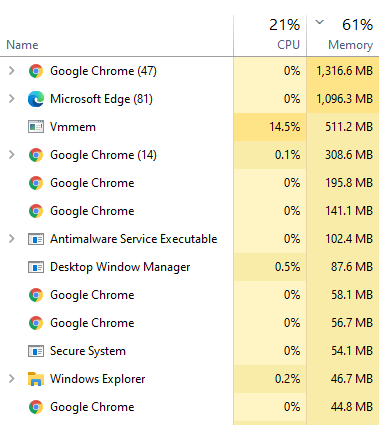
I have seen this lots of times in the past few years, that the Task Manager will not show the actual process using the memory or processor until you re-start the Task Manager, but in this case restarting it doesn’t help.
Looking at the next screen there’s a bit more information: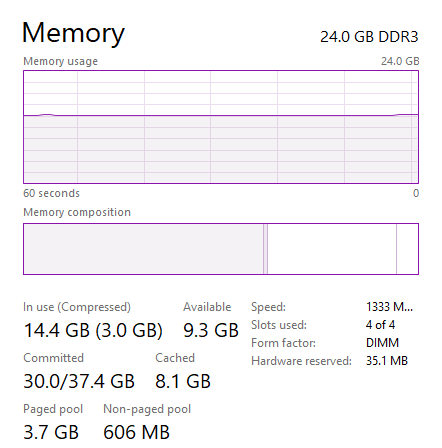
If you take a look into
topit seems the memory belongs to WSL 2 - but the values don’t add up either:I have also seen this with Hyper-V machines - even with CPU usage. The system is consuming 100% total but all the processes added up don’t even come close to that (IIRC it’s about 70% usage). It’s quite frustrating when the data in the Task Manager doesn’t match what is actually going on.
Don’t know if this impacts any of you, but using the new VMWare Workstation 15.5.5 update which includes support for Hyper-V and works side by side with WSL2, the
.wslconfigis no good because it appears that VMWare workstation shares the memory allocation. This means that if I limit the memory WSL can use, I am also limiting what VMWware can use, which makes my VMs unusable given that WSL2 distros hog up all the memory and does not give it back unless manually freed.Given there was (bold itallics) a fix Oct 29, 2019, and that fix shipped in 2004 aka 19041 aka 20H1, this would normally be closed. But given WSL2 only just shipped, people are still experiencing memory issues of greater or lesser extent, and per Craig “[the devs] are still working on the exact implementation”, call this open and in the works.
@minusdavid It is working great for me. Obviously I encountered the issue as well when I imported my 60GB database dump into my postgres database running on WSL. It took up all of my ram during the import and did not give it back after it was done. I had to manually free up the ram after with the command:
"echo 'sync && echo 3 > /proc/sys/vm/drop_caches' | sudo sh". To prevent this issue from happening for now, you would have to configure your .wslconfig as mentioned above to limit the maximum ram capacity that the WSL2 VM can consume. After configuring this, it has honestly been a really smooth experience for me. I moved all of my development work from my Ubuntu workstation over and it has been overall really solid. The massive improvement in file I/O performance in WSL2 over WSL1 made it really possible for me to really do development work on Windows. There are just some quirks such as this that can be addressed manually for now.If this is by design, wouldn’t a sensible solution be to make a system tray icon with click to terminate?
I suspect properly fixing this issue will involve;
I’ll gladly remove that from my config when this issue is fixed for WSL, but as of now including that option was the only way to make the above workaround work for me
I had the same problem. I’ve installed docker using wsl2 backend, and started developing an angular application inside a container (with vscode remote container). After some time everything became very slow, and I saw that vmmem used up all of my RAM. I had to run
Restart-Service LxssManagerto reclaim it. It won’t go down otherwise.ver: Microsoft Windows [Version 10.0.19041.208]
EDIT: Sorry, due to the large number of messages the most important ones didn’t caught my eyes. I solved the issue following the steps here: https://github.com/microsoft/WSL/issues/4166#issuecomment-618159162
Thank you @matheusmb and @jefferai
Quick update from me - I found the root cause - in my case it was Wix Import Cost plugin to VS Code which was using tremondous amount of RAM and CPU…
If someone is interested, I have summarized a bunch of tunings to make WSL2 usable in the form of Ansible playbook. Welcome to use it, if you like it. Subj of the thread is also fixes by @utimukat55 script, launched in cron, launched in supervisor, launched from
~/.bash_profile. https://gitlab.com/slavoutich/ansible_wsl2_config Improvements are welcome 😃A faster solution for me is to type
wsl --shutdownto forcefully terminate all running distro, but this is way too violence, and sometimes the tasks just stuck in the middle of calculation, just because they cannot have more memory to allocate, even though the process only consumes 3~4GB memory astopshows. I guess it’s something worse than holding memory until all terminal terminated, maybe there’s a memory leak.Most (if not all) Linux-based OSes will always use nearly all free RAM for caching. Starting with Windows 10 build 19013, if you specifically tell a Linux instance running inside WSL2 to free memory, that freed memory will be brought back to the host system. Since that almost never happens under normal circumstances (after all, free RAM = wasted RAM), many still think the original issue still happens, but that’s not the case anymore since Windows 10 build 19013.
Also, you can still override the maximum amount of RAM a WSL2 instance can use (by default 80% of the total RAM available in the host) with the
.wslconfigfile and you can still prevent file I/O operations of specific programs from being cached by running them through nocache…The host system becoming unusable because wsl by default eats all your ram and doesn’t release it isn’t an issue? Yeah right
On Fri, 27 Dec 2019 at 22:00, Leonardo Araujo Pimentel < notifications@github.com> wrote:
Thanks a lot, it really saved my 8GB ram laptop. I set ram limit to 512MB, and use 8GB swap as below:
Before this change, ram usage always spikes to 1.5G+ after I run the docker, but for now, the ram usage is limit to 512MB as Task Explorer shows below and you can also find in machine that wsl2 start to use swap when memory 500MB exceeds.
how about a workaround? this just started happening for me (with 18965) and it has effectively killed my WSL 2 environment
You can’t imagine how much appreciated hommie. Ty!
The longer WSL runs and I do things in it, even after configuring WSL to only use a maximum amount of memory, it will use more and overage usage will become “hidden” in task manager until the usage is hitting 90+ percent of 64GB of memory with task manager stating WSL is only using around the max I set. People online will say “Unused ram is wasted ram” but as this reaches over 90 percent used ram, many other processes begin slowing down – this ram can’t be freed for some odd reason. Even shutting down WSL will not free the majority of ram this process secretly consumes.
You are right, Docker and VSCode makes the issue worse taking large amounts of ram.
Docker had issues itself taking more than 3Gb just for running 0 containers.
VSCode WSL extension adds an extra layer of memory leak as reported in other thread, where a faulty AMD driver from x version takes pieces of RAM over the time on top of this thread issue.
Same here… The more I use WSL, the more I want to return to native Linux. It has way too many issues.
So WSL 2.3.11 update does not improve the situation? There is nothing in the notes about it
Simply copying a few gigs of data in WSL is enough to consume a lot of RAM by WSL.
cp /mnt/d/DATA/20Gb.zip /home/user/I don’t have this problem on Win10, but have it on Win11. htop reports 3GB used, Windows task manager reports 6GB. That is without doing anything special. Trashing ssds instead of reclaiming memory or killing the process due to OOM is criminal.
For users with AMD gpu, the community discovered a memory leak in the Adrenaline v24 video drivers. Disable the integrated GPU or downgrade the video drivers to Adrenaline v23. More info in this thread:
https://github.com/microsoft/WSL/issues/8725#issuecomment-2128772463
I am having a similar problem with wsl 2 and Docker. After a few days of running smoothly, vmmem takes up 90-100% of CPU and remains at this level, even after I shutdown docker desktop, and issue multiple “wsl --shutdown” commands. Note that this is a laptop - could it be related to putting the laptop to sleep occasionally?
Here is what I see:
I have tried to out-wait it to see what happens, but in each case I’ve become frustrated after 15-20 minutes and end up rebooting to fix the problem. Here is what I see after the reboot - I don’t know why “docker-desktop-data” and “docker-desktop” appear now in the list, but didn’t prior to the reboot:
525 + 1.1G = ~1.6G. Task manager shows 1701mb ~ 1.6G. Whats the problem?
IMO, using Docker to run everything adds complexity and overhead without commensurate benefit. I wrote an article describing how I run Ollama on WSL2.
I am not using Docker, but have the same problem with WSL2 gobbling up RAM and
.wslconfigis useless@moracabanas When you had
autoMemoryReclaim=dropCacheturned on, did you find it wasn’t dropping cache? Even when your machine was idle and you were using it?We turned that feature on by default in latest WSL pre-release builds and our aim is for it to help tackle the ‘WSL holds onto lots of my RAM’ problem.
@wolf99
My mistake, I meant after running wsl after shutting it down it takes 1.5gb
Tested this over the period of a couple days, this seems to release the memory in most cases after 10 minutes, however, running Docker seems to prevent memory being released, even after exiting and waiting out the 10 minute inactivity period.
In my case, memory consumption was reduced. Good work 👍
Same here, Vmm using 70% of ram. I’m not sure my 16gb of ram laptop will be able to handle full dev mode.
Before the thread gets locked again. I would love to hear more about the orginal idea of a fix https://github.com/microsoft/WSL/issues/4166#issuecomment-641445502 vs the one that is in a PR.
It sounds like the PR fix would solve many of the issues in this thread, but won’t do much for those of us with larger environments that would best benefit from everything being dynamic.
In the meantime, I’ve been using the drop caches trick when needed, and getting by.
read above comment. A guys having 32 gb still This usses 30+ Gb @frederikhors https://github.com/microsoft/WSL/issues/4166#issuecomment-522615455
Same issue. I can use wsl2 conf to limit memory usage, but if i do and linux needs more ram during some tasks running, they will just crash. There is no solution for now. It seems Microsoft not going to do anything with that. Just use Hyper-V like i do, until bug is fixed, if it will.
This reply was more then a year ago. Probably it was meant that this will be fixed by the time of stable release. Seems that it’s not that simple. For example I’ve returned to WSL 1 for development; yes it’s slower, but still OK and the slowness is better then not having RAM at all for work purposes.
https://github.com/microsoft/WSL/issues/4166#issuecomment-502748913
please stop discussing. The bug has been fixed already and is in the processed of being upstreamed. This ticket needs locking.
@UbaidurRehman1 Linux is not better, it has even more bugs but at least you can fix it by urself or pay someone so
i tested it, and buff/cache inside WSL2 VMs is really the issue. I freed them this way and it worked:
also i shutdown Docker Desktop (which runs as WSL2 VM too), when not using it; shutdown together with unnecessary WSL2 VMs using
wsl -t XXX@bdbch When that happens open a terminal and type
free -h. You will see if cached memory is the problem.I experienced what looks like that too when exploring (totally unrelated) #5108. I haven’t had a chance to dive in detail to figure out if running VSCode and mass memory consumption is a correlation thing or a causation thing. But there might be something to it.
[edit/update] I re-ran the test case. For me VSCode’s cpptools was eating around ~10GiB of core and continuously dirtying around ~30GiB of buffer cache, so
echo 3 > drop_cachescouldn’t save me. But that’s feature of the plugin, not something WSL can do anything about.For me this seems to be related to VS Code Insiders. I now worked with VS Code Insiders / VS Code in the last few weeks and inspected my RAM usage when using Insiders/Non-Insiders.
Everytime I used the insiders branch, I almost 100% of the time hit the RAM problem with the vmmem using 98% of my RAM and a lot of my CPU.
When I don’t use insiders my RAM stays at around 4-5GB of 32GB and CPU usage is normal. Is something broken with the new Insiders version?
I’m seeing the same issue - wsm is using 1GB when idle and ~40% CPU on tasks that otherwise consume <5%. I wonder if the problem could be that I’ve switched WSL version from 1 to 2, instead of creating a brand new machine?
I currently have this on my computer :
Running app :
Windows config :
Docker for Windows config :
What i did so far :
But i still have no clue what WSL 2 can cache to take 19Go of my RAM …
It’s often common practice to disable swap in Linux, as long as there is sufficient memory for the required workloads. Kubernetes for example won’t even start if swap is enabled.
If after dropping the cache you were down to 1.5GB, then you probably want to enforce a limit of ~2GB, like I did. Just increase it by a couple of hundred megabytes if you run into any problems. Worst-case scenario is that whatever you’re running dies because of insufficient memory, but that hasn’t happened to me once yet. None of us should be taking risks with data we care about on an experimental build of Windows anyway.
I mainly use WSL for DevOps work: Ansible and Terrafrom, SSH, editing files in Visual Studio Code and occasional Docker Desktop stuff, although I turn that off when not actively using it, since it also consumes a large amount of memory.
Until or unless MS introduce some kind of hook into the guest OS that manages the cache when avaialble memory is low in Windows, then setting a reasonable memory limit will be the only option.
None of us would create a VirtualBox VM and give it 80-100% of the host memory right?
I currently don’t have a .wslconfig in my home so the vm starts with the default of 80%. In
htopI can see that the vm only needs around 500MB but in Windows the vm is at around of 4GB (even directly after the restart). Looks like 4GB is the whole system in ram. I know this won’t really help, just wanted to share my thoughts.@mdragosv From that screenshot, it looks like your WSL needs less than 1GB of RAM. The rest is it caching the 5GB of MySQL data that is being written to
/var/lib/mysql, plus other OS files it has touched.@drewhemm it’s a bug if the average user is expected to know that and how to configure it 😃 perhaps some default value is in order?
Also having this issue with high memory & CPU. Going to revert back to WSL1 until a fix is available.
Correct. Yet another reason why it’s not a great solution. See my comment above for a better alternative. 😃
A faster solution for me was to go back using dual-boot with Linux. I was in love with WSL and advertised to all of my developers but then this happened…
I’ll keep an eye on WSL hoping for a better future.
Yes you can downgrade your Distros, I did so as well.
I’m feeling dumb now, why do i forgotten the vemmem thing? Yes, it is WSL2. For me, vmmem it’s using The apropriate RAM. Like i said, i’ve setup to use 1GB.
Yesterday i received a Windows Update for the system
I don’t know why and how, but i’ve setup WSL according to DOCS to use 1GB of RAM, and we can see in the pic above that WSL seems to retrieving unused RAM to the host.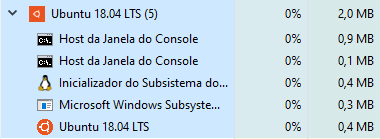
I made shellscript for cron of root. Procfs can’t use inotifywait… Check
SReclaimablein/proc/meminfo, executesyncandsysctl -w vm.drop_caches=3when over THRESHOLDKB. Please adjust value.Must enable crond.
# service cron startcron example (execute every 5 minutes)*/5 * * * * /root/dropcachescron.shThanks @iamakulov .Very much so =(
LxssManager seems to not be releasing the memory back to the system until it gets restarted.
Its a issue that is being a bit overlooked. Linux really does not have the habit of freeing memory from it cache/buffer and like to hold everything in memory forever ( only pushing out things that are not accessed in a long time, to make space for new things to cache ). So its a valid point, that is unfortunately somewhat ignored.
I think the expectations of the MS team is: You are done with your task, you close the bash and it auto frees memory. But if you have VSC open and you put your PC to sleep every day ( more productive then reopening everything every day ), it never gets freed. Thus it keep growing as you compile more code or do other file operations. And you are forced to put memory limits on those WSL instances.
By default WSL2 needs to have some kind of a limit or force the Linux kernel to be more aggressive in reclaiming the cache. For example: everything in cache, that is not used in 1 hour time, reclaim it ( a setting you can also override per WSL2 instance ).
/Edit:
And it becomes a issue fast when you work with a lot of microservices / have a lot of WSL2 instances open / like to have clean WSL2 instances by having your data cleanly separated per WSL2 /VM instance.
I created a .wslconfig file in %UserProfile% but it doesn’t take affect. I test it by setting the following:
[wsl2] swap=0 processors=3
but when I do ‘top’ it still shows values from before this change. What am I missing?
Same problem in 19008.1000, the ram will surge if you compile or open a vscode, but it returns really slow if you close the vscode and so on. I tested that the ram charges from 280m to 1280m through the compile,drops to 1032m after the compile but never get back to 280m again. Fortunately the
.wslcofigis really usefulComputer useless converting exiting Ubuntu to wsl 2. Is there any work around I can do to release memory or clear without interrupting the conversion?
It seems like this is diverting from the original issue.
@benhillis Can we get an update on the fix for the VM memory issue? ETA was 2 weeks almost 3 weeks ago.
I’m on Surface Book 2 13", so it’s the NVIDIA GPU that just got fixed. 😃