WSL: Starting WSL 2 distribution hangs forever
Environment
Windows build number: Microsoft Windows NT 10.0.20201.0
Your Distribution version: Ubuntu 18.04
Whether the issue is on WSL 2 and/or WSL 1: WSL 2
Steps to reproduce
Open wsl.exe, wt.exe, or ubuntu.exe
Possible duplicate of #5836
wsl.exe
Running wsl hangs forever, or at least the 10 minutes I waited.
Running wsl --help works properly.
Running wsl -l hangs for several minutes but then seems to properly output.
wt.exe Windows Terminal
Opening Windows Terminal displays the error since my default profile of Ubuntu isn’t working:
Could not find your default profile in your list of profiles - using the first profile. Check to make sure the “defaultProfile” matches the GUID of one of your profiles.
WSL logs: Feedback app hangs, can’t collect anything.
Expected behavior
WSL opens.
Actual behavior
WSL doesn’t open. See ‘Steps to reproduce’.
About this issue
- Original URL
- State: open
- Created 6 years ago
- Reactions: 45
- Comments: 55 (1 by maintainers)
Restarting my PC caused the issue to keep reoccurring 😎.
Uninstalling VirtualBox fixed the problem of wsl2 archlinux distro hanging on start and wsl --shutdown taking >10mins to execute, reinstalling VirtualBox brought the problem back.
Build 20206.rs_prerelease.200828-1431
For anyone who’s still having this issue occasionally like myself, I find this solution without rebooting your PC or tweaking services. I’ve used it twice and it worked perfectly. In these cases, the
LxssManageris somehow preventing the WSL2 from rebooting. Maybe this is worthwhile for MS to look into?I was getting the error
For me, the issue was the Host Network Service was not running. I changed it to start automatically and started it up once manually. I was then able to launch Ubuntu and set it as the default in WSL 2.
I am having the exact same issue. At every windows update, WSL starts working again, but after the first reboot the problem is back.
Uninstalling VirtualBox fixed this for me too
Turning off Hyper-V like #5836 said fixed the issue.
I faced this issue on Windows 11.
To fix, go to Windows Optional Features > Turn off the “Windows Subsystem for Linux” feature > Apply but do not restart. Then turn the feature back on. No need of restart and WSL started to run normally.
You can try to adopt this configuration in
.wslconfigto disable idle timeoutvmIdleTimeout=-1This feature is added on Windows 11, and for me, it would lead the VM to “sleep forever.”
You need to restart the WSL, when you possibly get stuck into “wsl --shutdown” and “inaccessibility”. You can try this one w/o rebooting OS Go
Task Manager> findWindows Subsystem for Linux> right button and clickEnd Taskto restart WSL.If you are dual-booting Linux and Windows, like I do - a VirtualBox installation on the Linux partition will influence WSL. Uninstalling VirtualBox on Linux fixed WSL on Windows.
for me going to the task mannager and ending the task of the wsl or windows subsystem for linux and opening it again worked for me
Ok great I’ve changed the startup type from “Manual” to “Automatic (Trigger Start)”. I am (was) primarily a Linux user, so I’m not super comfortable dealing with the internal workings of Windows. I’ll keep an eye out to see if this changes anything!
I forgot I even had VirtualBox installed. I uninstalled/updated and WSL works. What.
if this is still happening, in my case, it needs to restart.
Had my PC BSoD and restart a bunch, same issue occurs. Hyper-V is still off
I can reproduce this issue on my Windows 10 corporate laptop:
The WSL session cannot shut down (
wsl -torwsl --shutdownjust hangs;), starting a new WSL session hangs, attempts to kill the vmmem process reports “access denied”. The only resolution is rebooting.I also encountered this problem on windows 11, and I can’t shut down and restart, I can only reset the computer.
Experienced this issue, and my Host Network Service was running. However, restarting the service fixed the issue for me.
This can be done from an Administrator powershell prompt with
@alecive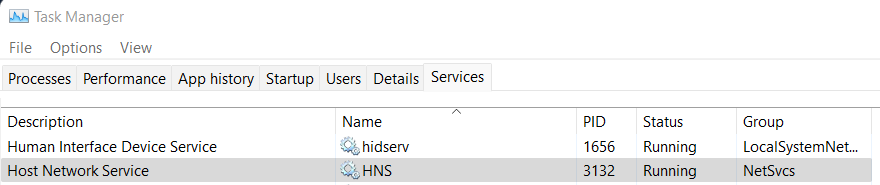
About starting it automatically, I think it is the default. But for some reason, shit happens sometimes and it stops or doesn’t start I think? Good luck.
Wow, uninstalling VirtualBox and rebooting finally fixed it! I had also forgotten that I’d installed it.
Thanks so much @mercurytoxic !!!
I suffered a similar problem with Ubuntu 22.04 and an “normal” apt install.
A post-install script tries to index the file system. I hangs on /mnt/c due to my company antivirus.
I restart. The system hangs. I can not umount /mnt/c because I have no console access. 😦
I can not fix it, I GOT fired, but I’m happy because no I can dedicate full time to hate Microsoft soooOOOOoouuu much for creating Windows and Office #humor
If your WSL 2 Instance suddenly just hangs, try to look at the other side like if the current disk might be already full. that’s what happened to me
after reset , i got same problem again soon
Just experienced this issue and this was the fix for me, after it got fixed I got the message:
I’ve done this upgrade and it was successful, hopefully this “new version” is better and doesn’t have this problem again…
Hm, I followed the advice of starting the
hnsservice, and it appeared to fix the problem, allowing the installation process to continue, however, it got stuck due to an unrelated error (causing me to attempt to reinstall later). After I rebooted the machine to apply Windows updates, however, the service doesn’t start anymore, so I can’t install the needed WSL distribution. I can’t figure why. I’m not even sure where to report this abnormality, so I resorted to writing here.Thanks, this worked for me, mine is disabled damn.
Windows 10 20H2 19042.630 kernel 4.19.128-microsoft-standard Ubuntu 20.04.1 LTS Just encountered this today. Not sure how to capture useful logs but it happens consistently for me. I dont have VirtualBox installed or Hyper-V enabled. And each time I tried to use VSCode remote container dev features from a WSL2 folder, my mouse cursor started to lagging, and several seconds later, I cannot open wsl shells and they hang forever. Restarting my computer can fix it but I still can’t use remote container dev. 😦