WSL: Headless Chrome Lighthouse Unable to connect to Chrome
- Your Windows build number: *
Microsoft Windows [Version 10.0.19041.153] Ubuntu 18.04
- What you’re doing and what’s happening:
In WSL 2, I am trying to run a Google Chrome Lighthouse audit on a website in --headless mode.
$ npm --version
6.13.4
$lighthouse --version
5.6.0
$ lighthouse https://pets.com --chrome-flags="--headless --no-sandbox" --output=json --output-path=foo.json
  ChromeLauncher Waiting for browser. +0ms
  ChromeLauncher Waiting for browser... +1ms
  ChromeLauncher Waiting for browser..... +507ms
  ChromeLauncher Waiting for browser....... +503ms
blau blau blau
  ChromeLauncher Waiting for browser..................................................................................................... +502ms
  ChromeLauncher Waiting for browser....................................................................................................... +502ms
  ChromeLauncher:error connect ECONNREFUSED 127.0.0.1:36695 +2ms
  ChromeLauncher:error Logging contents of /mnt/c/Users/Joel/AppData/Local/lighthouse.26915742/chrome-err.log +25ms
  ChromeLauncher:error
  ChromeLauncher:error DevTools listening on ws://127.0.0.1:36695/devtools/browser/80d94a0b-7734-4a51-808b-74f584542571
  ChromeLauncher:error  +0ms
Unable to connect to Chrome
- For WSL launch issues, please collect detailed logs
Total contents of chrome-err.log file above:
DevTools listening on ws://127.0.0.1:42073/devtools/browser/43fd7c2d-8251-4316-a68b-b46c28e9f735
I have tried to get the detailed logs from WSL, as requested, but I don’t see those files in the location specified, sorry.
- What’s wrong / what should be happening instead:
It should result in a Lighthouse report called foo.json. However, it looks like it can’t launch
Why is the connection refused? Why can’t it connect to Chrome?
I have exhausted all Chrome Lighthouse issues queues, and all four similar issues in here with no luck. So I am thinking it could be WSL 2 Ubuntu related. Any troubleshooting advice would be most welcome.
About this issue
- Original URL
- State: closed
- Created 7 years ago
- Reactions: 2
- Comments: 15
Yeah, same here
-install LHCI
npm install -g @lhci/cli-created a config file
lighthouserc.js-used basic settings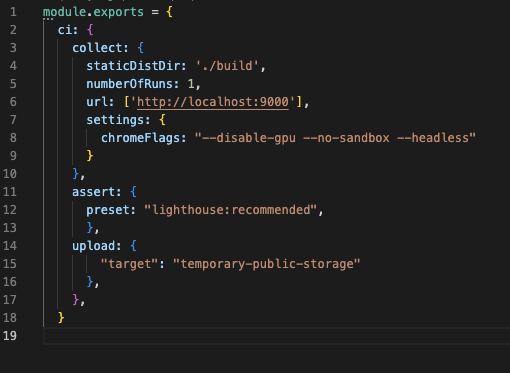
-trigger the test with
lhci autorunI am running into this same issue with current versions of wsl2.
Thanks, I will give it a try