WSL: "Element not found" after install KB4571756
Environment
Windows build number: Microsoft Windows NT 10.0.19042.0
Your Distribution version: Ubuntu 20.04 (WSL 2)
Steps to reproduce
Install KB4571756 Reboot PC Launch Windows Terminal with WSL
WSL logs: https://aka.ms/AA9kmq5
Expected behavior
WSL just works
Actual behavior
Element not found.
Process exited with code 4294967295

About this issue
- Original URL
- State: closed
- Created 6 years ago
- Reactions: 30
- Comments: 140 (5 by maintainers)
Links to this issue
Commits related to this issue
- Bookmark https://github.com/microsoft/WSL/issues/5880 — committed to hail2u/hail2u.net by hail2u 6 years ago
Hey ya’ll – for some reason it looks like one of the networked dlls got removed.
Confirm by checking your
System32folder forvmsynthnic.dll. If the file is missing, this is probably why it’s not working.Grab a backup of the dll from the
C:\Windows\WinSxSfolder (I had to search through mine-- found a couple copies and I used the bigger one: was just over 300kb). Copy that over to System32 and then re-register it:regsvr32 C:\Windows\System32\VmSynthNic.dll.After I did this, Ubuntu and Docker kicked right up. If you see “element not found” you also have to install Hyper-V.
A fix is going to be made available shortly, according to this: https://blogs.windows.com/windows-insider/2020/09/18/preparing-the-windows-10-october-2020-update-ready-for-release/
After the KB4571756 windows update I also got this error. I deleted the docker folders in AppData, then uninstalled and reinstalled docker but it didn’t fix. It finally worked when I uninstalled the latest windows quality updates. (docker is associated with wsl in this case.)
Caution: If you’re not sure what you’re doing, check out the tutorials on the web!
This is not a real solution but you can keep working at least until Microsoft fixes the problem.
@coxchris859 - are you asking why you are not hitting the problem? It turns out most systems are not hitting this issue, which is why it was so helpful to have people submit all of the traces and logs. The issue that was identified will only hit a small set of systems, but apparently that set overlaps strongly with the WSL community. This may turn out to have been a lucky break as this group is also above average in technical competence, so gathering all of the extra data for diagnosis was done pretty quickly. There is a fix in progress, but as you can imagine with any update rollout there is a lot of testing to be done (and yes, we missed this issue, but imagine if we didn’t do all of that testing).
@Brian-Perkins just wondering couple things:
My point is the fix should built to anticipate this workaround fix based on the information that we post here, not the other way around (unless this KB4571756 is pulled out entirely and to be replaced with others in the future)
I confirm that it also works for me!
@WillPresley don’t forget regiser dll using “regsvr32”.
Thanks!
We are actively investigating. Please try to remain constructive or I will begin deleting responses.
Sorry for the inconvenience - I suggest uninstalling the KB until this is resolved.
Removing the KB4571756 Windows update has fixed the problem for me as well
Getting the Element Not Found issue here after installing KB4571756. This also broke Docker. Uninstalled it and it fixed it. Rebooted and the KB4571756 got reinstalled (thanks a bunch whoever thought that was a good flow) and it broke again. Copying VmSynthNic.dll into C:\Windows\System32 and re-registering it seemed to make no difference. Hyper-V was shown as disabled, unsure if it was always that way, but enabling it didn’t help either.
Have now uninstalled KB4571756 and paused updates for a week so I can actually maybe get a bit of work done, who knows. The update hiding tool does not find KB4571756 availabe to hide so that’s no help - I have 7 days before I have to waste another age of reboots fixing this.
Logs attached. Please let’s get this fixed. I hate having a computer that just breaks itself and wastes my time just so that Paint can can apparently do 3D or some crap like that. Sorry to sound frustrated but I’ve just wasted an age on this and it’s especially galling to have fixed it by uninstalling the update once only to have it reinstall itself like it knows best, it’s just a terrible user experience.
logs.zip
Let me see if I can find that for you
VmSynthNic.zip
Additional logging request: we need update logs. You can get these by following the feedback hub instructions for WSL logs, but select the Category “Install and Update” / “Downloading, installing, and configuring Windows Update”. No need to attach traces for this one. Please post the link on completion. We really appreciate the help, and all of the logs we have gotten so far.
EDIT: To be clear, we are looking for logs from a system currently experiencing the “Element not found” issue.
While registering an old version of vmsynthnic.dll will workaround the issue, it may cause future problems with other updates. The safest way to workaround this issue for now it to uninstall KB4571744, which is a non-security update.
What this will normally mean is: remove KB4571756 and KB4571744, then reinstall KB4571756 (but not KB4571744).
If you’re seeing this networking issue can you please follow these instructions to help us collect some more detailed logs as this issue is difficult to repro:
Collect general logs if your WSL is in a bad networking state
OR If you are able to consistently repro the issue please use these instructions instead:
Thank you for your help in debugging this! -The WSL team
Cheers, this update/issue also somehow disabled Hyper-V, which I definitely had enabled before, so after carefully re-checking everything and running SFC/DISM afterward, I’ve got WSL2 up and working again using these directions, so I am confirming that this fix works as well. Thanks, @alexpaluzzi! One thing to note, if you try to copy to System32 through Explorer, you’ll likely actually copy to SysWOW64, so copy it using an admin cmd prompt.
If you want to prevent the installation of Windows updates until Microsoft releases a fix, you can temporarily do so by using the Pause setting:
Win+R(or select Start, typerunand pressENTER).ms-settings:windowsupdate, then select OK.Same issue as @francescarpi “The remote procedure call failed.” 20H2 build 19042.508 From: https://techdows.com/2020/09/windows-10-kb4571756-is-breaking-windows-subsystem-for-linux-2-wsl-2.html
Open Control Panel Programs > Programs and Features > Installed Updates Select “Update for Microsoft Windows (KB4571756) Click Uninstall KB4571756
Facing the same thing, uninstall the update doesn’t help. I ended up reinstall the Windows.
While the issue itself is perfectly understandable, I cannot express how deeply dissatisfied I am with the way Microsoft shoves updates down my throat, literally.
When this issue has occurred for the first time I simply reverted the last update and was fine (for a day or two). Two days later this build was back on my PC (no worries, I can just revert and grab a coffee before I start my day). Me and my Windows were fighting back and forth (update & revert) for some time, but that’s the price you got to pay for running a dev channel build, we lived a happy life… UNTIL ANOTHER WILD UPDATE APPEARED (do you see where I’m going?). Now I can revert latest update, but that won’t bring back my working environment - the last two updates are WSL broken and I cannot revert more.
Some may say that I should have paused the updates for 7 days, but:
…and for Windows 20H2 I need to do a fresh install.
There’s a reason people opted for the dev channel - WSL2 with Docker support enabled me to ditch my MBP completely. Please let us stay in the loop by using Dev channel, but without sacrificing so much.
Can anyone upload their VmSynthNic.dll file. As it’s not present in system32 directory as well as in WinSxS directory. And I received another update today with same number (KB4571756) and still wsl doesn’t work.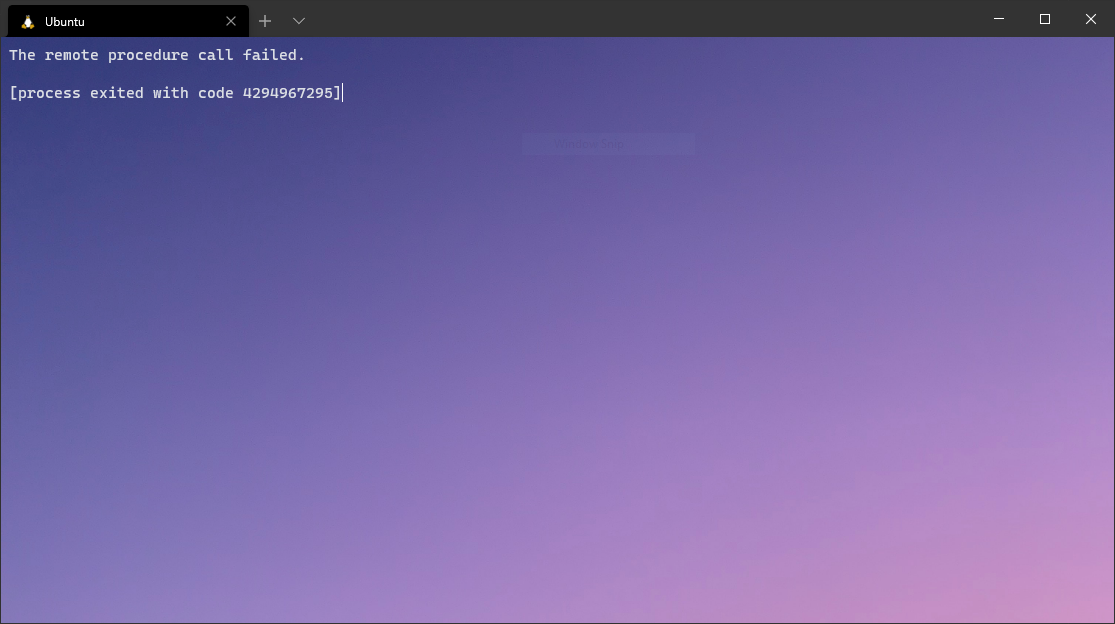 The error message has also changed.
Hi,
Want to confirm that solution from @alexpaluzzi is working for me as well! But previously my WSL is working just fine without any Hyper-V features installed. So after copying back VmSynthNic.dll (the file got removed after installation of KB4571756), I need to install the Hyper-V features to make the WSL working again, just like what @WillPresley did.
Thanks!
I would like to confirm that @alexpaluzzi 's fix worked on my system as well.
I re-installed the KB4561656 update, after which
wsl -d ubu2004yielded the dreaded “The remote procedure call failed.” (as expected).After copying back the
VmSynthNic.dllI had backed up before the upgrade, and doingregsvr32 C:\Windows\System32\VmSynthNic.dll,wsl -d ubu2004started up the WSL2 ubuntu 20.04 distribution without a hitch!Thank you @alexpaluzzi !!
Yes this is the solution !!! After this a have working ok Hyper-V and WSL2 . Thx @alexpaluzzi
I think this is what you are looking for. https://aka.ms/AA9mbgn … Reinstalled the update, did the feedback and recreated the problem.
The “remote procedure call failed” issue may be #5768 (e.g. try wsl --update). If anyone is seeing the “element not found” issue we are still looking for more WSL logs
I can confirm that the workaround of @EgoistDeveloper (uninstalling the KB4571756 update) solved the problem for me too.
@Mystic8b Thanks dude, appreciate it ✌
No idea, @alex73630. I just googled it for your convenience. OTOH also not sure you need to be on the dev builds either.
I’m suffering from the same problem.
I searched for “how to block a specific Windows update” and found the hide update troubleshooter. I’m able to hide KB4571756 as follows:
If I run the troubleshooter before rebooting, KB4571756 is not available to hide.
Good news, I installed Windows 20H2 and KB4571756 and so far WSL2 and Docker are working. Need to do some additional testing but it looks good so far.
@danak6jq See https://github.com/microsoft/WSL/issues/5880#issuecomment-690770532
Agreed - it’s KB4571756 that seems to cause the “Element Not Found” issue reported by WSL.
There seems to be growing confusion on this thread which is supposedly about update KB4571756, whereas half the comments now mention KB4571744. Which is it, I’m pretty sure it’s KB4571756, if so the others are just noise.
Hello, can anybody mirror their VmSynthNic.dll? In my system there’s only the ~140kb one (which fails to register)
@alexpaluzzi solution seemed to work for me. It looks like Microsoft has acknowledged the bug in KB4571756.
@Mystic8b your initial logs seem promising to help us find a solution, could you please follow the logging instructions below and provide these detailed logs for us? The most important ones are the
netshones!OR If you are able to consistently repro the issue please use these instructions instead:
Here are some additional logs, Windows reinstalled the update again overnight for me. Hope this helps.
logs.zip
Thanks for providing the logs! We’ll keep investigating this and will give any updates to this thread as soon as we have them.
Also to clarify @Smallthing 's question we believe that the root cause of this error is in our networking stack, which is why we’re asking for networking logs. 😃
Very frustratingly, the update re-installed itself overnight. That should absolutely never happen when the very same update was explicitly removed.
As it is, the problem consistently reproducible for me. So I grabbed the logs before uninstalling it again. Attached. logs.zip
logs.zip Same issue, can’t access the network drive from my quick access menu and terminal gives element not found error.
I have same problem after install KB4571756 too.
logs.zip
And after installing this update, I can’t connect to WSL’s drive, it shows error like this:
omg, microsoft, are you here? Pull back that damn update, it reinstalled on my computer overnight.
“Quality Update” my arse.
One of the only reasons I keep Windows on my main machine, and they broke it with a “quality” update. Time to head back to PopOs
Hi again,
My windows version:
Edición Windows 10 Pro Versión 20H2 Instalado el 28/05/2020 Versión del sistema operativo 19042.508 Experiencia Windows Feature Experience Pack 120.2212.31.0
My last update: KB4571756
This is my error:
I thing it’s the error:
I attach the log output.
error.zip
I’m not sure if it is the right error, but something its better than nothing xD
Thank you!
WSL logs