WSL: Can't access WSL P9 Network Linux Filesystem Share
-
Your Windows build number: (Type
verat a Windows Command Prompt) Microsoft Windows [Version 10.0.19041.264] -
What you’re doing and what’s happening: (Copy&paste the full set of specific command-line steps necessary to reproduce the behavior, and their output. Include screen shots if that helps demonstrate the problem.)
- Updated Windows to Version 2004
- First time activation of WSL and Virtual Machine Platform
- Download an install WSL2 Linux Kernel update from https://docs.microsoft.com/en-us/windows/wsl/wsl2-kernel
wsl --set-default-version 2- Install Ubuntu WSL Distro from Microsoft Store
- Launch Ubuntu WSL
- Complete user setup
- Try to access
\\wsl$\Ubuntu\ - Receive error alert
Attempt to access invalid address
-
What’s wrong / what should be happening instead:
- Should be able to access files inside the Linux VHD
Additional information
The Ubuntu share shows in Explorer, but trying to access it fails.
No /etc/wsl.conf file in use.
dir \\wsl$ or dir \\wsl$\Ubuntu in PowerShell fail with Cannot find path ...
apt-get update && apt-get upgrade were ran including WSL restarts
dmesg
[    0.000000] Linux version 4.19.104-microsoft-standard (oe-user@oe-host) (gcc version 8.2.0 (GCC)) #1 SMP Wed Feb 19 06:37:35 UTC 2020
[    0.000000] Command line: initrd=\initrd.img panic=-1 pty.legacy_count=0 nr_cpus=12
[    0.000000] KERNEL supported cpus:
[    0.000000]   Intel GenuineIntel
[    0.000000]   AMD AuthenticAMD
[    0.000000]   Centaur CentaurHauls
[    0.000000] x86/fpu: Supporting XSAVE feature 0x001: 'x87 floating point registers'
[    0.000000] x86/fpu: Supporting XSAVE feature 0x002: 'SSE registers'
[    0.000000] x86/fpu: Supporting XSAVE feature 0x004: 'AVX registers'
[    0.000000] x86/fpu: xstate_offset[2]:  576, xstate_sizes[2]:  256
[    0.000000] x86/fpu: Enabled xstate features 0x7, context size is 832 bytes, using 'compacted' format.
[    0.000000] BIOS-provided physical RAM map:
[    0.000000] BIOS-e820: [mem 0x0000000000000000-0x000000000009ffff] usable
[    0.000000] BIOS-e820: [mem 0x00000000000e0000-0x00000000000e0fff] reserved
[    0.000000] BIOS-e820: [mem 0x0000000000100000-0x00000000001fffff] ACPI data
[    0.000000] BIOS-e820: [mem 0x0000000000200000-0x00000000f7ffffff] usable
[    0.000000] BIOS-e820: [mem 0x0000000100000000-0x00000003387fffff] usable
[    0.000000] NX (Execute Disable) protection: active
[    0.000000] DMI not present or invalid.
[    0.000000] Hypervisor detected: Microsoft Hyper-V
[    0.000000] Hyper-V: features 0xae7f, hints 0x2c2c
[    0.000000] Hyper-V Host Build:19041-10.0-0-0.264
[    0.000000] Hyper-V: LAPIC Timer Frequency: 0x1e8480
[    0.000000] tsc: Marking TSC unstable due to running on Hyper-V
[    0.000000] Hyper-V: Using hypercall for remote TLB flush
[    0.000000] tsc: Detected 3200.151 MHz processor
[    0.000005] e820: update [mem 0x00000000-0x00000fff] usable ==> reserved
[    0.000006] e820: remove [mem 0x000a0000-0x000fffff] usable
[    0.000008] last_pfn = 0x338800 max_arch_pfn = 0x400000000
[    0.000037] MTRR default type: uncachable
[    0.000038] MTRR fixed ranges disabled:
[    0.000038]   00000-FFFFF uncachable
[    0.000039] MTRR variable ranges disabled:
[    0.000039]   0 disabled
[    0.000040]   1 disabled
[    0.000040]   2 disabled
[    0.000040]   3 disabled
[    0.000040]   4 disabled
[    0.000041]   5 disabled
[    0.000041]   6 disabled
[    0.000041]   7 disabled
[    0.000041] Disabled
[    0.000042] x86/PAT: MTRRs disabled, skipping PAT initialization too.
[    0.000050] CPU MTRRs all blank - virtualized system.
[    0.000052] x86/PAT: Configuration [0-7]: WB  WT  UC- UC  WB  WT  UC- UC
[    0.000053] last_pfn = 0xf8000 max_arch_pfn = 0x400000000
[    0.000066] Using GB pages for direct mapping
[    0.000068] BRK [0x02e00000, 0x02e00fff] PGTABLE
[    0.000068] BRK [0x02e01000, 0x02e01fff] PGTABLE
[    0.000069] BRK [0x02e02000, 0x02e02fff] PGTABLE
[    0.000093] BRK [0x02e03000, 0x02e03fff] PGTABLE
[    0.000426] RAMDISK: [mem 0x02e35000-0x02e44fff]
[    0.000430] ACPI: Early table checksum verification disabled
[    0.000439] ACPI: RSDP 0x00000000000E0000 000024 (v02 VRTUAL)
[    0.000458] ACPI: XSDT 0x0000000000100000 000044 (v01 VRTUAL MICROSFT 00000001 MSFT 00000001)
[    0.000462] ACPI: FACP 0x0000000000101000 000114 (v06 VRTUAL MICROSFT 00000001 MSFT 00000001)
[    0.000466] ACPI: DSDT 0x00000000001011B8 01E184 (v02 MSFTVM DSDT01   00000001 MSFT 05000000)
[    0.000468] ACPI: FACS 0x0000000000101114 000040
[    0.000470] ACPI: OEM0 0x0000000000101154 000064 (v01 VRTUAL MICROSFT 00000001 MSFT 00000001)
[    0.000472] ACPI: SRAT 0x000000000011F33C 0002D0 (v02 VRTUAL MICROSFT 00000001 MSFT 00000001)
[    0.000474] ACPI: APIC 0x000000000011F60C 0000A8 (v04 VRTUAL MICROSFT 00000001 MSFT 00000001)
[    0.000478] ACPI: Local APIC address 0xfee00000
[    0.000704] Zone ranges:
[    0.000705]   DMA      [mem 0x0000000000001000-0x0000000000ffffff]
[    0.000706]   DMA32    [mem 0x0000000001000000-0x00000000ffffffff]
[    0.000707]   Normal   [mem 0x0000000100000000-0x00000003387fffff]
[    0.000708] Movable zone start for each node
[    0.000708] Early memory node ranges
[    0.000709]   node   0: [mem 0x0000000000001000-0x000000000009ffff]
[    0.000709]   node   0: [mem 0x0000000000200000-0x00000000f7ffffff]
[    0.000710]   node   0: [mem 0x0000000100000000-0x00000003387fffff]
[    0.001485] Zeroed struct page in unavailable ranges: 31073 pages
[    0.001486] Initmem setup node 0 [mem 0x0000000000001000-0x00000003387fffff]
[    0.001488] On node 0 totalpages: 3344031
[    0.001489]   DMA zone: 59 pages used for memmap
[    0.001490]   DMA zone: 22 pages reserved
[    0.001490]   DMA zone: 3743 pages, LIFO batch:0
[    0.001568]   DMA32 zone: 16320 pages used for memmap
[    0.001570]   DMA32 zone: 1011712 pages, LIFO batch:63
[    0.023208]   Normal zone: 36384 pages used for memmap
[    0.023210]   Normal zone: 2328576 pages, LIFO batch:63
[    0.023950] ACPI: Local APIC address 0xfee00000
[    0.023956] ACPI: LAPIC_NMI (acpi_id[0x01] dfl dfl lint[0x1])
[    0.024336] IOAPIC[0]: apic_id 12, version 17, address 0xfec00000, GSI 0-23
[    0.024340] ACPI: INT_SRC_OVR (bus 0 bus_irq 9 global_irq 9 high level)
[    0.024341] ACPI: IRQ9 used by override.
[    0.024343] Using ACPI (MADT) for SMP configuration information
[    0.024349] smpboot: Allowing 12 CPUs, 0 hotplug CPUs
[    0.024359] [mem 0xf8000000-0xffffffff] available for PCI devices
[    0.024360] Booting paravirtualized kernel on bare hardware
[    0.024362] clocksource: refined-jiffies: mask: 0xffffffff max_cycles: 0xffffffff, max_idle_ns: 19112604462750000 ns
[    0.155722] random: get_random_bytes called from start_kernel+0x93/0x4bb with crng_init=0
[    0.155731] setup_percpu: NR_CPUS:256 nr_cpumask_bits:256 nr_cpu_ids:12 nr_node_ids:1
[    0.156516] percpu: Embedded 42 pages/cpu s133400 r8192 d30440 u262144
[    0.156520] pcpu-alloc: s133400 r8192 d30440 u262144 alloc=1*2097152
[    0.156521] pcpu-alloc: [0] 00 01 02 03 04 05 06 07 [0] 08 09 10 11 -- -- -- --
[    0.156536] Built 1 zonelists, mobility grouping on.  Total pages: 3291246
[    0.156538] Kernel command line: initrd=\initrd.img panic=-1 pty.legacy_count=0 nr_cpus=12
[    0.159953] Dentry cache hash table entries: 2097152 (order: 12, 16777216 bytes)
[    0.161551] Inode-cache hash table entries: 1048576 (order: 11, 8388608 bytes)
[    0.187709] Memory: 4096404K/13376124K available (14360K kernel code, 1575K rwdata, 2836K rodata, 1504K init, 2792K bss, 334492K reserved, 0K cma-reserved)
[    0.188000] SLUB: HWalign=64, Order=0-3, MinObjects=0, CPUs=12, Nodes=1
[    0.188008] ftrace: allocating 41537 entries in 163 pages
[    0.201148] rcu: Hierarchical RCU implementation.
[    0.201150] rcu:     RCU restricting CPUs from NR_CPUS=256 to nr_cpu_ids=12.
[    0.201151]  All grace periods are expedited (rcu_expedited).
[    0.201151] rcu: Adjusting geometry for rcu_fanout_leaf=16, nr_cpu_ids=12
[    0.203218] Using NULL legacy PIC
[    0.203220] NR_IRQS: 16640, nr_irqs: 520, preallocated irqs: 0
[    0.203609] Console: colour dummy device 80x25
[    0.203612] console [tty0] enabled
[    0.203617] ACPI: Core revision 20180810
[    0.203721] Failed to register legacy timer interrupt
[    0.203730] APIC: Switch to symmetric I/O mode setup
[    0.203731] Switched APIC routing to physical flat.
[    0.203750] Hyper-V: Using IPI hypercalls
[    0.203750] Hyper-V: Using MSR based APIC access
[    0.203755] clocksource: hyperv_clocksource_tsc_page: mask: 0xffffffffffffffff max_cycles: 0x24e6a1710, max_idle_ns: 440795202120 ns
[    0.203857] Calibrating delay loop (skipped), value calculated using timer frequency.. 6400.30 BogoMIPS (lpj=32001510)
[    0.203858] pid_max: default: 32768 minimum: 301
[    0.203876] Security Framework initialized
[    0.203905] Mount-cache hash table entries: 32768 (order: 6, 262144 bytes)
[    0.203927] Mountpoint-cache hash table entries: 32768 (order: 6, 262144 bytes)
[    0.204205] Last level iTLB entries: 4KB 1024, 2MB 1024, 4MB 512
[    0.204206] Last level dTLB entries: 4KB 1536, 2MB 1536, 4MB 768, 1GB 0
[    0.204207] Spectre V1 : Mitigation: usercopy/swapgs barriers and __user pointer sanitization
[    0.204208] Spectre V2 : Spectre mitigation: LFENCE not serializing, switching to generic retpoline
[    0.204209] Spectre V2 : Mitigation: Full generic retpoline
[    0.204209] Spectre V2 : Spectre v2 / SpectreRSB mitigation: Filling RSB on context switch
[    0.204214] Spectre V2 : mitigation: Enabling conditional Indirect Branch Prediction Barrier
[    0.204214] Spectre V2 : User space: Vulnerable
[    0.204215] Speculative Store Bypass: Mitigation: Speculative Store Bypass disabled via prctl and seccomp
[    0.204454] Freeing SMP alternatives memory: 44K
[    0.205789] smpboot: CPU0: AMD Ryzen 5 1600 Six-Core Processor (family: 0x17, model: 0x1, stepping: 0x1)
[    0.205853] Performance Events: PMU not available due to virtualization, using software events only.
[    0.206011] rcu: Hierarchical SRCU implementation.
[    0.206136] random: crng done (trusting CPU's manufacturer)
[    0.206239] smp: Bringing up secondary CPUs ...
[    0.206299] x86: Booting SMP configuration:
[    0.206300] .... node  #0, CPUs:        #1  #2  #3  #4  #5  #6  #7
[    0.010264] calibrate_delay_direct() dropping min bogoMips estimate 0 = 29292640
[    1.254176]   #8  #9 #10 #11
[    1.853970] smp: Brought up 1 node, 12 CPUs
[    1.853970] smpboot: Max logical packages: 1
[    1.853970] smpboot: Total of 12 processors activated (76595.21 BogoMIPS)
[    1.923861] node 0 initialised, 2236307 pages in 70ms
[    1.925574] devtmpfs: initialized
[    1.925574] clocksource: jiffies: mask: 0xffffffff max_cycles: 0xffffffff, max_idle_ns: 19112604462750000 ns
[    1.925574] futex hash table entries: 4096 (order: 6, 262144 bytes)
[    1.925574] xor: automatically using best checksumming function   avx
[    1.925574] NET: Registered protocol family 16
[    1.925574] ACPI: bus type PCI registered
[    1.925574] PCI: Fatal: No config space access function found
[    1.934355] HugeTLB registered 2.00 MiB page size, pre-allocated 0 pages
[    1.934355] raid6: Forced to use recovery algorithm avx2x2
[    1.934355] raid6: Forced gen() algo avx2x4
[    1.934355] ACPI: Added _OSI(Module Device)
[    1.934355] ACPI: Added _OSI(Processor Device)
[    1.934355] ACPI: Added _OSI(3.0 _SCP Extensions)
[    1.934355] ACPI: Added _OSI(Processor Aggregator Device)
[    1.934355] ACPI: Added _OSI(Linux-Dell-Video)
[    1.934355] ACPI: Added _OSI(Linux-Lenovo-NV-HDMI-Audio)
[    1.938806] ACPI: 1 ACPI AML tables successfully acquired and loaded
[    1.939616] ACPI: Interpreter enabled
[    1.939616] ACPI: (supports S0 S5)
[    1.939616] ACPI: Using IOAPIC for interrupt routing
[    1.939616] PCI: Using host bridge windows from ACPI; if necessary, use "pci=nocrs" and report a bug
[    1.939616] ACPI: Enabled 1 GPEs in block 00 to 0F
[    1.944030] SCSI subsystem initialized
[    1.944160] hv_vmbus: Vmbus version:5.0
[    1.944160] PCI: Using ACPI for IRQ routing
[    1.944160] PCI: System does not support PCI
[    1.944668] hv_vmbus: Unknown GUID: c376c1c3-d276-48d2-90a9-c04748072c60
[    1.944346] clocksource: Switched to clocksource hyperv_clocksource_tsc_page
[    1.959195] VFS: Disk quotas dquot_6.6.0
[    1.959207] VFS: Dquot-cache hash table entries: 512 (order 0, 4096 bytes)
[    1.959249] FS-Cache: Loaded
[    1.959281] pnp: PnP ACPI init
[    1.959329] pnp 00:00: Plug and Play ACPI device, IDs PNP0b00 (active)
[    1.959367] pnp: PnP ACPI: found 1 devices
[    1.965218] NET: Registered protocol family 2
[    1.965360] tcp_listen_portaddr_hash hash table entries: 8192 (order: 5, 131072 bytes)
[    1.965376] TCP established hash table entries: 131072 (order: 8, 1048576 bytes)
[    1.965726] TCP bind hash table entries: 65536 (order: 8, 1048576 bytes)
[    1.965815] TCP: Hash tables configured (established 131072 bind 65536)
[    1.965845] UDP hash table entries: 8192 (order: 6, 262144 bytes)
[    1.966067] UDP-Lite hash table entries: 8192 (order: 6, 262144 bytes)
[    1.966123] NET: Registered protocol family 1
[    1.966647] RPC: Registered named UNIX socket transport module.
[    1.966648] RPC: Registered udp transport module.
[    1.966648] RPC: Registered tcp transport module.
[    1.966649] RPC: Registered tcp NFSv4.1 backchannel transport module.
[    1.966651] PCI: CLS 0 bytes, default 64
[    1.966720] Trying to unpack rootfs image as initramfs...
[    1.966891] Freeing initrd memory: 64K
[    1.966894] PCI-DMA: Using software bounce buffering for IO (SWIOTLB)
[    1.966895] software IO TLB: mapped [mem 0xf4000000-0xf8000000] (64MB)
[    1.968228] kvm: no hardware support
[    1.968230] has_svm: svm not available
[    1.968230] kvm: no hardware support
[    1.968676] Initialise system trusted keyrings
[    1.968819] workingset: timestamp_bits=46 max_order=22 bucket_order=0
[    1.969846] squashfs: version 4.0 (2009/01/31) Phillip Lougher
[    1.970279] NFS: Registering the id_resolver key type
[    1.970286] Key type id_resolver registered
[    1.970287] Key type id_legacy registered
[    1.970289] Installing knfsd (copyright (C) 1996 okir@monad.swb.de).
[    1.971448] Key type cifs.idmap registered
[    1.971549] fuse init (API version 7.27)
[    1.971749] SGI XFS with ACLs, security attributes, realtime, scrub, no debug enabled
[    1.973371] 9p: Installing v9fs 9p2000 file system support
[    1.973379] FS-Cache: Netfs '9p' registered for caching
[    1.973458] FS-Cache: Netfs 'ceph' registered for caching
[    1.973462] ceph: loaded (mds proto 32)
[    1.979031] NET: Registered protocol family 38
[    1.979034] Key type asymmetric registered
[    1.979034] Asymmetric key parser 'x509' registered
[    1.979049] Block layer SCSI generic (bsg) driver version 0.4 loaded (major 250)
[    1.979051] io scheduler noop registered (default)
[    1.979946] hv_vmbus: registering driver hv_pci
[    1.980269] Serial: 8250/16550 driver, 4 ports, IRQ sharing disabled
[    1.980810] Non-volatile memory driver v1.3
[    1.984118] brd: module loaded
[    1.985362] loop: module loaded
[    1.985658] hv_vmbus: registering driver hv_storvsc
[    1.985706] Ethernet Channel Bonding Driver: v3.7.1 (April 27, 2011)
[    1.986165] tun: Universal TUN/TAP device driver, 1.6
[    1.986268] PPP generic driver version 2.4.2
[    1.986403] PPP BSD Compression module registered
[    1.986405] PPP Deflate Compression module registered
[    1.986412] PPP MPPE Compression module registered
[    1.986413] NET: Registered protocol family 24
[    1.986419] hv_vmbus: registering driver hv_netvsc
[    1.988649] scsi host0: storvsc_host_t
[    1.998311] VFIO - User Level meta-driver version: 0.3
[    1.998515] hv_vmbus: registering driver hyperv_keyboard
[    1.998776] rtc_cmos 00:00: RTC can wake from S4
[    2.020806] rtc_cmos 00:00: registered as rtc0
[    2.020819] rtc_cmos 00:00: alarms up to one month, 114 bytes nvram
[    2.020972] device-mapper: ioctl: 4.39.0-ioctl (2018-04-03) initialised: dm-devel@redhat.com
[    2.021457] hv_utils: Registering HyperV Utility Driver
[    2.021458] hv_vmbus: registering driver hv_util
[    2.021490] hv_vmbus: registering driver hv_balloon
[    2.021498] hv_utils: cannot register PTP clock: 0
[    2.021741] drop_monitor: Initializing network drop monitor service
[    2.021767] Mirror/redirect action on
[    2.021997] IPVS: Registered protocols (TCP, UDP)
[    2.022014] IPVS: Connection hash table configured (size=4096, memory=64Kbytes)
[    2.022243] hv_utils: TimeSync IC version 4.0
[    2.022467] hv_balloon: Using Dynamic Memory protocol version 2.0
[    2.023802] IPVS: ipvs loaded.
[    2.023807] IPVS: [rr] scheduler registered.
[    2.023808] IPVS: [wrr] scheduler registered.
[    2.023809] IPVS: [sh] scheduler registered.
[    2.024482] hv_balloon: cold memory discard enabled
[    2.027218] ipt_CLUSTERIP: ClusterIP Version 0.8 loaded successfully
[    2.027752] Initializing XFRM netlink socket
[    2.027827] NET: Registered protocol family 10
[    2.028334] Segment Routing with IPv6
[    2.031268] sit: IPv6, IPv4 and MPLS over IPv4 tunneling driver
[    2.031608] NET: Registered protocol family 17
[    2.031626] Bridge firewalling registered
[    2.031633] 8021q: 802.1Q VLAN Support v1.8
[    2.031655] sctp: Hash tables configured (bind 256/256)
[    2.031706] 9pnet: Installing 9P2000 support
[    2.031720] Key type dns_resolver registered
[    2.031729] Key type ceph registered
[    2.032085] libceph: loaded (mon/osd proto 15/24)
[    2.032088] hv_vmbus: registering driver hv_sock
[    2.032188] NET: Registered protocol family 40
[    2.032571] registered taskstats version 1
[    2.032579] Loading compiled-in X.509 certificates
[    2.032889] Btrfs loaded, crc32c=crc32c-generic
[    2.033546] rtc_cmos 00:00: setting system clock to 2020-05-31 19:06:44 UTC (1590952004)
[    2.033565] Unstable clock detected, switching default tracing clock to "global"
               If you want to keep using the local clock, then add:
                 "trace_clock=local"
               on the kernel command line
[    2.036017] Freeing unused kernel image memory: 1504K
[    2.103910] Write protecting the kernel read-only data: 20480k
[    2.104763] Freeing unused kernel image memory: 1988K
[    2.104992] Freeing unused kernel image memory: 1260K
[    2.104993] Run /init as init process
[    2.335994] scsi 0:0:0:0: Direct-Access     Msft     Virtual Disk     1.0  PQ: 0 ANSI: 5
[    2.336547] sd 0:0:0:0: Attached scsi generic sg0 type 0
[    2.337453] sd 0:0:0:0: [sda] 536870912 512-byte logical blocks: (275 GB/256 GiB)
[    2.337454] sd 0:0:0:0: [sda] 4096-byte physical blocks
[    2.337593] sd 0:0:0:0: [sda] Write Protect is off
[    2.337595] sd 0:0:0:0: [sda] Mode Sense: 0f 00 00 00
[    2.337869] sd 0:0:0:0: [sda] Write cache: enabled, read cache: enabled, doesn't support DPO or FUA
[    2.338212] IPv6: ADDRCONF(NETDEV_UP): eth0: link is not ready
[    2.341187] sd 0:0:0:0: [sda] Attached SCSI disk
[    2.354927] EXT4-fs (sda): mounted filesystem with ordered data mode. Opts: discard,errors=remount-ro,data=ordered
[    2.367411] scsi 0:0:0:1: Direct-Access     Msft     Virtual Disk     1.0  PQ: 0 ANSI: 5
[    2.367929] sd 0:0:0:1: Attached scsi generic sg1 type 0
[    2.368808] sd 0:0:0:1: [sdb] 536870912 512-byte logical blocks: (275 GB/256 GiB)
[    2.368810] sd 0:0:0:1: [sdb] 4096-byte physical blocks
[    2.368989] sd 0:0:0:1: [sdb] Write Protect is off
[    2.368991] sd 0:0:0:1: [sdb] Mode Sense: 0f 00 00 00
[    2.369248] sd 0:0:0:1: [sdb] Write cache: enabled, read cache: enabled, doesn't support DPO or FUA
[    2.372553] sd 0:0:0:1: [sdb] Attached SCSI disk
[    2.390587] EXT4-fs (sdb): recovery complete
[    2.392002] EXT4-fs (sdb): mounted filesystem with ordered data mode. Opts: discard,errors=remount-ro,data=ordered
[    2.451966] FS-Cache: Duplicate cookie detected
[    2.451968] FS-Cache: O-cookie c=000000001d484063 [p=00000000d518c32c fl=222 nc=0 na=1]
[    2.451968] FS-Cache: O-cookie d=00000000447dde30 n=000000009eb4bc2e
[    2.451969] FS-Cache: O-key=[10] '34323934393337353230'
[    2.451971] FS-Cache: N-cookie c=00000000a9c51d6f [p=00000000d518c32c fl=2 nc=0 na=1]
[    2.451972] FS-Cache: N-cookie d=00000000447dde30 n=000000006fbe2524
[    2.451972] FS-Cache: N-key=[10] '34323934393337353230'
[    2.457658] Adding 4194304k swap on /swap/file.  Priority:-2 extents:2 across:4202496k
[    3.003938] IPv6: ADDRCONF(NETDEV_CHANGE): eth0: link becomes ready
[   50.890482] hv_balloon: Max. dynamic memory size: 13064 MB
From https://github.com/microsoft/WSL/issues/4027#issuecomment-495812634:
dir C:\Windows\system32\p9np.dll
Mode                 LastWriteTime         Length Name
----                 -------------         ------ ----
-a----        07.12.2019     16:42         107048 p9np.dll
reg query HKLM\SYSTEM\CurrentControlSet\Control\NetworkProvider /s
HKEY_LOCAL_MACHINE\SYSTEM\CurrentControlSet\Control\NetworkProvider\HwOrder
    ProviderOrder    REG_SZ    P9NP,RDPNP,LanmanWorkstation,webclient

HKEY_LOCAL_MACHINE\SYSTEM\CurrentControlSet\Control\NetworkProvider\Order
    ProviderOrder    REG_SZ    P9NP,RDPNP,LanmanWorkstation,webclient

HKEY_LOCAL_MACHINE\SYSTEM\CurrentControlSet\Control\NetworkProvider\ProviderOrder
    LanmanWorkstation    REG_DWORD    0x7d0
    RDPNP    REG_DWORD    0x3e8
    webclient    REG_DWORD    0xbb8
    P9NP    REG_DWORD    0x1f4
reg query HKLM\SYSTEM\CurrentControlSet\Services\p9np /s
HKEY_LOCAL_MACHINE\SYSTEM\CurrentControlSet\Services\p9np
    Description    REG_EXPAND_SZ    @%systemroot%\system32\p9np.dll,-101
    DisplayName    REG_EXPAND_SZ    @%systemroot%\system32\p9np.dll,-100

HKEY_LOCAL_MACHINE\SYSTEM\CurrentControlSet\Services\p9np\NetworkProvider
    DeviceName    REG_SZ    \Device\P9Rdr
    DisplayName    REG_EXPAND_SZ    @%systemroot%\system32\p9np.dll,-100
    Name    REG_SZ    Plan 9 Network Provider
    ProviderPath    REG_EXPAND_SZ    %SystemRoot%\System32\p9np.dll
    TriggerStartCompleteNotification    REG_BINARY    7510BCA3541EC641
    TriggerStartNotification    REG_BINARY    7508BCA3541EC641
    TriggerStartPrefix    REG_SZ    wsl$
reg query HKLM\SYSTEM\CurrentControlSet\Services\p9rdr /s
HKEY_LOCAL_MACHINE\SYSTEM\CurrentControlSet\Services\p9rdr
    DependOnService    REG_MULTI_SZ    RDBSS
    Description    REG_SZ    @%SystemRoot%\System32\drivers\p9rdr.sys,-101
    DisplayName    REG_SZ    @%SystemRoot%\System32\drivers\p9rdr.sys,-100
    ErrorControl    REG_DWORD    0x1
    ImagePath    REG_EXPAND_SZ    System32\drivers\p9rdr.sys
    Start    REG_DWORD    0x3
    Type    REG_DWORD    0x1
About this issue
- Original URL
- State: closed
- Created 6 years ago
- Reactions: 18
- Comments: 146 (1 by maintainers)
I’m seeing this problem also.
Can
cd \\wsl$\Ubuntu-20.04in Powershell but explorer or any other Windows program trying access just reports “Windows can not access \\wsl$\Ubuntu-20.04”.Interestingly launching explorer.exe . from within WSL2 works but always ends up opening my Documents folder in Windows filesystem instead. This works however.
I was able to resolve my issue by editing the registry entries
HKEY_LOCAL_MACHINE\SYSTEM\CurrentControlSet\Control\NetworkProvider\OrderandHwOrderand making sureP9NPis at the start of those comma separated lists.Source: https://github.com/microsoft/WSL/issues/4027#issuecomment-496628274
So, to add another twist to this, if I use the url
\\wsl$\Ubuntu-20.04in Google Chrome (just paste the url into the address bar and hit enter) , I can actually see the WSL file system like I would expect. It’s only in Explorer, IE, or Edge where the error occurs. That tells me something is working right.for me the issue was solved when I added P9NP in registry HKLM\SYSTEM\CurrentControlSet\Control\NetworkProvider
HKEY_LOCAL_MACHINE\SYSTEM\CurrentControlSet\Control\NetworkProvider\HwOrder ProviderOrder REG_SZ P9NP,RDPNP,LanmanWorkstation,webclient
HKEY_LOCAL_MACHINE\SYSTEM\CurrentControlSet\Control\NetworkProvider\Order ProviderOrder REG_SZ P9NP,RDPNP,LanmanWorkstation,webclient
HKEY_LOCAL_MACHINE\SYSTEM\CurrentControlSet\Control\NetworkProvider\ProviderOrder LanmanWorkstation REG_DWORD 0x7d0 RDPNP REG_DWORD 0x3e8 webclient REG_DWORD 0xbb8 P9NP REG_DWORD 0x1f4
That definitely doesn’t work for mine (
\\wsl$\Ubuntuin my case just leads to a “not found” error page in Chrome and Edge). In Explorer it’s just the usual “Attempt to access invalid address”.cd \\wsl$\Ubuntudoesn’t work from either Command or Powershell. (You can’t even usecdwith UNC paths in cmd.exe)For reference I’m running
Ubuntu 20.04 LTS (GNU/Linux 4.19.104-microsoft-standard x86_64)inWindows 10 Pro version 2004 build 19041.388Edit: for completeness:
i also meet this quqestion,win10 19044.1741. The hint is “You may not have permission to use network resources”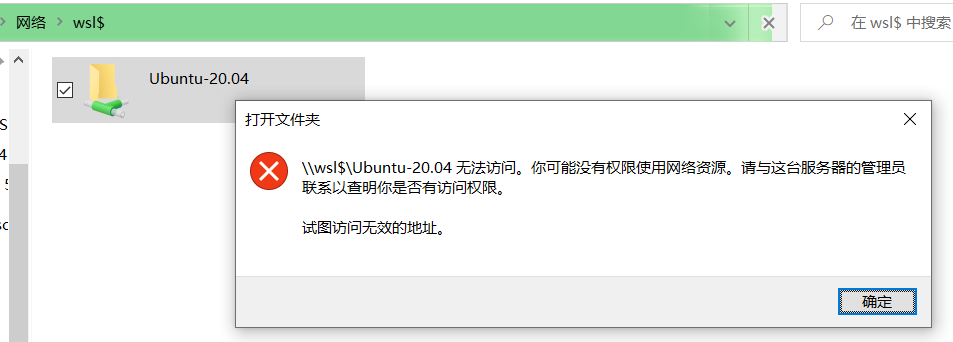
This is also what my system was missing this morning.
@whaaaley , Thanks for sharing, That did worked for me.
@Kufat , After making those changes to wsl.conf (/etc/wsl.conf) step1:
Enable extra metadata options by default
[automount] enabled = true
step2: –> Run Powershell as ‘Administrator’ PS C:\WINDOWS\system32> Restart-Service LxssManager
cmd+R -> \wsl$\Ubuntu-20.04\
worked like a charm! Thanks a lot guys
Sorry for being harsh, that’s understandable and will hopefully help someone who has the same problem. I am just pretty disheartened because since I made the original report there has been almost no news on what I can try or what further information I should provide.
Hold left shift key while clicking shutdown in windows, this fixed this issue for me
@K2ouMais WSL dev explained it in https://github.com/microsoft/WSL/issues/4027#issuecomment-495812634 and subsequent posts.
Potential fix was found here. It worked for me. https://github.com/microsoft/WSL/issues/4260 Issue stems from lack of '/etc/wsl.conf` file. I did not have this file in my Debian install by default in a fresh install.
The bit that fixed it for me were these lines specifically. These settings are supposed to be default settings, but perhaps they’re getting overwritten somehow. Who knows. I just know that I haven’t had this issue since.
Hi all,
I am facing the same issue.
Information that may be useful in debugging:
The things that don’t work:
\\wsl$\Ubuntufrom File Explorer\\wsl$\Ubuntuto a Network Driveexplorer.exe .orexplorer.exe /mnt/c(Opens upDocuments)The things that do work:
cd \\wsl$\Ubuntu\\wsl$\Ubuntuin their respective explorers (weird whyFile Explorerdoes not work when the IDE explorers do).file://wsl%24/Ubuntu/from Google Chrome (again, very weird).Any help will be hugely appreciated.
Regards, Priyansh
FWIW, I’m seeing the same issue as well. I installed Ubuntu 20.04 from the Windows Store. I can
cdinto\\wsl$\Ubuntu-20.04but cannot reach it from explorer. I receive theCannot accesserror like most other people. The troubleshooting tips earlier in this bug’s conversation also produce the same result. The 9P network interface looks like it’s starting normally, but Windows can’t see it.I don’t know if I can be any more clear on this, access to the distros filesystem from Windows doesn’t work ever.
It does not work if the
pwdis in the distros filesystem.I have this exact same issue and my p9np.dll and registry keys look identical.
Any updates or workarounds on this issue? Experiencing the same problem with WSL 2, Ubuntu 22.04.1 and Windows 11 22h2 (Build 22621.521)
I dont know maybe it will work for u guys but It helped me to enter the file system simply by typing in the start menu “\wsl$”(with 2 \) and then pressing the execute command, if it helped, I would be glad 😃
win 11 users have this bug widely, include me.
not quite. that
Y:is mounted\\wsl$\share.My .wslconfig in Windows User home directory:
Change LxssManager to autostart in regedit. Start LxssManager in services.msc. Lets test.
 Works.

If it doesn’t work, try Network Reset, and restart computer. From what I experienced, when there is a warning, that resource is unavailable, maybe you need more computer RAM, or try again later.
I am now running Version 20H2 (OS Build 19042.662) and every single information in the original report is still unchanged. Would be nice to get some reaction or more hints on what to check.
EDIT: I had the ability to check another device without this issue today, all of the registry information is exactly the same as provided above so it seems to be related to something not currently observed!
I’ve read there are two 9p running servers, one for admin and the other for the user. Do you have UAC disabled? Can you try
explorer.exe .in an elevated WSL terminal (Run as administrator)?It is not. Despite the
Ubuntufolder showing up I get the behaviour described in the report.Actually I could resolve the issue by calling “explorer.exe .” from within the wsl, from my home path like @onomatopellan suggested! I didn’t even know you could just call explorer.exe from within the WSL. But this kind of “broke the barrier”. That’s why I also deleted my comment. It’s just strange that I had to do this after about 2-3 years of WSL2 usage. And it seems I have to do it again after every boot now. But it’s a workaround I can live with.
And I’m on 21H2 (Build 19044.1889), the WSL2 distros are all kinds of versions (16.xx, 18.04, 20.04, they all run now)
same issue. open \wsl$ in explore lists ubuntu-20.04 but double click it leading to explore freeze. however, open ubuntu-20.04 in pre-defined remote driver like driver W: (the path is \wsl$\ubuntu-20.04), it works.
@onomatopellan Thank you! Put it in the conf, rebooted, and tried to open \wsl$\Ubuntu. All I got was:
5.817633723: INFO: Server started.which tends to support my suspicion that it’s broken on the Windows client side rather than the Linux server side. (The Linux client and Windows server seem to work fine; I can access /windir/c normally.)Thanks @yaofahua. This was the best suggestion I’d seen in some time. I did so (got source from the MS repo, enabled that config option, compiled, booted kernel, ensured log level was set to debug) and unfortunately there was no information printed. What I’d like to do now is see if there’s any way to get debug-level output from the Windows side of the 9p connection. Any suggestions?
Found a workaround for this with an overlay mount, since calling windows executables when
$PWDis on a mounted linux filesystem gives ainvalid argumenterror. So I do have afstablike thisthen at login I run a script with
Now I can call windows executables if
$PWDis under $HOME (or subfolders). From windows I can access the filesystem tree of the mounted directory (it doesn’t give aninvalid adress) but still opening files gives a permission error.When running the commands from additional information section I noticed that P9NP was absent from my output and was present in the sample output:
Then saw @a4ex had just forcibly updated those registry keys, so tried that.
i get the same thing:
windows+r
\\wsl$\Ubuntu\home\kufat“The specified path does not exist” even thoughHello everyone,
I see everyone trying to access
\\wsl$\Ubuntubut have to take a look on how your Distro is named?I dont see very often where people have made the work of exporting wsl and import it again just to change the name of it.
Please look at how your Distro is named… With the command
wsl -l -vyou can see the name of it.The most common is
\\wsl$\Ubuntu-20.04.Unfortunately for me there has been no news on this issue. The only new piece of information from the discussion thus far has been that while I can’t access
\\wsl$\Ubuntuvia explorer or command line it is possible to mount\\wsl$\Ubuntuas a network drive and access that.Same symptoms here, can’t access
\\wsl$\Debianpath within Explorer. Nor can Idir \\wsl$\Debianin PS. Tried another distro (Ubuntu-20.04) from scratch but no difference.The “network drive” hack works to access WSL files, I mounted
\\wsl$\DebiantoL:drive. However it breaks expectations, especially for IntelliJ IDEs (since 2020.2) watching for\\wsl$\paths to enable WSL-side git. This leads to a completely unusable git integration, and the following appears in dmesg output :Which sounds logical as soon as project is accessed through network drive mount point.
By the way, there is another interesting output in dmesg :
Win10 Pro 2004 19041.423
Today I again un- and reinstalled WSL2 with a reboot in-between every step, the issue persists exactly as described in my original comment.
This is very clearly different than the issue I am having; this already doesn’t work for me.
This also doesn’t seem to be related to my problem, as the
dmesgthere output includes errors, which mine does not.I have seen more users with the same problem. They can use
explorer.exe .from/mnt/cbut not from/home/username.Maybe @SvenGroot has an idea what’s happening.
But calling
explorer.exe .from bash does it work?9p access is a bit weird:
I can only do
cd \\wsl$\Alpine,cd \\wsl$\Ubuntu-20.04andcd \\wsl$\Ubuntu-20.04.wsl1otherwise it says path does not exist. So make sure you are typing the exact name of the distro.\\wsl$\Ubuntu\won’t work if the distro is not running in background. I prefer setup openssh-server in Ubuntu, so it will run in the background, and\\wsl$\Ubuntu\will work.