WSL: apt-get update/upgrade/install downloads packages at unacceptably slow speeds.
-
Your Windows build number: Microsoft Windows [Version 10.0.15063]
-
What you’re doing and what’s happening:
sudo apt-get update && sudo apt-get upgrade -ydownloads packages at less that 100 kB/s.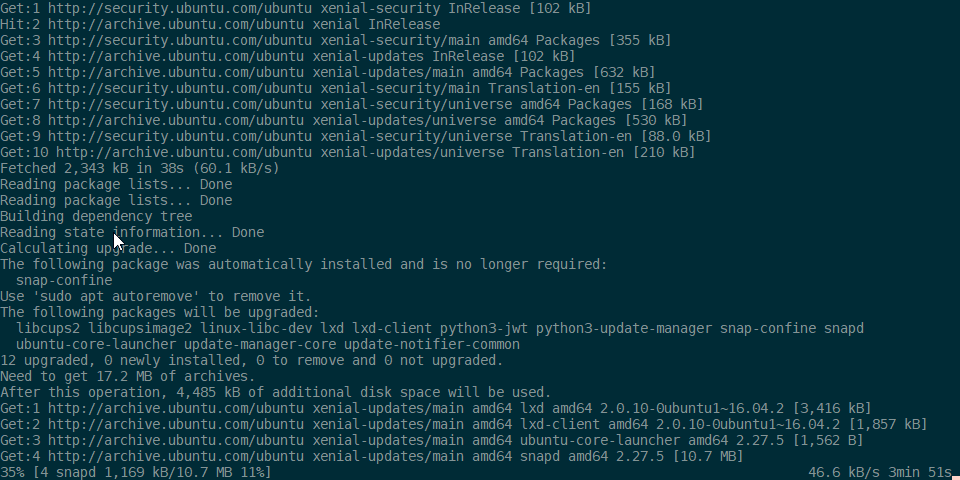
-
What’s wrong / what should be happening instead:
aptshould fetch packages much faster. My internet speed is 100 down / 10 up, on a bare-metal Linux installation or VirtualBox instance,aptis blazing fast. Packages are downloaded at upwards of 1024 kB/s. -
Strace of the failing command, if applicable: n/a
About this issue
- Original URL
- State: closed
- Created 9 years ago
- Reactions: 58
- Comments: 91 (5 by maintainers)
Ubuntu on WSL uses the Ubuntu’s main archive mirror, which may not be the fastest option depending on your location. Could those who are having this issue try choosing a local mirror from https://launchpad.net/ubuntu/+archivemirrors (tip: most countries have a mirror like us.archive.ubuntu.com, so you can try that for your country before scouring the list), updating /etc/apt/sources.list to use that mirror instead of archive.ubuntu.com, and see if that improves your download speed?
Make sure you run
sudo apt updateafter editing sources.list.You can use sed to make the change. For example, to change from archive.ubuntu.com to us.archive.ubuntu.com:
sudo sed -i "s/archive.ubuntu.com/us.archive.ubuntu.com/" /etc/apt/sources.list@RalphORama - Thanks for your post. We are aware that WSL networking perf is not at par with native Linux, but should not be unbearable. There are plans to improve the WSL n/w perf. I am not sure if uninstall/reinstalling will change much here for you.
I found that Windows Defender absolutely murders performance in WSL, especially tools like apt-get. Try temporally disabling it and see if that improves it or not.
Just turn off Windows Defender Real-time protection.
Add WSL folder and apt process in exclusion list will not work.
You should to completely disable real-time protection, reboot and will see how fast it will be
this. Windows Defender really messes with I/O actions in WSL, not just with
apt-get… adding scan exemptions does not seem to help much.Following THIS LINK, I created an exception on Windows Defender and it worked like a charm(!!!).
TL;DR
%USERPROFILE%\AppData\Local\Packagesand lookup for something like CanonicalGroupLimited.UbuntuonWindows_79rhkp1fndgsc. Copy the path of that folder.Settings > Update & Security > Windows Defender > Open Windows Defender Secutiry Central > Protection Against Viruses & Threats > Advanced Config… > Exclusions > Add or Remove > Add > Folderand then select the folder. Or you can also paste that folder’s path.You should also check that article as it has other methods as well.
Turning off Windows Defender Realtime protection did the trick. All other options did not work.
I fixed it by running this to PowerShell Admin:
New-NetFirewallRule -DisplayName "WSL" -Direction Inbound -InterfaceAlias "vEthernet (WSL)" -Action AllowThis basically opens the interface for WSL per this issue comment: #4585#issuecomment-610061194_
No turning off of windows defender necessary.
The same here. tried everything suggested here, but nothing helps. It has nothing to do with apt (I can live without often updates), but I cannot use subversion sever in local network because it takes ages to ‘svn update’, while the same ‘svn update’ completes almost instantly on hyper-v virtual machine
If disable Windows diffender that issue is gone
@Aymane11 I actually have a PowerShell script I use to do this automatically for all WSL instances. You will need an escalated PowerShell instance (Run as Admin).
Thanks! helped me too with ESET Internet Security
I realized the issue for me was that antivirus ESET was blocking the traffic for WSL Ubuntu. Unblocked by going to Setup --> Network --> Troubleshooting Wizard --> Unblock.
Haven’t read all the responses to see how many people have tried this but the mirrors generated from this tool fixed the issue for me
This thread has a few components, with different causes:
One can differentiate (1) from (2) with
speedtest-cli.@pcgeek86 Have you tried using an alternative mirror for Ubuntu? https://launchpad.net/ubuntu/+archivemirrors
Building on what Sven said, here is a quick and easy command to change apt to automatically point to a mirror inside your country.
sed -i -e 's/http:\/\/archive/mirror:\/\/mirrors/' -e 's/\/ubuntu\//\/mirrors.txt/' /etc/apt/sources.listI’ve been experiencing better speeds recently. Not sure what the cause of it was.
On Sat, Jan 19, 2019 at 4:24 AM Lars Fernhomberg notifications@github.com wrote:
Same problem on 1803 stable branch. Build 17134.48
@bazald How did you disable ipv6? The sysctl method which one would use on normal ubuntu doesn’t work here.
I can mostly confirm @therealkenc 's suspicion on the ipv6 connection timeout theory as this issue appeared in the RC for 1803. 16299 or Insider builds about halfway between 1709 & 1803 didn’t have this issue.
I changed the server to my local Indian server too. Didn’t change anything. I tried modifying the command at execution:
sudo apt-get update -o Acquire::ForceIPv4=trueBut it didn’t change the situation. I can confirm it happens with all connections on my setup, not just ipv6.
Some interesting patterns in the bug:
i realize this isn’t exactly an apples-to-apples comparison, however, this is two somewhat similar ubuntu images (xenial in wsl and artful in vmware player) running on the same windows host at the same time. apt-get update called at as close to the same time as i could reasonably do manually. wsl takes nearly three minutes to complete compared to 2.5 seconds in a vm. happy to provide more information on my environment if that helps.
I think (but can’t prove because I don’t have ipv6 with my ISP) the above issue might be a DNS lookup thing. Which is different than Sven’s (very good) “distant mirror” hypothesis. There an issue# ref for the ipv6 DNS lookup problem but too lazy to look it up atm. Your download speed with
aptshould be okay once the connection is made if that is the problem tho. One thing people can try to isolate is to find the.deburl of one of the “slow” gets thataptis fetching, and then just try getting it withwgetto see how the speed compares. That is (to a first order) whataptis doing under the hood after all.@therealkenc - Thanks for the repro steps. I tracked this down to a directory rename failing due something that has a handle open to one of the directory’s children. Unfortunately this is an NTFS limitation that I can’t think of a workaround without NTFS supporting posix-style rename. I know they were looking at that at some point, but I’m not sure of the status.