WSL: "An existing connection was forcibly closed by the remote host." error is presented when launching any WSL 2 distro
-
Your Windows build number:
Microsoft Windows [Version 10.0.18917.1000] -
What you’re doing and what’s happening: Trying to launch
wsl.exeorbashthrows an error message that statesAn existing connection was forcibly closed by the remote host.
    Microsoft Windows [Version 10.0.18917.1000]
    (c) 2019 Microsoft Corporation. All rights reserved.

    C:\Users\Steven>bash
    An existing connection was forcibly closed by the remote host.

    C:\Users\Steven>wsl
    An existing connection was forcibly closed by the remote host.

    C:\Users\Steven>
I’ve tried this with my converted Debian distro, as well as ArchWSL. I also tried to install Ubuntu but during setup after choosing my UNIX username the same error gets thrown.
- What’s wrong / what should be happening instead: The distro should be launching normally and I should be presented with a bash shell.
Log files: logs.zip
Edit (9/26/19): It appears that the number of entries in a modified hosts.txt is what is causing this issue at the moment. More information here: https://github.com/microsoft/WSL/issues/4105#issuecomment-531385551
About this issue
- Original URL
- State: closed
- Created 7 years ago
- Reactions: 7
- Comments: 152 (24 by maintainers)
Thanks for filing. From the trace it looks like your instance is being terminated during creation. Does the following command work? If so can you give me the output? When you’re in this state, can you look in task manager and see if there is a vmmem process running?
wsl.exe -u root -e dmesg
Thanks!
Sorry to read that !
What I did before :
I deleted a lot of « unused » entries (more than 5000 😉 ) in /etc/hosts on windows side. All these entries were added by a lot of AV apps I used before switching to Kaspersky.
Then I’ve rebooted.
Here’s my /etc/wsl.conf :
[automount]
enabled = true
root = /mnt/
options = “metadata,umask=0,fmask=111”
mountFsTab = true
If it works for me after a lot of tests, there is no reason that it is not the case for others… I think that it is just a matter of configuration, not software. May be some old specific configs that block the launch of WSL2
De : Hugh notifications@github.com Envoyé : mardi 10 septembre 2019 12:50 À : microsoft/WSL WSL@noreply.github.com Cc : Christian Denat christian.denat@orange.fr; Comment comment@noreply.github.com Objet : Re: [microsoft/WSL] “An existing connection was forcibly closed by the remote host.” error is presented when launching any WSL 2 distro (#4105)
@Chris <Christian.bos@gmail.com mailto:Christian.bos@gmail.com > Glad, it worked for you. Alas but not for me…Neither Ubuntu nor openSUSE runs, even after a fresh install. I tried openSUSE for the first time but received the same slap in the face (more actually, openSUSE keeps retrying!)
On Tue, Sep 10, 2019 at 12:38 AM Christian Denat <notifications@github.com mailto:notifications@github.com > wrote:
— You are receiving this because you commented. Reply to this email directly, https://github.com/microsoft/WSL/issues/4105?email_source=notifications&email_token=ACKGHVLZK7WZ6RE66RZUCLTQI53VBA5CNFSM4HXVMHE2YY3PNVWWK3TUL52HS4DFVREXG43VMVBW63LNMVXHJKTDN5WW2ZLOORPWSZGOD6KVNLI#issuecomment-529880749 view it on GitHub, or https://github.com/notifications/unsubscribe-auth/ACKGHVONJCB23LL2EVGHEK3QI53VBANCNFSM4HXVMHEQ mute the thread. https://github.com/notifications/beacon/ACKGHVMQXCFFWBVB2EETIN3QI53VBA5CNFSM4HXVMHE2YY3PNVWWK3TUL52HS4DFVREXG43VMVBW63LNMVXHJKTDN5WW2ZLOORPWSZGOD6KVNLI.gif
@andreluizgit - Unfortunately there are no WSL2 changes in 18932.
TNX for information hosts is the causion! DELETE hosts fix this.
Thanks for the information. I’ve since dropped out of receiving Insider builds and have reinstalled Windows 10 on my PC, but I believe I did have a custom hosts.txt file for ad-blocking before I did all of that.
I can confirm @benhillis that using the default HOSTS file as of
%WinDir%\System32\drivers\etc(https://support.microsoft.com/en-us/help/972034/how-to-reset-the-hosts-file-back-to-the-default) has got WSL2 working for me.Seems this is supported by others below too.
Background info: _My hosts file was an older version of https://raw.githubusercontent.com/EnergizedProtection/block/master/extensions/porn-lite/formats/hosts-ipv6.txt._
I guess one of the following is what kills WSL2:
Thanks @Skye19 and @chdenat for the idea. @steven-peralta since this is your issue, you might wanna take a look here.
I believe I have identified the issue! Fix will be in an upcoming insider build.
Awesome, I have a repro. I’ll get this fixed. Thanks to everybody for the help.
@laster https://github.com/laster—I, the grumpy, skeptical user that I am, can likewise confirm that restoring hosts to essentially empty works like a charm! I followed the directions that you linked to and a voila working Ubuntu!!! YAY double+ to you or whomever ☺👍👍
On Fri, Sep 13, 2019 at 2:47 PM Laster K. notifications@github.com wrote:
Fixed in 18995.
So is it to say someone may be never able to use WSL 2?
The impression I got was that there was a fix, but it was a ways away. 18936 is at least the second update since then. If you are holding your breath, time to stop and rest for a while. I don’t think there are enough of us with broken *wsl *to force the issue so it is just a “wait and see situation”…
On Fri, Jul 12, 2019 at 10:05 PM Yu Shengnan notifications@github.com wrote:
Since it looks like a fix will be released in the near future, I will go ahead and close this issue.
@andreluizgit Unfortunately not.
I wonder if we are all “guilty” of messing with Hyper-V? I did when I attempted to go GUI with WSL. I was partially successful with Xming/XLaunch—eyeballs moving and one or two editors working. Failed when attempting more complicated apps. That said, I left it alone and didn’t think about it further. If this or something like this is a common factor that could be a major clue…
On Mon, Jun 17, 2019 at 7:15 PM Omri Gabay notifications@github.com wrote:
Would it be possible for somebody hitting the “An existing connection was forcibly closed by the remote host” issue to export your distribution and share the tar file? This will contain your entire root file system so if there is private information please send it to secure@microsoft.com.
Me too. Same build 18917 and Debian, I converted it to Wsl version 2 but the Appx can’t run after this convertion… Then I returned to Wsl version 1.
The issue can be the ext4.vhdx disk image that can’t be open from Appx (Debian or Ubuntu) with Wsl2, before the linux files could be open via explorer with Wsl1.
Windows Insider forum : https://answers.microsoft.com/en-us/insider/forum/all/an-existing-connection-was-forcibly-closed-by-the-remote-host
I dont know why, it seems restart solves everything 😆
Glad to have open the door 😉
inspired by someone else’s comment, I moved my current hosts file (over 800k in size) and replaced it with one that was empty. with no other changes, ubuntu is working fine now.
Despite the hype about WSL 18980 is equally dead on arrival. While I will continue to check, I no longer believe that *any *fix is in the works. My thought is that it is much easier to make vague promises than actual fixes. Shame really, but without incentive (i.e. numbers) why would they bother to fix an obscure bug. While it is clear that they have broken a few machines it is not at all clear that anyone gives a damn. Pretty much the traditional Microsoft approach…
On Tue, Sep 10, 2019 at 11:23 AM Christian Denat notifications@github.com wrote:
Good news… It’s working 😉…
I’ve deployed 18975 but not really sure it’s the reason 😉 because I first tried first to set version 2 to one of my existing distro
wsl --set-version DistroName 2but got same error …What I did then is to re enable WSL using
Enable-WindowsOptionalFeature -Online -FeatureName Microsoft-Windows-Subsystem-Linuxthen re enable the VM PlatformEnable-WindowsOptionalFeature -Online -FeatureName VirtualMachinePlatformthen restarted my computer …
And now it’s working !!! Ubuntu has been set to v2… So Nice !!! See shots attached !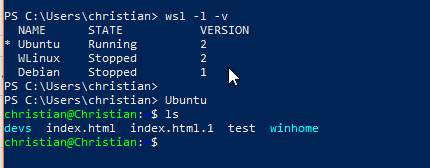
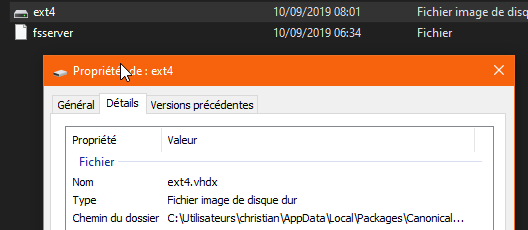
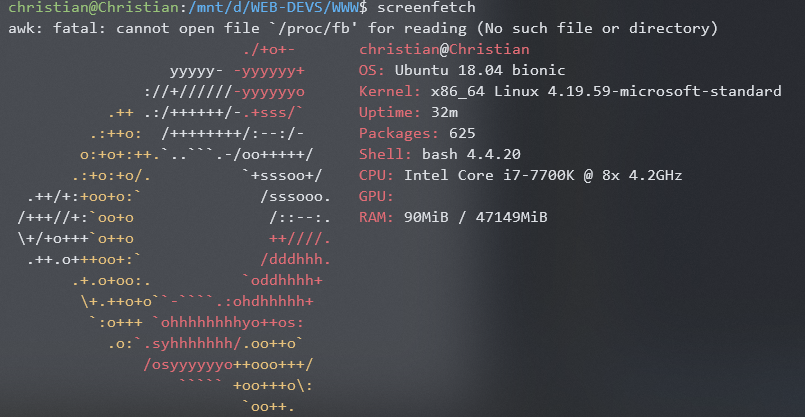
PS : do not forget to export first your existing distro to be enable to import it later in case of crash …
C:>systeminfo
Host Name: BIGIRON OS Name: Microsoft Windows 10 Pro Insider Preview OS Version: 10.0.18970 N/A Build 18970 OS Manufacturer: Microsoft Corporation OS Configuration: Standalone Workstation OS Build Type: Multiprocessor Free Registered Owner: hsmyers Registered Organization: Product ID: 00330-80000-00000-AA040 Original Install Date: 30.08.19, 07:59:10 System Boot Time: 30.08.19, 07:37:28 System Manufacturer: To be filled by O.E.M. System Model: To be filled by O.E.M. System Type: x64-based PC Processor(s): 1 Processor(s) Installed. [01]: AMD64 Family 21 Model 2 Stepping 0 AuthenticAMD ~3500 Mhz BIOS Version: American Megatrends Inc. 2601, 24.03.15 Windows Directory: C:\WINDOWS System Directory: C:\WINDOWS\system32 Boot Device: \Device\HarddiskVolume2 System Locale: en-us;English (United States) Input Locale: en-us;English (United States) Time Zone: (UTC-07:00) Mountain Time (US & Canada) Total Physical Memory: 32,668 MB Available Physical Memory: 22,108 MB Virtual Memory: Max Size: 65,436 MB Virtual Memory: Available: 49,446 MB Virtual Memory: In Use: 15,990 MB Page File Location(s): C:\pagefile.sys Domain: WORKGROUP Logon Server: \BIGIRON Hotfix(s): 3 Hotfix(s) Installed. [01]: KB4518975 [02]: KB4518978 [03]: KB4518974 Network Card(s): 3 NIC(s) Installed. [01]: ExpressVPN Tap Adapter Connection Name: Ethernet Status: Media disconnected [02]: Realtek PCIe GbE Family Controller Connection Name: Local Area Connection DHCP Enabled: Yes DHCP Server: 192.168.0.1 IP address(es) [01]: 192.168.0.3 [03]: Hyper-V Virtual Ethernet Adapter Connection Name: vEthernet (WSL) DHCP Enabled: No IP address(es) [01]: 172.20.128.1 [02]: fe80::38e7:738a:ce93:88f5 Hyper-V Requirements: A hypervisor has been detected. Features required for Hyper-V will not be displayed.
On Fri, Aug 30, 2019 at 3:17 PM onomatopellan notifications@github.com wrote:
Between Admin and Operational, only Admin reports anything and they are all information bullets.
On Fri, Aug 30, 2019 at 12:40 PM onomatopellan notifications@github.com wrote:
hsmyers.zip
Preview attachment lxcore_kernel.etl https://mail.google.com/mail/u/0?ui=2&ik=0b5ae2e802&attid=0.1&permmsgid=msg-a:r-2320754889435339887&th=16ce3867b99818e9&view=att&disp=safe&realattid=f_jzydo5yc0 https://mail.google.com/mail/u/0?ui=2&ik=0b5ae2e802&attid=0.1&permmsgid=msg-a:r-2320754889435339887&th=16ce3867b99818e9&view=att&disp=safe&realattid=f_jzydo5yc0 https://mail.google.com/mail/u/0?ui=2&ik=0b5ae2e802&attid=0.1&permmsgid=msg-a:r-2320754889435339887&th=16ce3867b99818e9&view=att&disp=safe&realattid=f_jzydo5yc0 https://mail.google.com/mail/u/0?ui=2&ik=0b5ae2e802&attid=0.1&permmsgid=msg-a:r-2320754889435339887&th=16ce3867b99818e9&view=att&disp=safe&realattid=f_jzydo5yc0Preview attachment lxcore_user.etl https://mail.google.com/mail/u/0?ui=2&ik=0b5ae2e802&attid=0.2&permmsgid=msg-a:r-2320754889435339887&th=16ce3867b99818e9&view=att&disp=safe&realattid=f_jzydo5zo2Preview attachment lxcore_service.etl https://mail.google.com/mail/u/0?ui=2&ik=0b5ae2e802&attid=0.3&permmsgid=msg-a:r-2320754889435339887&th=16ce3867b99818e9&view=att&disp=safe&realattid=f_jzydo5zm1 https://mail.google.com/mail/u/0?ui=2&ik=0b5ae2e802&attid=0.1&permmsgid=msg-a:r-2320754889435339887&th=16ce3867b99818e9&view=att&disp=safe&realattid=f_jzydo5yc0 lxcore_service.etl 40 KB https://mail.google.com/mail/u/0?ui=2&ik=0b5ae2e802&attid=0.3&permmsgid=msg-a:r-2320754889435339887&th=16ce3867b99818e9&view=att&disp=safe&realattid=f_jzydo5zm1 https://mail.google.com/mail/u/0?ui=2&ik=0b5ae2e802&attid=0.1&permmsgid=msg-a:r-2320754889435339887&th=16ce3867b99818e9&view=att&disp=safe&realattid=f_jzydo5yc0 lxcore_user.etl 16 KB https://mail.google.com/mail/u/0?ui=2&ik=0b5ae2e802&attid=0.2&permmsgid=msg-a:r-2320754889435339887&th=16ce3867b99818e9&view=att&disp=safe&realattid=f_jzydo5zo2 lxcore_kernel.etl 8 KB https://mail.google.com/mail/u/0?ui=2&ik=0b5ae2e802&attid=0.1&permmsgid=msg-a:r-2320754889435339887&th=16ce3867b99818e9&view=att&disp=safe&realattid=f_jzydo5yc0 note that my reply to Microsoft/wsl has three attachments I will forward same to ALL
On Fri, Aug 30, 2019 at 11:28 AM onomatopellan notifications@github.com wrote:
Here you go then
On Fri, Aug 30, 2019 at 11:12 AM Ben Hillis notifications@github.com wrote:
18970 doesn’t work as well, I’m beginning to think there is no correction in the works…
On Mon, Aug 26, 2019 at 6:45 AM Jimmy Gaussen notifications@github.com wrote:
Still no movement with 18965
I promise that I will stop posting off-topic issue … you guys from github are excellent, there’s no way Microsoft’s feedback-hub to become like github (there we have no feedback)? Thanks for answering.
@andreluizgit as @onomatopellan said we communicate that issues are being worked on with the ‘fixinbound’ tag. If more users post issues about the same problem we will mark them as duplicate and close them. Thank you for your feedback, I’d like to request that we keep the discussion on this thread just to the issue at hand.
@onomatopellan , you didn’understand … even with this Tag the users post the same problem/issue that is already fixed But it will release after new OS build
@andreluizgit That’s exactly what the “fixinbound” tag means. The issue in this thread is fixed and you will need to wait for the “fixedininsiderbuilds” tag. (normally 3-4 weeks)
That sounds great! Thanks. 😃 Any word on what was the problem? What is the root cause?
@OmriSama - Out of curiosity, if you can’t launch WSL2, how are you getting the dmesg output?
The problem is that the Appx (Ubuntu or Debian) can’t open this new VM (image disk ext4.vhdx) because the App was built to execute the root files with NT filesystem
more users with similar issues : https://github.com/microsoft/WSL/issues maybe would be good to suspend the release of wsl2 for this moment
Use mega.nz or something similar.
It’s not a traditional VM and it’s using a different platform (Virtual Machine Platform) which is the third? platform for Hyper-V virtualisation in Windows as you can see in Control Panel > Programs > Manage Optional Features. The other two are default Hyper-V (the one you see in the manager) and Hypervisor Platform (Android emulator uses this but doesn’t appear in manager too).
wsl --export creates a tar regardless if the distro is WSL1 or WSL2. What I suspect is there’s something in the root file system that /init does not like. The VM looks like it’s being created and the distro is able to be converted, but launching the distro fails.
Idk about you, but I’m experiencing it on a plain clean downloaded Ubuntu and Debian (and Kali) WSL instance so I’m not sure why it’s needed at all.
I think he wants it in WSL2 format.
This is what I see in task manager shortly after running that command
The the first running vmmem process will stick around for a bit before disappearing, while the second one stays in its suspended state indefinitely
That command doesn’t work; I’m still getting the original
An existing connection was forcibly closed by the remote host.message, but there is heightened Vmmem activity when I call this for sure (I tried calling it repeatedly and noticed the spike).