WSL: An error occurred mounting one of your file systems. Please run 'dmesg' for more details.
NOTE: This does not appear to be a dupe of #4101 at first sight, given the different errors appearing in dmesg output, hence why I am reporting it as a separate issue.
Environment
Windows build number: 20150
Your Distribution version: Debian bullseye
Whether the issue is on WSL 2 and/or WSL 1: WSL 2
Steps to reproduce
Error occurs when a WSL session is started (i.e. wsl.exe is executed) even if WSL is already running in the background, with the message An error occurred mounting one of your file systems. Please run 'dmesg' for more details. being displayed.
On examining the output of dmesg, the following errors are seen:
...
[   33.894977] 9pnet: Could not find request transport: virtio
[   33.895098] init: (1) ERROR: MountPlan9WithRetry:282: mount drvfs on /mnt/c (cache=mmap,noatime,msize=262144,trans=virtio,aname=drvfs;path=C:\;uid=1000;gid=1000;metadata;umask=022;fmask=022;symlinkroot=/mnt/
[   33.895103] ) failed: 22
...
and the automatic drvfs mount of /mnt/c is missing. The same errors are repeated if an immediate attempt to mount the drive manually is made, but if one is made after several minutes, it succeeds without logging additional errors.
Expected behavior
/mnt/c is automatically mounted without error.
About this issue
- Original URL
- State: closed
- Created 6 years ago
- Reactions: 15
- Comments: 41 (1 by maintainers)
I can confirm this fixed it for me thx @joworeiter
For me the default distro changed to docker-desktop-data without noticing.
so check with
wsl --statusif you have the correct default-distro. if not change it withwsl -s ${distroname}Works againYou can update the kernel by typing
wsl --updateas an admin (in windows command line). It fixed my problemI fixed it with “wsl -s ubuntu” (docker was default)
Same issue as well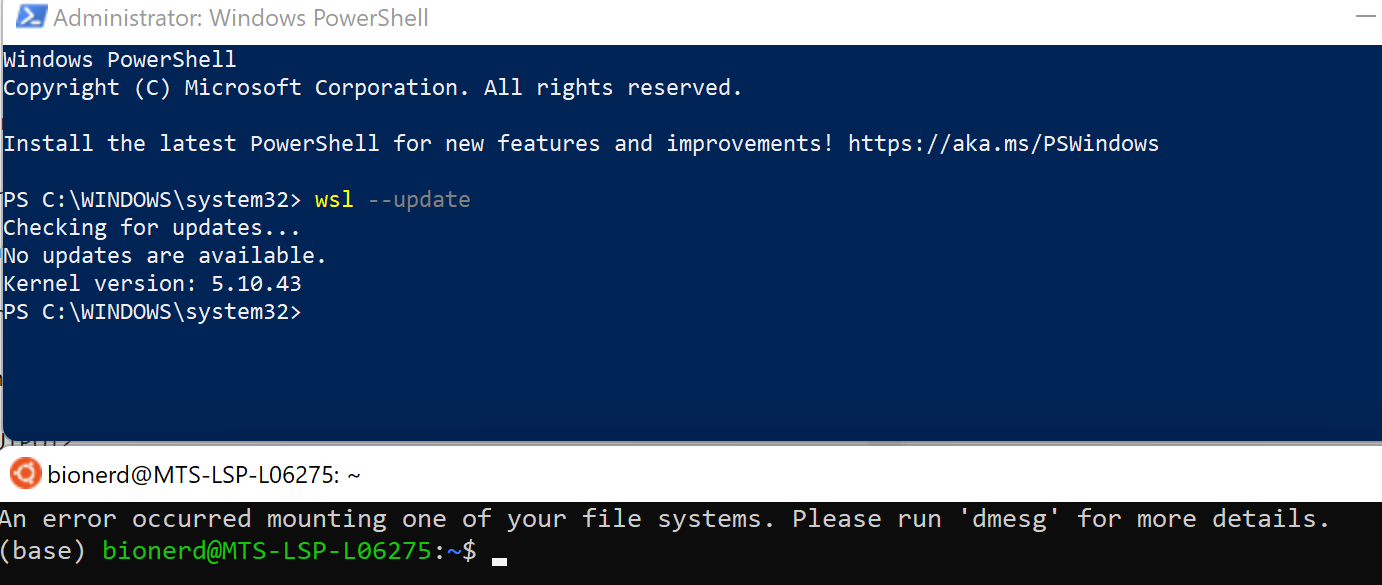
Same problem here out of nowhere. Shut down the system yesterday (didn’t install any updates) and today I was greeted with the error above. Running the latest Windows 11 Beta release Version 10.0.22000 Build 22000
after uninstall docker-desktop, wsl is working.
I ran into this issue when running the latest Insider release of Windows. My Windows drives weren’t mounting in Ubuntu.
I’m going to leave my experience with the issue for anyone who isn’t able to mount using:
mount -t drvfs 'C:' /mnt/cIf you have a custom kernel, you need to ensure that you enable:
CONFIG_NET_9P_VIRTIO=yIf this isn’t enabled, your mounts will not work (as per the opening issue).
The easiest way to recompile your kernel is to adjust the .config file; and find:
#CONFIG_NET_9P_VIRTIO=y and un-comment it.
Once you have, make the new kernel (this should be quick if you compiled one before):
make -j 8Load any kernel modules:
sudo make modules_installYou’ll need to copy the kernel to your C:\Users<username> folder via Winsows
Access all your WSL files in Windows via: \wsl$ – then navigate to your kernel build folder:
eg. /home/user/WSL-XXXXXX/arch/x86/boot/
Copy the: bzImage to your Desktop, rename it, and then move your new kernel to your user folder.
Define the new kernel image in your C:\Users<username>.wslconfig
Shutdown wsl via Powershell:
wsl --shutdownFinally, start wsl:
wslIn my case, it was a bitlocker drive not unlocked. After unlocking it using my password and shutdown wsl (
wsl --shutdown), the error disappeared.I has this issue arise similarly to how @grmlin reports. WSL and docker desktop working fine then;
After theupdate (on the 28 afaik), Hyper-v seemed to be not installed from a Windows Feature perspective. I renabled it via the “Turn Windows Features on or off” ui.
Following this i got;
So I added a new distro via the store and set it as the default, and it started fine.
I didn’t need anything on the old wsl install, so my impact was minimal. I didn’t look for a way to restore the old instace however. but this got me back up and running.
I suspect you are using a private kernel? That is going to open you up to issues like this in the future. If there are config options you’d like to see in the supported kernel just let us know.
Was having the same issue, tried messing with wsl.conf and updating kernel but no luck on kernel
5.10.60.1and windows21H2 22000.348Uninstalled Docker desktop on Windows, restarted WSL and it worked! Reinstalling Docker didn’t seem to break it again, not sure why that happened in the first place.
Update: problem went away after installing the latest update Version 10.0.22000 Build 22000 of the Windows 11 Beta!
Edit: installed KB5005191 yesterday