vscode: UTF8bom files do not open as UTF8 after fix in #39084
Issue Type: Bug As mentioned in https://github.com/microsoft/vscode/issues/127936 this fix does not work for me.
In my extension “f-script” files.encoding is set to OEM850. After the fix from #39084 this is working also when files are opened directly with no runnig instance of VSCode (as described in the mentioned Issue).
Regression: Files that are explicit saved as UTF8BOM are opened also in OEM850 now -> this has changed.
Steps to reproduce:
- set files.encoding in an extension to e.g. OEM850
- close all instances of VSCode / Insider
- via context menu open a UTF8bom saved file within “insider”
- file is opened as “pseudo-OEM850”, BOM stands there as text…
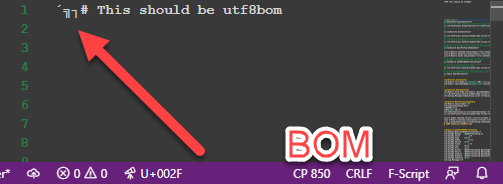
VS Code version: Code - Insiders 1.67.0-insider (72b4be55fad0d41092d7df8e03b5597c715fd2e2, 2022-04-22T06:27:20.290Z) OS version: Windows_NT x64 10.0.19044 Restricted Mode: No
System Info
| Item | Value |
|---|---|
| CPUs | Intel® Core™ i7-1065G7 CPU @ 1.30GHz (8 x 1498) |
| GPU Status | 2d_canvas: enabled canvas_oop_rasterization: disabled_off direct_rendering_display_compositor: disabled_off_ok gpu_compositing: enabled multiple_raster_threads: enabled_on oop_rasterization: enabled opengl: enabled_on rasterization: enabled raw_draw: disabled_off_ok skia_renderer: enabled_on video_decode: enabled video_encode: enabled vulkan: disabled_off webgl: enabled webgl2: enabled |
| Load (avg) | undefined |
| Memory (System) | 31.59GB (21.02GB free) |
| Process Argv | H:\Insyde\FF\HO-CatEnterpriseSearch-02.v614.ff --crash-reporter-id 7225540c-8dfb-4d99-8bb4-c4faee480e6c |
| Screen Reader | no |
| VM | 0% |
Extensions (32)
| Extension | Author (truncated) | Version |
|---|---|---|
| rainbow-brackets | 2gu | 0.0.6 |
| Bookmarks | ale | 13.2.4 |
| vdf | ali | 0.3.2 |
| tsl-problem-matcher | amo | 0.6.2 |
| vscode-svgviewer | css | 2.0.0 |
| vscode-eslint | dba | 2.2.2 |
| xml | Dot | 2.5.1 |
| vscode-npm-script | eg2 | 0.3.24 |
| windows-explorer-context-menu | ele | 3.2.1 |
| vscode-npm | fkn | 3.3.0 |
| gc-excelviewer | Gra | 4.2.54 |
| todo-tree | Gru | 0.0.215 |
| ilspy-vscode | ics | 0.13.1 |
| easy-icons | jam | 0.3.1 |
| vscode-language-pack-de | MS- | 1.67.0 |
| vscode-dotnet-runtime | ms- | 1.5.0 |
| cpptools | ms- | 1.10.0 |
| opacciconbar | Opa | 0.0.1 |
| f-script | Opa | 17.0.1 |
| opacc-fscript-debug | Opa | 16.20.1 |
| webapplicationservices-language-server | Opa | 6.14.0 |
| jsdoc-live-preview | Per | 2.0.0 |
| qub-msbuild | qub | 0.6.3 |
| snippets-viewer | Ran | 1.9.0 |
| testcafe-test-runner | rom | 2.1.1 |
| testlatte | ssh | 2.1.2 |
| msbuild-tools | ste | 0.0.12 |
| addDocComments | ste | 0.0.8 |
| vscode-sftp | sun | 1.1.1 |
| msbuild-project-tools | tin | 0.4.3 |
| snippets-view | use | 0.2.10 |
| cursorCharCode | zei | 0.2.0 |
A/B Experiments
vsliv695:30137379
vsins829:30139715
vsliv368cf:30146710
vsreu685:30147344
python383cf:30185419
vspor879:30202332
vspor708:30202333
vspor363:30204092
pythonvspyl392:30422396
pythontb:30258533
pythonptprofiler:30281269
vshan820:30294714
pythondataviewer:30285072
vscod805:30301674
pythonvspyt200:30323110
bridge0708:30335490
bridge0723:30353136
vsaa593:30376534
pythonvs932:30404738
wslgetstarted:30449409
pythonvspyt640:30438691
vscscmwlcmt:30465136
cppdebugcf:30475217
pynewfile477:30451556
About this issue
- Original URL
- State: closed
- Created 2 years ago
- Reactions: 1
- Comments: 26 (8 by maintainers)
Commits related to this issue
- UTF8bom files do not open as UTF8 after fix in #39084 (fix #148025) — committed to microsoft/vscode by bpasero 2 years ago
@bpasero I’m softwaretester so i love debug-params 😉
Cool marking as verified thereby, thanks!
not sure if i get the problem again - since i killed my AppData but i gonna love the --verbose command.
I have to give coding-lessons for our script-language today, but i’ll check the new command tomorrow/tonight.
No i did not say that. I did not change a file myself when i created this issue… The problem was related to something in my AppData -> After killing AppDate completely everything is fine.
I just mentioned, that this problem ALSO occures when you press a Key during VSCode Startup/File open). I don’t need to change the file - that was just something i did during tests.