vscode: Unable to save Github Credentials on Linux
- VS Code Version: 1.54.3
- OS Version: Arch Linux x64 kernel 5.11.10-arch1-1
Steps to Reproduce:
- Click the person icon in the bottom right
- Click “Sign in to Settings Sync”
- Select “Sign in with GitHub”
- Browser opens, does Oauth flow, and returns to VS Code
- Error message appears:
Writing login information to the keychain failed with error 'Unknown or unsupported transport “disabled” for address “disabled:”'.
Does this issue occur when all extensions are disabled?: Yes
Before this gets closed as a duplicate of other issues:
- yes, I have
libsecretandgnome-keyringinstalled, as other issues describe - yes, I have a keyring and it is set as default
- other applications are able to use the keyring successfully
About this issue
- Original URL
- State: closed
- Created 3 years ago
- Comments: 43 (2 by maintainers)
Commits related to this issue
- Update keychain troubleshooting guide, fixes https://github.com/microsoft/vscode/issues/120392 — committed to microsoft/vscode-docs by deleted user 3 years ago
I had the same problem before, in my case i need to add
dbus-launchin.xinitrcto run dbus-sessionAnd those who doesn’t use a gnome based system, like kubuntu?
Anyone on kde still facing the problem, simply install gnome-keyring
I’m on arch so
sudo pacman -S gnome-keyringdid the job@maosid what would be the code for KDE?
Yup, I use Arch with Sway window manager, and this solution didn’t fix the issue, I also tried this solution #92972 didn’t fix it either
I personally gave up using copilot because of this.
Any idea about KDE Wallet instead of gnome-keyring?
Please, stop being opinionated how about Linux and keep vscode things on vscode code space, stop trying to use desktop services because Linux users are very diversified and everything was OK until now.
How can I use KDE Wallet (kwalletd) instead? Gnome keyring does not integrate well into a KDE workstation.
@julianperezpesce I had the same problem with manjaro plasma The problem was solved by : Add the following lines to your ~/.xinitrc:
see https://unix.stackexchange.com/a/295652/332452
source /etc/X11/xinit/xinitrc.d/50-systemd-user.sh
see https://wiki.archlinux.org/title/GNOME/Keyring#xinitrc
eval $(/usr/bin/gnome-keyring-daemon --start) export SSH_AUTH_SOCK
see https://github.com/NixOS/nixpkgs/issues/14966#issuecomment-520083836
mkdir -p “$HOME”/.local/share/keyrings
for me, surprisingly these steps worked out
I’m facing the same problem, but the error message is different and that’s why haven’t tried any solutions for now…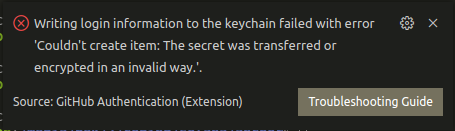 any thoughts?
As a kludge, it’s also possible to simply do:
dbus-launch codeThe dbus-launch command sets some environment variables for the process that it spawns. If you are spawning a window manager in .xinitrc (ie
dbus-launch dwm) then the entire GUI session will have those environment variables set.If you run just
dbus-launchat the cli, then you see the variables it is trying to set, ie:If you have launched your window manager from dbus-launch in .xinitrc or wherever, then you should be able to see those variables already existing by:
For those familiar with ssh-agent, this is the same concept.
I use Gentoo, had the same issue and resolved it by launching sway via
dbus-run-session sway. Hope this helps someone.