vscode: `settings.json` conflicts when there aren't any changes
Issue Type: Bug
I don’t know how to reproduce it.
After leaving VSC open, I get an error saying:
Failed to save 'settings.jsons': The content of the file is newer.
Please compare your version with the file contents or overwrite the content of the file with your changes.
When comparing, they’re both the same.
If I overwrite it, the notification just comes back a few hours later and the settings.json file gets opened.
VS Code version: Code 1.64.0 (5554b12acf27056905806867f251c859323ff7e9, 2022-02-03T04:20:17.224Z) OS version: Darwin x64 19.6.0 Restricted Mode: No
System Info
| Item | Value |
|---|---|
| CPUs | Intel® Core™ i7-5775R CPU @ 3.30GHz (8 x 3300) |
| GPU Status | 2d_canvas: enabled gpu_compositing: enabled metal: disabled_off multiple_raster_threads: enabled_on oop_rasterization: enabled opengl: enabled_on rasterization: enabled skia_renderer: disabled_off_ok video_decode: enabled webgl: enabled webgl2: enabled |
| Load (avg) | 4, 4, 4 |
| Memory (System) | 16.00GB (0.72GB free) |
| Process Argv | -psn_0_2388551 --crash-reporter-id 133c6f3a-b0f2-4e27-b9c4-5186fbde6fa8 |
| Screen Reader | no |
| VM | 0% |
Extensions (62)
| Extension | Author (truncated) | Version |
|---|---|---|
| html-snippets | abu | 0.2.1 |
| formatter-pug | ale | 0.0.1 |
| vscode-sqlite | ale | 0.14.0 |
| vscode-django | bat | 1.8.0 |
| procfile | ben | 1.1.7 |
| django-html | bib | 1.3.0 |
| better-toml | bun | 0.3.2 |
| npm-intellisense | chr | 1.4.0 |
| bootstrap-5-snippets-by-coder-foundry | Cod | 1.2.1 |
| flask-snippets | cst | 0.1.2 |
| dart-code | Dar | 3.34.0 |
| flutter | Dar | 3.34.0 |
| pep8-asm | dea | 0.0.1 |
| python-environment-manager | don | 1.0.3 |
| python-extension-pack | don | 1.7.0 |
| xml | Dot | 2.5.1 |
| es7-react-js-snippets | dsz | 4.1.0 |
| vscode-html-css | ecm | 1.11.0 |
| vscode-npm-script | eg2 | 0.3.24 |
| prettier-vscode | esb | 9.2.0 |
| copilot | Git | 1.7.4812 |
| remotehub | Git | 0.24.0 |
| vscode-pull-request-github | Git | 0.36.0 |
| gitpod-desktop | git | 0.0.28 |
| vscode-env | Iro | 0.1.0 |
| vscode-heroku | iva | 1.2.6 |
| vsc-python-indent | Kev | 1.14.2 |
| kite | kit | 0.147.0 |
| MagicPython | mag | 1.1.0 |
| heroku-vscode | man | 0.3.0 |
| identical-sublime-monokai-csharp-theme-colorizer | max | 1.1.0 |
| replit | mir | 0.9.0 |
| vscode-docker | ms- | 1.19.0 |
| python | ms- | 2022.0.1786462952 |
| vscode-pylance | ms- | 2022.2.0 |
| jupyter | ms- | 2022.1.1001775990 |
| jupyter-keymap | ms- | 1.0.0 |
| jupyter-renderers | ms- | 1.0.6 |
| remote-containers | ms- | 0.217.1 |
| remote-ssh | ms- | 0.70.0 |
| remote-wsl | ms- | 0.64.2 |
| vscode-remote-extensionpack | ms- | 0.21.0 |
| cpptools | ms- | 1.8.2 |
| vsliveshare | ms- | 1.0.5330 |
| vsliveshare-audio | ms- | 0.1.91 |
| vsliveshare-pack | ms- | 0.4.0 |
| autodocstring | njp | 0.5.4 |
| itunes-vscode | Psy | 0.16.5 |
| LiveServer | rit | 5.7.4 |
| jinjahtml | sam | 0.16.0 |
| vscode-spotify | shy | 3.2.1 |
| slacksnippets | Sla | 0.0.4 |
| vscode-3dviewer | sle | 0.2.2 |
| snyk-vulnerability-scanner | sny | 1.2.7 |
| tabnine-vscode | Tab | 3.5.19 |
| python | tht | 0.2.3 |
| simple-rst | tro | 1.5.1 |
| vscodeintellicode | Vis | 1.2.16 |
| jinja | who | 0.0.8 |
| JavaScriptSnippets | xab | 1.8.0 |
| pyqt-integration | zho | 0.2.0 |
| html-css-class-completion | Zig | 1.20.0 |
A/B Experiments
vsliv368cf:30146710
vsreu685:30147344
python383cf:30185419
vspor879:30202332
vspor708:30202333
vspor363:30204092
pythonvspyl392:30425749
pythontb:30283811
pythonptprofiler:30281270
vsdfh931cf:30280410
vshan820:30294714
vstes263:30335439
pythondataviewer:30285071
vscod805cf:30301675
pythonvspyt200:30340761
binariesv615:30325510
bridge0708:30335490
bridge0723:30353136
vsaa593cf:30376535
vsc1dsc:30433058
pythonvs932:30410667
wslgetstarted:30433507
vscop940:30404999
vsrem710:30416614
vscscmwlcmt:30433761
About this issue
- Original URL
- State: closed
- Created 2 years ago
- Reactions: 10
- Comments: 18 (6 by maintainers)
Commits related to this issue
- Fix #142342 — committed to microsoft/vscode by sandy081 2 years ago
Just to add here, I’m having the same issue and I see it happening when the system theme changes during automatic mode. The theme changes to either dark or light and this causes vscode to add the
workbench.colorThemeattribute in light mode and then brings the unsaved changes popup.This happened to be on Windows 10 as well, though it does not trigger every time I do the theme switch via “Setting -> Personalization -> Colors -> Light/Dark”, and only in one workspace.
I guess fewer people are affected on Windows as the system does not provide an option to auto-switch theme when the time of day changes, but the issue is there. I get for macOS it can be annoying with the “Auto” switch theme option.
This is really annoying. I can reproduce this with all extensions disabled and with workspace trust disabled. Repro instructions:
Preferred Dark Color ThemeandPreferred Light Color Themeas their default values, which areDark+ (default dark)andLight+ (default light))Unexpected: One of the two windows will show
Failed to save 'settings.json': The content of the file is newer. Please compare your version with the file contents or overwrite the content of the file with your changes. This is extremely annoying with more than two VSCode windows open (I typically have 10+ for different projects) as all but one window will have thesettings.jsonfile open and dirty. I then have to dismiss the alert, undo the edit, and closesettings.jsonin each window. It means theme switching in VSCode is barely usable.Here’s a screen recording that shows how annoying it is:
https://user-images.githubusercontent.com/406394/154816941-1d87f4e2-f639-4e15-8315-27e8953aec22.mov
@rzhao271 Thanks for the info. I’m on stable
Ah wait, it’s happening again, but only in windows that are workspaces without access to my home folder (my settings currently reside in
~/Library/Application Support/Code/User/settings.json).If I make a test workspace in a test folder under my home folder, and trust it, then that workspace window will replicate this bug. If I then open a new window, that new window will not replicate this bug. It’s a weird situation where the settings json file is shown to be saved in the new window, but unsaved with changes in the workspace window ??
Here’s a screen recording to show the above (apologies for the low quality: it’s a 12fps gif recording of a screen recording, cos the video is too large to upload here):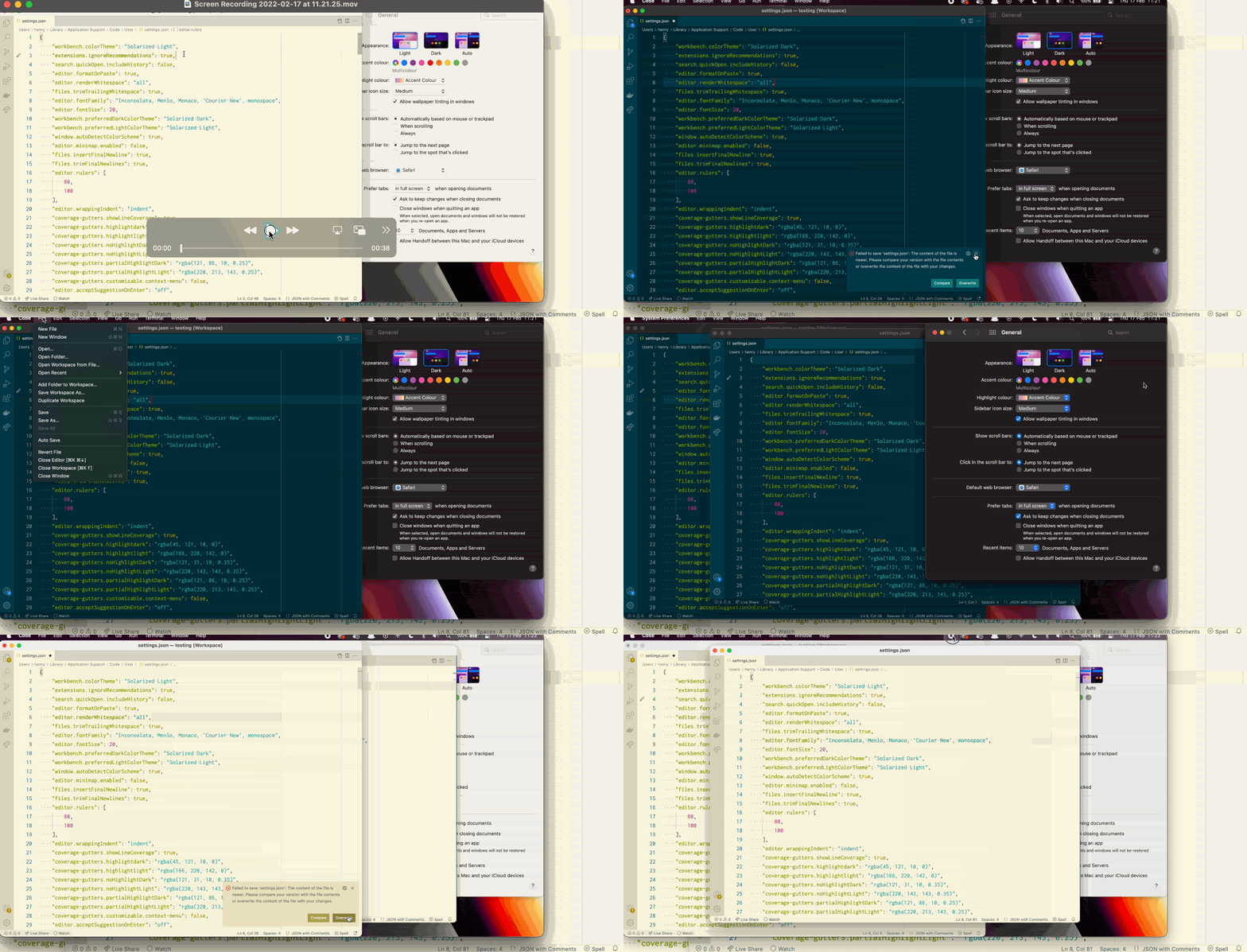
This does seem to be related to the “Trust” system, where workspaces inherently don’t have trusted access to the home folder
~/(unless they’re in it), and the settings json resides in~/Library.