vscode: Setting Sync: failed because of Unauthorized (401)

Does this issue occur when all extensions are disabled?: Yes

  • VS Code Version:
Version: 1.60.1 (user setup)
Commit: 83bd43bc519d15e50c4272c6cf5c1479df196a4d
Date: 2021-09-10T17:07:10.714Z
Electron: 13.1.8
Chrome: 91.0.4472.164
Node.js: 14.16.0
V8: 9.1.269.39-electron.0
OS: Windows_NT x64 10.0.22000

Steps to Reproduce:

  1. Enable Settings Sync (with a Microsoft account, @live.com in case it matter)
  2. Wait 15-20 minutes, sync will eventually stop with an Unauthorized error

I can reproduce this problem on three different machines, both with the latest Stable and Insiders. The problem started last month for me but we were just a few days away from the August release so I decided to wait and see if the problem went away with the new version (it happened in the past). It didn’t.

Setting Sync Log:

[2021-09-14 18:14:00.571] [settingssync] [info] Auto Sync: Triggered by Interval
[2021-09-14 18:14:00.870] [settingssync] [info] Settings: No changes found during synchronizing settings.
[2021-09-14 18:14:00.884] [settingssync] [info] Keybindings: No changes found during synchronizing keybindings.
[2021-09-14 18:14:00.899] [settingssync] [info] Snippets: No changes found during synchronizing snippets.
[2021-09-14 18:14:01.175] [settingssync] [info] GlobalState: No changes found during synchronizing ui state.
[2021-09-14 18:14:01.417] [settingssync] [info] Extensions: No changes found during synchronizing extensions.
[2021-09-14 18:14:01.421] [settingssync] [info] Sync done. Took 679ms
[2021-09-14 18:19:01.439] [settingssync] [info] Auto Sync: Triggered by Interval
[2021-09-14 18:19:01.707] [settingssync] [info] Settings: No changes found during synchronizing settings.
[2021-09-14 18:19:01.749] [settingssync] [info] Keybindings: No changes found during synchronizing keybindings.
[2021-09-14 18:19:01.765] [settingssync] [info] Snippets: No changes found during synchronizing snippets.
[2021-09-14 18:19:02.031] [settingssync] [info] GlobalState: No changes found during synchronizing ui state.
[2021-09-14 18:19:02.277] [settingssync] [info] Extensions: No changes found during synchronizing extensions.
[2021-09-14 18:19:02.278] [settingssync] [info] Sync done. Took 688ms
[2021-09-14 18:24:02.283] [settingssync] [info] Auto Sync: Triggered by Interval
[2021-09-14 18:24:02.567] [settingssync] [info] Settings: No changes found during synchronizing settings.
[2021-09-14 18:24:02.583] [settingssync] [info] Keybindings: No changes found during synchronizing keybindings.
[2021-09-14 18:24:02.602] [settingssync] [info] Snippets: No changes found during synchronizing snippets.
[2021-09-14 18:24:02.897] [settingssync] [info] GlobalState: No changes found during synchronizing ui state.
[2021-09-14 18:24:03.125] [settingssync] [info] Extensions: No changes found during synchronizing extensions.
[2021-09-14 18:24:03.126] [settingssync] [info] Sync done. Took 698ms
[2021-09-14 18:29:03.136] [settingssync] [info] Auto Sync: Triggered by Interval
[2021-09-14 18:29:03.426] [settingssync] [info] Settings: No changes found during synchronizing settings.
[2021-09-14 18:29:03.442] [settingssync] [info] Keybindings: No changes found during synchronizing keybindings.
[2021-09-14 18:29:03.456] [settingssync] [info] Snippets: No changes found during synchronizing snippets.
[2021-09-14 18:29:03.720] [settingssync] [info] GlobalState: No changes found during synchronizing ui state.
[2021-09-14 18:29:03.959] [settingssync] [info] Extensions: No changes found during synchronizing extensions.
[2021-09-14 18:29:03.965] [settingssync] [info] Sync done. Took 654ms
[2021-09-14 18:34:03.973] [settingssync] [info] Auto Sync: Triggered by Interval
[2021-09-14 18:34:04.120] [settingssync] [info] Request failed {"url":"https://vscode-sync.trafficmanager.net/v1/manifest","status":401,"execution-id":"3a1b0766-8591-4179-ab40-e37a58352793"}
[2021-09-14 18:34:04.120] [settingssync] [info] Auto Sync: Suspended until auth token is available.
[2021-09-14 18:34:04.120] [settingssync] [info] Auto sync: Cancelled sync that is in progress
[2021-09-14 18:34:04.120] [settingssync] [info] Auto Sync: Stopped
[2021-09-14 18:34:04.121] [settingssync] [error] Unauthorized (UserDataSyncError) syncResource:unknown operationId:unknown: Request 'https://vscode-sync.trafficmanager.net/v1/manifest' failed because of Unauthorized (401).
    at S.request (vscode-file://vscode-app/c:/Users/carloc/AppData/Local/Programs/Microsoft%20VS%20Code/resources/app/out/vs/code/electron-browser/sharedProcess/sharedProcessMain.js:58:171737)
    at async S.manifest (vscode-file://vscode-app/c:/Users/carloc/AppData/Local/Programs/Microsoft%20VS%20Code/resources/app/out/vs/code/electron-browser/sharedProcess/sharedProcessMain.js:58:168934)
    at async o.createSyncTask (vscode-file://vscode-app/c:/Users/carloc/AppData/Local/Programs/Microsoft%20VS%20Code/resources/app/out/vs/code/electron-browser/sharedProcess/sharedProcessMain.js:58:140173)
    at async u.doSync (vscode-file://vscode-app/c:/Users/carloc/AppData/Local/Programs/Microsoft%20VS%20Code/resources/app/out/vs/code/electron-browser/sharedProcess/sharedProcessMain.js:58:134594)
[2021-09-14 18:34:04.148] [settingssync] [info] Auto Sync: Started
[2021-09-14 18:34:04.149] [settingssync] [info] Auto Sync: Triggered by Interval
[2021-09-14 18:34:04.176] [settingssync] [info] Request failed {"url":"https://vscode-sync.trafficmanager.net/v1/manifest","status":401,"execution-id":"4ceacf3f-3468-47d1-a83a-910db1f0a0e9"}
[2021-09-14 18:34:04.176] [settingssync] [info] Auto Sync: Suspended until auth token is available.
[2021-09-14 18:34:04.176] [settingssync] [info] Auto sync: Cancelled sync that is in progress
[2021-09-14 18:34:04.176] [settingssync] [info] Auto Sync: Stopped
[2021-09-14 18:34:04.177] [settingssync] [error] Unauthorized (UserDataSyncError) syncResource:unknown operationId:unknown: Request 'https://vscode-sync.trafficmanager.net/v1/manifest' failed because of Unauthorized (401).
    at S.request (vscode-file://vscode-app/c:/Users/carloc/AppData/Local/Programs/Microsoft%20VS%20Code/resources/app/out/vs/code/electron-browser/sharedProcess/sharedProcessMain.js:58:171737)
    at async S.manifest (vscode-file://vscode-app/c:/Users/carloc/AppData/Local/Programs/Microsoft%20VS%20Code/resources/app/out/vs/code/electron-browser/sharedProcess/sharedProcessMain.js:58:168934)
    at async o.createSyncTask (vscode-file://vscode-app/c:/Users/carloc/AppData/Local/Programs/Microsoft%20VS%20Code/resources/app/out/vs/code/electron-browser/sharedProcess/sharedProcessMain.js:58:140173)
    at async u.doSync (vscode-file://vscode-app/c:/Users/carloc/AppData/Local/Programs/Microsoft%20VS%20Code/resources/app/out/vs/code/electron-browser/sharedProcess/sharedProcessMain.js:58:134594)

Things I tried (all with no luck):

  1. Logged off from the Microsoft account I use for sync
  2. Turn off Settings Sync on all my machines and VSCode instances
  3. Clear data in Cloud

One additional pointer: I sync both Stable and Insiders on the Stable channel. I remember at least one occurrence in the past where the two versions could not be sync’ed in the same channel because of some temporary incompatibility, is this still the case?

About this issue

  • Original URL
  • State: closed
  • Created 3 years ago
  • Reactions: 15
  • Comments: 60 (39 by maintainers)

Commits related to this issue

Most upvoted comments

fixed in #137083 . Will be included in 1.62.3 coming later this week.

Here are some fun learnings…

This value comes from a cracked open JWT used in the Microsoft Authentication extension

exp: 1636664095

This value comes from the response of the API call that gave me said JWT

expires_in: 4209

exp is a unix time in seconds… the Date.now() at the time was 1636660150974 in ms.

1636664095 * 1000 - 1636660150974 = 3944026ms / 1000 / 60 = 65.73min

expires_in is simply in seconds…

4209/60 = 70.15min

So if the docs say:

exp int, a Unix timestamp The “exp” (expiration time) claim identifies the expiration time on or after which the JWT must not be accepted for processing. It’s important to note that a resource may reject the token before this time as well, such as when a change in authentication is required or a token revocation has been detected.

and

expires_in How long the access token is valid (in seconds).

Who is right? 🙃

We currently refresh at a rate of 30 seconds before expires_in which in the example above… would mean that the token is technically expired for a solid 4 and a half minutes before we refresh…

I talked to @connor4312 about this and he says:

For consuming things like this I always use expires_in and refresh when it reaches something like 2/3rd’s of the lifetime. If the consuming code is running on users’ devices there’s no guarantee their time is accurate. Or if I need to use a timestamp I can convert it to an “expires in” by looking at the Date header of the API response (which is pretty common and usually returned from most servers)

In our case, we don’t need to use a timestamp so the “refresh every 2/3rds of expires_in” is a reasonable approach. This is what I’m gonna run with.

So at the end of the day, a simple 1 line change of expiresIn * 2/3 replacing expiresIn - 30… I’ve been running it for a few hours and haven’t seen any issues yet… let’s see how you all fare.

The commit: https://github.com/microsoft/vscode/commit/f8b17200c1318f0b58090445cc1a6338da426e4e

I’m able to repro this and I’m filling the codebase with log statements since attaching a debugger doesn’t work in this instance.

It just takes over an hour to get a repro… figure out I’m missing X log statement… then rerun the whole experiment.

I am actively working on this - just want you all to know.

Thank you all so much for all the great information. I am feeling very confident that we have narrowed down the route cause and have fixed this issue 🎉

The fix for this will be in two parts.

  1. First off, the workaround. The workaround we want to work is “signing out and signing back in to your Microsoft account via the Account menu”. However, that doesn’t always work because of: https://github.com/microsoft/vscode/issues/136235 image

That is marked as a candidate and will be in the release of vscode this week.

As an alternative to waiting, you can continue signing out of Microsoft until in no longer shows up on that list in the screenshot.

  1. The greater fix which will completely fix this issue is here: d848f76a66b5bb953dda5111141d2284e07d80eb it will require you to re-sign in to Settings Sync (which will be surfaced to you via the badge on the account menu in the lower left). This sign in is required because the Microsoft API scopes required for settings sync has changed.

With all that said, that commit didn’t make the release cut off, unfortunately, so that won’t make it in to VS Code stable until next month. However, it will be in VS Code insiders starting later this week/next week.

Since there’s no more action needed besides waiting for these releases to happen, I will close this issue. If you end up using VS Code insiders starting next week and you still see this issue, please don’t hesitate to comment here or open a new issue.

Unfortunately the workaround does not work for me (I have even cleared all relevant cached creds from Credential Manager), I’ll test the fix when it comes out to Insiders

Just FYI, I pushed another commit with more logging and a potential fix.

Please give Insiders a go starting tomorrow and let me know.

👋 hi all.

We need more data as this is tricky to narrow down…

@sandy081 will be adding some additional logging around Settings Sync but this will only be in insiders for now so we need you folks to give that a go and share the logs as mentioned here https://github.com/microsoft/vscode/issues/133201#issuecomment-962285046

Hi, I’ve also been suffering from this bug for a few weeks now (in the previous version of VScode), and just today I received the new 1.62.0 stable October version, but the same problem persists: Every so often, sometimes about 30 minutes, sometimes instantaneously, several times consecutively, the error pops up.

I attach VSCode version, Microsoft Authentication and Setting Sync log, in case it helps.

Version: 1.62.0 (user setup)
Commit: b3318bc0524af3d74034b8bb8a64df0ccf35549a
Date: 2021-11-03T15:23:01.379Z
Electron: 13.5.1
Chrome: 91.0.4472.164
Node.js: 14.16.0
V8: 9.1.269.39-electron.0
OS: Windows_NT x64 10.0.19043

Settings Sync Log (Note that I have detected several consecutive authentication errors.)

[2021-11-04 23:21:58.783] [settingssync] [info] Auto Sync: Triggered by Activity
[2021-11-04 23:21:59.007] [settingssync] [info] Settings: No changes found during synchronizing settings.
[2021-11-04 23:21:59.012] [settingssync] [info] Keybindings: No changes found during synchronizing keybindings.
[2021-11-04 23:21:59.015] [settingssync] [info] Snippets: No changes found during synchronizing snippets.
[2021-11-04 23:21:59.028] [settingssync] [info] GlobalState: No changes found during synchronizing ui state.
[2021-11-04 23:21:59.109] [settingssync] [info] Extensions: No changes found during synchronizing extensions.
[2021-11-04 23:21:59.115] [settingssync] [info] Sync done. Took 121ms
[2021-11-04 23:26:07.072] [settingssync] [info] Auto Sync: Triggered by Activity
[2021-11-04 23:26:07.742] [settingssync] [info] Settings: No changes found during synchronizing settings.
[2021-11-04 23:26:07.748] [settingssync] [info] Keybindings: No changes found during synchronizing keybindings.
[2021-11-04 23:26:07.751] [settingssync] [info] Snippets: No changes found during synchronizing snippets.
[2021-11-04 23:26:07.764] [settingssync] [info] GlobalState: No changes found during synchronizing ui state.
[2021-11-04 23:26:07.857] [settingssync] [info] Extensions: No changes found during synchronizing extensions.
[2021-11-04 23:26:07.858] [settingssync] [info] Sync done. Took 148ms
[2021-11-04 23:27:01.071] [settingssync] [info] Auto Sync: Triggered by Activity
[2021-11-04 23:27:01.316] [settingssync] [info] Settings: No changes found during synchronizing settings.
[2021-11-04 23:27:01.320] [settingssync] [info] Keybindings: No changes found during synchronizing keybindings.
[2021-11-04 23:27:01.356] [settingssync] [info] Snippets: No changes found during synchronizing snippets.
[2021-11-04 23:27:01.376] [settingssync] [info] GlobalState: No changes found during synchronizing ui state.
[2021-11-04 23:27:01.510] [settingssync] [info] Extensions: No changes found during synchronizing extensions.
[2021-11-04 23:27:01.511] [settingssync] [info] Sync done. Took 208ms
[2021-11-04 23:31:25.541] [settingssync] [info] Auto Sync: Triggered by Activity
[2021-11-04 23:31:26.261] [settingssync] [info] Request failed {"url":"https://vscode-sync.trafficmanager.net/v1/manifest","status":401,"execution-id":"8a4e8a4c-411e-4437-ae67-6ea9685e540b"}
[2021-11-04 23:31:26.261] [settingssync] [info] Auto Sync: Suspended until auth token is available.
[2021-11-04 23:31:26.261] [settingssync] [info] Auto sync: Cancelled sync that is in progress
[2021-11-04 23:31:26.262] [settingssync] [info] Auto Sync: Stopped
[2021-11-04 23:31:26.262] [settingssync] [error] Unauthorized (UserDataSyncError) syncResource:unknown operationId:unknown: Request 'https://vscode-sync.trafficmanager.net/v1/manifest' failed because of Unauthorized (401).
    at p.request (vscode-file://vscode-app/c:/Users/rrcht/AppData/Local/Programs/Microsoft%20VS%20Code/resources/app/out/vs/code/electron-browser/sharedProcess/sharedProcessMain.js:76:174848)
    at async p.manifest (vscode-file://vscode-app/c:/Users/rrcht/AppData/Local/Programs/Microsoft%20VS%20Code/resources/app/out/vs/code/electron-browser/sharedProcess/sharedProcessMain.js:76:172045)
    at async l.createSyncTask (vscode-file://vscode-app/c:/Users/rrcht/AppData/Local/Programs/Microsoft%20VS%20Code/resources/app/out/vs/code/electron-browser/sharedProcess/sharedProcessMain.js:76:142912)
    at async a.doSync (vscode-file://vscode-app/c:/Users/rrcht/AppData/Local/Programs/Microsoft%20VS%20Code/resources/app/out/vs/code/electron-browser/sharedProcess/sharedProcessMain.js:76:137299)
[2021-11-04 23:31:26.267] [settingssync] [info] Auto Sync: Started
[2021-11-04 23:31:26.267] [settingssync] [info] Auto Sync: Triggered by Interval
[2021-11-04 23:31:26.365] [settingssync] [info] Request failed {"url":"https://vscode-sync.trafficmanager.net/v1/manifest","status":401,"execution-id":"56d7f5df-3b99-4506-9998-fd0f42819f58"}
[2021-11-04 23:31:26.365] [settingssync] [info] Auto Sync: Suspended until auth token is available.
[2021-11-04 23:31:26.365] [settingssync] [info] Auto sync: Cancelled sync that is in progress
[2021-11-04 23:31:26.365] [settingssync] [info] Auto Sync: Stopped
[2021-11-04 23:31:26.366] [settingssync] [error] Unauthorized (UserDataSyncError) syncResource:unknown operationId:unknown: Request 'https://vscode-sync.trafficmanager.net/v1/manifest' failed because of Unauthorized (401).
    at p.request (vscode-file://vscode-app/c:/Users/rrcht/AppData/Local/Programs/Microsoft%20VS%20Code/resources/app/out/vs/code/electron-browser/sharedProcess/sharedProcessMain.js:76:174848)
    at async p.manifest (vscode-file://vscode-app/c:/Users/rrcht/AppData/Local/Programs/Microsoft%20VS%20Code/resources/app/out/vs/code/electron-browser/sharedProcess/sharedProcessMain.js:76:172045)
    at async l.createSyncTask (vscode-file://vscode-app/c:/Users/rrcht/AppData/Local/Programs/Microsoft%20VS%20Code/resources/app/out/vs/code/electron-browser/sharedProcess/sharedProcessMain.js:76:142912)
    at async a.doSync (vscode-file://vscode-app/c:/Users/rrcht/AppData/Local/Programs/Microsoft%20VS%20Code/resources/app/out/vs/code/electron-browser/sharedProcess/sharedProcessMain.js:76:137299)
[2021-11-04 23:46:39.954] [settingssync] [info] Auto Sync: Started
[2021-11-04 23:46:39.954] [settingssync] [info] Auto Sync: Triggered by Interval
[2021-11-04 23:46:40.691] [settingssync] [info] Request failed {"url":"https://vscode-sync.trafficmanager.net/v1/manifest","status":401,"execution-id":"2058caf0-84a3-4062-bfbf-98458f0aebed"}
[2021-11-04 23:46:40.691] [settingssync] [info] Auto Sync: Suspended until auth token is available.
[2021-11-04 23:46:40.691] [settingssync] [info] Auto sync: Cancelled sync that is in progress
[2021-11-04 23:46:40.691] [settingssync] [info] Auto Sync: Stopped
[2021-11-04 23:46:40.691] [settingssync] [error] Unauthorized (UserDataSyncError) syncResource:unknown operationId:unknown: Request 'https://vscode-sync.trafficmanager.net/v1/manifest' failed because of Unauthorized (401).
    at p.request (vscode-file://vscode-app/c:/Users/rrcht/AppData/Local/Programs/Microsoft%20VS%20Code/resources/app/out/vs/code/electron-browser/sharedProcess/sharedProcessMain.js:76:174848)
    at async p.manifest (vscode-file://vscode-app/c:/Users/rrcht/AppData/Local/Programs/Microsoft%20VS%20Code/resources/app/out/vs/code/electron-browser/sharedProcess/sharedProcessMain.js:76:172045)
    at async l.createSyncTask (vscode-file://vscode-app/c:/Users/rrcht/AppData/Local/Programs/Microsoft%20VS%20Code/resources/app/out/vs/code/electron-browser/sharedProcess/sharedProcessMain.js:76:142912)
    at async a.doSync (vscode-file://vscode-app/c:/Users/rrcht/AppData/Local/Programs/Microsoft%20VS%20Code/resources/app/out/vs/code/electron-browser/sharedProcess/sharedProcessMain.js:76:137299)
[2021-11-04 23:46:57.997] [settingssync] [info] Auto Sync: Started
[2021-11-04 23:46:57.997] [settingssync] [info] Auto Sync: Triggered by Interval
[2021-11-04 23:46:58.256] [settingssync] [info] Settings: No changes found during synchronizing settings.
[2021-11-04 23:46:58.272] [settingssync] [info] Keybindings: No changes found during synchronizing keybindings.
[2021-11-04 23:46:58.275] [settingssync] [info] Snippets: No changes found during synchronizing snippets.
[2021-11-04 23:46:58.684] [settingssync] [info] GlobalState: Updated remote ui state
[2021-11-04 23:46:58.693] [settingssync] [info] GlobalState: Updated last synchronized ui state
[2021-11-04 23:46:58.770] [settingssync] [info] Extensions: No changes found during synchronizing extensions.
[2021-11-04 23:46:58.771] [settingssync] [info] Sync done. Took 531ms
[2021-11-04 23:47:00.297] [settingssync] [info] Auto Sync: Triggered by Activity
[2021-11-04 23:47:00.552] [settingssync] [info] Settings: No changes found during synchronizing settings.
[2021-11-04 23:47:00.557] [settingssync] [info] Keybindings: No changes found during synchronizing keybindings.
[2021-11-04 23:47:00.560] [settingssync] [info] Snippets: No changes found during synchronizing snippets.
[2021-11-04 23:47:00.569] [settingssync] [info] GlobalState: No changes found during synchronizing ui state.
[2021-11-04 23:47:00.652] [settingssync] [info] Extensions: No changes found during synchronizing extensions.
[2021-11-04 23:47:00.653] [settingssync] [info] Sync done. Took 109ms
[2021-11-04 23:48:18.255] [settingssync] [info] Auto Sync: Triggered by Activity

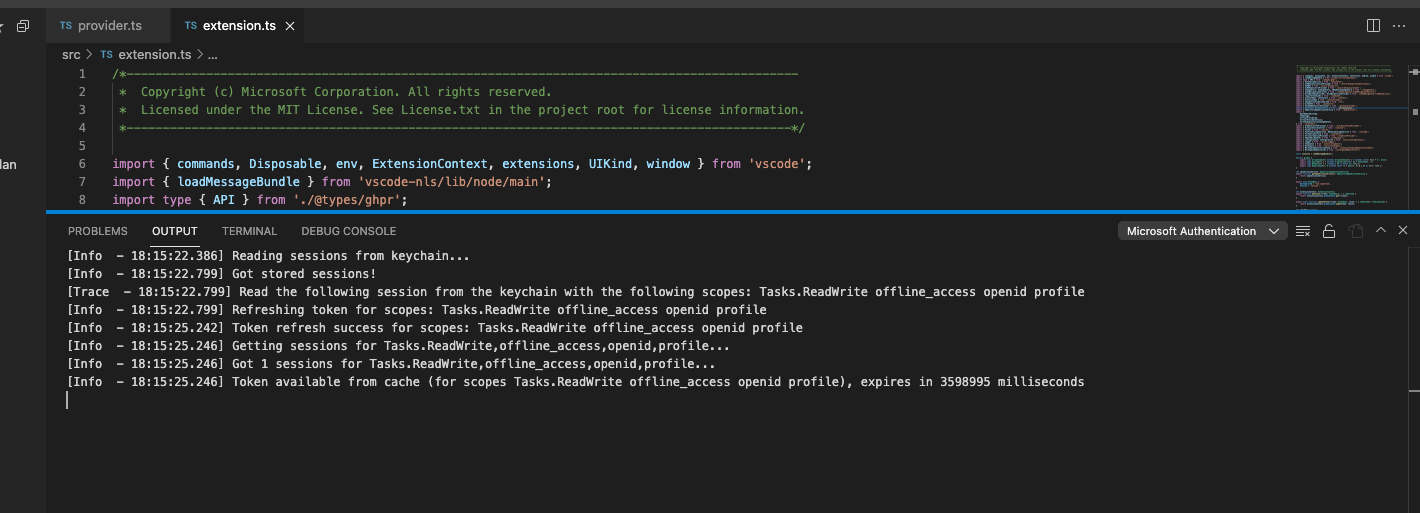
Microsoft Authentication Output

[Info  - 22:29:18.23] Got 1 sessions for all scopes...
[Info  - 23:31:26.261] Getting sessions for all scopes...
[Info  - 23:31:26.261] Token available from cache (for scopes email offline_access openid profile), expires in 943184 milliseconds
[Info  - 23:31:26.262] Got 1 sessions for all scopes...
[Info  - 23:31:26.367] Getting sessions for all scopes...
[Info  - 23:31:26.367] Token available from cache (for scopes email offline_access openid profile), expires in 943078 milliseconds
[Info  - 23:31:26.367] Got 1 sessions for all scopes...
[Info  - 23:46:38.53] Getting sessions for all scopes...
[Info  - 23:46:38.53] Token available from cache (for scopes email offline_access openid profile), expires in 31392 milliseconds
[Info  - 23:46:38.54] Got 1 sessions for all scopes...
[Info  - 23:46:39.453] Refreshing token for scopes: email offline_access openid profile
[Info  - 23:46:39.948] Getting sessions for all scopes...
[Info  - 23:46:39.948] Token available from cache (for scopes email offline_access openid profile), expires in 29497 milliseconds
[Info  - 23:46:39.948] Got 1 sessions for all scopes...
[Info  - 23:46:40.135] Token refresh success for scopes: email offline_access openid profile
[Info  - 23:46:40.137] Getting sessions for all scopes...
[Info  - 23:46:40.137] Token available from cache (for scopes email offline_access openid profile), expires in 4172997 milliseconds
[Info  - 23:46:40.137] Got 1 sessions for all scopes...
[Info  - 23:46:40.693] Getting sessions for all scopes...
[Info  - 23:46:40.693] Token available from cache (for scopes email offline_access openid profile), expires in 4172441 milliseconds
[Info  - 23:46:40.693] Got 1 sessions for all scopes...
[Info  - 23:46:54.514] Getting sessions for all scopes...
[Info  - 23:46:54.514] Token available from cache (for scopes email offline_access openid profile), expires in 4158620 milliseconds
[Info  - 23:46:54.514] Got 1 sessions for all scopes...
[Info  - 23:46:56.909] Getting sessions for all scopes...
[Info  - 23:46:56.909] Token available from cache (for scopes email offline_access openid profile), expires in 4156225 milliseconds
[Info  - 23:46:56.909] Got 1 sessions for all scopes...
[Info  - 23:46:57.994] Getting sessions for all scopes...
[Info  - 23:46:57.994] Token available from cache (for scopes email offline_access openid profile), expires in 4155140 milliseconds
[Info  - 23:46:57.994] Got 1 sessions for all scopes...
[Info  - 23:47:13.698] Getting sessions for all scopes...
[Info  - 23:47:13.698] Token available from cache (for scopes email offline_access openid profile), expires in 4139436 milliseconds
[Info  - 23:47:13.698] Got 1 sessions for all scopes...
[Info  - 23:47:16.98] Getting sessions for all scopes...
[Info  - 23:47:16.98] Token available from cache (for scopes email offline_access openid profile), expires in 4137036 milliseconds
[Info  - 23:47:16.98] Got 1 sessions for all scopes...

Looks like Stable has regressed on all my machines, the behavior and logs looks the same as what I previously shared above. Insiders is still running smoothly (for now)

Thanks Tyler. Will do!

@Jimbo99 I don’t think this is related but I’m not sure. Can you open a new issue (since this one is way to long)? And also attach the following:

  • Open the Command Palette
  • Run the Developer: Set Log Level... command
  • Choose Trace
  • Wait for the issue to happen…
  • Open the Output pane (ctrl+shift+u I think on Windows)
  • drop in this issue he contents of the following:
    • Microsoft Authentication Output channel
    • Log (Settings Sync) Output channel
    • Log (Window) Output channel

Marked as a candidate so that the change can be included in a 1.62.3 (if we do one)

Today’s Insiders has been running smoothly with Settings Sync enabled for over four hour, it never lasted this long without errors. Looks very promising

Added additional log statements. I would also request to provide us the screenshot of the accounts picker after clicking on sign in action in the prompt that says settings sync is suspended because of successive auth failures. Ideally a video would be great.

We’ll have a new stable next week so we’ll be able to really test things out then.

I’ve added a ton more logging on the Microsoft Auth side in that☝️ commit and I did move a few other things around… let’s see how it goes for you all. Please try out Insiders tomorrow.

If you still see the issue, please add the Microsoft Authentication Output channel here.

Here’s where it is for your reference: image