PowerToys: [PowerToys Run / KBM; BUG] PT Run opens behind Start menu
Environment
Windows build number: 10.0.18363
PowerToys version: 0.18.0
PowerToy module for which you are reporting the bug (if applicable): PowerToys Run
Steps to reproduce
- Press Win key to open start
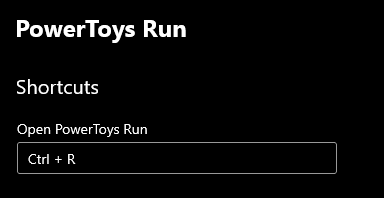
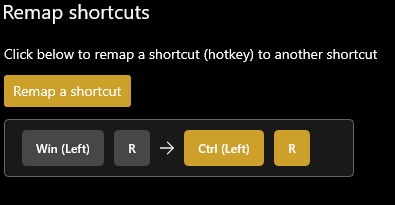
- Press shortcut (Win+R) to open PT Run
- Type search string
- Press escape to close start.
- Press escape to close PT Run.
Expected behavior
PT Run’s window is in focus. The typed text will be entered in PT Run. I can close PT Run while pressing escape to close start and then press escape the second time to close PT Run.
Actual behavior
The typed text will be entered in start/windows search. Pressing escape two times to close start and PT Run doesn’t close PT Run. I have to first click on PT Run to close it while pressing escape or clicking on the desktop background.
Screenshots
Shortcut mapping:
PT Run behavior:

About this issue
- Original URL
- State: closed
- Created 4 years ago
- Comments: 16 (5 by maintainers)
There seems to be some very weird interaction happening here. I was able to reproduce this, so my first thought was maybe KBM is doing something wrong with Win key, because in the above scenario after you open start menu if you just press Ctrl+R, start menu closes and launcher is in focus. However instead of Win+R I just tried Alt+R instead and the same issue occurs. And its not just that launcher doesn’t appear in focus and start menu doesn’t go away but also that launcher appears in an off-center position in my screen
@crutkas I’m confused, this started working for me a bit ago 😅
Edit: nvm, missed context that this is while start is open.
It also happens when other Taskbar menus are in focus. I see the same behavior if I enter my shortcut (Alt+Space) after clicking any icon in the notification area (e.g., volume, network, calendar, power) or right clicking an open app icon.
If I press Esc while any of these menus are open and then enter my shortcut, PT Run gets focus back. Start Menu is an exception to this, I always have to manually click on the PT Run prompt to close it if the Start Menu was the last shell view I’d opened.
I think the interesting question is why PT’s window is not activated.