PowerToys: [PowerRename] Crashes when there are many files
Microsoft PowerToys version
0.58.0
Running as admin
- Yes
Area(s) with issue?
PowerRename
Steps to reproduce
- Create lots of files at PowerShell.
cd c:\tmp for($i = 1; $i -lt 30000; $i++) { echo $null > file${i}.txt } - Run PowerRename from ContextMenu.
- Rename
file29999.txtto_file29999.txt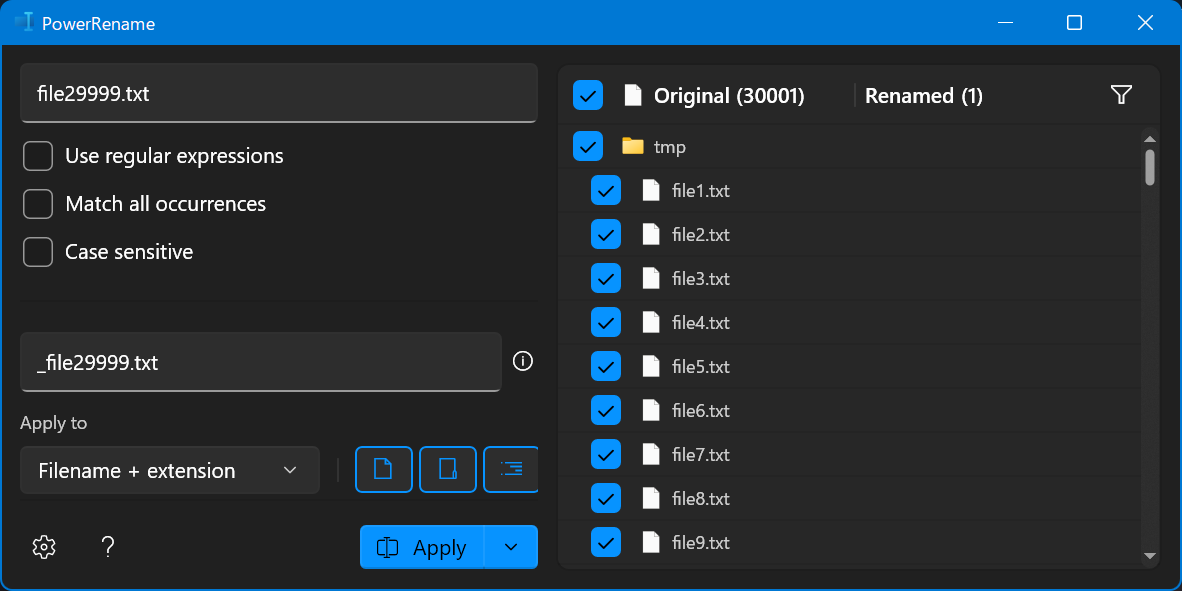
✔️ Expected Behavior
The file is renamed without crashing.
❌ Actual Behavior
PowerRename silently exits, not renamed.
The following information is recorded in the event log.
Event 1000, Application Error

Faulting application name: PowerToys.PowerRename.exe, version: 0.58.0.0, time stamp: 0x6270f9ef
Faulting module name: Windows.UI.Xaml.dll, version: 10.0.22000.706, time stamp: 0x5ba917a6
Exception code: 0xc000027b
Fault offset: 0x000000000059e671
Faulting process id: 0xa86c
Faulting application start time: 0x01d8702d5054691c
Faulting application path: C:\Program Files\PowerToys\modules\PowerRename\PowerToys.PowerRename.exe
Faulting module path: C:\Windows\System32\Windows.UI.Xaml.dll
Report Id: 6f12e3d1-7bc9-41d1-a61b-829fed2c7d0e
Faulting package full name:
Faulting package-relative application ID:
Event 1001,  Windows Error Reporting

Fault bucket 1274624960784452198, type 4
Event Name: APPCRASH
Response: Not available
Cab Id: 0

Problem signature:
P1: PowerToys.PowerRename.exe
P2: 0.58.0.0
P3: 6270f9ef
P4: combase.dll
P5: 10.0.22000.706
P6: 067ff922
P7: 80400001
P8: 0000000000032b5b
P9:
P10:

Attached files:
\\?\C:\ProgramData\Microsoft\Windows\WER\Temp\WER.402f33ee-a298-4917-b6ad-871c2e0af29a.tmp.mdmp
\\?\C:\ProgramData\Microsoft\Windows\WER\Temp\WER.c8af17a7-7412-4583-81bb-9f9f58a7c10b.tmp.WERInternalMetadata.xml
\\?\C:\ProgramData\Microsoft\Windows\WER\Temp\WER.75cceb14-b90b-4863-9837-260462685787.tmp.xml
\\?\C:\ProgramData\Microsoft\Windows\WER\Temp\WER.662525a6-f5b6-40f6-b3dc-b7c3353edee3.tmp.csv
\\?\C:\ProgramData\Microsoft\Windows\WER\Temp\WER.ab2e1b46-ba0f-40bf-a043-639a8f8eda00.tmp.txt

These files may be available here:
\\?\C:\ProgramData\Microsoft\Windows\WER\ReportArchive\AppCrash_PowerToys.PowerR_1e67f64ddc9aca6c770395974a3456a14f8d94b_f7e5f6e8_6fd9faa4-fee9-4683-92bd-4cee54b10dc5

Analysis symbol:
Rechecking for solution: 0
Report Id: 6f12e3d1-7bc9-41d1-a61b-829fed2c7d0e
Report Status: 268435456
Hashed bucket: eb6de3071fdf560571b060a609674a66
Cab Guid: 0
Other Software
Edition Windows 11 Pro Version 21H2 Installed on 2021/06/29 OS build 22000.706 Experience Windows Feature Experience Pack 1000.22000.706.0
About this issue
- Original URL
- State: closed
- Created 2 years ago
- Reactions: 3
- Comments: 16 (3 by maintainers)
I have the same problem even if I am only renaming 20 or so files.
I in PowerRename, I use regular expressions to change “.*” to “$YYYY $MM$DD $hh$mm”
@jaimecbernardo jaimecbernardo removed this from To do in 0.62 Release 16 days ago
Downloaded 0.62.1 Still crashed on ~2000 files containing also 200 folders direct why sliding through the file names list.
Doesn’t matter on running in admin mode or not. This bug seems to be related to a “too large image size > 16.384 pixel height.” Did you render all the file name entries into any large image and try to display? bad idea! Windows cant render images larger than 16K in any direction.
Guys, do not move the shitty bug all the time to any other version. This is really annoying, because I’m waiting about an year nothing happens.
Real issue, we should look into it, i don’t think anyone has tried to rename 30k+ files