playwright: Missing dependency chrome_elf.dll
Running the following test using .NET
public async Task Test1()
{
    using var playwright = await Playwright.CreateAsync();
    await using var browser = await playwright.Chromium.LaunchAsync(new() { Headless = false });
    var page = await browser.NewPageAsync();
    await page.GotoAsync("https://playwright.dev/dotnet");
    await page.ScreenshotAsync(new PageScreenshotOptions { Path = "screenshot.png" });
}
Results in following error
[xUnit.net 00:00:02.01]     PlaywrightDemo.UnitTest1.Test1 [FAIL]
  Failed PlaywrightDemo.UnitTest1.Test1 [1 s]
  Error Message:
   Microsoft.Playwright.PlaywrightException : Host system is missing dependencies!

Full list of missing libraries:
    chrome_elf.dll

  Stack Trace:
     at Microsoft.Playwright.Transport.Connection.SendMessageToServerAsync[T](String guid, String method, Object args)
   at Microsoft.Playwright.BrowserType.LaunchAsync(IEnumerable`1 args, String channel, Nullable`1 chromiumSandbox, Nullable`1 devtools, String downloadsPath, IEnumerable`1 env, String executablePath, Nullable`1 handleSIGINT, Nullable`1 handleSIGTERM, Nullable`1 handleSIGHUP, Nullable`1 headless, Proxy proxy, Nullable`1 timeout, String tracesDir, IEnumerable`1 firefoxUserPrefs, Nullable`1 slowMo, IEnumerable`1 ignoreDefaultArgs, Nullable`1 ignoreAllDefaultArgs)
   at PlaywrightDemo.UnitTest1.Test1() in C:\WS\Tmp\PlaywrightDemo\PlaywrightDemo\UnitTest1.cs:line 13
--- End of stack trace from previous location ---
The chrome_elf.dll IS present in the following location: C:\Users<username>\AppData\Local\ms-playwright\chromium-888113\chrome-win\chrome_elf.dll
NuGet Package: Microsoft.Playwright (Version 1.12.2) Node.JS: v16.4.2 Dotnet: 5.0.301 OS: Windows 10
About this issue
- Original URL
- State: closed
- Created 3 years ago
- Comments: 24 (3 by maintainers)
Commits related to this issue
- browser(winldd): attempt to fix dependency loading on windows References #7560 — committed to aslushnikov/playwright by aslushnikov 3 years ago
- browser(winldd): attempt to fix dependency loading on windows (#7790) References #7560 — committed to microsoft/playwright by aslushnikov 3 years ago
@aslushnikov
Running PrintDeps.exe results in the following:
And again checked chrome_elf.dll is still available
First of all thank you for your quick response.
I completely removed the ms-playwright folder and reinstalled. Because I am behind a corporate proxy the playwright install command fails.
I have installed the Browsers using the command:
npm i -D playwrightThis again downloads chromium, ffmpeg, firefox and webkit. I can start chrome.exe from the chromium-888113/chrome-win folder.
chrome_elf.dll is present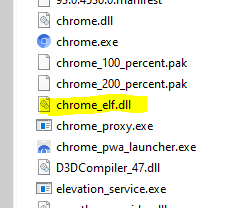
Test still fail with same error: Host system is missing dependencies! (chrome_elf.dll)