qgroundcontrol: Segmentation fault on start with latest Daily (Ubuntu 18.04)
Expected Behavior
QGC starts normally like the older daily versions I was running before.
Current Behavior
The latest daily I downloaded today (31.08.2019) segfaults immediately on start before the window comes up:
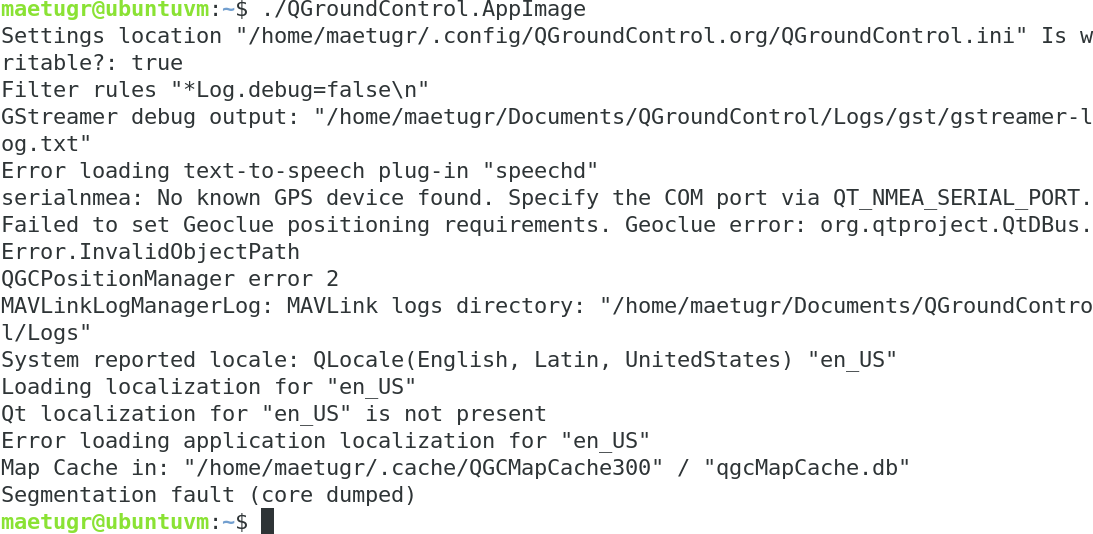
Steps to Reproduce:
Please provide an unambiguous set of steps to reproduce the current behavior
wget https://s3-us-west-2.amazonaws.com/qgroundcontrol/builds/master/QGroundControl.AppImagechmod +x QGroundControl.AppImage./QGroundControl.AppImage- See segfault
System Information
- Operating System: Ubuntu 18.04 in VMWare on Windows 10 host
- QGC Version: Latest Daily 31.08.2019 16:50 CET, I have no idea how to extract the version from the binary if it doesn’t start.
Detailed Description
I did not attach any autopilot via USB or UDP. Older versions are still working fine e.g. the last I used on that computer was the daily build based on aa2c794c0 (quite old).
About this issue
- Original URL
- State: closed
- Created 7 years ago
- Comments: 23 (18 by maintainers)
Yes, we’re talking about two separate issues. One is the dependency of a specific version of OpenSSL. That’s something that is showing up on Ubuntu 19.01 and some other distributions. @MatejFranceskin added some code that requires linking against OpenSSL and that’s the root of that issue. OpenSSL was already used by other parts of QGC. @DonLakeFlyer would know better what that is. We need to coordinate the use of OpenSSL to avoid depending on a specific version.
The other problem, the one you created this Github issue for is something else. The app image is crashing and I can’t find out why. When building the image locally, using the same code base (but likely a very different build environment), it works fine.
I was looking into the Travis logs. I now found it in the latest build (I could not find in some random earlier build): https://travis-ci.org/mavlink/qgroundcontrol/jobs/579108795
I don’t see anything extraordinary about the log output. Running the script here produces a functional appImage. I get the same crash as Matthias when running that particular appImage. This is not related to missing OpenSSL. If you have the missing OpenSLL issue, it happens immediately and it says so on the console.