material-web: md-dialog doesn't seem to work well with dark theme by default (pre.7)
Maybe there’s some trick to style it properly, but default is barely legible:
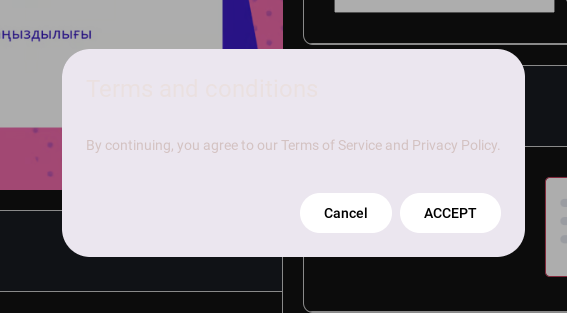
 <md-dialog id="terms-dialog" width="300">
        <div slot="header">
           ${msg('Terms and conditions')}
        </div>
        <p class="">
          ${msg(
          'By continuing, you agree to our Terms of Service and Privacy Policy.' }
        )}
        </p>
        <md-filled-button slot="footer" dialogAction="close">
          Cancel
        </md-filled-button>
        <md-filled-button
          id="confirm-button"
          slot="footer"
          @click=${this.handleAcceptTermsAndConditions}>
          ACCEPT
        </md-filled-button>
      </md-dialog>
About this issue
- Original URL
- State: closed
- Created a year ago
- Comments: 16 (4 by maintainers)
If you are using material theme builder, the tokens there are missing the container tokens. While the team is updating that, please use the “Dynamic” scheme here to generate your tokens to match the behavior of material theme builder’s color generator
https://lit.dev/playground/#gist=abcc77f636c1b76506df860db6dc0faf&view-mode=preview