MassTransit: Slow InMemoryTestHarness?
I can not catch actual issue yet, but I’ll try to explain what I’m noticing and may be that will lead somewhere.
After starting to use InMemoryTestHarness, we’ve noticed that our unit test suite slowed down, a lot. Unit tests, that were running in matter of few milliseconds now take 6s each, which does not align with sentence in documentation “The in-memory harness is the easiest to use, is lightning fast, and runs entirely in-memory without any external dependencies”.
Interestingly enough if I profile single test, I don’t see such numbers and even if our tests do not run concurrently, I was suspecting something with locking or our extra harsh antiviruses.
So I have following method:
private static async Task TestHarness()
{
    var harness = new InMemoryTestHarness();

    await harness.Start();
    try
    {
    }
    finally
    {
        await harness.Stop();
    }
}
And if I run like this:
var start = DateTime.UtcNow;

for (int i = 0; i < 100; i++)
{
    await TestHarness();
}

Console.WriteLine(DateTime.UtcNow - start);
It is fast, less than 0.5s for 100 invocations. Now if I run it like this:
var start = DateTime.UtcNow;

Parallel.For(0, 100, async i =>
{
    await TestHarness();
});

Console.WriteLine(DateTime.UtcNow - start);
that becomes 30+s and in profiler I see, that most of the time is spent in waiting:
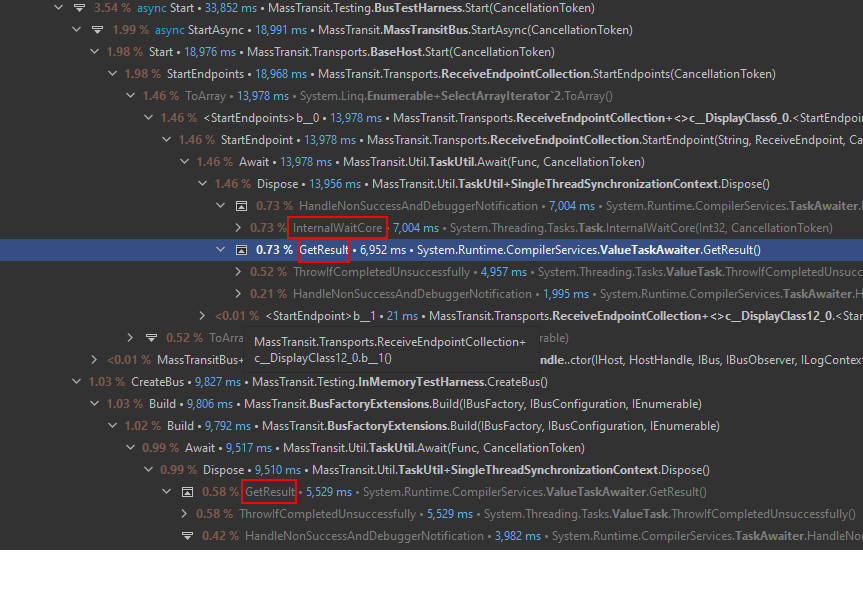
Also I’ve noticed one interesting thing:
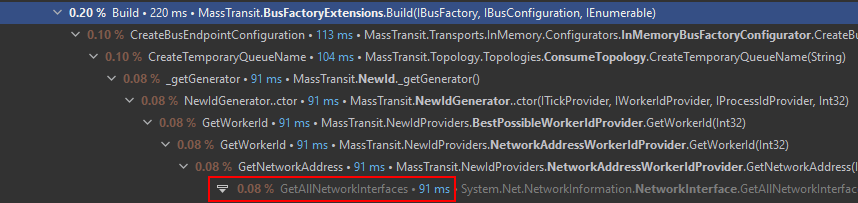
If it is InMemory harness, does it actually need to rad all network interfaces in each unit test?
Sorry, that I did not had time to dig deeper in the issue and may be searching issues in obvious stuff.
About this issue
- Original URL
- State: closed
- Created 3 years ago
- Comments: 25 (14 by maintainers)
Commits related to this issue
- Issue #2544 - only use TaskUtil.Await() if Task is not already completed (which will never happen, but nonetheless, safety first). — committed to phatboyg/MassTransit by phatboyg 3 years ago
- Issue #2544 - only use TaskUtil.Await() if Task is not already completed (which will never happen, but nonetheless, safety first). Dispose of that there semaphore good buddy. Slight tweak to channel e... — committed to phatboyg/MassTransit by phatboyg 3 years ago
- fix: test, do not use .count or .toList in harness list to avoid wait timeout (https://github.com/MassTransit/MassTransit/issues/2544#issuecomment-884858167) fix inactivity timeout (setting 1 sec) fix... — committed to gumberss/FinanceControlinator by gumberss 2 years ago
The default inactivity timeout is 6 seconds. A properly written test should never see this duration, and it’s usually because developers are selecting counts, or waiting for things that shouldn’t happen.
The default values can be changed using:
Single(), by its very nature, is the same asCount(). Use.First()instead.