cordova-plugin-googlemaps: Can not load image from 'http://localhost:8080/var/containers/Bundle' IONIC 3
I’m submitting a … (check one with “x”)
- question
- any problem or bug report
OS: (check one with “x”)
- Android
- iOS
- Browser
cordova information: (run $> cordova plugin list)
insert the output from the command here
If you use @ionic-native/google-maps, please tell the package.json (only @ionic-native/core and @ionic-native/google-maps are fine mostly)
@ionic-native/core :
@ionic-native/google-maps :
Current behavior:
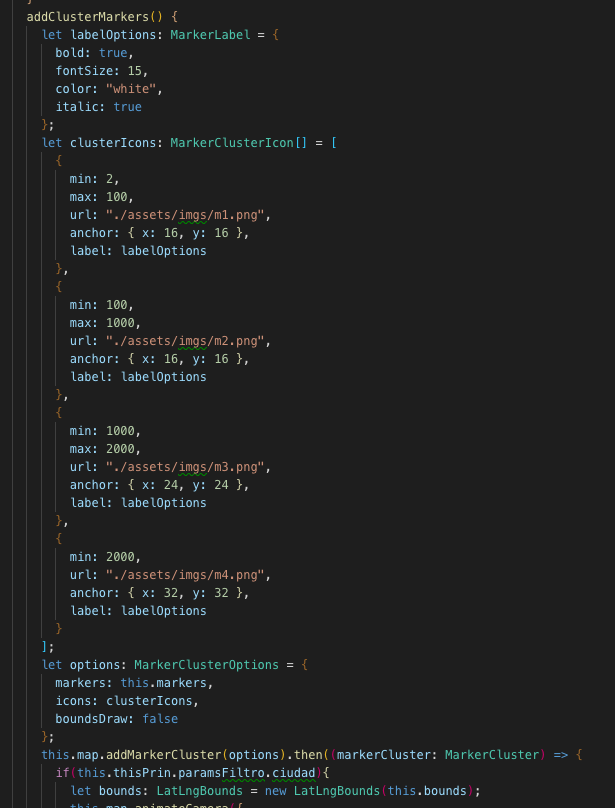
Hello, what happens is that in my main marker of the map I have it calling an asset image that I have saved it, likewise the images for the MarkerCluster, but it tells me the following error:
2019-02-08 16:39:15.744866-0500 Simi Comercial[406:43574] ERROR: map_0_293471758616 Can not load image from ‘http://localhost:8080/var/containers/Bundle/Application/272E987D-B4BB-43BD-B685-B079457B4193/Simi Comercial.app/www/assets/imgs/iconoappsimiAzul.png’.

I am compiling the app in tests on the mobile device. but I’m not using Livereload.
I work with IONIC 3.
Expected behavior:
Here are the screenshots



Screen capture or video record:
Related code, data or error log (please format your code or data):
Please share your project files on Github or others(Bitbucket, Gitlabs...etc).
If you don't want to share your project files, please create a demo project, then share it.

Screen captures, and/or native logs(such as Logcat, xcode logs) are appreciate.

Giving much information, you are waiting time is less.
Thank you for your cooperation.
Support this plugin activity
I appreicate if you give me a beer 🍺 from here
About this issue
- Original URL
- State: closed
- Created 5 years ago
- Comments: 16 (5 by maintainers)
@paulnagle this was my exact issue. Most icon/cluster images failing to load with an error message until you pinch/scroll around for a bit, then they started to appear/disappear at random before all working fine after a minute or so of fiddling with the map.
I base64’d the actual image file, not the url (should have clarified). The package I found (linked in my previous comment) contains a
base64.encodeFile(...)method which takes a local/absolute file path as an argument and returns the base64 data for that file in the form of a promise.Turns out the
iconproperty of marker options and theurlproperty of cluster options can take base64 encoded urls just fine - and this seems to eliminate the issue.I don’t have the exact code I used to hand (I’m on my mobile at the moment) but the gist of it was:
Of course, the base64 package I used is for ionic 3, you’d have to try out the ionic 4 version.
For private repo support, I appreciate if you donate $5 to the project for maps plugin activity.