cordova-plugin-googlemaps: Android and IOS app crashes
Android and IOS app crashes when navigating to maps page. But able to see the map on ionic cordova run browser -l
cordova plugin list
com.razorpay.cordova 0.16.1 "RazorpayCheckout"
cordova-android-firebase-gradle-release 2.1.0 "cordova-android-firebase-gradle-release"
cordova-android-play-services-gradle-release 2.1.0 "cordova-android-play-services-gradle-release"
cordova-android-support-gradle-release 3.0.1 "cordova-android-support-gradle-release"
cordova-plugin-add-swift-support 2.0.2 "AddSwiftSupport"
cordova-plugin-compat 1.2.0 "Compat"
cordova-plugin-device 1.1.7 "Device"
cordova-plugin-fcm-with-dependecy-updated 2.4.0 "Cordova FCM Push Plugin"
cordova-plugin-file 6.0.2 "File"
cordova-plugin-file-opener2 2.2.1 "File Opener2"
cordova-plugin-file-transfer 1.7.1 "File Transfer"
cordova-plugin-geolocation 2.4.3 "Geolocation"
cordova-plugin-googlemaps 2.6.3-20190614-1928 "cordova-plugin-googlemaps"
cordova-plugin-ionic 5.3.1 "cordova-plugin-ionic"
cordova-plugin-ionic-webview 2.5.1 "cordova-plugin-ionic-webview"
cordova-plugin-nativegeocoder 3.2.2 "NativeGeocoder"
cordova-plugin-network-information 2.0.2 "Network Information"
cordova-plugin-splashscreen 5.0.3 "Splashscreen"
cordova-plugin-whitelist 1.3.4 "Whitelist"
ionic-plugin-keyboard 2.2.1 "Keyboard"
If you use @ionic-native/google-maps, please tell the package.json (only @ionic-native/core and @ionic-native/google-maps are fine mostly)
@ionic-native/core :  "^4.4.0",
@ionic-native/google-maps : "^4.14.0",
ionic info :
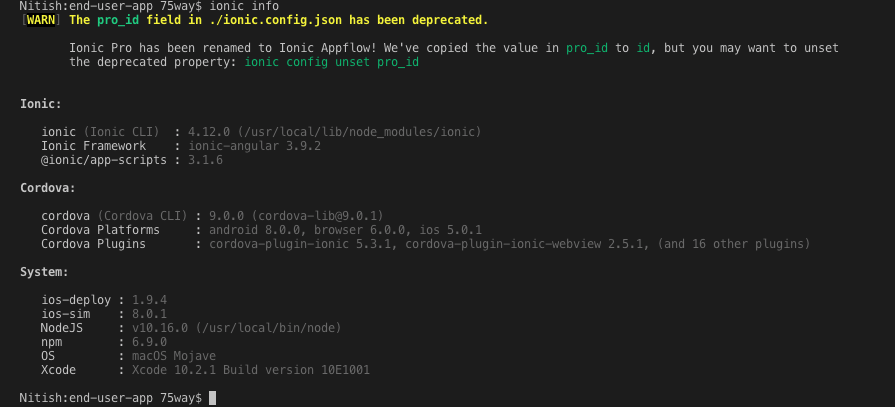
Current behavior:
- App crashed when navigating to maps page.
Expected behavior:
- App should show google map.
About this issue
- Original URL
- State: closed
- Created 5 years ago
- Comments: 56 (19 by maintainers)
@nitish75 and @moshe5745
2. Hint
Guys do you have some
edit-configtag in config.xml?Since there is no update for a while, I close this thread.
That’s breaks the Android manifest.xml file.
Guys I made quick fix.
QUICK FIX
Find file that must to be edited
platforms\android\app\src\main\AndroidManifest.xmlNow in the file just add into tag application these two tags:
<meta-data android:name="com.google.android.geo.API_KEY" android:value="YourKey" />this will cause error in logcat:
Caused by: java.lang.ClassNotFoundException: Didn't find class "org.apache.http.ProtocolVersion" on path:To fix this new error add into xml before map tag this tag:
<uses-library android:name="org.apache.http.legacy" android:required="false" />For me after build app work! But this is not solution, is only quick fix. That will allow you to develop app. Should be better to find a way how to fix the problem, not only how to hide it.
Please also confirm that this work.
Thx, issue is still open
I changed the AndroidManifest.xml manually, and its NOT being overwritten. But obviously its not a solution to make it manually.
No update. I’m super busy
Thanks, I will check it out tomorrow.
but i did it in config.xml.
And package.json as well