magento2: Type Error occurred when creating object: Magento\Framework\Communication\Config\Data
Following the instructions on https://devdocs.magento.com/guides/v2.3/comp-mgr/cli/cli-upgrade.html for upgrading Magento, I got this error when executing the command “php bin/magento setup:upgrade”
Preconditions (*)
- Upgraded from 2.2.3 -> 2.3.1
- PHP Version 7.2.16
Steps to reproduce (*)
- Starting with a 2.2.3 installation, in Magento root dir:
- php bin/magento maintenance:enable
- composer require magento/product-community-edition=2.3.1 --no-update
- composer require --dev phpunit/phpunit:~6.2.0 friendsofphp/php-cs-fixer:~2.10.1 lusitanian/oauth:~0.8.10 pdepend/pdepend:2.5.2 sebastian/phpcpd:~3.0.0 squizlabs/php_codesniffer:3.2.2 --no-update
- composer remove --dev sjparkinson/static-review fabpot/php-cs-fixer --no-update
- Open composer.json and edit the “autoload”: “psr-4” section to include “Zend\Mvc\Controller\”: “setup/src/Zend/Mvc/Controller/”:
“autoload”: { “psr-4”: { “Magento\Framework\”: “lib/internal/Magento/Framework/”, “Magento\Setup\”: “setup/src/Magento/Setup/”, “Magento\”: “app/code/Magento/”, “Zend\Mvc\Controller\”: “setup/src/Zend/Mvc/Controller/” }, … } 6. composer create-project --repository=https://repo.magento.com magento/project-community-edition=2.3.1 temp_dir --no-install 7. rm -rf update 8. mv temp_dir/update . 9. rm -rf temp_dir 10. composer update 11. bin/magento cache:clean 12. rm -rf var/cache/* 13. rm -rf var/page_cache/* 14. rm -rf generated/code/* 15. bin/magento setup:upgrade
Expected result (*)
- The command “bin/magento setup:upgrade” should finish without errors
Actual result (*)
- The command “bin/magento setup:upgrade” breaks with message:
Type Error occurred when creating object: Magento\Framework\Communication\Config\Data
In the system.log I see the whole message:
[2019-05-07 13:47:47] main.CRITICAL: Type Error occurred when creating object: Magento\Framework\Communication\Config\Data, Argument 2 passed to Magento\Framework\Reflection\TypeProcessor::resolveFullyQualifiedClassName() must be of the type string, null given, called in /var/www/vhosts/schuhjaeger.at/magento2_test/shop-v2/vendor/magento/framework/Reflection/TypeProcessor.php on line 535 [] []
This is the function from TypeProcess.php:
` /** * Get the parameter type * * @param ParameterReflection $param * @return string * @throws \LogicException */ public function getParamType(ParameterReflection $param) { $type = $param->detectType(); if ($type === ‘null’) { throw new \LogicException(sprintf( ‘@param annotation is incorrect for the parameter “%s” in the method “%s:%s”.’ . ’ First declared type should not be null. E.g. string|null’, $param->getName(), $param->getDeclaringClass()->getName(), $param->getDeclaringFunction()->name )); } if ($type === ‘array’) { // try to determine class, if it’s array of objects $paramDocBlock = $this->getParamDocBlockTag($param); $paramTypes = $paramDocBlock->getTypes(); $paramType = array_shift($paramTypes);
        $paramType = $this->resolveFullyQualifiedClassName($param->getDeclaringClass(), $paramType);

        return strpos($paramType, '[]') !== false ? $paramType : "{$paramType}[]";
    }
    return $this->resolveFullyQualifiedClassName($param->getDeclaringClass(), $type);
}
`
According to the error message, the variable $type is null.
How can I solve this?
Thank you very much in advance!
About this issue
- Original URL
- State: closed
- Created 5 years ago
- Comments: 20 (1 by maintainers)
I had a similar issue after upgrading to 2.4.4, I just checked that it causing because by a third-party module.
file : vendor\magento\framework\Reflection\TypeProcessor.php
Add this line of code before line 550, and check which class is causing the issue:
after upgrading my module to latest version issue solved.
fix this issue. The root cause is magento read the configurations files and it try to resolve the parameter in consumer handler method.
Same issue when installing Magento 2.4.4. Please advice as to how to fix the issue.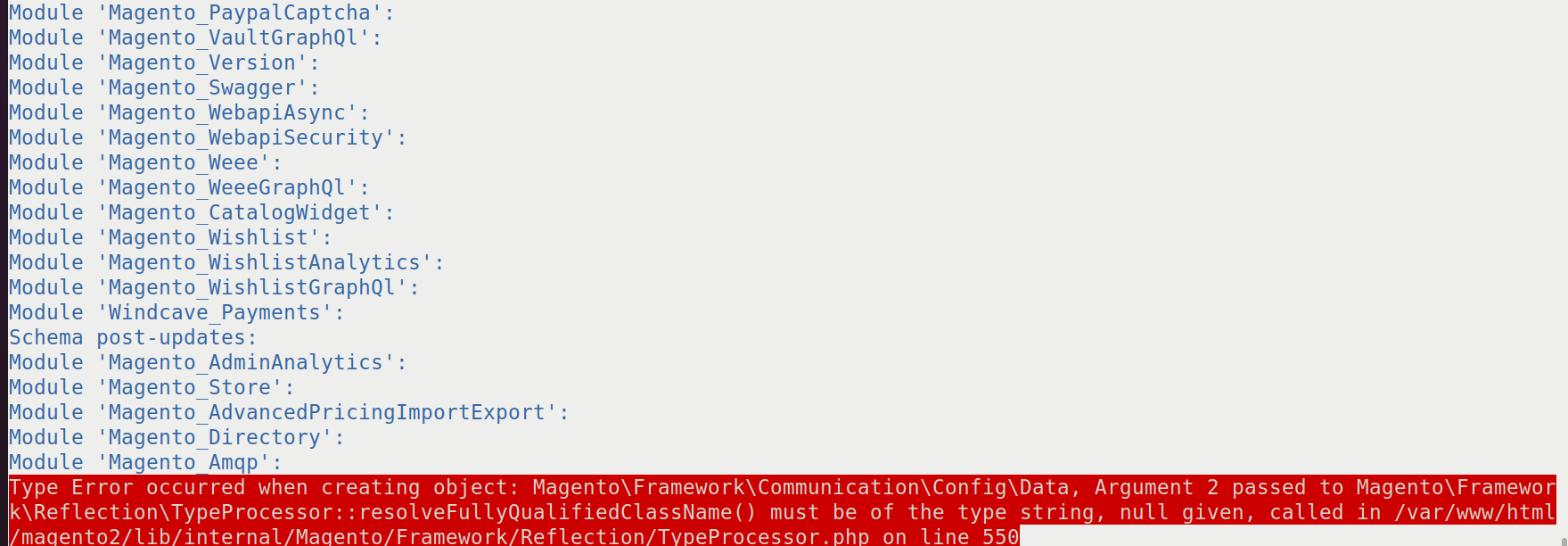
I FIX my issue: 1st, I try to put print_f inside TypeProcesson.php before line 550 to see what declared class that causing this issue. 2nd, Issue a command
magento setup:upgradeResult: I notice that prior to thetypeproblem, the declared class is my own defined template class. This template belongs to one of my group insystem.xmlthat I commented while it has also entries inwebapi.xml(not a problem with Magento 2.4.3) Solution: I just commented thewebapi.xmlfor that group as it’s not being used.May not be applicable to you but try to debug whats causing the issue.
For some more information: The error is occurring on trying to define the “type” for Magento\Framework\MessageQueue\Consumer::process docblock. In the screenshot you can see the Docblock for the method. It has a param.
Problem is the Zend\Code\Reflection\ParameterReflection::detectType method is returning null. This is because the DocBlock params aren’t being picked up on line 107, but as you can see in the screenshot the param type is available on the Interface. In the screenshot below you can see there are no tags.
@akamenew @just-tom just-tom change function Path: Magento\Framework\Reflection\TypeProcessor
public function getParamType(ParameterReflection $param) { $type = $param->detectType(); if ($type === ‘null’) { throw new \LogicException(sprintf( ‘@param annotation is incorrect for the parameter “%s” in the method “%s:%s”.’ . ’ First declared type should not be null. E.g. string|null’, $param->getName(), $param->getDeclaringClass()->getName(), $param->getDeclaringFunction()->name )); } if ($type === ‘array’) { // try to determine class, if it’s array of objects $paramDocBlock = $this->getParamDocBlockTag($param); $paramTypes = $paramDocBlock->getTypes(); $paramType = array_shift($paramTypes);
@rawsj24 thank you for your recommendation.