magento2: Huge "product_data_storage" in localStorage hangs the shop
Preconditions
- Magento 2.2.x and others with this commit applied: https://github.com/magento/magento2/commit/05ff6d4b36022a3875061b6ff9a58fb2545a95e0.
Steps to reproduce
- Open the shop.
- Visit a lot of different product pages (~400 in our case) without invalidating user data.
- Notice how browser slows down at load because of
product_data_storagein localStorage getting bigger and bigger.
I’m also attaching the contents of product_data_storage.txt, which we dumped from one of the affected computers that you can use to replace the value in your browser.
Expected result
- I think that some rotating mechanism or even a simple purge when number of products in
product_data_storageis getting too big.
Actual result
product_data_storageis growing bigger and bigger slowing down the browser.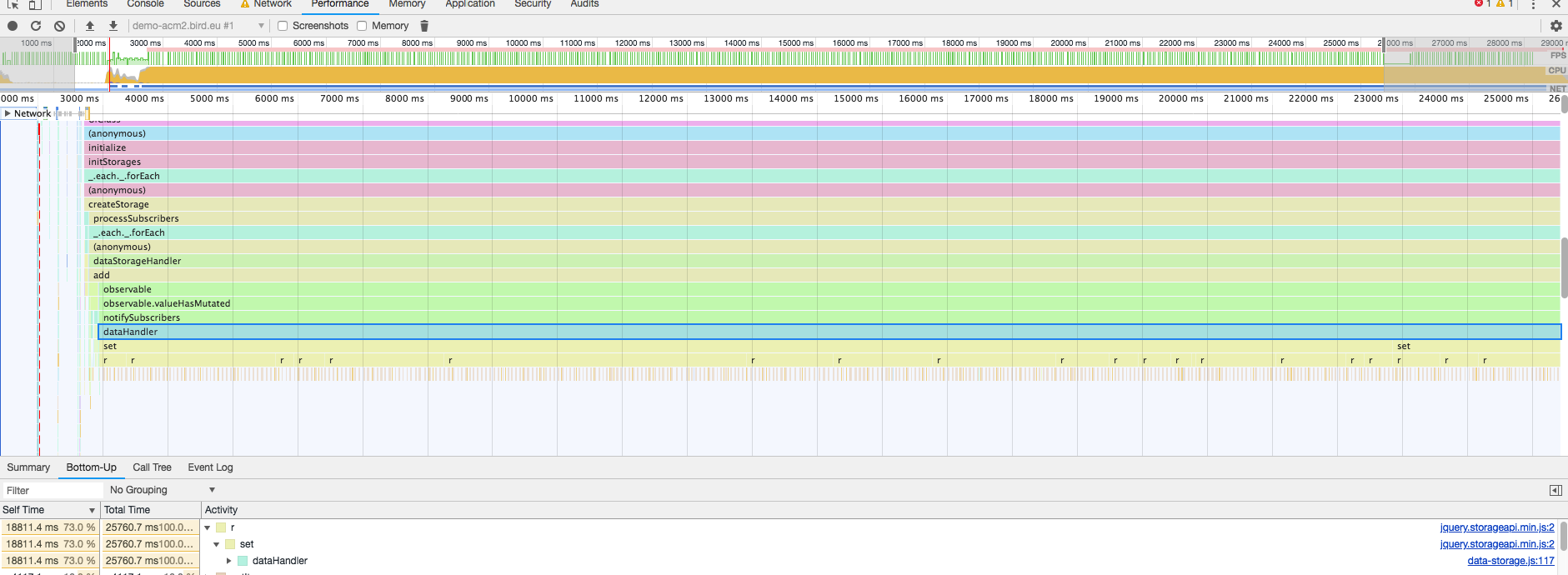
About this issue
- Original URL
- State: closed
- Created 6 years ago
- Reactions: 14
- Comments: 70 (23 by maintainers)
Commits related to this issue
- #17813 - Huge "product_data_storage" in localStorage hangs the shop — committed to omiroshnichenko/magento2 by omiroshnichenko 6 years ago
- Fix issue with localstorage getting huge https://github.com/magento/magento2/issues/17813 — committed to magesuite/magento-patches by deleted user 5 years ago
Thanks for starting the discussion on this @krzksz - this is a great find! I noticed this when profiling a few weeks ago, but I didn’t see the same bottleneck as you because I had only visited a few products on the storefront.
At some point, we should look into the evacuation strategy we’re using for
product_data_storageand verify that it actually works.Magento_Customer/js/customer-data.jsdoes have code that triggers an evacuation ofproduct_data_storage, but I can’t speak to whether it actually works.Having said all that, there is a lot of extra, synchronous work happening in this code path that shouldn’t.
The code above takes in a new object that should be merged into the general storage, as shown below:
After this code executes,
this.data(Knockout observable property) is now set to the latest data that we would want to persist inlocalStorage.The problem here ends up being in the listener that we have on the observable, in
Magento_Catalog/js/product/storage/data-storage.js:When
this.localStorage.setis invoked, it is actually invoking the jQuery Storage API abstraction that m2 uses. As the docs call out, when an object is passed as the first parameter toset, each key is individually set on the target object inlocalStorage:This means that, even though we know the state of the final object we want in
localStorage(because we handled the merge instorage-service.js, the jQuery plugin is doing the following:this.data(every product’s data)JSON.parseon the currentlocalStoragevalueJSON.stringifyon the whole objectlocalStorageIt turns out this unnecessary work is incredibly expensive/time consuming. It doesn’t help that the jQuery plugin does a
setItemandgetItemon each iteration of the loop.This abstraction around
localStorageonly seems useful when you want to update a key without handling the merging logic yourself. Since we’re already doing the merge, we should just be using the DOM API which is native (localStorage.setItem).Fixing
To illustrate how expensive this jQuery plugin is, I’ve made the following changes:
Magento_Catalog/js/product/storage/ids-storage.js
Magento_Catalog/js/product/storage/data-storage.js
Local data
Before Change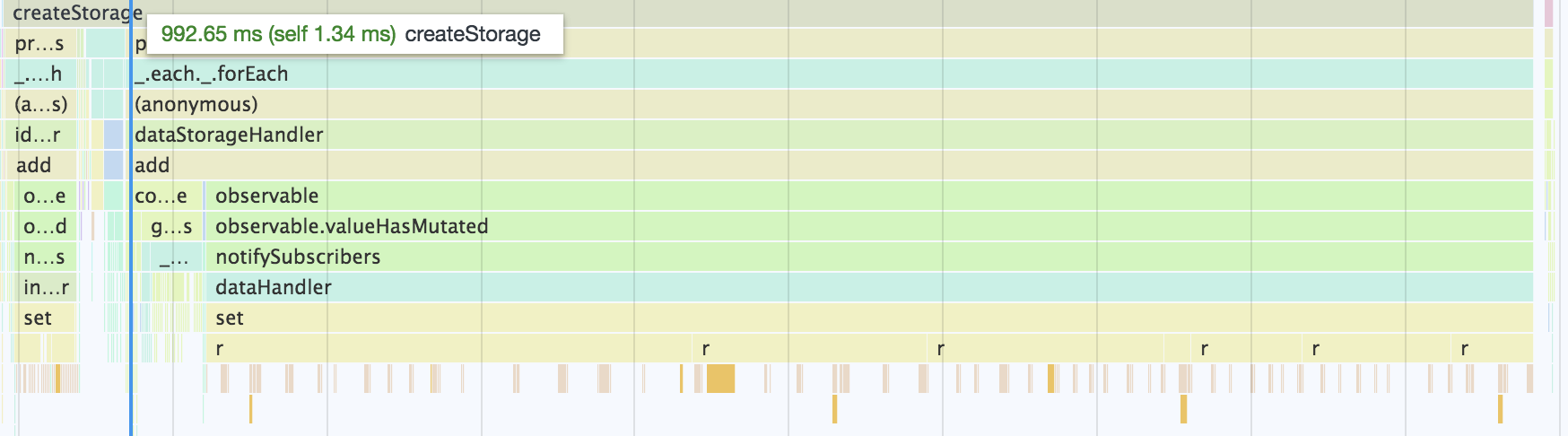
After Change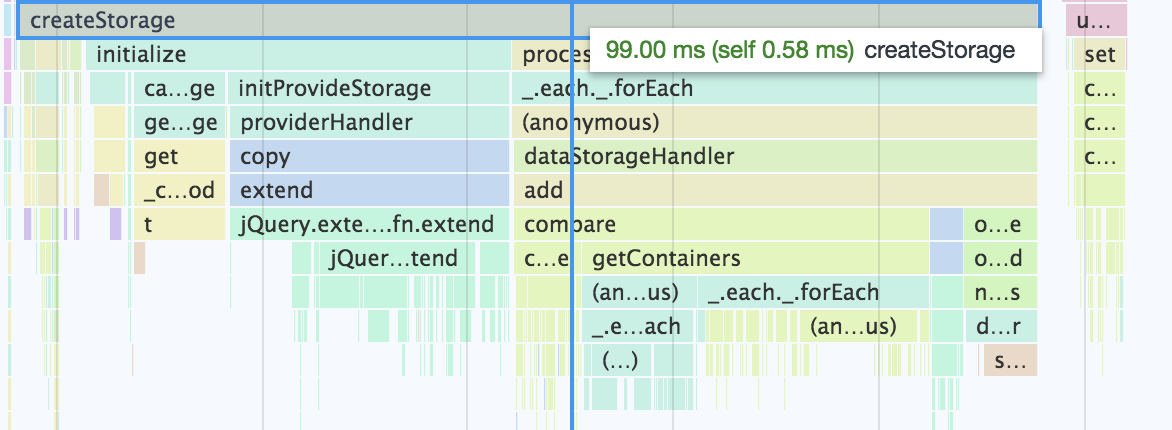
Already some huge savings! But we can actually take this even further. 40ms of the 99ms in the After Change example is doing a comparison on an object, to decide whether we want to persist to
localStorage. But this comparison is significantly more expensive than just updatinglocalStorage. So let’s remove that as well:Magento_Catalog/js/product/storage/ids-storage.js
Result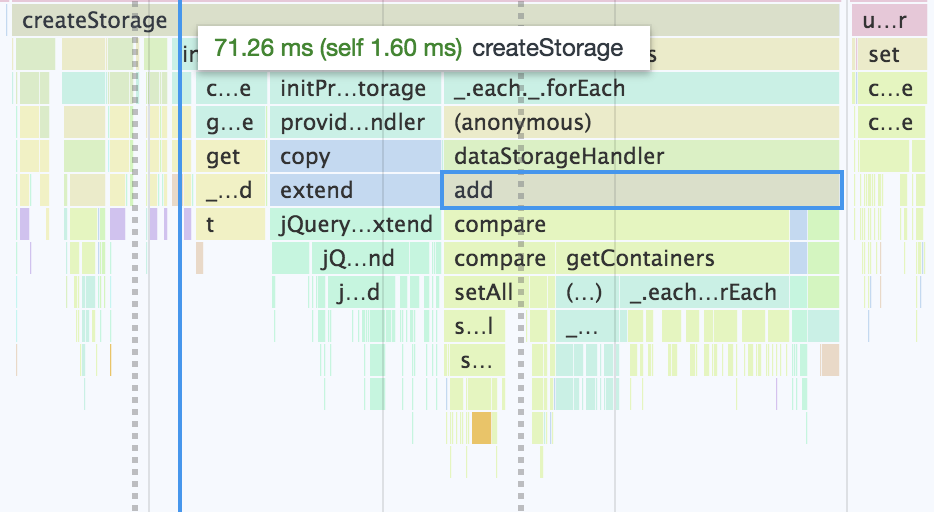
It’s worth noting that
Magento_Catalog/js/product/storage/storage-service.jshas another unnecessary comparison that is adding ~29ms in the screenshot above.If we can get a PR with these changes, this should drastically reduce this bottleneck during pageload. Any takers?
I dumped the JSON from the text file in @krzksz’s original post into my
localStorageforproduct_data_storageand did some before/after profiling.Without Code Change (~22s)
With Code Change (~390ms)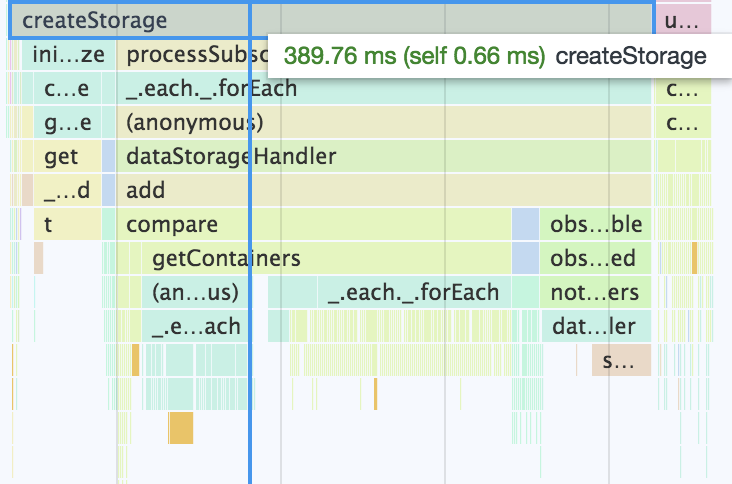
and if I update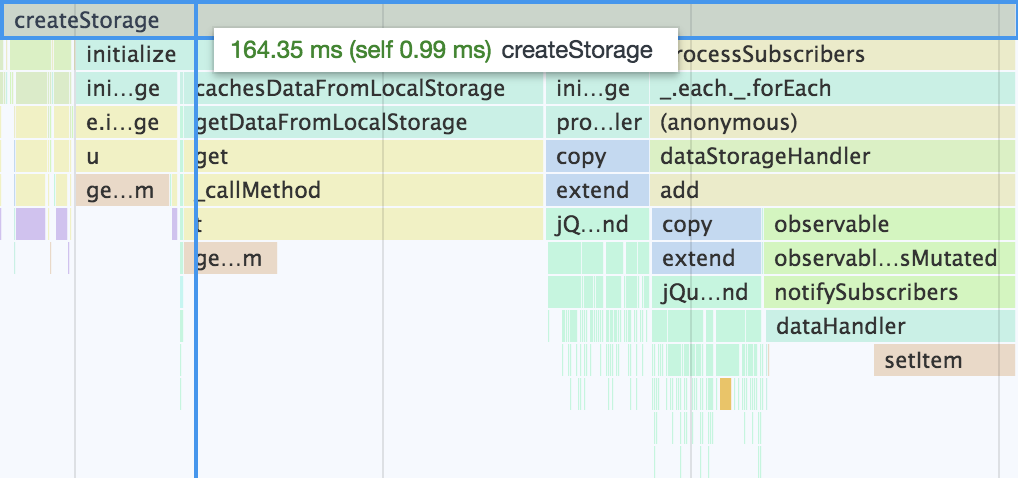
storage-service.jsto remove the unnecessary call tocompare, we get down to ~164ms.Confirming that this issue will be resolved in 2.3.0. Internal ticket MC-4277 has been approved. Thanks for all the help @DrewML, @krzksz, @omiroshnichenko.
If all goes as planned, the fix for this should be landing in 2.3.0
Great !!! Warm thank you ! Solution applied in theme to avoid patching core files. Before : Chrome totally freeze starting 90 tabs opened. After : 190 tabs opened without problem.
I’m waiting my customer to confirm everything is ok on his slowest computer.
Finally fixed in 2.2.8 🎉
@DrewML Yes, this is running in production on https://masta.nl right now. Seems to be working excellent!
@cdcrothers: could you open a new issue for this? That way it will get more traction then leaving a comment on a very old ticket. Thanks!
@1stoked21 no, Google crawl bot doesn’t do sessions
@snoroozi yes it is! 😃
My conclusion from the previous response was not really correct although I feel like this is related. Even after nuking localStorages, the products re-appeared. I checked my database and this is what I found in the
catalog_compare_itemtable;The same four products kept being added to the compare products localStorage becuase in the database they were not assigned to a specific customer, and to visitor_id
0. Magento then concludes that these products should be added to all visitors!@DrewML looks like this fixed our issues as well!
Before:
After:
This is with 20 products. We found one of our clients had over 1000 products in their product_data_storage. This amounted to (1000/20) * 193 = 9.65 seconds! This would now be less than 1 second; a more than 10-fold speed increase 😃 We are happy campers!
Hi @krzksz. Thank you for your report. The issue has been fixed in magento/magento2#19014 by @omiroshnichenko in 2.2-develop branch Related commit(s):
The fix will be available with the upcoming 2.2.8 release.
Thanks @DrewML! I see how you handled it at: https://github.com/magento/magento2/commit/ed6995c7dfa5d35d57ec4f4df5a39b45b734b3bf
I’ve juste taken the originals ones from vendor/magento/module-catalog/view/frontend/web/js/product/storage and applied patches from @DrewML as explained here : https://github.com/magento/magento2/issues/17813#issuecomment-424134757
Another Magento “performance enhancement” that did more harm than good. In my opinion, they need to focus on reducing client-side resources needed instead of adding more server caching. I have a 40ms TTFB, but 10 seconds of client-side execution.