magento2: Admin panel not working if I install any custom modules in Magento 2.2.0
I can’t install any custom modules. When I do this, I get error in admin panel in Magento 2.2.0.
Preconditions
I installed it on my PC on Windows 7 and XAMPP 7.1.9 (which contains PHP 7.1.9, Apache 2.4.27, MariaDB 10.1.26). But then I tried it also on Magento optimized hosting from Nexcess and I get exactly the same error.
Steps to reproduce
- install Magento 2.2.0 with sample data in
D:\xampp\htdocs\my\folder - verify that Magneto works correctly after installation
- upload custom module to
D:\xampp\htdocs\my\app\code\Company\Simple\folder (full code of this module is presented at the end of my post) - enable the module:
php magento module:enable Company_Simple - execute Magento commands:
php magento setup:upgradephp magento setup:di:compile - refresh the “Dashboard” page in Magento admin panel.
Expected result
The “Dashboard” page in Magento admin panel should work normally.
Actual result
The page is blank and the following error is displayed:
Fatal error: Uncaught Error: Call to a member function setActive() on boolean in D:\xampp\htdocs\my\vendor\magento\module-backend\Model\View\Result\Page.php:27 Stack trace: #0 D:\xampp\htdocs\my\vendor\magento\module-backend\Controller\Adminhtml\Dashboard\Index.php(35): Magento\Backend\Model\View\Result\Page->setActiveMenu(‘Magento_Backend…’) #1 D:\xampp\htdocs\my\vendor\magento\framework\App\Action\Action.php(107): Magento\Backend\Controller\Adminhtml\Dashboard\Index->execute() #2 D:\xampp\htdocs\my\vendor\magento\module-backend\App\AbstractAction.php(229): Magento\Framework\App\Action\Action->dispatch(Object(Magento\Framework\App\Request\Http)) #3 D:\xampp\htdocs\my\vendor\magento\framework\App\FrontController.php(55): Magento\Backend\App\AbstractAction->dispatch(Object(Magento\Framework\App\Request\Http)) #4 D:\xampp\htdocs\my\vendor\magento\framework\App\Http.php(135): Magento\Framework\App\FrontController->dispatch(Object(Magento\Framework\App\Request\Http in D:\xampp\htdocs\my\vendor\magento\module-backend\Model\View\Result\Page.php on line 27
Module manager works fine
So I can’t display any page in admin panel, but when I manually type in the address of Module Manager in my browser (http://localhost/my/setup/#/module-grid), the Module Manager page is displayed correctly and my module Company_Simple is listed in the table of installed modules:
company/module-simple | Company_Simple | 2.0.0 | Company
How to make the admin work correctly again
I noticed that if I delete this file:
generated/metadata/global.php
the admin panel starts to work correctly again.
Full code of my custom module
Below is the full code of my test module. It is a minimal module for testing. Here’s the files structure:
- etc/module.xml
- Helper/Data.php
- composer.json
- registration.php
Here’s the code of each file:
composer.json:
{
    "name": "company/module-simple",
    "description": "",
    "require": {
        "php": "~5.6.0|~7.0.0|~7.1.0"
    },
    "type": "magento2-module",
    "version": "2.0.0",
    "license": [
        "Proprietary"
    ],
    "autoload": {
        "files": [
            "registration.php"
        ],
        "psr-4": {
            "Company\\Simple\\": ""
        }
    }
}
registration.php:
<?php

\Magento\Framework\Component\ComponentRegistrar::register(
    \Magento\Framework\Component\ComponentRegistrar::MODULE,
    'Company_Simple',
    __DIR__
);
etc/module.xml:
<?xml version="1.0"?>
<config xmlns:xsi="http://www.w3.org/2001/XMLSchema-instance" xsi:noNamespaceSchemaLocation="urn:magento:framework:Module/etc/module.xsd">
    <module name="Company_Simple" setup_version="2.0.0" />
</config>
Helper/Data.php:
<?php

namespace Company\Simple\Helper;

use Magento\Framework\App\Helper\AbstractHelper;

class Data extends AbstractHelper
{
    /**
     * Test method
     *
     * @return string
     */
    public function doSomething()
    {
        return "Do something.";
    }
}
About this issue
- Original URL
- State: closed
- Created 7 years ago
- Reactions: 1
- Comments: 37 (5 by maintainers)
Has anyone found a permanent solution of this issue? I am facing this issue randomly in Magento 2.3.1 EE version.
I was experiencing this issue, and was even able to solve it by deleting (read: re-naming)
generated/metadata/global.phpalso worked for a little while, but the issue did eventually did appear again, on another admin page.My store is on a linux server, so I wasn’t buying the xampp/windows theory. However, I do develop on windows using PHPstorm. And I know that PHP storm will sometimes break lines to “clean up” code, so that seemed like a more plausible theory.
I used a regex search in
app/code/to find any of my extensions that matchedhttp://www.w3.org/2001/XMLSchema-instance"\n, and discovered there was a layout XML for a module that related to what page I was getting the error. I removed the newline, and everything was back to normal.I then built a regex to see if there are other XML layout files that have this newline:
find . -path "*/layout/*.xml" -exec grep -lir "http://www.w3.org/2001/XMLSchema-instance\"" {} +and it turned out there are a lot of core files that have this, which might explain why some people have this issue on clean installs. What I can’t explain is why it isn’t more widespread, or why it is even an issue.More testing is necessary.
@C4rter The issue doesn’t need to be caused by Windows/Xampp. Maybe there’s just some kind of a bug in Magento which reveals itself only on Windows/Xampp (e.g. because of how Windows handles file permissions, or something like that).
I’ve had an extensive debugging session and I had some insights into the issue. But no solution. The issue seems to be that the backend theme is not properly created when this issue is happening. The trace differs early on and Magento tries to create the backend theme a different way with or without the global.php.
I think the key is this file: vendor\magento\module-theme\Model\View\Design.php
When the issue is happening Magento never “sets” the theme. It just gets it at some point and because it’s not there it’s created on the fly, which creates a faulty theme.
When calling getDesignTheme without a theme set before it creates a theme that just consists of one field “type” with the value of 1.
When the issue is not happening the theme is created differently by setting it. In this function:
The code runs through the “else” part of the second if condition. That creates a proper theme.
It seems like none of the plugins that are in place before and during theme creation are called when the issue is happening. As I mentioned the trace differs in both cases:
Faulty trace: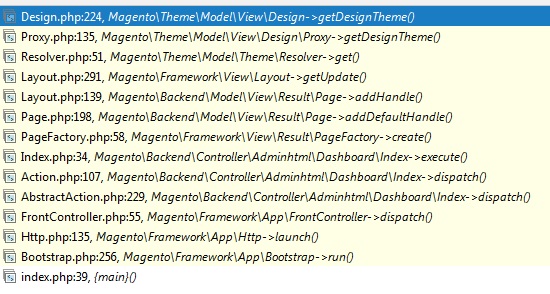
Working trace: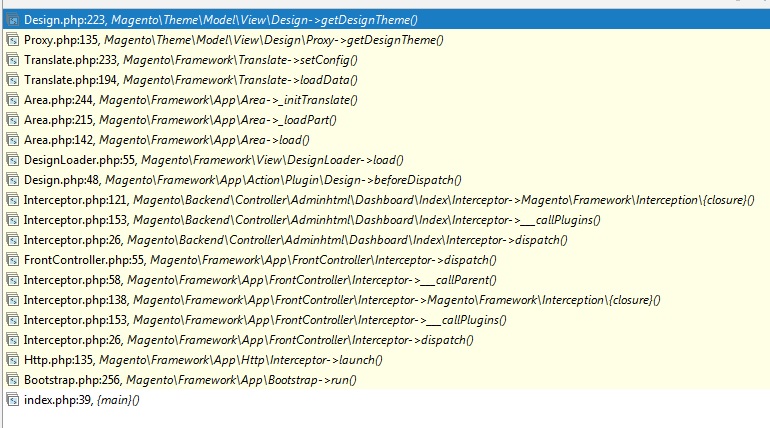
Debugger will show. If you tried to clean everything up (caches,
var/*,generated/*) it’s hard to guess what else may be broken.What could cause that? It’s clean installation.