uptime-kuma: Ping stopped working with Debian base on Podman
Is it a duplicate question? No
Describe the bug
Monitoring using Ping stopped working with error spawn EPERM after pulling latest Docker image 1.6
Public domains like google.com or IP addresses didn’t work either.
Reverting back to the Alpine base with uptime-kuma:alpine fixed the issue.
I’m also using HTTP and TCP monitoring and they work as expected.
To Reproduce
services:
  kuma:
    image: louislam/uptime-kuma
    container_name: kuma
    volumes:
      - /containers/uptime-kuma:/app/data:Z
Expected behavior Monitoring using ping should resolve correctly.
Info
- Uptime Kuma Version: 1.6 from
louislam/uptime-kuma:latest - Using Docker?: Podman 3.3
- OS: Fedora 34 (Server Edition) x86_64
- Browser: Firefox 92
Screenshots
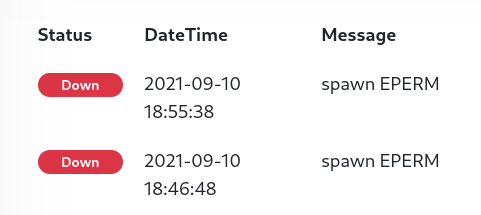
Error Log
Monitor #11 ' Internet': Failing: spawn EPERM | Type: ping
Monitor #11 ' Internet': Failing: spawn EPERM | Type: ping
Monitor #11 ' Internet': Failing: spawn EPERM | Type: ping
About this issue
- Original URL
- State: closed
- Created 3 years ago
- Comments: 16 (5 by maintainers)
Aha my bad! I’m actually using rootful Podman as a docker replacement with
podman-docker, I should’ve mentioned it from the start. It probably comes down to differences in default capabilities. I edited my original post for whoever ends up in the same situation.Can confirm! the following fixed the issue:
I can submit a PR to add it to documentation if required. I’m still curious about why it worked it Alpine though, how does it bypass the permission…