longhorn: [BUG] volume expansion starts for no reason, gets stuck on current size > expected size
Describe the bug (🐛 if you encounter this issue)
Inexplicably, some of my volumes seem to think their current size is bigger than what’s actually specified in the pvc. This looks and feels like someone expanded the volume without changing the pvc, but I’m certain I didn’t.
Either way, the volume gets stuck “expanding” to a smaller size, which of course fails. It can be fixed by manually changing the pvc size to what the volume thinks its size is.
so far, this has happened for the following pvc sizes:
- 100Mi became 1Gi
- 1Gi became 10Gi (twice)
- 8Gi became 10Gi
I have only fixed the 100Mi one by expanding the pvc to 1Gi. I’ll leave the other 3 volumes (non critical workloads) in this bugged state to see what happens / if we need further info.
To Reproduce
sadly, I haven’t found a consistent way to reproduce the issue. it has happened randomly four of my volumes. with no clear pattern
Expected behavior
No expansion should start because there isn’t any reason to.
Log or Support bundle
Sorry in advance: I just realized that something in the longhorn namespace is spamming logs, not sure if that’s related in any way. 1.6 million lines per hour? oh boy. again, sorry if that somehow makes it into the bundle. supportbundle_7bb6c93a-b585-4656-9515-b63f135bffec_2023-03-08T14-37-37Z.zip
I searched my logs for “expan” on the day I already fixed one of these volumes, and here’s what I found:
2023-03-03T21:35:21+01:00	time="2023-03-03T20:35:21Z" level=warning msg="HTTP handling error unable to cancel expansion for volume pvc-0670996d-cd3e-4eef-bf85-941d870416e4: volume expansion is not started"
2023-03-03T21:35:21+01:00	time="2023-03-03T20:35:21Z" level=error msg="Error in request: unable to cancel expansion for volume pvc-0670996d-cd3e-4eef-bf85-941d870416e4: volume expansion is not started"
2023-03-03T21:44:12+01:00	time="2023-03-03T20:44:12Z" level=warning msg="HTTP handling error unable to cancel expansion for volume pvc-0670996d-cd3e-4eef-bf85-941d870416e4: volume expansion is not started"
2023-03-03T21:44:12+01:00	time="2023-03-03T20:44:12Z" level=error msg="Error in request: unable to cancel expansion for volume pvc-0670996d-cd3e-4eef-bf85-941d870416e4: volume expansion is not started"
2023-03-03T21:47:39+01:00	time="2023-03-03T20:47:39Z" level=info msg="CSI plugin call to expand volume pvc-0670996d-cd3e-4eef-bf85-941d870416e4 to size 1073741824"
2023-03-03T21:47:39+01:00	time="2023-03-03T20:47:39Z" level=info msg="Volume pvc-0670996d-cd3e-4eef-bf85-941d870416e4 expansion from 104857600 to 1073741824 requested"
2023-03-03T21:47:39+01:00	time="2023-03-03T20:47:39Z" level=info msg="Event(v1.ObjectReference{Kind:\"Volume\", Namespace:\"longhorn-system\", Name:\"pvc-0670996d-cd3e-4eef-bf85-941d870416e4\", UID:\"a73e58a4-5067-45ae-953b-8a91f0817f62\", APIVersion:\"longhorn.io/v1beta2\", ResourceVersion:\"129337317\", FieldPath:\"\"}): type: 'Normal' reason: 'CanceledExpansion' Canceled expanding the volume pvc-0670996d-cd3e-4eef-bf85-941d870416e4, will automatically detach it"
2023-03-03T21:47:39+01:00	10.42.0.167 - - [03/Mar/2023:20:47:39 +0000] "POST /v1/volumes/pvc-0670996d-cd3e-4eef-bf85-941d870416e4?action=expand HTTP/1.1" 200 4105 "" "Go-http-client/1.1"
2023-03-03T21:47:41+01:00	time="2023-03-03T20:47:41Z" level=debug msg="Polling volume pvc-0670996d-cd3e-4eef-bf85-941d870416e4 state for volume expansion at 2023-03-03 20:47:41.978512983 +0000 UTC m=+310226.612297251"
2023-03-03T21:47:41+01:00	time="2023-03-03T20:47:41Z" level=info msg="Skip NodeExpandVolume since this is offline expansion, the filesystem resize will be handled by NodeStageVolume when there is a workload using the volume."
coincidentally I took a screenshot of the UI error message:
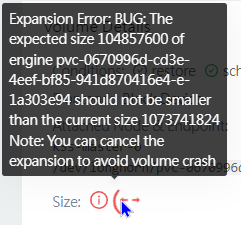
the smaller 104xx number is 100Mi, the bigger 107xxx is 1Gi. Note how the ui claims the current size is 1Gi (and thus can’t “expand” to the desired 100Mi), but when I change the pvc from 100Mi to 1Gi, the logs show that exact expansion happening and the “previous current size” was 100Mi after all.
Environment
- Longhorn version: v1.4.0
- Installation method kubectl
- Kubernetes distro k3s
- Number of management node in the cluster: 1
- Number of worker node in the cluster: 1
- Node config
- OS type and version: ubuntu 22 😦
- CPU per node: 10
- Memory per node: 40Gi
- Disk type: virtualized disk on zpool on nvme ssds
- Network bandwidth between the nodes: n/a
- Underlying Infrastructure: kvm on proxmox
- Number of Longhorn volumes in the cluster: 30
Additional context
I have recently swapped out the server’s physical drives (resilvering in between using mirrored zfs), but I really don’t think that’s related. my kubernetes node is a vm with a disk on the zpool, so it shouldn’t be affected by this at all.
Since it’s a single node cluster, it really doesn’t handle reboots well, even with a proper drain following the recommendations from the docs. it’s possible that a reboot kicked the volumes into this broken state, but I don’t think I have a way of telling for sure.
possibly related:
- #4475 improved the message in the ui, but doesn’t actually touch on how this could happen (I think in that case expansion was triggered by an accidental resize)
- #4459 sounds like my issue, but doesn’t offer a solution (other than “eh it should be fine”)
- #2666 the “halfway resized” reminds me of my issue, but no idea if it makes sense from a technical perspective
Again, I’m leaving the stuck volumes as-is for now. let me know if you want me to try anything on them. Thanks
About this issue
- Original URL
- State: closed
- Created a year ago
- Reactions: 2
- Comments: 31 (17 by maintainers)
For context sharing during the investigation: Currently, I found that there are 4 places that change
volume.spec.size:kubectl -n longhorn-system edit lhv) or the CSI plugin (PVC spec size update)None of the above cases is a new operation introduced in v1.4.0.
In the support bundle attached in this ticket description, I re-checked the problematic volume
pvc-0670996d-cd3e-4eef-bf85-941d870416e4and found that there was no restore request in volume & engine. And the expansion to size 1Gi actually happened around 01/31 ~ 02/01 (by checking the backup CRs). This indicated that the restore logic was probably not the culprit. As for the volume spec size shrinking to 100Mi, there was still no clue.We may need more logs from other users.
I experienced this issue too several times after upgrading from 1.3 to 1.4.1 It occurs only after an immediate restart of one or more worker nodes. Because it has a high impact, shouldn’t we downgrade to 1.3.x ??
And isn’t there really no other workaround like killing a process or deleting a K8S object?
@pwurbs The root cause of this issue is probably this. And based on the discussion, it will be triggered not only in v1.4.1 but also v1.3.x…
Just for anyone else who experiences this, is there a temporary workaround to “resync” longhorn with kubernetes?
I’ll continue working on the support bundle, but one other thing I did was select all my volumes, and upgrade all the engines at once.
I just had this happen after upgrading to 1.4.1 (unfortunately, I don’t remember which I was on before this). This happened to 4 of my volumes.
One peculiar thing I noticed is that one volume scaled up from 10Gi to 600Gi. This very specific size is actually the size of another volume. Considering all of my volumes are <= 50Gi except the one 600Gi one, I found this to be suspicious; almost like it got confused about which volume it was.
Additionally, on my cluster the pvcs are still marked as their original size; longhorn just thinks they are a different size.
Unprompted Volume expansion happened in another user. https://cloud-native.slack.com/archives/CNVPEL9U3/p1679336037573449
The end solution to fix unexpected volume expansion is at https://github.com/longhorn/longhorn/issues/5845.
cc @ejweber
Same issue here with Longhorn v1.4.1.
@wyattjsmith1
Currently there are 2 kinds of workarounds:
oh, january is a while ago. I didn’t notice the issue because volumes still work as expected and I rarely check the longhorn ui. sorry!
Just to note this again, 100Mi is the correct (pvc spec) size I requested and never manually changed. the (temporary) 1Gi size is the weird one
from my commit history I can tell you that I upgraded longhorn including engines (via auto engine upgrade, concurrency=1) from v1.3.0 to v1.4.0 on december 31st 2022 and haven’t touched the longhorn deployments since, so at least for me it wasn’t directly related to an engine update.
Let’s also create an upstream issue as well. If OS is not recognized, Longhorn host log collection should still continue, but ensure collector-longhorn fault tolerant, for example, if unable to collect some specific logs on the host, just skip.
I think the exception comes from support-bundle-collector.sh#L18-L22
I will take a look and create a ticket to see how to fix it.
No. It seems that somehow the volume spec size is shrunk and we don’t know which component changes it. IIRC, currently, there is no strong evidence indicating that the CSI plugin receives an invalid expansion request then sends it to longhorn managers. Maybe this change is not via this HTTP API. We should prevent it in the webhook as well.
YES. At least Longhorn should reject this kind of shrink request. As for the root cause investigation, we will see if there are more clues or ideas later.