longhorn: [BUG] storage suddenly full because of old snapshots
Describe the bug Today I looked into the longhorn stats and found out that the storage is almost full:
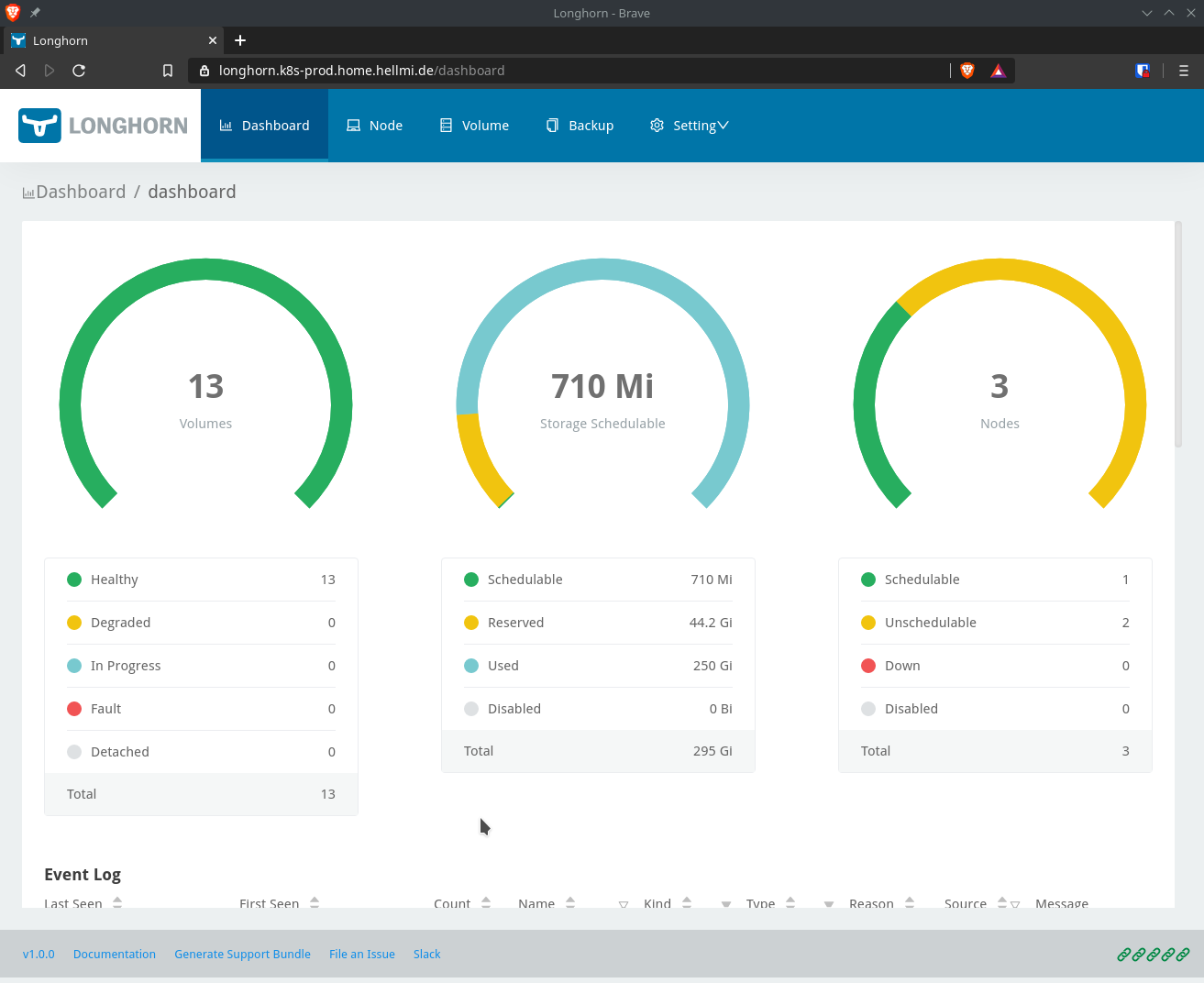
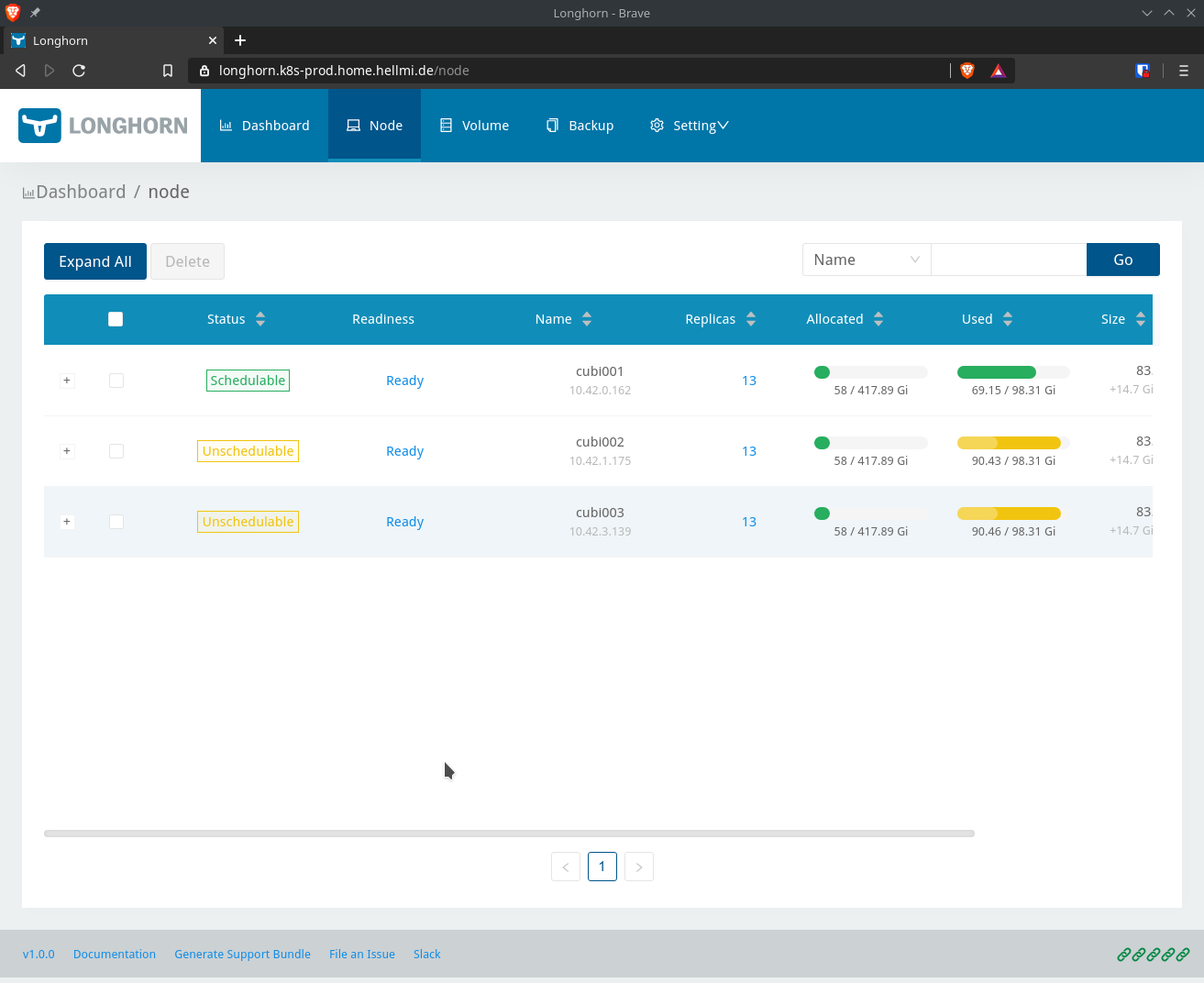
Unfortunatly the guy does not show me which volume waste so much disk space.
I have only a bunch of volumes, which used to only need about 50% of the storage:
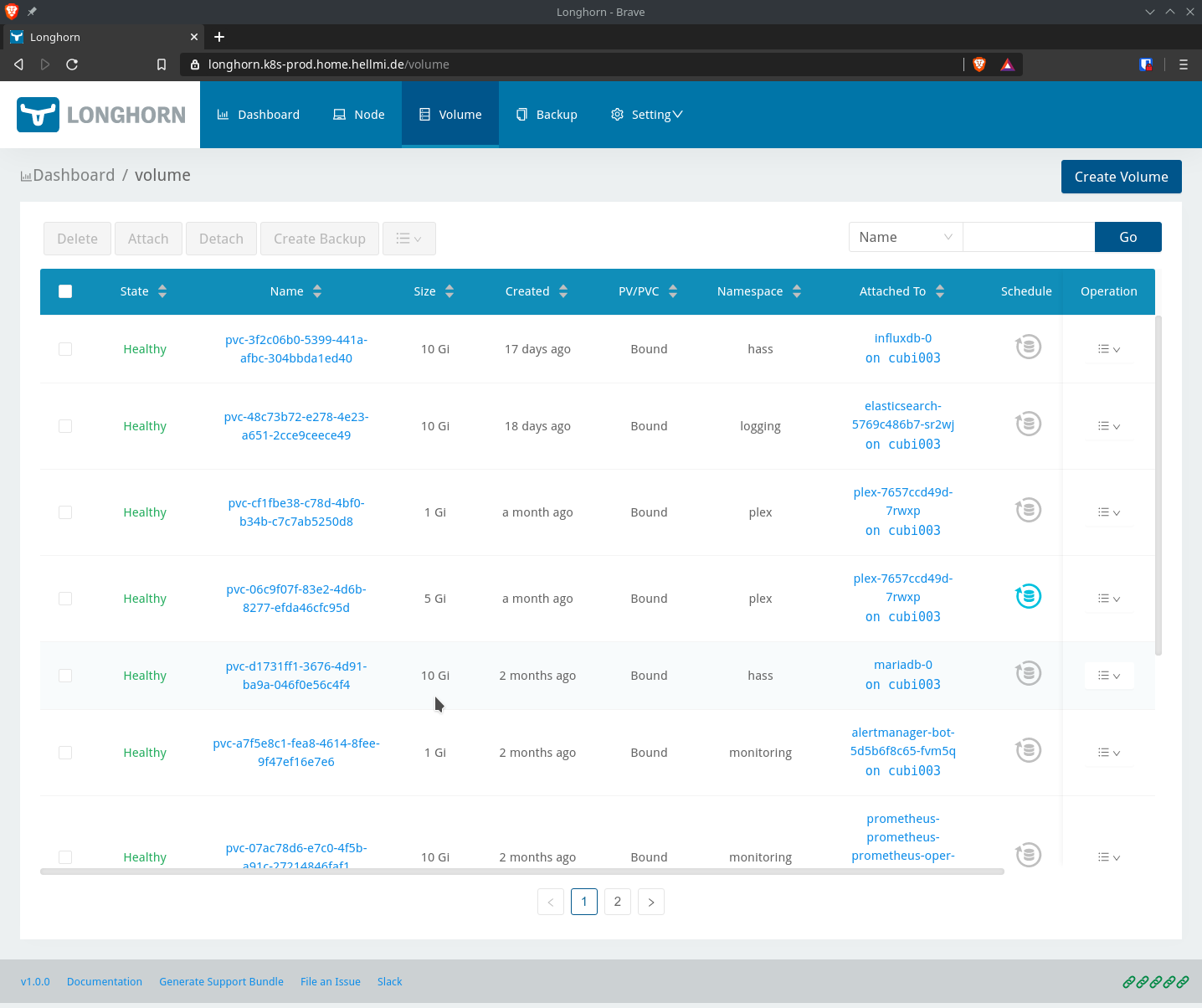
I could image that longhorn did not cleanup volumes. I have open all volumes but could not find any specific volume which has more than 3 replicas.
Cubi1 is the only node which hasn’t been rebooted for weeks. I suspect that during the rebuilding operations caused by reboots of Cubi2-3 some files were not cleaned up.
I also suspect of longhorn beeing responsible for zombie processes:
Welcome to Ubuntu 20.04 LTS (GNU/Linux 5.4.0-37-generic x86_64)

 * Documentation:  https://help.ubuntu.com
 * Management:     https://landscape.canonical.com
 * Support:        https://ubuntu.com/advantage

  System information as of Wed 17 Jun 2020 08:34:49 PM UTC

  System load:  1.33              Processes:               351
  Usage of /:   43.0% of 9.78GB   Users logged in:         0
  Memory usage: 47%               IPv4 address for cni0:   10.42.3.1
  Swap usage:   0%                IPv4 address for enp6s0: 10.0.20.83
  Temperature:  52.0 C

  => /var/longhorn is using 92.0% of 98.30GB
  => There are 16 zombie processes.

 * MicroK8s gets a native Windows installer and command-line integration.

     https://ubuntu.com/blog/microk8s-installers-windows-and-macos

2 updates can be installed immediately.
0 of these updates are security updates.
To see these additional updates run: apt list --upgradable
The prometheus volume looks ok in the webgui:
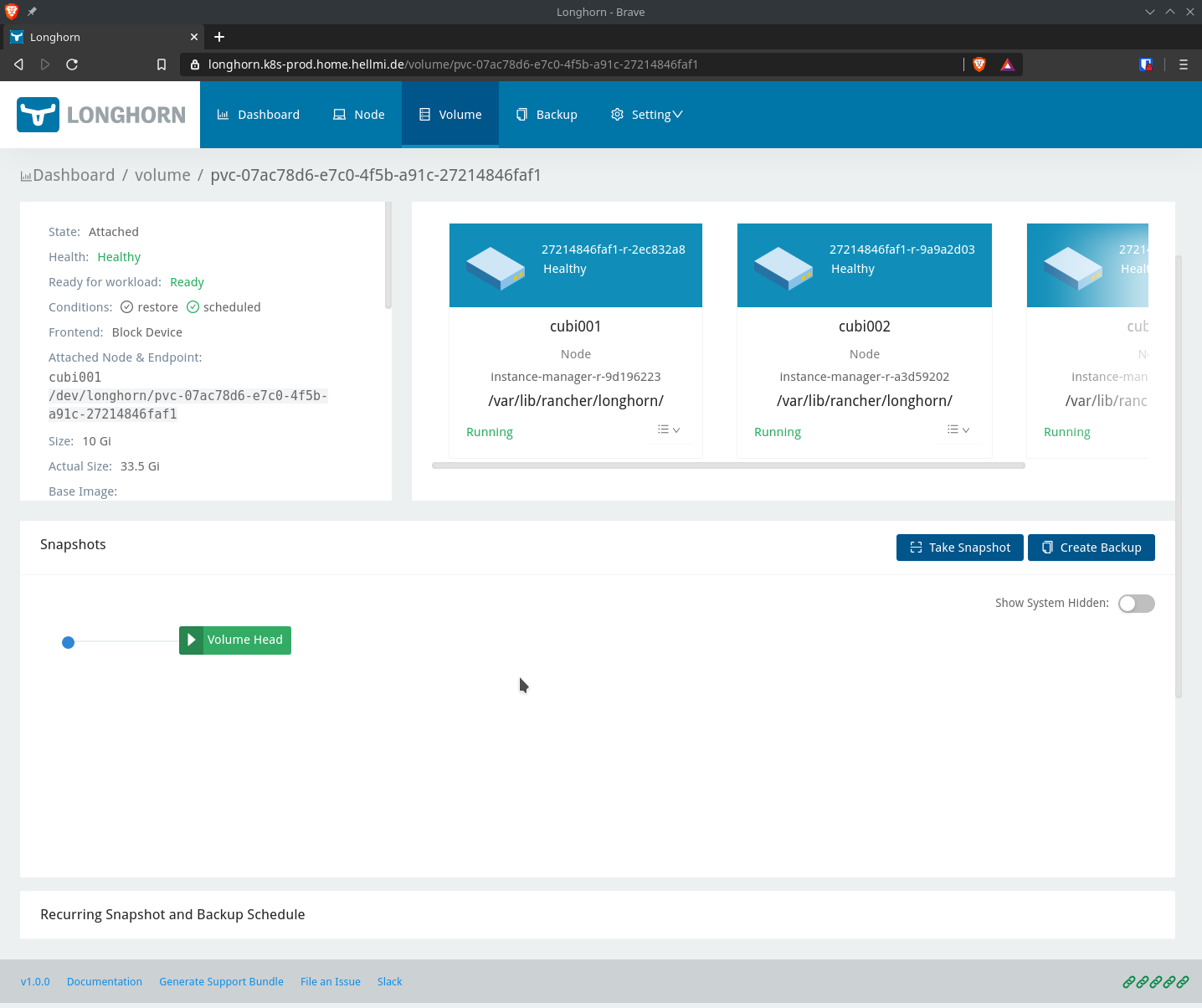
But in the filesystem there are additional files of snapshots which are not shown in the gui. Funny enough I haven’t used snapshots for this specific volume…
root@cubi003:/var/longhorn/replicas/pvc-07ac78d6-e7c0-4f5b-a91c-27214846faf1-19c98e47# ls -la
total 35151564
drwx------  2 root root        4096 Jun 15 15:47 .
drwxr-xr-x 26 root root        4096 Jun 15 15:20 ..
-rw-------  1 root root        4096 Jun 17 20:36 revision.counter
-rw-r--r--  1 root root 10737418240 Jun 17 20:36 volume-head-001.img
-rw-r--r--  1 root root         178 Jun 15 15:20 volume-head-001.img.meta
-rw-r--r--  1 root root         184 Jun 15 15:47 volume.meta
-rw-r--r--  1 root root 10737418240 Jun 15 15:47 volume-snap-0575529f-7b3a-4262-b36c-875dfc08a5a4.img
-rw-r--r--  1 root root         178 Jun 15 15:47 volume-snap-0575529f-7b3a-4262-b36c-875dfc08a5a4.img.meta
-rw-r--r--  1 root root 10737418240 Jun 15 15:47 volume-snap-33673919-030e-40de-989a-0285d47a3b25.img
-rw-r--r--  1 root root         178 Jun 15 15:47 volume-snap-33673919-030e-40de-989a-0285d47a3b25.img.meta
-rw-r--r--  1 root root 10737418240 Jun 15 15:29 volume-snap-38283387-fefc-4b9b-b997-eab0e6aebd73.img
-rw-r--r--  1 root root         178 Jun 15 15:29 volume-snap-38283387-fefc-4b9b-b997-eab0e6aebd73.img.meta
-rw-r--r--  1 root root 10737418240 Jun 15 15:47 volume-snap-54bb0542-7768-409d-aac2-1946906f40c5.img
-rw-r--r--  1 root root         178 Jun 15 15:47 volume-snap-54bb0542-7768-409d-aac2-1946906f40c5.img.meta
-rw-r--r--  1 root root 10737418240 Jun 15 15:47 volume-snap-7d8417a3-0b5b-463d-8b0c-736d793911e3.img
-rw-r--r--  1 root root         178 Jun 15 15:47 volume-snap-7d8417a3-0b5b-463d-8b0c-736d793911e3.img.meta
-rw-r--r--  1 root root 10737418240 Jun 15 15:47 volume-snap-866eda87-848f-49eb-bd76-c5eea9d90159.img
-rw-r--r--  1 root root         178 Jun 15 15:47 volume-snap-866eda87-848f-49eb-bd76-c5eea9d90159.img.meta
-rw-r--r--  1 root root 10737418240 Jun 15 15:20 volume-snap-ad7b6d2a-604e-4b15-9802-850bb48e807c.img
-rw-r--r--  1 root root         178 Jun 15 15:20 volume-snap-ad7b6d2a-604e-4b15-9802-850bb48e807c.img.meta
-rw-r--r--  1 root root 10737418240 Jun 15 15:39 volume-snap-d1985dbd-492b-4a4a-88bc-22aec130d387.img
-rw-r--r--  1 root root         126 Jun 15 15:39 volume-snap-d1985dbd-492b-4a4a-88bc-22aec130d387.img.meta
-rw-r--r--  1 root root 10737418240 Jun 15 15:29 volume-snap-d55808ea-cdbc-40af-8e16-382ecfb18cf8.img
-rw-r--r--  1 root root         178 Jun 15 15:29 volume-snap-d55808ea-cdbc-40af-8e16-382ecfb18cf8.img.meta
-rw-r--r--  1 root root 10737418240 Jun 15 15:47 volume-snap-dbcbed02-3d60-469a-9e4e-fd986859c8a4.img
-rw-r--r--  1 root root         178 Jun 15 15:47 volume-snap-dbcbed02-3d60-469a-9e4e-fd986859c8a4.img.meta
Environment:
- Longhorn version: 1.0
- Kubernetes version: k3s
- Node OS type and version: ubuntu 20.04
Additional context Add any other context about the problem here.
About this issue
- Original URL
- State: open
- Created 4 years ago
- Comments: 15 (15 by maintainers)
OK. The replica directory in host is
/var/lib/longhorn/replicas/<volume name>-<8 random characters>and you can find the accurate path in the volume detail page. You can follow the below instructions to do manual cleanup:cd /var/lib/longhorn/replicas.ls.When the node is rebooted, the replicas on the nodes will become failed. Then Longhorn will do the cleanup when it decides to remove the failed replica. But the node may be still unavailable during the cleanup. In this case, Longhorn has no way to remove the replica directory on the node. And once the failed replica is gone, the replica directory will be a leftover and Longhorn won’t touch it anymore. That’s why you see the cleanup not work right now.
The reason why Longhorn doesn’t apply an aggressive cleanup is that users can use the left replica directory to recover the data when there is something wrong with Longhorn or the volume. Maybe we can provide an option for the aggressive cleanup later.