longhorn: [BUG] RWX volume becomes faulted after the node reconnects
Describe the bug (🐛 if you encounter this issue)
In node-disconnection , case3 step4~5:
node is disconnected for 100 seconds and then reconnected, the volume becomes faulted after the node reconnects
To Reproduce
Preparation:
- Disable auto-salvage.
Steps to reproduce the behavior:
- Launch Longhorn.
- Use statefulset launch a pod with the RWX volume and write some data.
kubectl apply -f statefulset.yaml
statefulset.yaml
apiVersion: v1
kind: Service
metadata:
  name: nginx-state-rwx
  labels:
    app: nginx-state-rwx
spec:
  ports:
  - port: 80
    name: web-state-rwx
  selector:
    app: nginx-state-rwx
  type: NodePort
---
apiVersion: apps/v1
kind: StatefulSet
metadata:
  name: web-state-rwx
spec:
  selector:
    matchLabels:
      app: nginx-state-rwx # has to match .spec.template.metadata.labels
  serviceName: "nginx-state-rwx"
  replicas: 1 # by default is 1
  template:
    metadata:
      labels:
        app: nginx-state-rwx # has to match .spec.selector.matchLabels
    spec:
      restartPolicy: Always
      terminationGracePeriodSeconds: 10
      containers:
      - name: nginx-state-rwx
        image: k8s.gcr.io/nginx-slim:0.8
        livenessProbe:
          exec:
            command:
              - ls
              - /usr/share/nginx/html/lost+found
          initialDelaySeconds: 5
          periodSeconds: 5
        ports:
        - containerPort: 80
          name: web-state-rwx
        volumeMounts:
        - name: www
          mountPath: /usr/share/nginx/html
  volumeClaimTemplates:
  - metadata:
      name: www
    spec:
      accessModes: [ "ReadWriteMany" ]
      storageClassName: "longhorn"
      resources:
        requests:
          storage: 0.5Gi
- Run command
syncin pod, make sure data fulshed. - Disconnect the node to which the
shared-manager-pvcis attached for 100 seconds - Wait for the node back and the volume reattachment.
- After the volume is reattached, the pod will be automatically deleted and recreate.
- Verify the data and the pod still works fine.
- Repeat step 2~6 for 3 times.
- Create, Attach, and detach other volumes to the recovered node. All volumes should work fine.
- Remove Longhorn and repeat step 1~9 for 3 times.
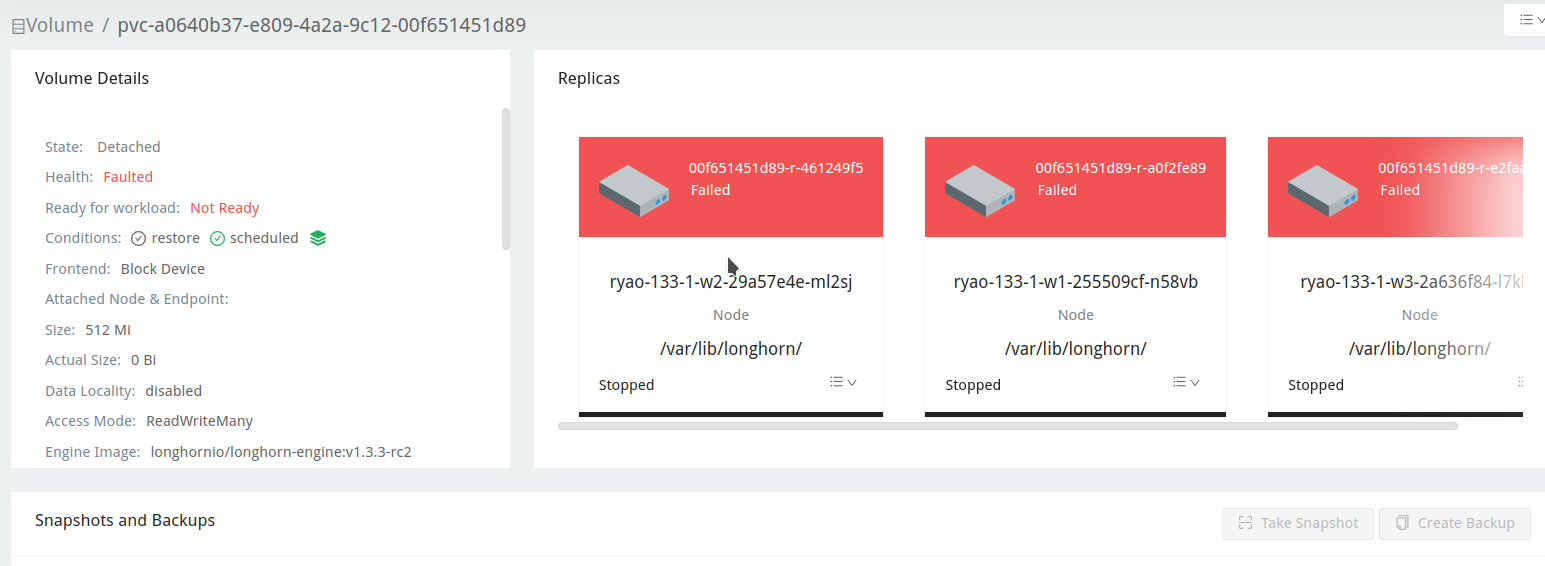
Expected behavior
The volume should be reattached after the node reconnects
Log or Support bundle
longhorn-support-bundle_ec7047cb-8d8a-4455-8c13-3e20680696e4_2023-03-24T08-10-11Z.zip
Environment
- Longhorn version:
v1.3.3-rc2 - Installation method (e.g. Rancher Catalog App/Helm/Kubectl):
Rancher - Kubernetes distro (e.g. RKE/K3s/EKS/OpenShift) and version:
v1.24.10+k3s1- Number of management node in the cluster:
1 - Number of worker node in the cluster:
3
- Number of management node in the cluster:
- Node config
- OS type and version:
- CPU per node:
4 - Memory per node:
16 - Disk type(e.g. SSD/NVMe):
SSD - Network bandwidth between the nodes:
- Underlying Infrastructure (e.g. on AWS/GCE, EKS/GKE, VMWare/KVM, Baremetal):
AWS - Number of Longhorn volumes in the cluster:
1
Workaround
Enable salvage
Additional context
Add any other context about the problem here.
About this issue
- Original URL
- State: open
- Created a year ago
- Reactions: 1
- Comments: 20 (18 by maintainers)
Hi @innobead @derekbit : I was able to reproduce the issue on
v1.3.2andmaster-head.132_issue5658_longhorn-support-bundle_a969d7ce-5b54-458d-a6ff-ecca96045595_2023-03-30T03-24-11Z.zip
master-head-issue5658-supportbundle_c92f689c-7db9-4b5f-a219-82d39482967f_2023-03-30T04-59-05Z.zip
I also wanted to update you on one thing. When I tried to reproduce this issue 10 times with master-head on rke1, I was unable to observe the issue. However, I was able to easily reproduce this issue on k3s.
master-head-on-rke1-supportbundle_9ba22ba5-77f3-4e9e-96d1-44e4bed09566_2023-03-30T05-08-42Z.zip
Correct my finding and please ignore previous steps. I found out the engine process was trapped into an error state at an earlier moment.
This is caused by orphaned engine process.
I/O error: no backend available.faileAtSo when we disconnect the network of the node of the share-manager pod from the cluster. There is a period that the workload pod is still writing to the volume because the volume has the local replica. Then later on, longhorn-manager marked the local replica as error (for some reason I do not investigate closely yet) and rebuild that replica using replicas on other nodes
From my testing, looks like with master-head version, the instance-manager pod on the node that we turned off network for 100 seconds always got restarted so there is no chance for the orphan engine process to exist. More specifically:
Looks like there doesn’t seem to have orphan engine process as the instance-manager pods was restarted @derekbit However, it seems problematic that the volume rebuilds the replica on node-1 using other replicas. This seems incorrect as in theory the replica on node-1 should be the one which has the latest data. WDYT @shuo-wu
Since this ticket is dependent on the ticket https://github.com/longhorn/longhorn/issues/5717 and the ticket https://github.com/longhorn/longhorn/issues/5717 is schedule for Longhorn v1.7. Should we also move this one to v1.7? @innobead @derekbit
Hi @derekbit my
k3sisv1.24.10+k3s1&rke1isv1.24.10Thanks @roger-ryao ! Then it should be a different cause than the PR I mentioned, so more likely a day 1 issue now. We need more time on this.
No, the volume is detached and transfers another node, but the original engine process is not deleted because the original one is disconnected. If the volume is located on this node again, it will hit the issue.