longhorn: [BUG] Memory leak in CSI plugin caused by stuck umount processes if the RWX volume is already gone
Describe the bug (🐛 if you encounter this issue)
The memory usage of the CSI plugins has been growing steadily for the past few weeks after upgrading to version 1.4.0
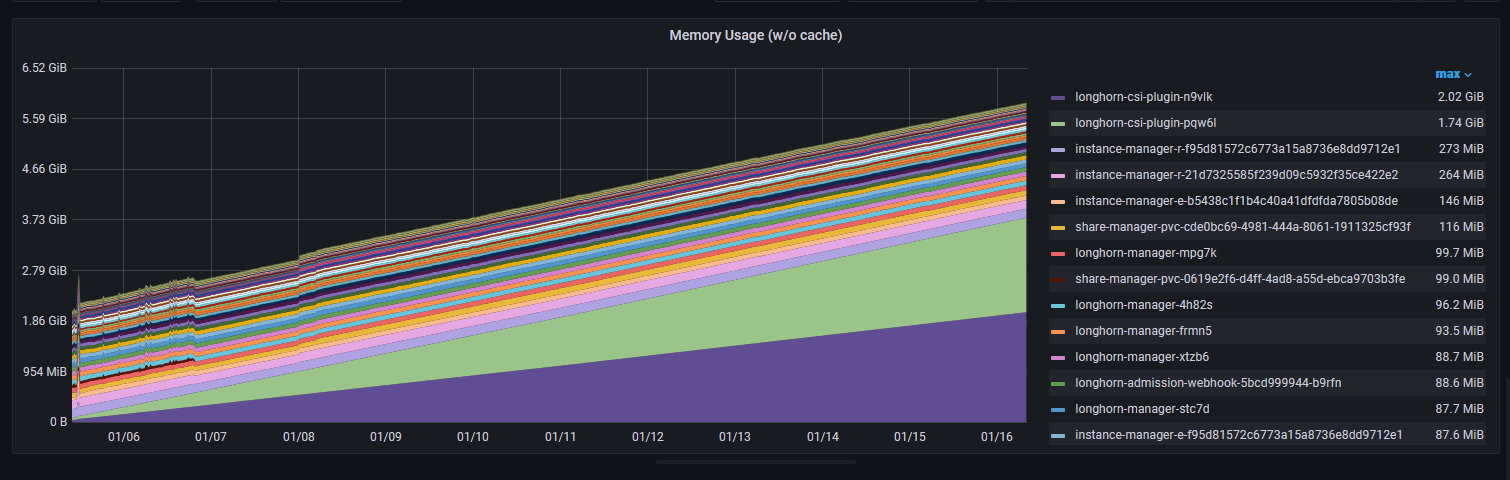
To Reproduce
No specific steps. It has been like that since upgrading to version Longhorn 1.4.0.
Expected behavior
The CSI plugin memory usage should stay relatively small without growing steadily.
Log or Support bundle
supportbundle_413f9f8b-328c-47d2-a25d-4f7c903bf06f_2023-01-16T08-27-12Z.zip
Environment
Longhorn version: 1.4.0 Installation method (e.g. Rancher Catalog App/Helm/Kubectl): Helm Kubernetes distro (e.g. RKE/K3s/EKS/OpenShift) and version: v1.25.4+k3s1 Number of management node in the cluster: 1 Number of worker node in the cluster: 4 Node config OS type and version: Raspbian (5.15.76-v8) and Ubuntu server (22.04.1) CPU per node: 2-4 Memory per node: 4-8G Disk type(e.g. SSD/NVMe): SSD Network bandwidth between the nodes: 1G Underlying Infrastructure (e.g. on AWS/GCE, EKS/GKE, VMWare/KVM, Baremetal): Baremetal Number of Longhorn volumes in the cluster: 15
Workaround
Force umount the stuck umount process by umoun -f.
Additional context
Initially discussed as part of another issue https://github.com/longhorn/longhorn/issues/5195#issuecomment-1383662401
About this issue
- Original URL
- State: closed
- Created a year ago
- Comments: 35 (22 by maintainers)
I am able to reproduce the issue by:
longhorn-csi-plugin:cc @derekbit
Yeah, should follow this pattern.
mount-utils.UnmountWithForce does graceful unmount first. If failed, do force unmount.
Some notes below:
@lazar-boradzhiev Got it. Can you try to umount it by
umount -f?The main culprit seems the k3s server. BTW, a weird thing is that a tons of
umountprocesses (~4000) are stuck on this node.@lazar-boradzhiev would probably need your cooperation when investigating this issue. Thanks first.
@roger-ryao Did you see CPU usage on LH nodes went high when you were validating the issue and the unmount processes were stuck?
We have a fix for the unmount stuck issue. This is because the RWX volume is mounted with
hardmode from v1.4.0. If the share manager is somehow deleted before the volume detachment, the graceful unmount won’t work correctly. Before the release, you can try the workaround.On Sat, Jan 21, 2023 at 3:11 AM Rob Landers @.***> wrote:
Besides figuring out if it can be reproduced, need to use force umount as a fallback in general if graceful umount not working. WDYT or any concerns? @derekbit @joshimoo @PhanLe1010
I see. I cannot reproduce it from my side. @PhanLe1010 Have you succeeded to reproduce it?
For the resilience, we can force umount the mountpoint in CSI plugin as @joshimoo mentioned in https://github.com/longhorn/longhorn/issues/5296#issuecomment-1386347221.
It executed successfully! 🚀
Logs from container:
Memory usage is back to a healthy level
@PhanLe1010 The volume is a ReadWriteMany volume. I saw
longhorn-csi-plugintries to clean up the mountpoint repeatedly. However, the volume and the share-manager are already gone.@lazar-boradzhiev Can you check if
/var/lib/kubelet/pods/e1cf9e16-b3eb-455c-ae64-887200d6f267/volumes/kubernetes.io~csi/pvc-c2c40895-326b-4198-ac70-27f92b6ea62d/mountis still on your Longhorn node? Can you try to force unmount the mountpoint byumount -f?Tons of the below log in the longhorn-csi-plugin:
The weird thing is, there is no error reported from the unmount. And the actual unmount interface Kubernetes provides does not contain a timeout mechanism.
Besides, Kubernetes still considers this volume is in use but actually the related Longhorn volume object is gone:
Probably we can get something from the kubelet log.
dmesg_amaterasu.txt - master dmesg_hermes.txt - storage dmesg_horreum.txt - storage
@derekbit The kubelet logs are quite big. For the last 1 week for total of around 250 MBs, which is not allowed by github. I could spend some time later to try and filter them out a bit or upload them elsewhere.
@lazar-boradzhiev Can you provide the
dmesg -Tof each Longhorn node and kubelet logs for further investigation? Thank you.@lazar-boradzhiev Can you log into the
longhorn-csi-plugincontainer of thelonghorn-csi-pluginpod and check which process is using the big memory byps aux --sort -rss?