longhorn: [BUG] After the node reconnects, the restoring volume sometimes becomes faulted.
Describe the bug (🐛 if you encounter this issue)
In restore-volume-node-down , case1 step3:
I try to simulate a power off on the volume-attached node using a disconnect network script for 5, 100, 400, and 1200 seconds. After disconnecting for 400 seconds, I found that the restoring volume sometimes became faulted after the node reconnected. I was able to reproduce this issue on v1.4.1. Therefore, I believe that I should create a ticket to have this behavior checked to determine whether it is expected or not.
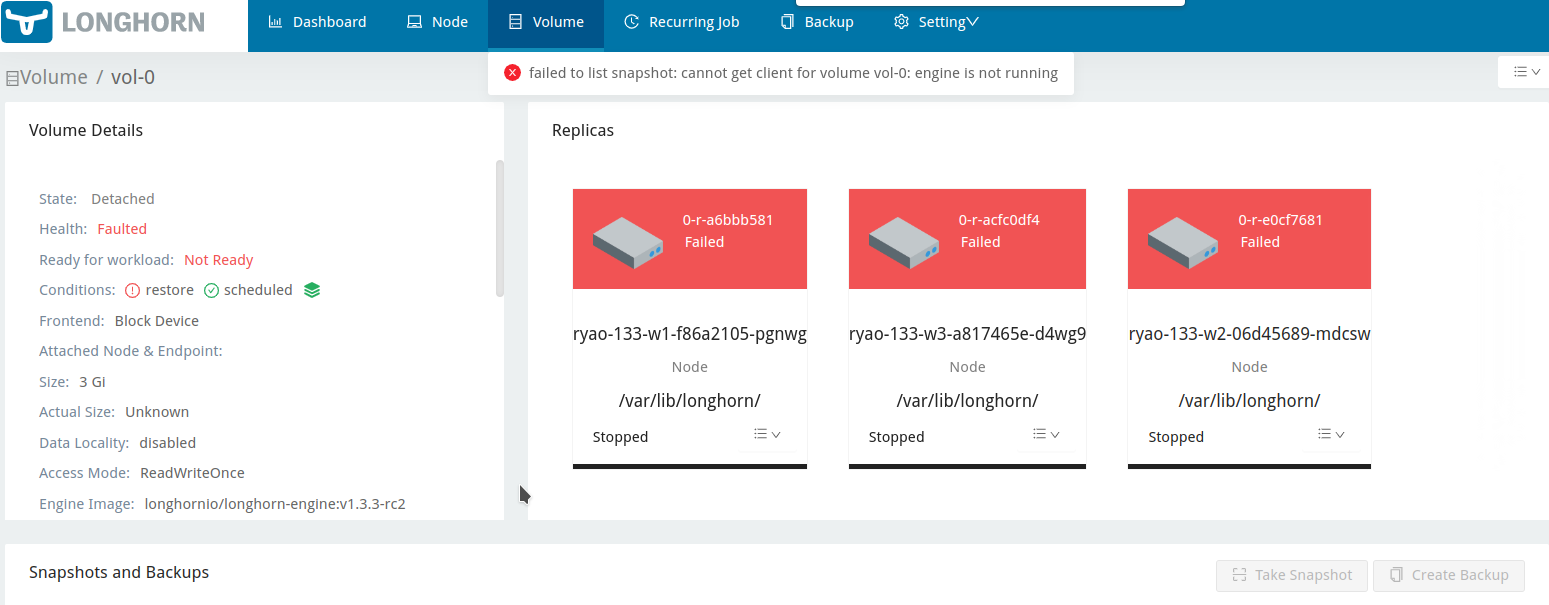
To Reproduce
Steps to reproduce the behavior:
- Create a volume, pv and pvc
vol-0 - Launch a pod with Longhorn volume.
kubectl apply -f pod_mount_1vol.yaml
pod_mount_1vol.yaml
kind: Pod
apiVersion: v1
metadata:
  name: ubuntu-mountvol0
  namespace: default
spec:
  containers:
    - name: ubuntu
      image: ubuntu
      command: ["/bin/sleep", "3650d"]
      volumeMounts:
      - mountPath: "/data/"
        name: vol-0
  volumes:
    - name: vol-0
      persistentVolumeClaim:
        claimName: vol-0
- Write 1.2G data to the volume and create a backup.
kubectl exec -it ubuntu-mountvol0 -- /bin/bash -c "dd if=/dev/urandom of=/data/1.2g bs=1M count=1200 oflag=direct status=progress && md5sum /data/1.2g" - Create a restore volume from the backup.
- Disconnect the network of the node that the volume attached to for 400 seconds during the restoring.
- Wait for the Longhorn node down.
- Wait for the restore volume being reattached and starting restoring volume with state
Degraded. - Wait for the restore complete.
- Attach the volume and verify the restored data.
- Verify the volume works fine.
Expected behavior
The volume restore should be completed.
Log or Support bundle
longhorn-support-bundle_c15ffec2-0b12-496f-b7c6-aa3f64af6826_2023-03-27T06-23-28Z.zip
Environment
- Longhorn version: v1.3.3-rc2
- Installation method (e.g. Rancher Catalog App/Helm/Kubectl): Kubectl
- Kubernetes distro (e.g. RKE/K3s/EKS/OpenShift) and version:
- Number of management node in the cluster: 1
- Number of worker node in the cluster:3
- Node config
- OS type and version:
- CPU per node:4
- Memory per node: 16g
- Disk type(e.g. SSD/NVMe): SSD
- Network bandwidth between the nodes:
- Underlying Infrastructure (e.g. on AWS/GCE, EKS/GKE, VMWare/KVM, Baremetal): AWS
- Number of Longhorn volumes in the cluster: 1
Additional context
https://confluence.suse.com/pages/viewpage.action?spaceKey=LON&title=Negative+Testing https://longhorn.github.io/longhorn-tests/manual/pre-release/backup-and-restore/restore-volume-node-down/
About this issue
- Original URL
- State: closed
- Created a year ago
- Comments: 15 (9 by maintainers)
Hi @c3y1huang : I was not able to reproduce the issue when restoring (reverting) the existing volume’s backup (snapshot).
Steps to reproduce the behavior:
vol-0pod_mount_1vol.yamlusing the commandkubectl apply -f pod_mount_1vol.yaml.pod_mount_1vol.yaml
kubectl exec -it ubuntu-mountvol0 -- /bin/bash -c 'dd if=/dev/urandom of=/data/1.2g bs=1M count=1200 oflag=direct status=progress && md5sum /data/1.2g', and create a backup of the volume.When the engine process fails to communicate with a replica, all replicas are marked ERR, and the volume’s RestoreRequired status cannot be updated to false. Hence, blocking auto-salvage. By the current design, Longhorn is relying on the RestoredRequired flag to determine the completion of the restores. So the behavior described in this issue is expected.
On the other hand, restoring backup within exiting volume calls snapshot revert, which is different from the volume backup restore process. So we don’t expect to hit this issue with the backup(snapshot) revert.
@roger-ryao could you help to confirm the behavior when restoring(revert) the existing volume’s backup(snapshot) ?
According to the Node disconnection test, this behavior is only expected if the auto-salvage is disabled.
So need to check why it’s not salvaged in this case.
Ref:
https://github.com/longhorn/longhorn-tests/pull/1296
Hi @innobead : I was able to reproduce the issue not only on v1.3.2, but also on v1.4.0. Here is the support bundle for your reference.
@roger-ryao one more request , is it able to reproduce in 1.3.2?
I was able to reproduce the issue on the master-head. supportbundle_ae12f40a-8c91-42e6-93e0-f5ee6f57b315_2023-03-28T04-28-23Z.zip
Hi @innobead : I didn’t disable
Automatic Salvage; it was enabled. However, the volume’s robustness status remainedfaultedand did not return to a healthy state.I could reproduce this on 1.3.3-RC2 and 1.4.1, but I don’t test it on master yet.