longhorn: AttachVolume.Attach failed despite all volumes being attached and healthy.
I have 3 nodes: small, medium and large.
I need my application to run fully on the large node (bpknsvaifp01), so the replicas only provision there. This is achieved via node selector for my deployments and data locality for replicas. The longhorn storage class has number of replicas set to 1 and data locality is best-effort.
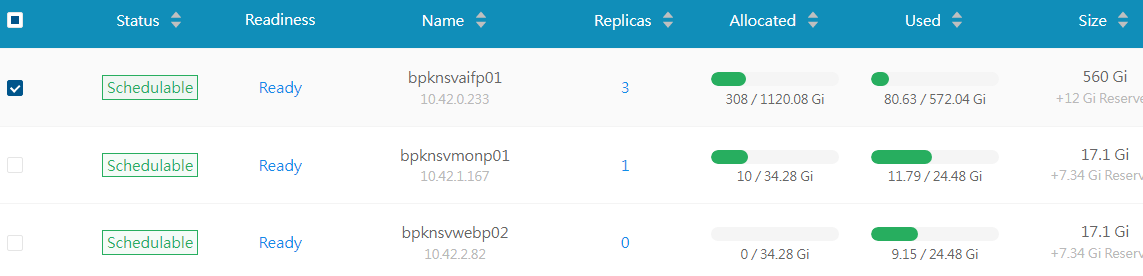
When I install the deployment, the pods are created and longhorn provisions the PVCs correctly. The application has 3 volumes to mount and their singleton replicas are all living on bpknsvaifp01 according to screenshot below:
Unfortunately the pods that are looking to mount the pvc-bf6acb45-1f4c-45a7-b0f5-482e58912182 are getting:
AttachVolume.Attach failed for volume "pvc-bf6acb45-1f4c-45a7-b0f5-482e58912182" : rpc error: code = DeadlineExceeded desc = volume pvc-bf6acb45-1f4c-45a7-b0f5-482e58912182 failed to attach to node bpknsvaifp01
The pod distribution is as follows:
- Application pods are on all
bpknsvaifp01 - Replica instance manager is on
bpknsvaifp01 - Volume instance manager is on
bpknsvmonp01. - Longhorn says the volume is mounted to
bpknsvmonp01
What can I do to make it all run on bpknsvaifp01?
There are no errors in any logs of the Replica and Volume instance managers.
About this issue
- Original URL
- State: closed
- Created 2 years ago
- Comments: 35 (10 by maintainers)
The RWO worked by the way. We ended up using a remote NFS share for the data anwyay, but it was good to run through different scenarios.
Is the storage SSD or HDD? We probably need to investigate the slowness and have it improved.
Yes. I did a quick test. It works if all pods are on the same node. You can give it a go. 😃
@derekbit is it possible to tell Share Manager to spin up on a specific Node? I have 4 pods that are writing and reading from the volume. It should all be contained within this one Node.
Interesting, I have not seen this. Thank you I will try that!