libgdx: Crashes not loading libgdx.so on certain devices
Please ensure you have given all the following requested information in your report.
Issue details
We see some amount of crash reports from certain devices when loading libgdx games.
Reproduction steps/code
Seeing crash reports from firebase.
Version of LibGDX and/or relevant dependencies
1.9.10
Stacktrace
Caused by com.badlogic.gdx.utils.GdxRuntimeException
Couldn't load shared library 'gdx' for target: Linux, 32-bit
com.badlogic.gdx.utils.SharedLibraryLoader.load (SharedLibraryLoader.java:125)
com.badlogic.gdx.utils.GdxNativesLoader.load (GdxNativesLoader.java:33)
com.badlogic.gdx.backends.android.AndroidApplication.<clinit> (AndroidApplication.java:60)
java.lang.Class.newInstance (Class.java)
android.app.Instrumentation.newActivity (Instrumentation.java:1078)
android.app.ActivityThread.performLaunchActivity (ActivityThread.java:2558)
android.app.ActivityThread.handleLaunchActivity (ActivityThread.java:2727)
android.app.ActivityThread.-wrap12 (ActivityThread.java)
android.app.ActivityThread$H.handleMessage (ActivityThread.java:1478)
android.os.Handler.dispatchMessage (Handler.java:102)
android.os.Looper.loop (Looper.java:154)
android.app.ActivityThread.main (ActivityThread.java:6121)
java.lang.reflect.Method.invoke (Method.java)
com.android.internal.os.ZygoteInit$MethodAndArgsCaller.run (ZygoteInit.java:889)
com.android.internal.os.ZygoteInit.main (ZygoteInit.java:779)
de.robv.android.xposed.XposedBridge.main (XposedBridge.java:107)
Caused by java.lang.UnsatisfiedLinkError
dlopen failed: library "/system/lib64/libgdx.so" needed or dlopened by "/system/lib64/libnativeloader.so" is not accessible for the namespace "classloader-namespace"
Please select the affected platforms
- [ X] Android
- iOS (robovm)
- iOS (MOE)
- HTML/GWT
- Windows
- Linux
- MacOS
About this issue
- Original URL
- State: open
- Created 5 years ago
- Reactions: 1
- Comments: 32 (16 by maintainers)
Hi, sorry for writing in this “old” issue, but I think this issue is still not solved. We are using the libGDX version 1.11.0, and in ALL of our games we have some significant number of crashes in the Google Play Console (and crashlytics) with the error:
Yesterday we released a new update of a game (only 10% staged rolled update) and araised quite a lot errors, that on previous version didn’t appear (it was using the previous libGDX v1.10.0)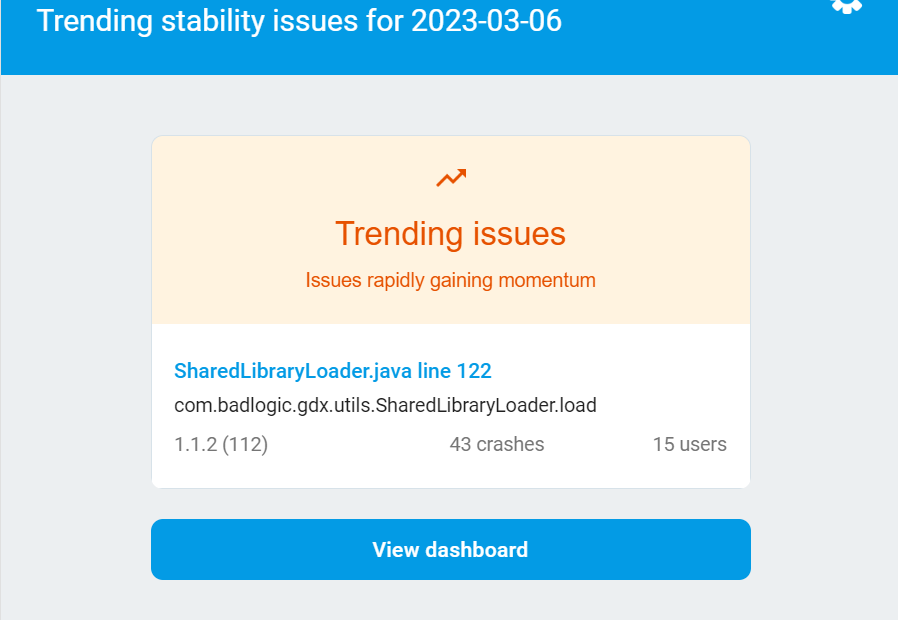
Investigating this issue we found that it afected mostly the device : OnePlus 8 Pro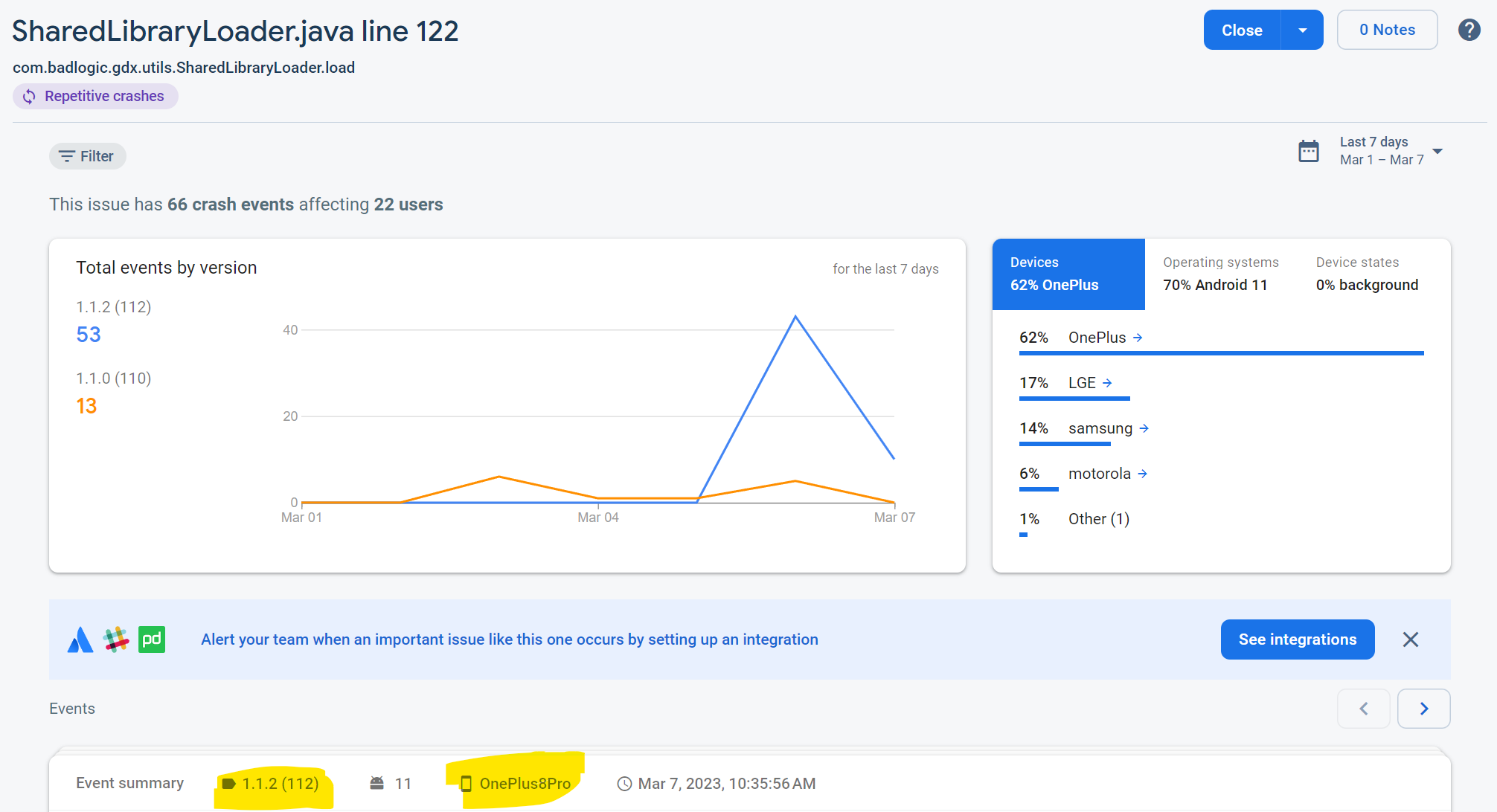
Very strange… maybe this device in particular has not the “Android Runtime” string in the property “java.runtime.name” Anyways I think the way to detect that we are on an Android device OS is not working in all cases: PR:(https://github.com/libgdx/libgdx/pull/5897)
Maybe there should be some alternate way to “force” the Android loading of the .so file. Or just check if contains the “Android” string.
PD: I am using the Bundle format.
I think i don’t userstand the exact problem. The crash (crashytics) is in SharedLibraryLoader line 122:
But the error message “detects” the Android flag (watch selected Exception lines:
Caused by com.badlogic.gdx.utils.SharedLibraryLoadRuntimeException: Couldn’t load shared library ‘gdx’ for target: Android at com.badlogic.gdx.utils.SharedLibraryLoader.load (SharedLibraryLoader.java:128) at com.badlogic.gdx.utils.GdxNativesLoader.load (GdxNativesLoader.java:30)
So the problem don’t seems to be in the checking of the “Android Runtime” in the System properties… What I am missing?
I’ll reopen this because even if I’m skeptical it can be fixed, it’s still present (and has been for many years).
First thing to note is that, even if this is by far my most common crash (and has been like that for years) with 150+ unique users with this error and over 600 crahes in Firebase on the last 90 days in one of my games I’ve never seen a review complaining about it or direct email to complain about which suggests this is only happening to some kind of user that’s doing something non standard.
In my experience the model/brand of devices, OS version and rooted device percentage distribution of the crashes suggests a majority are most likely occurring to users that did not download the game from Google Play. The most likely cause for this issue is that they downloaded the wrong architecture from an alternative store and when it crashes they just assume the APK is corrupted or something like that and move on.
What we could do to try to confirm this theory to add more information to the Exception message of
SharedLibraryLoadRuntimeExceptionbut I wouldn’t be too worried about it.This can only be fixed if someone is able to reliably reproduce this issue. Have you tried any of the fixes and debugging steps mentioned above?
This seems to be a Problem with the mapping in line: https://github.com/libgdx/libgdx/blob/11a53e2d9d573e2a0a94457b309dbf7044623497/gdx/src/com/badlogic/gdx/utils/SharedLibraryLoader.java#L101 and the setting that android is no linux / the System.getProperty() value also could not match: https://github.com/libgdx/libgdx/blob/11a53e2d9d573e2a0a94457b309dbf7044623497/gdx/src/com/badlogic/gdx/utils/SharedLibraryLoader.java#L51 Could somebody of you run the following snippet inside the Launcher’s create method before creating the
new AndroidApplication(...)statement and provide the output here?: