matter-js: Unexpected loss of energy in frictionless perfectly elastic setting
I’m using a modified version of the beachBalls example, with no friction, no air friction, and restitution of 1. When I let it run in the demo window, the balls eventually stop bouncing and come to a stop. I would expect them to keep bouncing indefinitely.
(function() {

    var World = Matter.World,
        Bodies = Matter.Bodies,
        Composites = Matter.Composites;

    Example.frictionlessBeachBalls = function(demo) {

        var engine = demo.engine,
            world = engine.world;

        // need random initialization
        var stack = Composites.stack(0, 100, 3, 1, 20, 0, function(x, y) {
            return Bodies.circle(x, y, 75, { restitution: 1, friction: 0, frictionAir: 0, frictionStatic: 0 });
        });
        World.add(world, stack);
    };

})();
I also tried setting the restitution of the world boundaries to 1 (the code below is modified from the Demo.reset, and that did not help.
        World.add(world, [
            Bodies.rectangle(400, -offset, 800.5 + 2 * offset, 50.5, { isStatic: true, restitution: 1 }),
            Bodies.rectangle(400, 600 + offset, 800.5 + 2 * offset, 50.5, { isStatic: true, restitution: 1 }),
            Bodies.rectangle(800 + offset, 300, 50.5, 600.5 + 2 * offset, { isStatic: true, restitution: 1 }),
            Bodies.rectangle(-offset, 300, 50.5, 600.5 + 2 * offset, { isStatic: true, restitution: 1 })
        ]);
I thought this might be an approximation issue when computing the effects of collisions and set high numbers for positionIterations, velocityIterations, and constraintIterations.
        demo.engine.positionIterations = 1000
        demo.engine.velocityIterations = 1000
        demo.engine.constraintIterations = 1000
This did not help either.
Is this loss of energy due to numerical approximation errors, or can this energy loss be explicitly controlled? At the moment beyond adjusting restitution and friction I am unable to find ways to make energy conservation perfect.
About this issue
- Original URL
- State: open
- Created 8 years ago
- Reactions: 6
- Comments: 27 (8 by maintainers)
Adding this line of code seems resolve the issue.
Matter.Resolver._restingThresh = 0.001;@karimshalapy thanks for sharing!
This is still on my list of improvements I’d like to make (quite a long list though!)
For now my suggestions are the following as discussed earlier in the thread:
body.friction = 0andbody.frictionAir = 0body.inertia = Infinitybody.slopEngine.update(engine, 1)and call multiple updates per frameengine.positionIterations = 20andengine.velocityIterations = 20Body.setVelocity(body, Vector.mult(Vector.normalise(body.velocity), speed))Hi! Sorry for gravedigging.
This still seems to be an issue. I put multiple balls in a box (no friction, infinite inertia) and calculate the total kinetic energy over time. I initialize all of them by applyForce. There are 3 major problems. 1. Energy loss over time, 2. Sticky walls, 3. reflection angle on walls not always correct (tendency towards the wall). If the E-loss would just be a small loss per collision it would be fine, but it seems to distort the collision angle as well. In case a wall is sticky, I checked on the body.velocity x/y ratio and it was still the same (ignoring that one component was 0 since it stuck in the wall).
With the Workaround of @Menowa1709 the energy is conserved, walls are not sticky and the angle looks fine. Here is a fiddle where the fix can be switched on/off on line 77 https://jsfiddle.net/dediggefedde/3n6whja5/22/
The problem of the workaround is ignoring inertia and friction if it is switched on. also momentum transfer based on mass is not working. (In my code I made a small error setting all speeds to the first ones, but even splitting them does not fix this. One would need to calculate the e-transfer by hand)
I wanted to do a collision simulation, and a Brownian motion simulation but the energy loss in a fully elastic world is recognizable and the system becomes idle fairly quickly especially when a ball hits a stationary wall. In order to get the desired outcome, I had to implement the physics logic in the “collisionStart” event on the engine.
And here’s what I did to achieve the Brownian motion…
Add some walls
Then I add balls at random locations and set a random initial velocity to each one.
And here are the Helper functions:
The function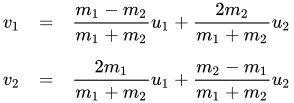 For more information search Elastic collisions or check the equations for a brief explanation on the wiki here
calcElasticCollisioncalculates the final velocity after an elastic collision according to the equations:Doing this will provide you with a fully elastic collision system that never loses energy, this would work with one-dimensional collision too, but too complicated stuff I have no guarantees it’ll work. Anyway, this is my workaround and I hope this helps someone who needed the same thing I did, and I hope this issue is solved and closed soon enough.
Regards,
in beforeUpdate event:
I am facing the same issues. I want a very slow body (ball or rectangle does not change what I get) that bounces forever with no friction. I get a body that stops at a wall, if the initial force is very low. I’ve used { inertia: Infinity, inverseInertia: 0, restitution: 1, frictionStatic: 1, frictionAir: 0, friction: 0 }
Any suggestion?
Thanks for the test case. My guess is that at least some of the loss is due to floating point errors (it seems that even box2d has the same issue). There’s an article on energy drift which suggests the same.
My suggestion is to artificially add energy (through velocity or forces) back in over time, which you may be able to do yourself using collision or tick events. But a generic solution for any situation might be difficult.
I was trying something similar to the original poster. Just a ball bouncing on a static body.
var ball = Bodies.circle(100, 250, 50, { inertia: Infinity, restitution: 1, friction: 0, frictionAir: 0, frictionStatic: 0});Even with inertia set to Infinity, the ball loses energy and bounces closer and closer to the ground, although interestingly never fully stopping. It seemingly bounces forever very close to the ground. Am I missing something?
Here’s some HTML to quickly test this problem… (It’s a slightly modified version of the “Getting Started” Tutorial.)
I saw the 0.15.0 update, and I thought that I saw this issue listed as closed, so I decided to test this issue once again. It seems that the problem still exists.
Through some experimentation, I realized that squares don’t bounce indefinitely. They don’t bounce very well at all actually. Also, liabru made an interesting suggestion…
That’s why I looked more closely at the circle body.
It doesn’t look like a circle. It looks like a 26-sided polygon. So, I added a 1000 sided polygon next to the circle. Surprisingly, the 1000-sided polygon bounces similarly. I thought it might be better at preserving energy. It is, but only towards the end. While the circle eventually stops, the polygon keeps bouncing — in a similar manner to the previous animated GIF.
This looks like it’s still an issue, so I’m posting up what I found.
The momentum loss is quite significant. I can’t just increase the bounce above 1, because then it will eventually gain too much energy. (Without CCD, the bouncing element will just fly out of the scene.)
Based on previous conversations, I tried two things to fix this problem.
I didn’t even know that setting existed. 😄 The initial value is 0.05. I set it to 0. I didn’t notice a difference.
Setting the
InertiatoInfinitywas another suggestion.This didn’t solve the problem, but it did change the results. The bouncing element will still lose momentum quickly, but not totally. When the distance between the two colliding elements is really close, the bouncing element no longer seems to lose momentum. That’s not much new information, but that seemed like really strange behavior to me. Maybe that helps to track down this problem.
Take a look at this jsfiddle:
https://jsfiddle.net/vd7d25pu/10/
Notice that the ball does appear to bounce forever here. The only difference is that the ‘ground’ rectangle’s height is set to 1. I stumbled upon this accidentally.
It loses it noticeably quick.
https://jsfiddle.net/vd7d25pu/7/