ts-jest: v23: require(...).install is not a function
ts-jest v23.0.0
If I revert back to the latest v22.4.6 and my tests work without issue.
 FAIL  __tests__/base.gun.spec.ts
  ● Test suite failed to run

    TypeError: require(...).install is not a function

    > 1 | import { myAPI } from '../src/myAPI'
About this issue
- Original URL
- State: closed
- Created 6 years ago
- Reactions: 20
- Comments: 55 (2 by maintainers)
@duncanhall you are using react-script-ts which has in its dependencies jest 22 and ts-jest 22. I might be wrong, but maybe it’s not compatible with jest and ts-jest version 23, which might be why your test fails when you switch to version 23 of ts-jest.
That’s really strange. I assume
require(...).install is not a functionis from the source-map-support library that uses an install hook to make sure the sourcemaps are gone.However, we removed that in 23 and we’re using jests built-in source map support, so we’ve deleted the dependency entirely. It errors on line 1 because we’re prepending the install hook to the file - but it obviously can’t find it.
This is why I’m thinking it’s a cache issue, as somehow the old files don’t get the install hook removed, further supported by you not being able to reproduce on a clean repo.
At least that’s my theory.
Unsure why changing the jest version work though. I’m stil betting on a cache issue - try running the stuff here and maybe seeing if there’s both a global and a local cache.
I’m experiencing the same
require(...).install is not a functionissue since upgrading to ts-jest 23.0.0. Downgrading to the previous version fixes the issue.I have made a minimum repo to reproduce the issue at https://github.com/duncanhall/ts-jest-issue-603 (CC: @ahnpnl @kulshekhar)
You can simply
yarn install && yarn testto reproduce it. You can also then downgrade ts-jest to 22.4.2 and the issue goes away. More notes are available in the READMEClearing the jest cache makes absolutely no difference and from reading the responses above seems to be an entirely separate issue from
require(...).install is not a function.@GeeWee I just checked inside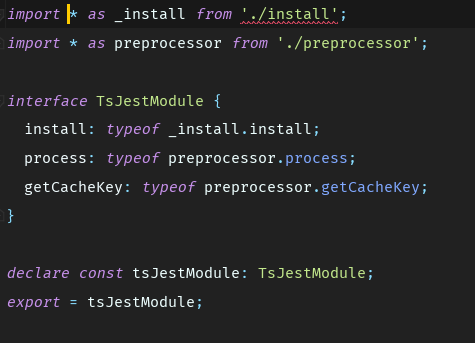
node_modules/ts-jestwith v23 and found thisI think the publishing process to npm had issues.
@huafu I want to share a tip about the caching issue that if you see your tests constantly repeat the same error via several runs, it’s better to run
yarn jest --clearCacheornpm run jest --clearCache. That will at least make sure thatjestdoesn’t cache the old codes and run with your correct code 😃from looking at running
react-scripts-ts test --env=jsdom "--showConfig"the version of jest is actually 20.0.4 and the version of ts-jest is probably different too.I think you’re right.
@huafu Never mind, I think Gun 0.9.9994 is causing the issue somehow. When I reverted to .9.9993, the Jest tests are now all working. I’m not sure what ended up ultimately fixing this issue… might have been deleting node_modules and reinstalling.
https://github.com/amark/gun/issues/576
@krohrsb I don’t think so. The
require(...).installwas some code injected by the transformer.I’ve ran both --no-cache and --clearCache with npm, but my problem still persists. Although the error seems to be a little different now.
yup, also tried that 😕
Does this issue still appear if you run with --no-cache?
…at the end I decided to do one right now, will post t here when done
Hi,
Can you provide a minimum repo to reproduce your problem ? That would help a lot for us to debug 😃