vsphere-csi-driver: Pod timed out waiting for the condition
/kind bug
I have a native/vanilla kubernetes cluster and i’m expriencing a few issues with creatinf stateful sets, when defining dynamic PVC in a stateful set manifest my pods are not being created, they are stuck Waiting\PodInitializing.
Running this:-
kubectl describe pod redis-ss-0 -n redis
Returns:-
Warning FailedMount 41s (x3 over 32m) kubelet Unable to attach or mount volumes: unmounted volumes=[redis-data redis-claim], unattached volumes=[config-map kube-api-access-g4gb8 redis-data redis-claim]: timed out waiting for the condition
I have been through the config and everything looks good. The worker nodes are using the CSIDriver etc. But something is stopping the volumes to be attached.
andy@k8s-master-01:~/k8s/vmware/cpi$ kubectl get CSINode
NAME DRIVERS AGE
k8s-master-01.fennas.home 1 3d19h
k8s-worker-01.fennas.home 1 23h
k8s-worker-02.fennas.home 1 23h
k8s-worker-03.fennas.home 1 23h
The strangest thing is that the Container Volumes are created in vCenter:-

Also I can see the PVCs in kubernetes:-

When I run this `andy@k8s-master-01:~/k8s/vmware/cpi$ kubectl get volumeattachments.storage.k8s.io’
I get this No resources found
Also getting the logs using kubectl logs -n kube-system vsphere-csi-controller-6c6c686dc5-wt82l vsphere-csi-controller -n vmware-system-csi returns 404 Not Found not sure what this means.
{"level":"info","time":"2023-01-29T18:01:30.429429243Z","caller":"vsphere/utils.go:189","msg":"Defaulting timeout for vCenter Client to 5 minutes","TraceId":"846739f8-fa67-413f-905b-d4ba78e741b4"} **{"level":"info","time":"2023-01-29T18:01:31.328660238Z","caller":"k8sorchestrator/topology.go:303","msg":"failed to retrieve tags for category \"cns.vmware.topology-preferred-datastores\". Reason: GET https://10.1.1.3:443/rest/com/vmware/cis/tagging/category/id:cns.vmware.topology-preferred-datastores: 404 Not Found","TraceId":"846739f8-fa67-413f-905b-d4ba78e741b4"}** {"level":"info","time":"2023-01-29T18:06:30.426823673Z","caller":"k8sorchestrator/topology.go:218","msg":"Refreshing preferred datastores information...","TraceId":"c9ff1c0c-be52-426f-a6ed-6b44522fdb4d"} {"level":"info","time":"2023-01-29T18:06:30.428074899Z","caller":"vsphere/utils.go:189","msg":"Defaulting timeout for vCenter Client to 5 minutes","TraceId":"c9ff1c0c-be52-426f-a6ed-6b44522fdb4d"} {"level":"info","time":"2023-01-29T18:06:31.318248441Z","caller":"k8sorchestrator/topology.go:303","msg":"failed to retrieve tags for category \"cns.vmware.topology-preferred-datastores\". Reason: GET https://10.1.1.3:443/rest/com/vmware/cis/tagging/category/id:cns.vmware.topology-preferred-datastores: 404 Not Found","TraceId":"c9ff1c0c-be52-426f-a6ed-6b44522fdb4d"} {"level":"info","time":"2023-01-29T18:11:30.425465179Z","caller":"k8sorchestrator/topology.go:218","msg":"Refreshing preferred datastores information...","TraceId":"7e38e15c-8487-44fc-aeee-f9bc2aee14ac"} {"level":"info","time":"2023-01-29T18:11:30.426395053Z","caller":"vsphere/utils.go:189","msg":"Defaulting timeout for vCenter Client to 5 minutes","TraceId":"7e38e15c-8487-44fc-aeee-f9bc2aee14ac"} {"level":"info","time":"2023-01-29T18:11:31.361592652Z","caller":"k8sorchestrator/topology.go:303","msg":"failed to retrieve tags for category \"cns.vmware.topology-preferred-datastores\". Reason: GET https://10.1.1.3:443/rest/com/vmware/cis/tagging/category/id:cns.vmware.topology-preferred-datastores: 404 Not Found","TraceId":"7e38e15c-8487-44fc-aeee-f9bc2aee14ac"} {"level":"info","time":"2023-01-29T18:16:30.42615884Z","caller":"k8sorchestrator/topology.go:218","msg":"Refreshing preferred datastores information...","TraceId":"f5d3a125-befd-40bc-838f-826b33d59b87"} {"level":"info","time":"2023-01-29T18:16:30.428534918Z","caller":"vsphere/utils.go:189","msg":"Defaulting timeout for vCenter Client to 5 minutes","TraceId":"f5d3a125-befd-40bc-838f-826b33d59b87"} {"level":"info","time":"2023-01-29T18:16:31.85130119Z","caller":"k8sorchestrator/topology.go:303","msg":"failed to retrieve tags for category \"cns.vmware.topology-preferred-datastores\". Reason: GET https://10.1.1.3:443/rest/com/vmware/cis/tagging/category/id:cns.vmware.topology-preferred-datastores: 404 Not Found","TraceId":"f5d3a125-befd-40bc-838f-826b33d59b87"}
I would expect that the Pods would be initialised and didn’t get stuck Waiting.
These are the manifests that I’m using to create the stateful set:-
kind: StorageClass
apiVersion: storage.k8s.io/v1
metadata:
namespace: redis
name: redis-sc
annotations:
storageclass.kubernetes.io/is-default-class: "false"
provisioner: csi.vsphere.vmware.com
parameters:
storagepolicyname: "vSAN Default Storage Policy"
---
apiVersion: apps/v1
kind: StatefulSet
metadata:
name: redis-ss
namespace: redis
spec:
serviceName: redis-service
replicas: 3
selector:
matchLabels:
app: redis
template:
metadata:
labels:
app: redis
spec:
initContainers:
- name: init-redis
image: redis:latest
command:
- bash
- "-c"
- |
set -ex
[[hostname =~ -([0-9]+)$ ]] || exit 1
ordinal=${BASH_REMATCH[1]}
if [[ $ordinal -eq 0 ]]; then
cp /mnt/master.conf /etc/redis-config.conf
else
cp /mnt/slave.conf /etc/redis-config.conf
fi
volumeMounts:
- name: redis-claim
mountPath: /etc
- name: config-map
mountPath: /mnt/
containers:
- name: redis
image: redis:latest
ports:
- containerPort: 6379
name: redis-ss
command:
- redis-server
- "/etc/redis-config.conf"
volumeMounts:
- name: redis-data
mountPath: /data
- name: redis-claim
mountPath: /etc
volumes:
- name: config-map
configMap:
name: redis-ss-configuration
volumeClaimTemplates:
- metadata:
name: redis-claim
spec:
accessModes: [ "ReadWriteOnce" ]
resources:
requests:
storage: 1Gi
storageClassName: redis-sc
- metadata:
name: redis-data
spec:
accessModes: [ "ReadWriteOnce" ]
resources:
requests:
storage: 1Gi
storageClassName: redis-sc
These are the logs from the worker nodes:-
I0129 17:30:23.674573 1 main.go:166] Version: v2.5.1 I0129 17:30:23.674706 1 main.go:167] Running node-driver-registrar in mode=registration I0129 17:30:23.677059 1 main.go:191] Attempting to open a gRPC connection with: "/csi/csi.sock" I0129 17:30:23.677180 1 connection.go:154] Connecting to unix:///csi/csi.sock W0129 17:30:33.677946 1 connection.go:173] Still connecting to unix:///csi/csi.sock W0129 17:30:43.678064 1 connection.go:173] Still connecting to unix:///csi/csi.sock I0129 17:30:52.099050 1 main.go:198] Calling CSI driver to discover driver name I0129 17:30:52.099118 1 connection.go:183] GRPC call: /csi.v1.Identity/GetPluginInfo I0129 17:30:52.099145 1 connection.go:184] GRPC request: {} I0129 17:30:52.128004 1 connection.go:186] GRPC response: {"name":"csi.vsphere.vmware.com","vendor_version":"v2.6.0"} I0129 17:30:52.128422 1 connection.go:187] GRPC error: <nil> I0129 17:30:52.128461 1 main.go:208] CSI driver name: "csi.vsphere.vmware.com" I0129 17:30:52.128554 1 node_register.go:53] Starting Registration Server at: /registration/csi.vsphere.vmware.com-reg.sock I0129 17:30:52.129394 1 node_register.go:62] Registration Server started at: /registration/csi.vsphere.vmware.com-reg.sock I0129 17:30:52.129732 1 node_register.go:92] Skipping HTTP server because endpoint is set to: "" I0129 17:30:52.324084 1 main.go:102] Received GetInfo call: &InfoRequest{} I0129 17:30:52.325440 1 main.go:109] "Kubelet registration probe created" path="/var/lib/kubelet/plugins/csi.vsphere.vmware.com/registration" I0129 17:30:52.504378 1 main.go:120] Received NotifyRegistrationStatus call: &RegistrationStatus{PluginRegistered:true,Error:,}
Environment:
-
csi-vsphere version: 2.7.0
-
vsphere-cloud-controller-manager version: 1.25
-
Kubernetes version: Client Version: version.Info{Major:“1”, Minor:“26”, GitVersion:“v1.26.0”, GitCommit:“b46a3f887ca979b1a5d14fd39cb1af43e7e5d12d”, GitTreeState:“clean”, BuildDate:“2022-12-08T19:58:30Z”, GoVersion:“go1.19.4”, Compiler:“gc”, Platform:“linux/amd64”} Kustomize Version: v4.5.7 Server Version: version.Info{Major:“1”, Minor:“26”, GitVersion:“v1.26.0”, GitCommit:“b46a3f887ca979b1a5d14fd39cb1af43e7e5d12d”, GitTreeState:“clean”, BuildDate:“2022-12-08T19:51:45Z”, GoVersion:“go1.19.4”, Compiler:“gc”, Platform:“linux/amd64”}
-
vSphere version: Hypervisor: VMware ESXi, 7.0.3, 20328353
-
vCenter version:- 7.0.3.01200
-
OS (e.g. from /etc/os-release): ubuntu 22.04 server
-
Kernel (e.g.
uname -a): Linux k8s-master-01.fennas.home 5.15.0-58-generic 64-Ubuntu SMP Thu Jan 5 11:43:13 UTC 2023 x86_64 x86_64 x86_64 GNU/Linux
This is the documentation I used:-
Any help is much appreciated
About this issue
- Original URL
- State: open
- Created a year ago
- Comments: 33 (11 by maintainers)
I have tried both using dynamically creating PVC and statically creating PVs both fail with the same waiting status
@adikul30 - I can confirm that all nodes, including the master node has
disk.enableUUID=truesee attached screen dumps…k8s-master-01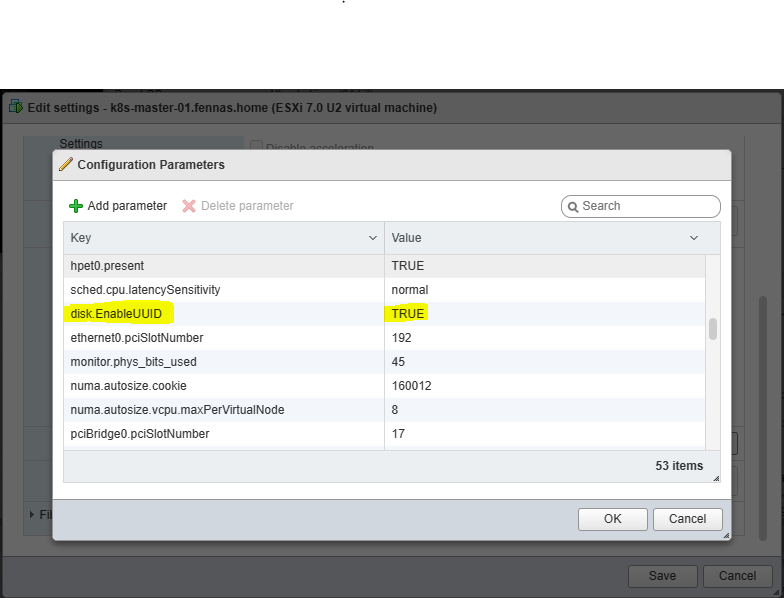
k8s-worker-01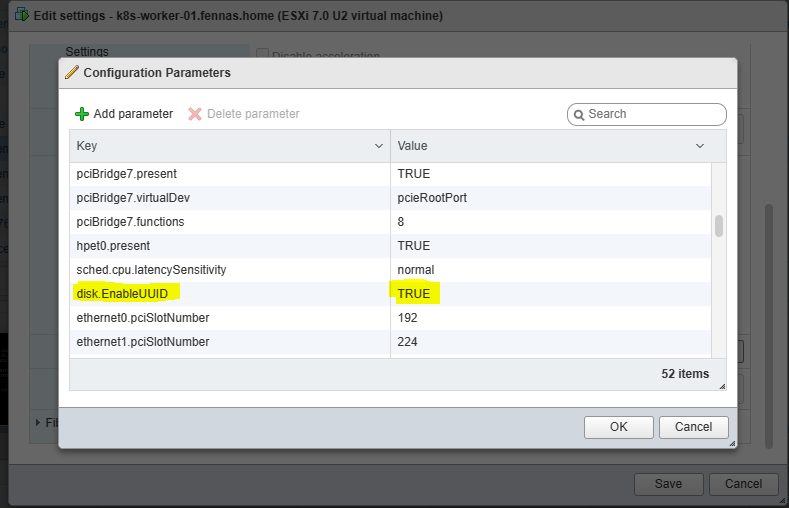
k8s-worker-02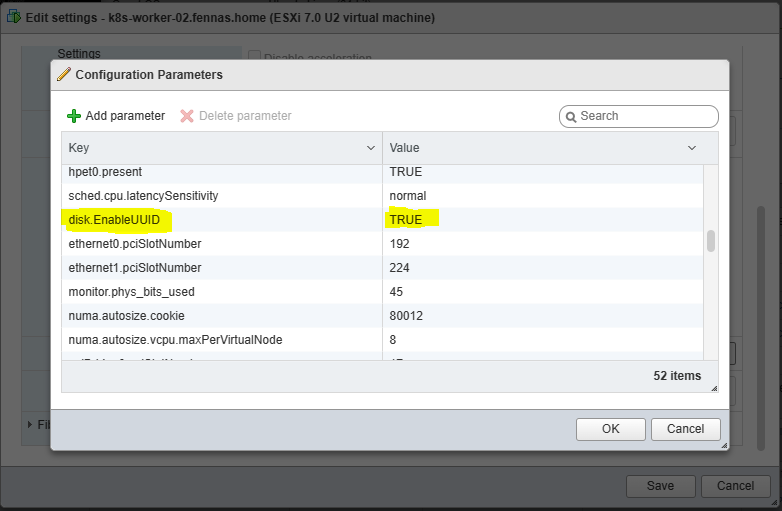
k8s-worker-03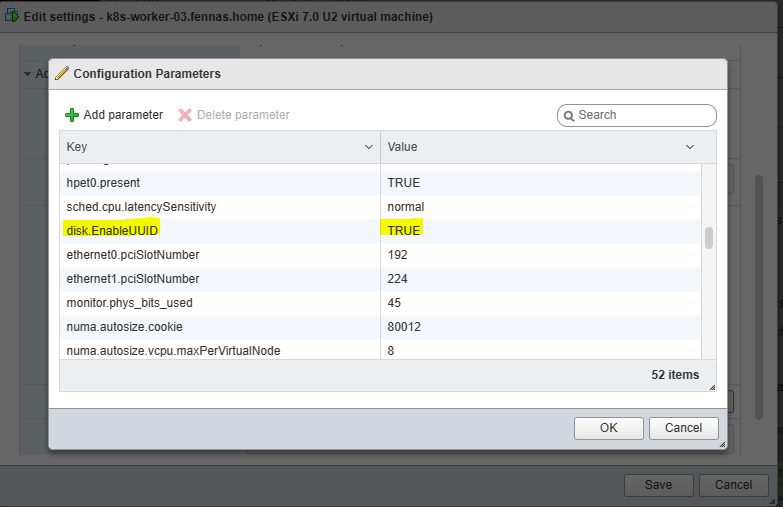
How do I obtain the logs for
ControllerPublishVolumeThanks for your support
I saw very similar behaviour when I had forgotten to configure the VM option
disk.enableUUID=truein the template used to provision the Kubernetes nodes. Everything was created correctly in vCenter, the virtual disk attached to the nodes and volumeattachment created in Kubernetes but the pod would not start correctly until I had exposed the UUIDs to the VM.logs-from-vsphere-cloud-controller-manager-in-vsphere-cloud-controller-manager-c78xh.log logs-from-vsphere-csi-node-in-vsphere-csi-node-gf5bc.log logs-from-csi-provisioner-in-vsphere-csi-controller-5664789fc9-kztkb.log logs-from-vsphere-syncer-in-vsphere-csi-controller-5664789fc9-kztkb.log logs-from-vsphere-csi-controller-in-vsphere-csi-controller-5664789fc9-kztkb.log
zips not allowed on here, I can just add the log files
@fenngineering Can you check if you’re able to deploy a PVC, it dynamically creates a PV, binds to it and you’re able to attach it to a Pod in your namespace? Refer to the examples directory in this repository if you need samples. Let’s make sure that this step is working and then we can revisit the statefulset.
Taking a look!