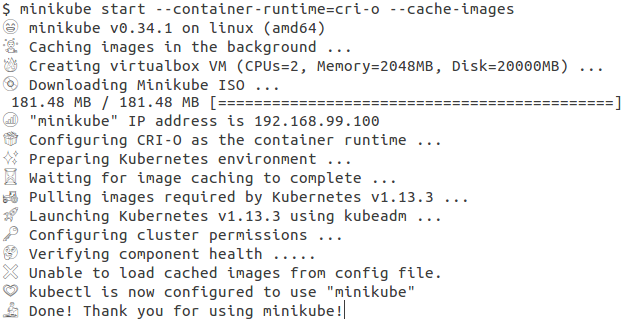
minikube: Emoji/icons are too large on my terminal

Please fix this, or remove the icons. It makes minikube unusable for me recently. On gnome-terminal 3.30.2.
About this issue
- Original URL
- State: closed
- Created 5 years ago
- Comments: 18 (3 by maintainers)
These symbols (both emoji and the “lo-fi” symbols like '= ', etc.) provide no meaning whatsoever to an end user, and should be removed entirely or an option provided to disable them. In the meantime, I’ll probably alias
minikubeto something that cleans up this inane output.Who got the clever idea of adding emoji into the output, anyway?..
What is the meaning of those ASCII symbols (and emojis…)? This seems quite random and unusual for a command line tool.
Guess I’m setting that environment variable for the rest of time. Not a fan of the new emoji in the output. Would be really, really nice to not sacrifice all color to avoid that particular aesthetic.
I agree with @jakebasile, these emotes feel arbitrary and don’t add any real meaning.
I understand the desire for some additional severity info (i.e.
info,debug, etc) but the current prefixes (both the emotes and especially the low prefixes) don’t provide any additional meaning. In fact they’re usually redundant: a whale emote when talking about Docker? A running man emote when talking about “running” the vm?At best they’re redundant information. At worst they’re eyesores added to every line.
@intelfx: There is an ASCII version available as well.
The main suggestion here was to split “color” and “emoji” configuration into two variables…
AFAIK, minikube doesn’t use any color in the output ? Maybe we should split the configuration variables, one for color (text) and one for emoji (icons). That way you could have colored text output - without emojis.
Note that on older platforms the emoji will be shown in black-and-white, so there’s no color here…