kubernetes: Symlink for ca.crt & token files are broken on windows containers
Is this a BUG REPORT or FEATURE REQUEST?: BUG REPORT
Uncomment only one, leave it on its own line:
/kind bug
/kind feature
What happened:
I am trying to deploy prometheus on windows container inside a pod. I was getting the error that it cannot read the ca.crt and token files placed by kubernetes at ‘C:\var\run\secrets\kubernetes.io\serviceaccount’. Detailed error is:
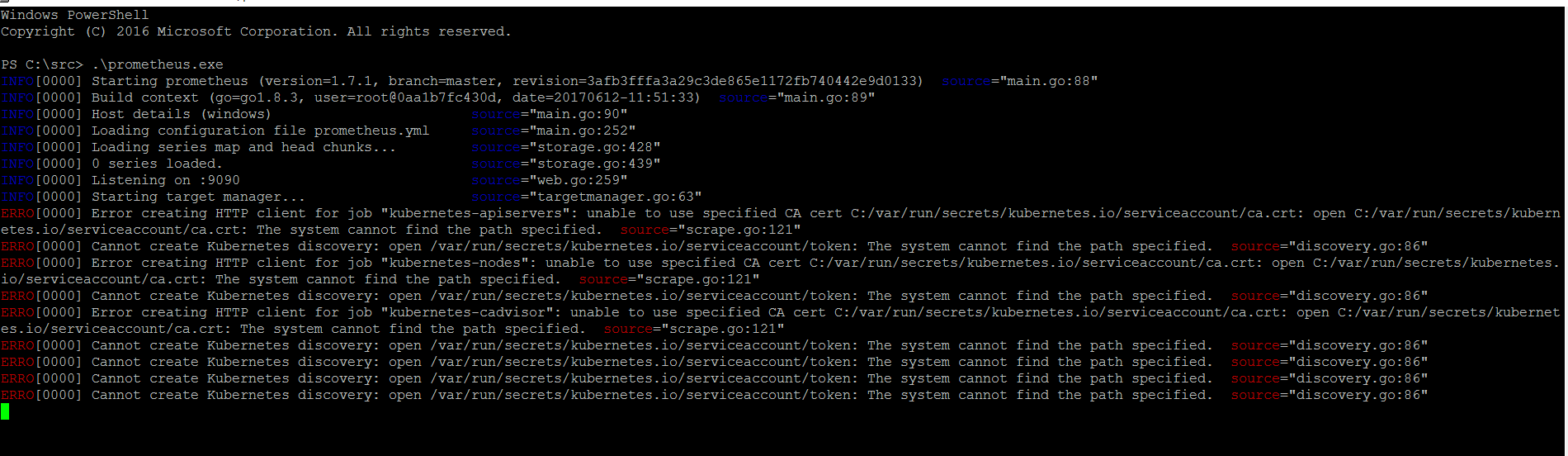
Then I exec powershell inside that pod and further explored the ‘C:\var\run\secrets\kubernetes.io\serviceaccount’ directory and found that the ca.crt and token files are based on symlink. But if I ‘Get-Content ca.crt’ then it fails to print the contents of the file giving the following error:

Then I queried the symlink target of ca.crt file using ‘Get-ChildItem ca.crt | Format-List’ which is ‘{…data\ca.crt}’
PS C:\var\run\secrets\kubernetes.io\serviceaccount> Get-ChildItem ca.crt | Format-List


    Directory: C:\var\run\secrets\kubernetes.io\serviceaccount


Name           : ca.crt
Length         : 0
CreationTime   : 9/13/2017 8:02:07 AM
LastWriteTime  : 9/13/2017 8:02:07 AM
LastAccessTime : 9/13/2017 8:02:07 AM
Mode           : -a---l
LinkType       : SymbolicLink
Target         : {..data\ca.crt}
VersionInfo    : File:             C:\var\run\secrets\kubernetes.io\serviceaccount\ca.crt
                 InternalName:
                 OriginalFilename:
                 FileVersion:
                 FileDescription:
                 Product:
                 ProductVersion:
                 Debug:            False
                 Patched:          False
                 PreRelease:       False
                 PrivateBuild:     False
                 SpecialBuild:     False
                 Language:
But when I cd to the ‘…data’ directory and tried to list the content using dir command, it returned the following error:
dir : Could not find a part of the path 'C:\var\run\secrets\kubernetes.io\serviceaccount\..data'.
At line:1 char:1
+ dir
+ ~~~
    + CategoryInfo          : ReadError: (C:\var\run\secr...eaccount\..data:String) [Get-ChildItem], DirectoryNotFoundException
    + FullyQualifiedErrorId : DirIOError,Microsoft.PowerShell.Commands.GetChildItemCommand
But if I cd to the ‘…9989_13_09_08_02_06.402707801’ folder and list the contents using dir, it shows me the ca.crt and token files and I can print the content of these files using Get-Content.
PS C:\var\run\secrets\kubernetes.io\serviceaccount> dir


    Directory: C:\var\run\secrets\kubernetes.io\serviceaccount


Mode                LastWriteTime         Length Name
----                -------------         ------ ----
d-----        9/13/2017   8:02 AM                ..9989_13_09_08_02_06.402707801
d----l        9/13/2017   8:02 AM                ..data
-a---l        9/13/2017   8:02 AM              0 ca.crt
-a---l        9/13/2017   8:02 AM              0 namespace
-a---l        9/13/2017   8:02 AM              0 token


PS C:\var\run\secrets\kubernetes.io\serviceaccount>
PS C:\var\run\secrets\kubernetes.io\serviceaccount> cd .\..9989_13_09_08_02_06.402707801
PS C:\var\run\secrets\kubernetes.io\serviceaccount\..9989_13_09_08_02_06.402707801> dir


    Directory: C:\var\run\secrets\kubernetes.io\serviceaccount\..9989_13_09_08_02_06.402707801


Mode                LastWriteTime         Length Name
----                -------------         ------ ----
-a----        9/13/2017   8:02 AM           1182 ca.crt
-a----        9/13/2017   8:02 AM              7 namespace
-a----        9/13/2017   8:02 AM            846 token
So, it means that there is some issue with the symlinks. Due to this issue I am currently unable to deploy prometheus server.
What you expected to happen: Doing the ‘Get-Content ca.crt’ in ‘C:\var\run\secrets\kubernetes.io\serviceaccount’ directory should print the contents of the file. And the file should be accessible to prometheus server.
How to reproduce it (as minimally and precisely as possible):
- Deploy a windows container in a pod.
- Exec powershell in that pod.
- cd to ‘C:\var\run\secrets\kubernetes.io\serviceaccount’ directory.
- Run ‘Get-Content ca.crt’
Anything else we need to know?: Apart, I also mounted a kubernetes volume with a windows container and populated this volume with kubernetes configmaps, it placed the file in the volume using symlink as well and the same issue is there as well. The actual file is in the …9999xxx named directory but the symlink is not working.
Environment:
- Kubernetes version (use
kubectl version):
Client Version: version.Info{Major:"1", Minor:"6", GitVersion:"v1.6.6", GitCommit:"7fa1c1756d8bc963f1a389f4a6937dc71f08ada2", GitTreeState:"clean", BuildDate:"2017-06-16T18:21:54Z", GoVersion:"go1.7.6", Compiler:"gc", Platform:"linux/amd64"}
Server Version: version.Info{Major:"1", Minor:"6", GitVersion:"v1.6.6", GitCommit:"7fa1c1756d8bc963f1a389f4a6937dc71f08ada2", GitTreeState:"clean", BuildDate:"2017-06-16T18:21:54Z", GoVersion:"go1.7.6", Compiler:"gc", Platform:"linux/amd64"}
- Cloud provider or hardware configuration**: Azure Container Service
- OS (e.g. from /etc/os-release): Kubernetes with linux master and windows worker nodes.
- Kernel (e.g.
uname -a): Linux Master:Linux k8s-master-EAD988D1-0 4.4.0-93-generic #116-Ubuntu SMP Fri Aug 11 21:17:51 UTC 2017 x86_64 x86_64 x86_64 GNU/Linux - Install tools:
- Others:
About this issue
- Original URL
- State: closed
- Created 7 years ago
- Comments: 19 (15 by maintainers)
The operating system change @PatrickLang referenced above (MS 14651051) has been fixed and will be included in the next release (Windows Server version 1803), Windows insiders can test that change now!