kubernetes: Could not access default Kubernetes Service inside Windows Pod
What happened:
Executing curl.exe -k https://kubernetes.default.svc.cluster.local inside a Windows Pod, but get the following msg:
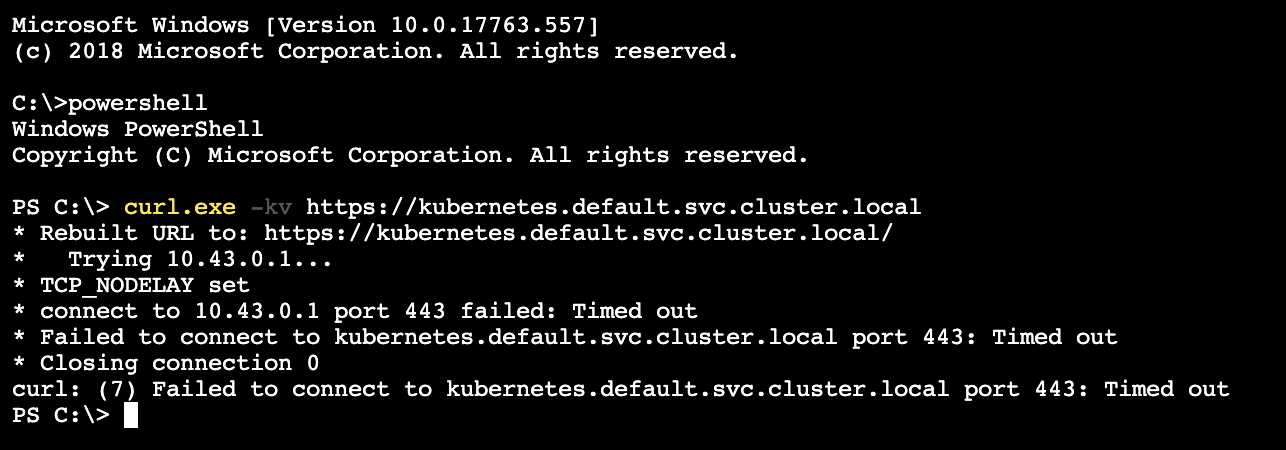
What you expected to happen:
Executing curl.exe -k https://kubernetes.default.svc.cluster.local inside a Windows Pod, could view:
{
  "kind": "Status",
  "apiVersion": "v1",
  "metadata": {

  },
  "status": "Failure",
  "message": "Unauthorized",
  "reason": "Unauthorized",
  "code": 401
}
How to reproduce it (as minimally and precisely as possible):
- Using Flannel
VxLanmode to create a Cluster with one control plane (via RKE) and one Windows Node (viahttps://kubernetes.io/docs/setup/production-environment/windows/user-guide-windows-nodes/) - Executing into the Windows Pod
curl.exe <other service>is finecurl.exe https://www.google.comis finecurl.exe -k https://kubernetes.default.svc.cluster.local, but get timeout error
Anything else we need to know?:
-
Windows workload yaml:
apiVersion: apps/v1beta2 kind: Deployment metadata: labels: app: win-webserver name: win-webserver namespace: default spec: replicas: 1 selector: matchLabels: app: win-webserver template: metadata: labels: app: win-webserver name: win-webserver spec: containers: - name: windowswebserver image: mcr.microsoft.com/windows/servercore:1809 stdin: true tty: true nodeSelector: beta.kubernetes.io/os: windows -
Nodes info:

-
Content of
vfpOutput.txtfromcollectlogs.ps1 -Network Overlay:Port name MAC address PortId --------- ----------- ------ ... 83DE1BDF-F44C-49DF-826E-128A9421B5AC 0A-3C-4B-73-C3-9C 2 ... Policy for port : 83DE1BDF-F44C-49DF-826E-128A9421B5AC ... ITEM LIST =========== SPACE : 6443A6CF-F618-4F56-86F6-B6D8023C0F4E Friendly name : VNET_ENCAP_SPACE ... MAPPING : Flags : permanent non-unique-pa mac-mapping Provider address: 172.31.8.102 Customer address: 10.43.0.1 Provider MAC address: 00-00-00-00-00-00 Idle time: 0 TNI: 0 Customer MAC address: 0A-3C-4B-73-C3-9C ... Command list-mapping succeeded! ITEM LIST =========== LAYER : SNAT Friendly name : SNAT Flags : 0x9 Default Allow , Update flows on address change Priority : 200 ... RULE : Friendly name : Block_LoopBack593C6_10.42.1.2_10.43.0.1_443_6443_6 Priority : 1 Flags : 1 terminating Type : block Conditions: Source IP : 10.43.0.1 Destination IP : 10.43.0.1 Destination ports : 443 Flow TTL: 0 FlagsEx : 0 ... RULE : Friendly name : SNAT_TCP_593C6_10.42.1.2_10.43.0.1_443_6443_6 Priority : 100 Flags : 3 terminating stateful Type : dynnat Conditions: Protocols : 6 Destination IP : 10.43.0.1 Destination ports : 443 Flow TTL: 240 MSS delta: 50,0 Type : Source NAT; NAT pool : SLB_NATPOOL_IPV4_TCP_10.42.1.210.43.0.1443 FlagsEx : 0 ... LAYER : LB Friendly name : LB Flags : 0x1, Default Allow Priority : 300 ... RULE : Friendly name : LB_593C6_10.42.1.2_10.43.0.1_443_6443_6 Priority : 100 Flags : 1 terminating Type : lbnat Conditions: Protocols : 6 Destination IP : 10.43.0.1 Destination ports : 443 Flow TTL: 240 Rule Data: Decrementing TTL Fixing MAC Modifying destination IP Modifying destination port Creating a flow pair Map space : 6443A6CF-F618-4F56-86F6-B6D8023C0F4E Count of DIP Ranges: 1 DIP Range(s) : { 172.31.10.110 : 6443 } FlagsEx : 0 ... LAYER : SLB_HAIRPIN_LAYER Friendly name : SLB_HAIRPIN_LAYER Flags : 0x3 Hairpin Layer, Default Allow Priority : 101 ... GROUP : LB_HAIRPIN_NON_DSR_IN Friendly name : LB_HAIRPIN_NON_DSR_IN Priority : 100 Direction : IN Type : IPv4 Conditions: <none> Match type : Longest prefix match on Destination IP ... RULE : Friendly name : HP_SRC_593C6_10.42.1.2_10.43.0.1_443_6443_6_Exception Priority : 50 Flags : 32 skip_hairpinning Type : transposition Conditions: Protocols : 6 Source IP : 10.43.0.1 Source ports : 443 Destination IP : 172.31.8.102 Flow TTL: 0 Transposition: Modify: Source MAC: 0A-3C-4B-73-C3-9C Forward to Switch: F315AF11-BAAB-4ACC-9A5F-82D34AFC1B65 Forward to Port: 83DE1BDF-F44C-49DF-826E-128A9421B5AC FlagsEx : 0 ... RULE : Friendly name : HP_DEST_593C6_10.42.1.2_10.43.0.1_443_6443_6 Priority : 100 Flags : 1 terminating Type : transposition Conditions: Protocols : 6 Destination IP : 10.43.0.1 Destination ports : 443 Flow TTL: 0 Transposition: Modify: Source MAC: 0A-3C-4B-73-C3-9C Forward to Switch: F315AF11-BAAB-4ACC-9A5F-82D34AFC1B65 Forward to Port: 83DE1BDF-F44C-49DF-826E-128A9421B5AC FlagsEx : 0 ... RULE : Friendly name : HP_SRC_593C6_10.42.1.2_10.43.0.1_443_6443_6 Priority : 100 Flags : 1 terminating Type : transposition Conditions: Protocols : 6 Source IP : 10.43.0.1 Source ports : 443 Flow TTL: 0 Transposition: Modify: Source MAC: 0A-3C-4B-73-C3-9C Forward to Switch: F315AF11-BAAB-4ACC-9A5F-82D34AFC1B65 Forward to Port: 83DE1BDF-F44C-49DF-826E-128A9421B5AC FlagsEx : 0 ... Command list-rule succeeded! ... ITEM LIST =========== NAT POOL : SLB_NATPOOL_IPV4_TCP_10.42.1.210.43.0.1443 Friendly name : SLB_NATPOOL_IPV4_TCP_10.42.1.210.43.0.1443 Pool Flags : no reuse udp port binding NAT RANGE : Friendly name : SLB_PREALLOCATED_PORT Status : Idle Idle time : 841 Ip address : 10.42.1.2 Port range : 65216-65279 Reuse limit : 0 ... Command list-nat-range succeeded! -
More researching:
- Deploy an Nginx workload with host port exposed, and then create an Endpoint and Service for it, finally access the vip from Windows inside:
apiVersion: apps/v1beta2
kind: Deployment
metadata:
  name: rs1
  namespace: default
  labels:
    app: rs1
spec:
  replicas: 1
  selector:
    matchLabels:
      app: rs1
  template:
    metadata:
      labels:
        app: rs1
    spec:
      containers:
      - image: nginx:alpine
        name: rs1
        ports:
        - containerPort: 80
          hostPort: 8080
          name: tcp80
          protocol: TCP
        stdin: true
        tty: true
      nodeSelector:
        beta.kubernetes.io/os: linux
---
apiVersion: v1
kind: Endpoints
metadata:
  name: rs1
  namespace: default
subsets:
- addresses:
  - ip: 172.31.10.110
  ports:
  - name: https
    port: 8080
    protocol: TCP
---
apiVersion: v1
kind: Service
metadata:
  labels:
    app: rs1
  name: rs1
  namespace: default
spec:
  ports:
  - name: https
    port: 80
    protocol: TCP
    targetPort: 8080
  type: ClusterIP

Environment:
- Kubernetes version (use
kubectl version):
Client Version: version.Info{Major:"1", Minor:"13", GitVersion:"v1.13.7", GitCommit:"4683545293d792934a7a7e12f2cc47d20b2dd01b", GitTreeState:"clean", BuildDate:"2019-06-06T01:46:52Z", GoVersion:"go1.11.5", Compiler:"gc", Platform:"linux/amd64"}
Server Version: version.Info{Major:"1", Minor:"14", GitVersion:"v1.14.3", GitCommit:"5e53fd6bc17c0dec8434817e69b04a25d8ae0ff0", GitTreeState:"clean", BuildDate:"2019-06-06T01:36:19Z", GoVersion:"go1.12.5", Compiler:"gc", Platform:"linux/amd64"}
- Cloud provider or hardware configuration:
AWS Cloud Provider
- OS (e.g:
cat /etc/os-release):
Linux: Operating System: Ubuntu 18.04.2 LTS
Windows: Windows Server 2019 Datacenter Version 1809 (OS Build 17763.557)
- Kernel (e.g.
uname -a):
Linux: Kernel Version: 4.15.0-1039-aws
Windows:Kernel Version: 10.0 17763 (17763.1.amd64fre.rs5_release.180914-1434)
- Install tools:
Control plane created via RKE, Windows node created by Kuberentes guide
- Network plugin and version (if this is a network-related bug):
Flannel VxLan
About this issue
- Original URL
- State: closed
- Created 5 years ago
- Comments: 18 (2 by maintainers)
@ksubrmnn But it doesn’t work in 1.18.1
The fix for the issue above is included in 1.18.1
@JocelynBerrendonner to help further
Hi @ksubrmnn , it happens in 1.14, 1.15 and 1.16.
You sent us a commit to fix it before. https://github.com/ksubrmnn/kubernetes/commit/ff03c98ae992c34a57d1af2d210ab5d2ef347ab1
It works well. Hope we can get it fixed in upstream as well.